A Novel Idea for a Security System That Guards Religious Centers and Identifies Crime [Centurion Prototype V0]
by robmol28 in Circuits > Arduino
20 Views, 0 Favorites, 0 Comments
A Novel Idea for a Security System That Guards Religious Centers and Identifies Crime [Centurion Prototype V0]


Abstract:
The main objective of this project will be to monitor crimes such as vandalism and arson against religious centers. The project will involve a device that will be able to detect any activity in the surrounding environment. First, the device will be equipped with a motion sensor to detect any activity, a ping sensor to detect the distance the activity is taking place, and various other sensors, such as a flame sensor, a smoke sensor, and a sound sensor, to detect possible crime. In addition, the device will also be equipped with AI in order to identify the exact culprit of a possible crime, and will send a message to a transmitter that will relay data over to the police department. This will operate using wifi. The device may also be equipped with lights and night vision sensors in order to see better. The device itself may be in the disguise of either a police siren, so it can fit on top of police cars, or building attachments such as electrical boxes or HVAC units.
Overview:
This is the first prototype of the Centurion security project. My partner and I have worked on this project since October 2025. We implemented multiple sensors on an Arduino microcontroller and are now looking into implementing them on an ESP32 to send data over WiFi and interact with active police units.
Supplies


Flame Infrared Sensor
Ultrasonic Sensor
PIR Motion Sensor
Arduino UNO
USB 2.0 Type A to Type B Cable
Jumper Wires
Wire the Sensors And

Please look at the image and code for the wire diagram. Please check sensor pinOUTs when connecting to the microcontroller.
Upload Code Onto the Microcontroller
This code will enable monitoring through the serial monitor as well as monitoring by LEDs that turn ON and OFF whenever a sensor is activated to its set value.
/*
* Project: Integrated Flame, Motion, and Ultrasonic Monitoring System
* Description: Monitors environment for fire and movement, using an LED
* indicator and Serial Monitor for real-time feedback.
*/
// --- PIN ASSIGNMENTS ---
int led = 8; // LED indicator for alerts
const int flameAnalogPin = A0; // Flame sensor (Analog: for intensity levels)
const int flameDigitalPin = 2; // Flame sensor (Digital: for binary detection)
int sensor = 3; // PIR Motion sensor input pin
const int triggerPin = 4; // Ultrasonic Sensor: Trigger (sends sound)
const int echoPin = 5; // Ultrasonic Sensor: Echo (receives sound)
// --- GLOBAL VARIABLES ---
int state = LOW; // Current state of motion (default: none)
int val = 0; // Variable to store motion sensor reading
void setup() {
// Initialize Serial communication at 9600 bits per second
Serial.begin(9600);
Serial.println("System Initializing...");
Serial.println("Flame and Motion Sensor Test Started...");
// Define pin modes
pinMode(led, OUTPUT);
pinMode(triggerPin, OUTPUT); // Trigger must be an output to send pulses
pinMode(echoPin, INPUT); // Echo must be an input to listen for pulses
pinMode(sensor, INPUT); // Motion sensor as input
pinMode(flameDigitalPin, INPUT); // Flame digital output as input
}
void loop() {
// --- FLAME SENSOR READINGS ---
int analogValue = analogRead(flameAnalogPin); // Read raw intensity (0-1023)
int digitalValue = digitalRead(flameDigitalPin); // Read binary fire state (0 or 1)
// Log flame data to Serial Monitor
Serial.print("Analog Value: ");
Serial.print(analogValue);
Serial.print(" | Digital: ");
Serial.print(digitalValue);
// --- ULTRASONIC DISTANCE MEASUREMENT ---
long duration, inches, cm;
// Clear the trigger pin to ensure a clean pulse
digitalWrite(triggerPin, LOW);
delayMicroseconds(2);
// Send a 10-microsecond HIGH pulse to trigger the sensor
digitalWrite(triggerPin, HIGH);
delayMicroseconds(10);
digitalWrite(triggerPin, LOW);
// Measure the time the Echo pin stays HIGH (travel time of sound)
duration = pulseIn(echoPin, HIGH);
// Convert travel time into physical distance
inches = microsecondsToInches(duration);
cm = microsecondsToCentimeters(duration);
// --- MOTION SENSOR LOGIC ---
val = digitalRead(sensor); // Read PIR sensor state
if (val == HIGH) { // If movement is detected
digitalWrite(led, HIGH);
Serial.println(" --> MOTION DETECTED!");
Serial.print("Distance: ");
Serial.print(inches);
Serial.print("in, ");
Serial.print(cm);
Serial.println("cm");
delay(100); // Small debounce/stability delay
}
// --- FLAME DETECTION LOGIC ---
if (digitalValue == HIGH) {
// Note: Some modules are 'active low', but here we assume HIGH = Fire
Serial.println(" --> FLAME DETECTED!");
digitalWrite(led, HIGH); // Ensure LED stays on if fire is present
} else {
// If neither fire nor motion is active, turn off the LED
if (val == LOW) {
digitalWrite(led, LOW);
}
Serial.println(" | Environment Clear");
}
delay(100); // Main loop delay for stability
}
// --- CONVERSION FUNCTIONS ---
/**
* Converts microseconds to inches.
* Sound travels at ~1130 feet per second.
* We divide by 74 (μs per inch) and then by 2 (out and back trip).
*/
long microsecondsToInches(long microseconds) {
return microseconds / 74 / 2;
}
/**
* Converts microseconds to centimeters.
* Speed of sound is 340 m/s or 29 microseconds per centimeter.
* We divide by 29 and then by 2 to account for the return trip.
*/
long microsecondsToCentimeters(long microseconds) {
return microseconds / 29 / 2;
}
// END OF CODE
Test the Project
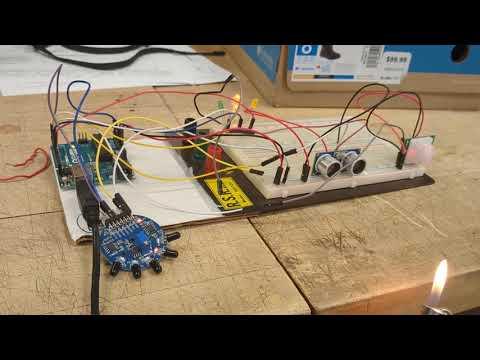
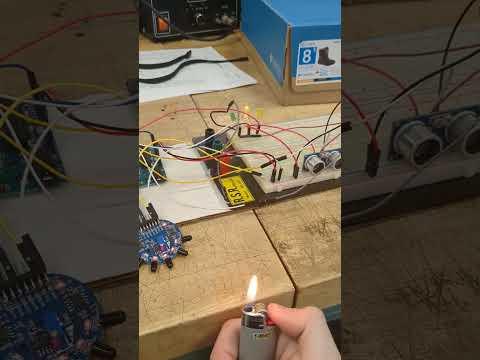

After the Centurion unit is wired up, you should test all sensors.
How you should test the sensors:
PIR (Motion) Sensor --> Wave your hand in front of it and see if it activates
Ultrasonic Sensor --> Move your hand from afar to be closer to the ultrasonic sensor
Infrared Sensor --> Use a barbecue or Bic lighter (does not matter) and put it in the same line as the sensing infrared LED. One thing to be noted is that in this case, only the infrared LED will be detected; in the ESP32 version, we will be utilizing all 5 LEDS.
To check if they work:
The sensor will light up, the corresponding debug LED will light up, and the serial monitor will detect sensor activation