Analog Hologram Clock

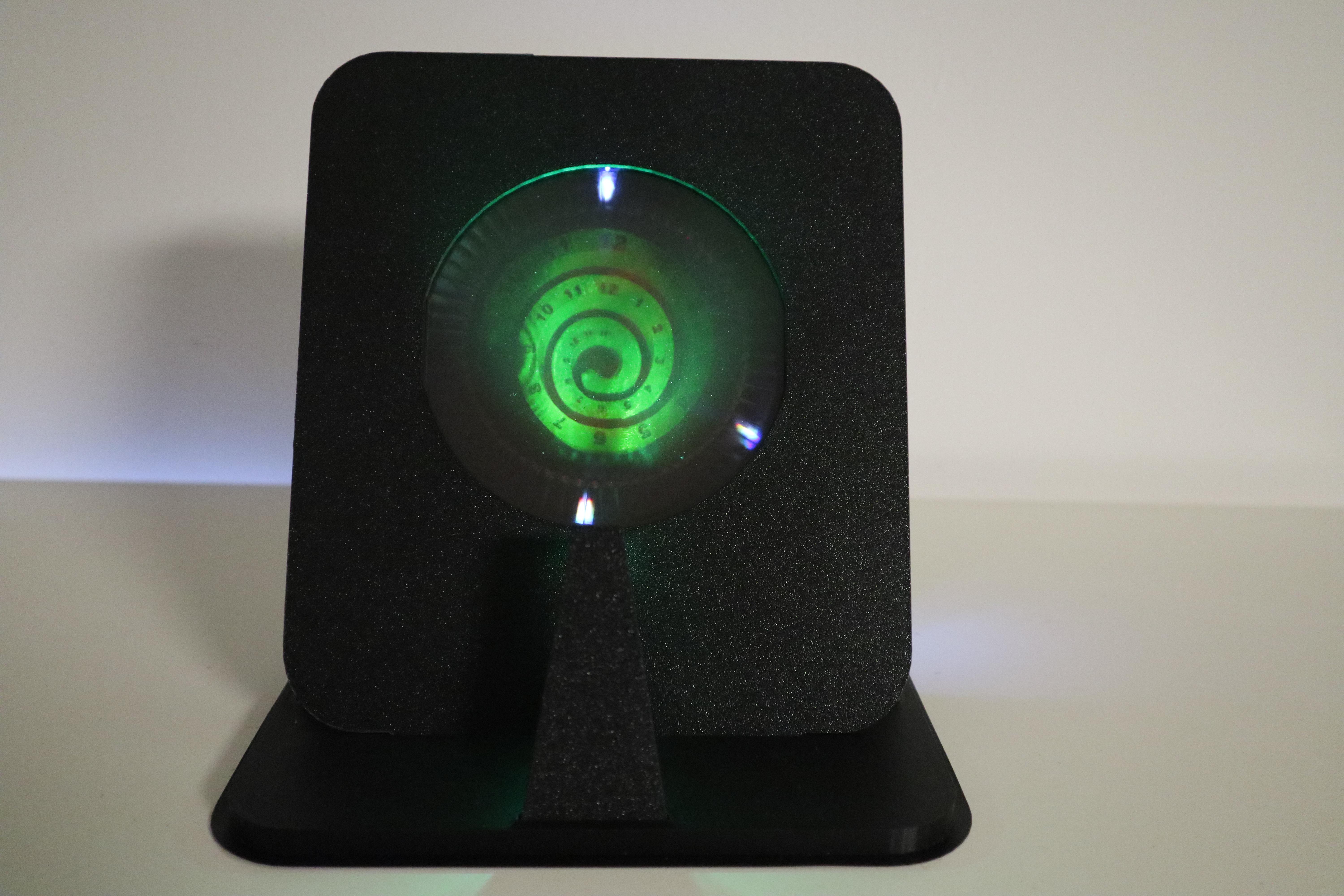


After finishing my holographic 7-segment display clock I decided to make an analog version. It uses the same technique of recording multiple holograms on a holographic plate at different illumination angles. In addition, it uses a combination of reflection holograms for the clock face and transmission holograms for the "clock hands". I also made two versions of this clock, one with a red laser on a 2x3" holographic plate and one with a green laser on a larger 4x5" plate. The smaller version only has a 12 position dial and so it is only accurate within 5 minutes while the larger version has a 60 position dial and accurately shows hours, minutes and seconds.
Supplies

2x3" Version
Supplies
- 2 pcs - 2x3" holographic plates by litiholo
- 12 pcs - 3mm white LEDs
- 3mm LED (matching the color of your laser)
- Wemos D1 mini
- MCP23017 16-bit I/O Expander
- 1kOhm resistor
- PCB board
Tools
- 3D printer
- soldering iron
- laser suitable for holography
4x5" Version
Supplies
- 4x5" holographic plate by litiholo
- 60 pcs - 3mm white LEDs
- 2 pcs - 3mm LEDs (matching the color of your laser)
- Wemos D1 mini
- MAX7219 8-Digit LED Display Driver
- 22kOhm resistor
- custom PCB
Tools
- 3D printer
- soldering iron
- laser suitable for holography
- 1" mirror and apsheric lens (depending on your laser)
All files can be found on my GitHub
Making the Transmission Holograms


All holograms were recorded using 3D printed holders for the holographic plates. The recorded object was a backilluminated piece of lampshade foil attached to a glass plate. Only a small region of the holographic plate around the object was exposed for each hologram and the other regions were blocked.
For the 2x3" holograms I used a divergent 633nm single frequency laser diode directly illuminating the plates from the bottom at an 45° angle. The exposure time for each hologram was 3 minutes. The holographic plate was rotated by hand in between exposures. In this way 12 individual holograms were recorded, one for each position of the "clock hand".
For the 4x5" holographic plate I wanted to record 60 individual holograms so doing this by hand would have been quite tedious. Therefore, I constructed a 3D printed setup, where the holographic plate is rotated by a 28BYJ-48 stepper motor and the laser can be blocked with a shutter controlled by an SG90 servo. The stepper motor and servo were controlled by a Wemos D1 mini and a small push button was added to start the exposure. I used a collimated 561nm DPSS laser with an additional small aspheric lens to widen the beam. The beam was then directed towards the holographic plate at an 45° angle using a 1" diameter silver mirror.
Making the Reflection Holograms


The clockfaces are reflection holograms of objects 3D printed from white PLA. For the 2x3" hologram I printed a Moebius ring and then added the numbers using black self-adhesive vinyl foil. For the 4x5" version the clockface is a spiral with embossed numbers that were painted black using a pencil. The objects were then placed into a 3D printed holder and the holographic plate was placed on top. This is then illuminated with the laser from the front at an 45° angle. For the 4x5" version the reflection hologram was recorded on the same plate as the transmission hologram because they are rather expensive I only had few of them left. For the 2x3" I used a separate holographic plate to record the transmission hologram.
I had some issues with the reflection hologram on the 4x5" plate. You can see a circular fringe pattern on the left side which probably results from a small dust particle on the lens. In addition the hologram is rather dark on the right side and there are also some dark areas in the center. It is not clear to me what the issue was but it might be unwanted reflections within the glass plate or from another surface nearby.
Electronics


For the 2x3" version I had to control 13 LEDs which was achieved using an MCP23017 16-bit I/O Expander connected to an ESP8266 based Wemos D1 mini microcontroller. Because this was just supposed to be a protype a did not go through effort of designing a custom PCB but just soldered the components onto a protoyping PCB board. The board also contains male pin headers to connect the LEDs in a common cathode configuration.
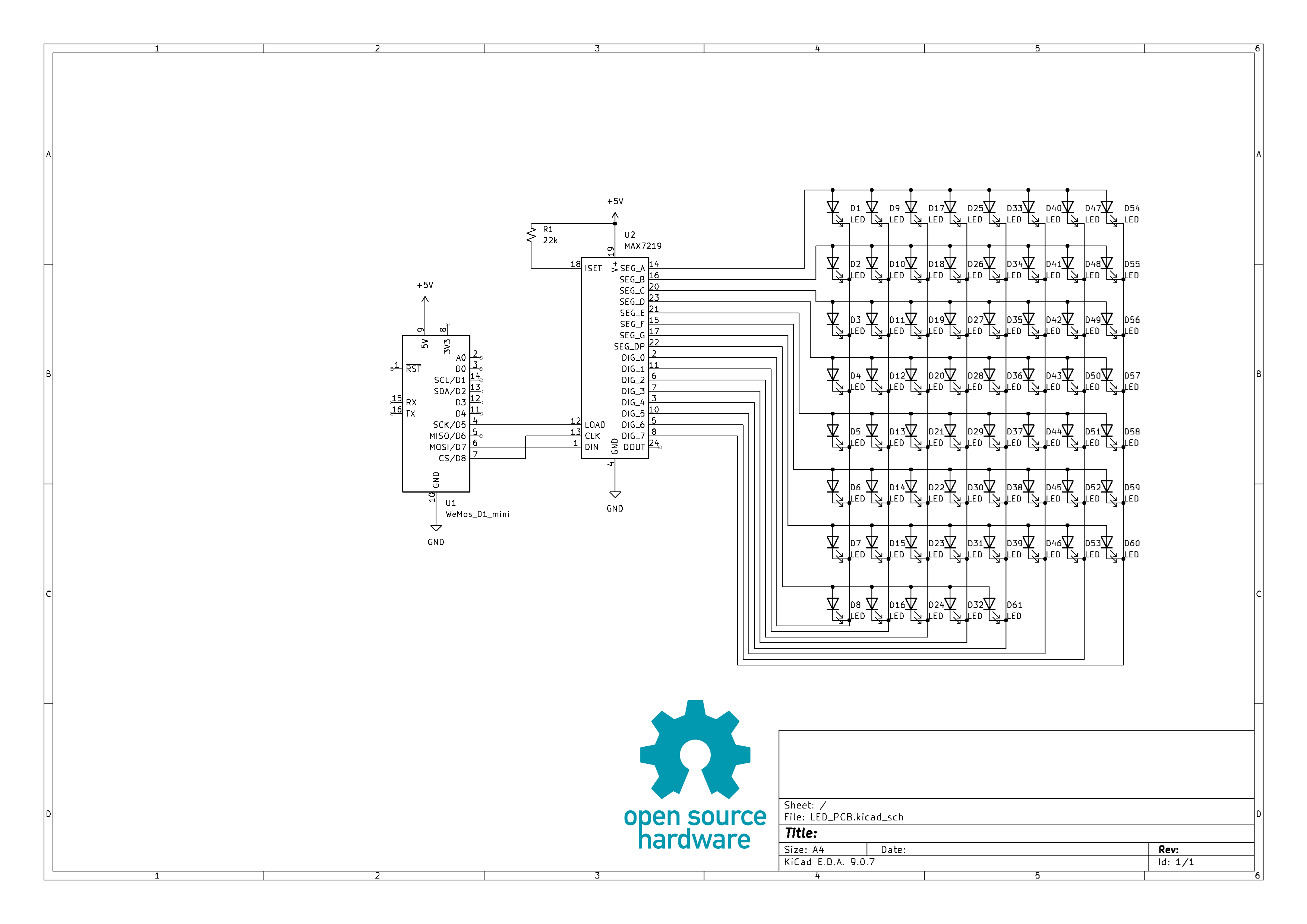
The 4x5" version uses 61 LEDs that are controlled by a MAX7219 8-Digit LED Display Driver connected to the Wemos D1 mini. A 22kOhm resistor was used for setting the current limit to ~20mA per LED. Here it definitely made sense to use a custom PCB due to the large number of LEDs. I designed a circular PCB board in KiCAD that houses all components including the LEDs. The latter were arranged in a 8x8 matrix with the cathodes connected to the digit and the anodes to the segment inputs of the MAX7219.
Designing the Clock
The clocks were designed in Fusion360. Both clocks consist of individual holder plates which are stacked behind wach other onto a base plate. There is a holder for the front LED, for the holographic plate and for the back LEDs. The front LED illuminates the reflection hologram showing clockface why the back LEDs illuminate the transmission holograms that indicate time. Due to the large size of the 4x5" clockface I used two green LEDs for illumination (wired on parallel) while the 2x3" clockface was just illuminated with a single red LED. The wires from the front LEDs are fed through a channel in the baseplate.
All the components were printed from black PLA.
Assembling the Clock


For the 2x3" version the LEDs were connected with wires. I then crimped female Dupont cables to the wires so they can be attached to the male headers on the PCB.
For the 4x5" version the tricky part is to attach the LEDs to the custom PCB and at the same time to the 3D printed holder plate. I first soldered the Wemos D1 mini, MAX7219 and current limiting resistor to the PCB. I then stuck all the LEDs into the PCB without soldering them. After that I pressed the LEDs one by one into the 3D printed holder plate using tweezers. The front LEDs were connected to wires that go through the base plate. The wires are terminated with female Dupont plugs that connect to a male header on the PCB. Finally, all the plates are assembled onto the base plate.
Code


The code for the clock was written with the Arduino IDE. The Wemos D1 mini will fetch the time from an NTP server when connected to WiFi.
The 2x3" version just has 12 indicators so time is displayed by blinking the LED that shows the minute hand and constantly lighting the hour hand. Every 5 minutes the clock lights up the next minute LED.
On the 4x5" version 3 LEDs are lit up simultaneously. One LED that shows the current second, another LED blinking indicating the minutes and a constantly lit LED showing the hours.