Analogy Clippy


Project by: Cassie Kwok, Patricia Kuang
This is an interactive smart memo system that attaches to a book holder. It can be used in different ways depending on your needs, functioning both as a to-do list for a notebook and as a study reminder for textbooks or other reading materials.
The machine aims to prevent avoidance and encourage focus by physically interacting with the user. Instead of remaining a passive note, the memo actively responds to your behavior, making it harder to ignore your tasks.
As you flip through pages, the memo follows, ensuring your reminder stays visible at all times. If you attempt to remove the memo or close the book to avoid studying, the system detects the change and triggers a warning, creating an active and responsive study device that reinforces focus and task awareness.
At the same time, the project explores the idea of a “useless machine” that appears to be useful. Its constant presence can become annoying or unhelpful, covering parts of the page and making it difficult to step away once you begin. The machine’s responsiveness may create irritation or mild anxiety, subtly disrupting the focus it is meant to support. Yet, ironically, this same behavior still ensures that you remember what you wrote on the memo.
Supplies

Assembly Materials :
- Arduino
- Ultrasonic Distance Sensor x 1
- Photoresistors x 2
- 10kΩ Resistors x2
- Servo Motor x 1
- Buzzer x1
- Breadboard
- Jumper wires
- Plywood for building the book holder
Concept


Our concept is inspired by a whiteboard eraser designed to clean everything. We aim to exaggerate the machine's original function to the point where it becomes self-destructive. The project presents an interactive machine that appears useful at first glance, but reveals itself to be inconvenient and unfriendly in actual use.
We give the machine a sense of life, allowing it to respond to users’ actions while misunderstanding their intentions, overreacting, and generating annoyance mixed with humour.
Mechanism


1. How does the memo know when to move with the page and not flip back too early?
When flipping a page, the user’s hand naturally moves from the left corner to the right corner. This movement creates a predictable range of motion. We define a specific detection zone at the page corner so the system only responds during intentional flipping.
When the hand leaves the detection range toward the right corner during the flip, the memo arm returns to its original position, creating a seamless memo flip that follows the page flipping. The logic is similar to an automatic door that stays open only while someone is within range.
- Input: Distance from ultrasonic sensor to user’s hand
- Output: Servo motor moves memo arm from 0° → 90°
- Condition: Hand detected within 20–25 cm (approximate book corner range)
2. How does the system detect when the memo is removed?
When the memo is lifted, more light reaches the surface beneath it. A photocell under the memo detects this brightness increase.
- Input: Brightness under memo, detected by a photocell
- Output:
- Servo arm moves 0° → 60° (repeat 3 times)
- Buzzer beeps
- Condition: Brightness level becomes higher than the dark threshold
3. How does it prevent the user from simply leaving?
If the book is removed, the brightness beneath the book increases. A photocell under the book detects this brightness increase.
- Input: Brightness under the book, detected by a photocell
- Output: Buzzer beeps
- Condition: Brightness exceeds the dark threshold
Debugging
.gif)

Problem 1
Page flipping slightly increases brightness under the memo, falsely triggering memo removal detection.
Solution:
By adding another condition, the memo removal detection can only activate 2 seconds after a page flip is triggered.
Problem 2
Page flipping is too sensitive. Just slightly passing through the detection range triggers the servo.
Solution:
- Narrow the distance detection range
- Require the hand to remain within range for at least 0.5 seconds before triggering
Final Trigger Conditions
Page Flip
- Input: Ultrasonic distance
- Output: Memo arm 0° → 90°
- Condition:
- Hand within 19–25 cm
- Duration longer than 0.5 seconds
Memo Removal
- Input: Brightness under memo
- Output:
- Servo 0° → 60° (repeat 3 times)
- Buzzer beep
- Condition:
- Brightness exceeds dark threshold
- Occurs more than 2 seconds after the page flip trigger
Book Removal
- Input: Brightness under the book
- Output: Buzzer beep
- Condition: Brightness exceeds dark threshold
Downloads
Book Holder Fabrication

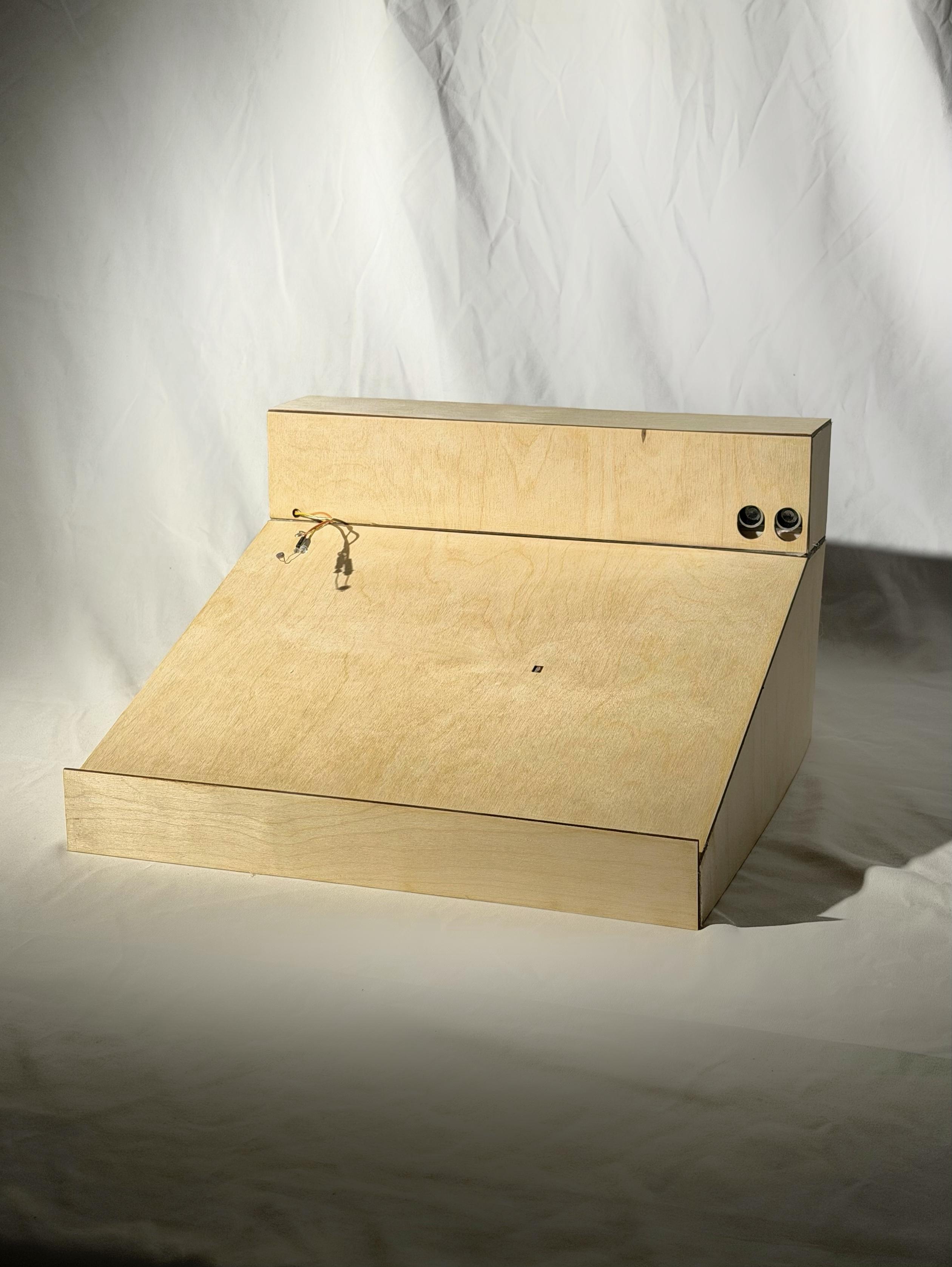
The holder integrates and hides all electronic components while maintaining usability.
- Slightly tilted surface for comfortable reading and writing
- Hole for memo arm extension
- Hole for the photocell under the book
- Opening for the ultrasonic sensor
- Hollowed back panel for efficient wiring and material reduction
Conclusion & Next Steps

We learned that even when the code works, it requires constant adjustment to better fit user experience and real-world conditions. Physical testing, instead of simulation in Tinkercad, revealed problems we had not fully considered, allowing us to refine and improve the design.
Next Steps:
- Use a camera to detect more accurate hand movements and page flips, reducing misread gestures.
- Add more features to make the machine more lively and interactive.