Animatronic Face of Dwayne Johnson
by sommiemgbodille in Circuits > Arduino
16 Views, 0 Favorites, 0 Comments
Animatronic Face of Dwayne Johnson

The Dwayne Johnson animatronic is a small, interactive robotic figure designed to mimic expressive facial movements while reacting to user input. Using joystick control, the animatronic raises its eyebrow when a stimulus is detected, creating a lifelike response. A push button triggers a synchronized mouth-movement routine while a connected laptop automatically plays an audio clip of The Rock’s iconic catchphrase. Two servo motors provide smooth, articulated motion for the eyebrows and mouth, creating a coordinated performance. The system is built using an Arduino Uno, servo motors, ultrasonic sensor or joystick module, push button, jumper wires, breadboard, external audio playback via Python, and basic mounting hardware for the animatronic’s structure.
Supplies
Bill of Materials:
Arduino Uno R3
USB cable
2 breadboards
Jumper Wires (male-male and male-female)
Joystick Module
Push Button
2 Servo Motors (SG90)
Laptop with speakers
Erector Set - $15
Elmer's School Glue - $3
Zip and Velcro Ties - $2
Servo Mounting Brackets (3D Printed)
Cardboard
Total Price: $20
Supporting Structure
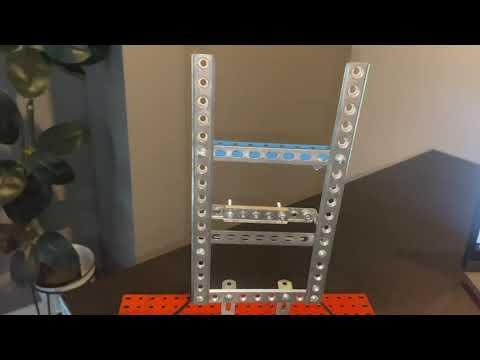
The animatronic’s structural framework is built using a classic erector set, which provides a lightweight, modular, and easily adjustable chassis. Metal beams, brackets, and plates are connected with small nuts and bolts to form a rigid skeleton that supports the servos and face overlay. This framework allows precise positioning of the eyebrow and mouth servos, ensuring consistent motion and stable mounting. The open, perforated design of the erector set also makes wire routing simple and allows quick access for adjustments or component replacement.
Coding
The animatronic is programmed using Arduino C++, where the microcontroller reads inputs from sensors and buttons and drives the facial servos accordingly. The joystick provides real-time control of the eyebrow servo, while a push button triggers the mouth-movement animation sequence. To synchronize audio with the servo motions, the Arduino sends a "PLAY" command over USB serial as soon as the button is pressed. A Python script running on the laptop listens for this message using the pyserial library, and when detected, automatically launches the audio file so playback begins immediately. Together, the Arduino code handles physical motion and timing, while the Python code manages audio playback—creating a coordinated, interactive animatronic performance.
Wiring Setup

The wiring system integrates sensors, servos, and control logic through an Arduino microcontroller mounted on a breadboard. The push button and joystick connect to the Arduino’s digital and analog pins, with all components sharing a common ground to ensure stable operation. Two servo motors—one for the eyebrow and one for the mouth—are powered directly from the Arduino’s 5V rail and controlled through PWM-capable digital pins, allowing smooth and precise motion. The Arduino also communicates with a laptop via USB, sending a "PLAY" command over serial when the button is pressed so external audio can synchronize with the servo movement. Jumper wires organize the connections across the breadboard, forming a clean, modular circuit that is easy to modify, debug, and expand.
Final Assembly


Lesson Learnt and Future Improvements
Lessons Learnt
1.Audio Timing synchronization is more complex than expected.
A key lesson was realizing that audio playback on the laptop does not start instantly, which required adding a delay so the mouth servo animation could align properly with the sound. Early versions of the project had the servo start too soon, causing visible desynchronization.
2.Multiple programs accessing the same COM port can cause upload errors.
One mistake was keeping the Python listener open while uploading new Arduino code, which locked COM3 and prevented the IDE from flashing the board. This highlighted the importance of shutting down all serial connections before uploading.
Improvements
- Add a more realistic facial surface using foam, silicone, or latex.
- Adding servos for subtle movements—such as eyelid blinking, cheek lifting, or jaw motion—would significantly increase realism and allow the character to convey more expressions.