Simple Audio Player on Adafruit Circuit Playground Bluefruit (CPB)
by kevinjwalters in Circuits > Microcontrollers
163 Views, 0 Favorites, 0 Comments
Simple Audio Player on Adafruit Circuit Playground Bluefruit (CPB)
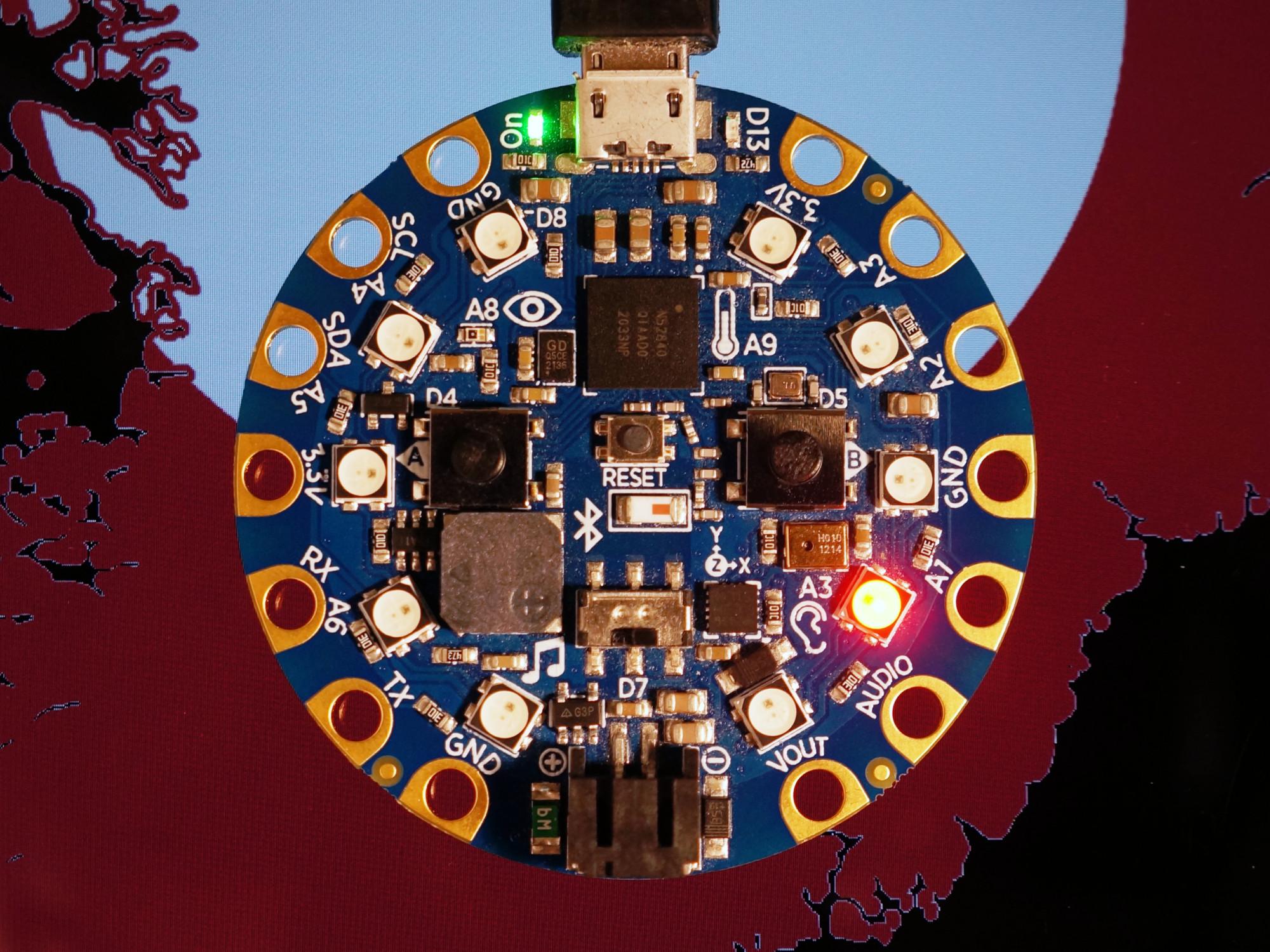
This article shows a very simple audio sample player on the Adafruit Circuit Playground Bluefruit. This board features a Nordic nRF52840 microcontroller, 2MB external flash storage and a tiny speaker amongst other things. The nRF52 series do not have digital to analogue converters but CircuitPython can play digital audio from wav files using pulse-width modulation (PWM). The speaker is not very loud but it's audible at close range in a quiet room.
This article also summarises the differences between the original Circuit Playground board, the Circuit Playground Express (CPX) and Circuit Playground Bluefruit (CPB). The audio sample player only works on the CPX and CPB boards. The original board was rebranded as a "Classic" board.
Supplies
Installing Software
If you are not familiar with CircuitPython then it's worth reading the Welcome to CircuitPython guide first.
- Install the latest version of CircuitPython (10.0.3 on January 2026) from https://circuitpython.org/ - this process is described in CircuitPython on Circuit Playground Bluefruit.
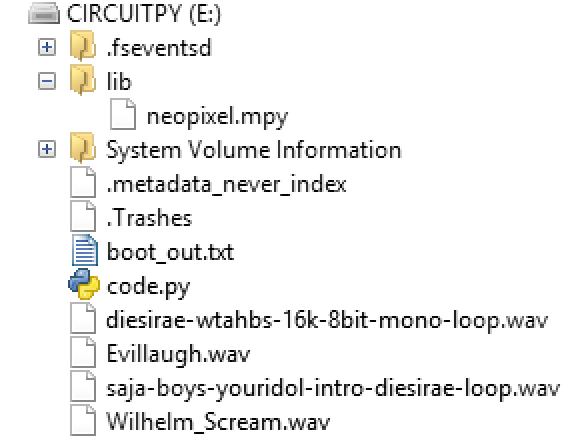
- Verify the installation by connecting to the seial console over USB. The REPL prompt shows the version number. The version can also be checked by inspecting the boot_out.txt file on the CIRCUITPY drive.
- Install this library from a recent bundle from https://circuitpython.org/libraries into the lib directory on CIRCUITPY:
- neopixel.mpy
- Download the example program to CIRCUITPY by clicking on the Raw button on the page and then Save link as... on cpb-wav-player.py
- Rename or delete any existing code.py file on CIRCUITPY, then rename the cpb-wav-player.py to code.py. This file is run when the CircuitPython interpreter starts or reloads.
The versions used for this article were:
- CircuitPython: 10.0.3
- CircuitPython library bundle: adafruit-circuitpython-bundle-10.x-mpy-20260107
Demonstration of Audio Sample Player

The video above shows the Circuit Playground Bluefruit playing four wav files, a scream, an evil laugh, looping sung Latin and looping chanting in Latin (Dies Irae XVI).
The left button plays the current sound sample. The right button stops any playing sample and subsequent presses advance to the next wav file. Any wav file found in the root directory is played. A suffix of -loop will cause the sample to loop forever.
CircuitPython Audio Libraries
CircuitPython has a rich set of libraries for audio support available on many ports. The audio sample player uses the audiocore library and either audiopwmio or audioio depending on the board. The code to play a wav file is very simple, an example on REPL is shown below.
There are far more audio libraries, for example: audiomp3 (CPB only), audiomixer, audiobusio (for I2S output) and synthio. The adafruit_circuitplayground high-level library provides some simple, easy ways to play wav and mp3 files.
audiopwmio
The PWMAudioOut object is used for DAC-less microcontrollers with the audio samples being converted into pulse-width modulated output.
audioio
The AudioOut object is used for DAC-based output either in mono or stereo. This will only play the left channel on stereo wav files for mono output.
audiocore
The WaveFile object converts a wav file into an object which can be played in CircuitPython. The bitrate stored in the file is used for playback by default.
Making and Adjusting Wav Files

A tool like Audacity is useful to process audio files into wav files most suitable for CircuitPython and the tiny speaker on the Circuit Playground Bluefruit.
- The samples need to be "loud", i.e. use the full range of sampling and keep the dynamic range low. This can be achieved with a mixture of manual envelope manipulation and use of amplifier, compressor and/or limiter functions.
- The samples are best processed to a mono track. For a stereo wav file only the left channel will be played.
- For long duration samples it may make sense to keep the file size low by keeping the sample rate low (8k, 11.025k or 16k) and the sample size at 8 bits rather than 16.
- Filtering loud bass (below around 100Hz) may improve output - the speaker cannot reproduce these frequencies.
An example of creating a mono 8k wav file with Audacity can be found in Instructables: PIR Movement Alarm With BBC Micro:bit and External Speaker.
The Many Circuit Playground Boards
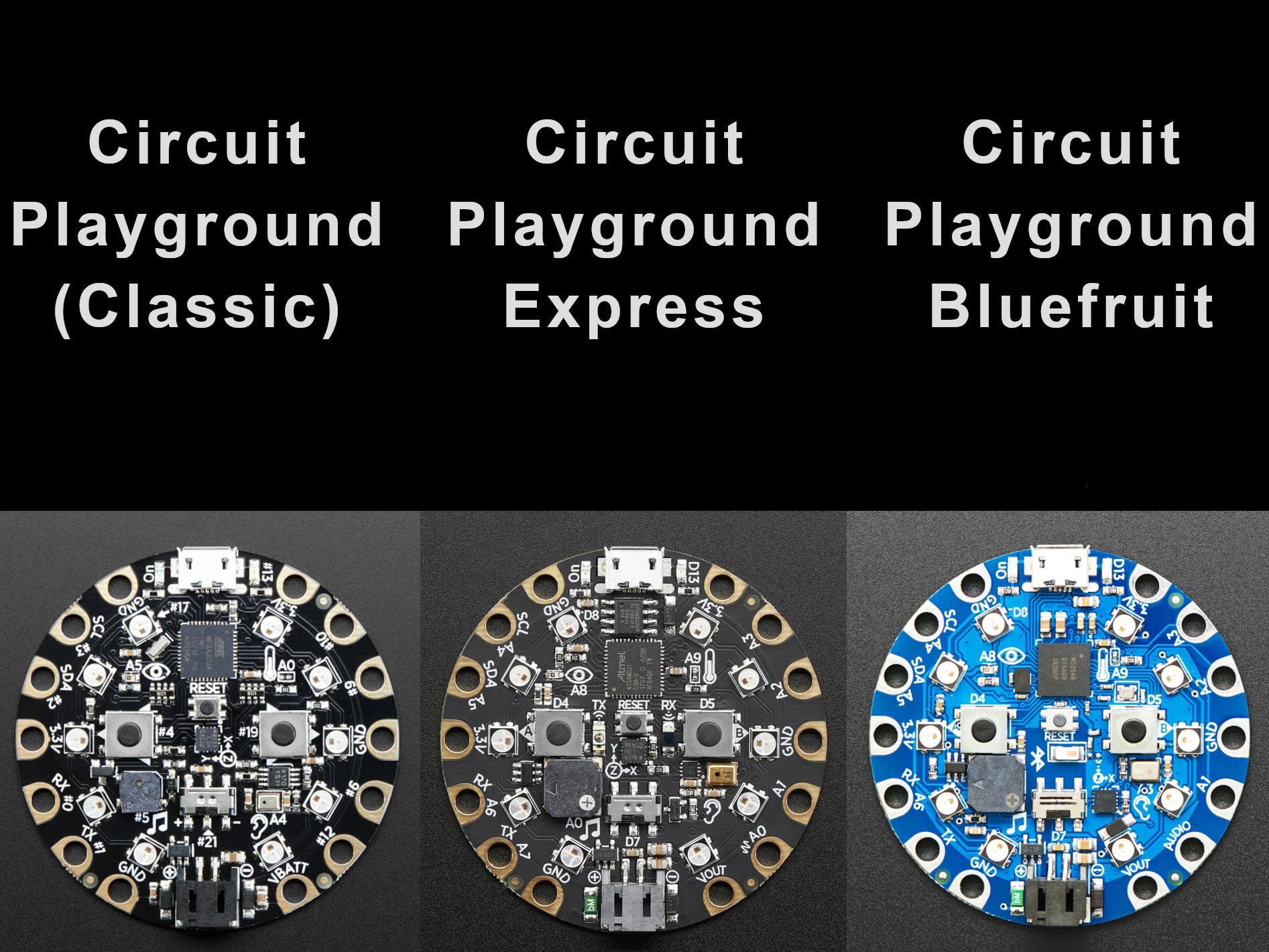
The product names in the world of hobbyist microcontroller boards can be confusingly similar at times. It's very important to ensure you understand the naming and features of a board to ensure a correct selection/purchase. This is true of many series, like the Arduino UNOs, any series deriving a name from Espressif's ESP32 microcontrollers and the Adafruit Circuit Playground range which is described below.
Circuit Playground (Classic)
This board was the first one released. It uses the MicroChip ATmega32u4 microcontroller (AVR 8bit 16MHz CPU, 32kB Flash, 2.5kB RAM, 8kB EEPROM). This is the same microcontroller as the one on the Arduino Leonardo but uses 3.3V rather than 5V. It can only run C/C++ code which would normally be written in the Arduino IDE. It has a distinctive round shape with pads with 1/8" diameter holes (3.1mm) and the following features.
- USB micro-B power or JST-PH connector for a battery (no charging onboard).
- 10x mini NeoPixels, each one can display any rainbow colour.
- 1x Motion sensor (LIS3DH triple-axis accelerometer with tap detection, free-fall detection).
- 1x Temperature sensor (thermistor).
- 1x Light sensor (phototransistor).
- 1x Sound sensor (MEMS microphone).
- 1x Mini speaker (8mm, 3.3V transistor driven).
- 2x Push buttons, left and right.
- 1x Slide switch.
- 8x alligator-clip (crocodile clip) friendly input/output pins.
- Includes I2C, UART, and 4 pins that can do analog inputs/PWM output.
- All 8 pads can act as capacitive touch inputs. Each pad has a 1M resistor to a single GPIO pin - this results in 2M resistance between pairs of pads.
- Green ON LED so you know its powered.
- Red #13 LED for basic blinking.
- Reset button.
- 3.3V GPIO - not 5V tolerant.
In 2017 Classic was added to the name to try to reduce confusion with other boards.
Circuit Playground Express (CPX)
This was the second board in this range and unfortunately the front looks very similar to the first one. It uses the MicroChip ATSAMD21 (ARM Cortex M0+ 32bit 48MHz CPU, 32kB RAM, 256kB Flash). This board can be programmed using a wide variety of languages: C/C++, CircuitPython, Microsoft MakeCode block-based or Javascript, and code.org CS Discoveries. The differences between the Circuit Playground and the CPX are listed below.
- Faster processor.
- A 7.5mm speaker driven by a class D amplifier (PAM8301).
- The buttons are labelled A and B.
- Infrared receiver and transmitter - can receive and transmit any remote control codes, as well as send messages between Circuit Playground Expresses. Can also act as a proximity sensor.
- All 8 pads can be used as analogue inputs.
- 7 pads can act as capacitive touch inputs (implemented in hardware) and the 1 remaining pad is a true analogue output courtesy of 350ksps 10bit SAMD21 onboard digital-to-analogue converter.
- 2MB of SPI Flash storage, used primarily with CircuitPython to store code and libraries.
This board is far more capable and more suitable for novices and educational use.
Circuit Playground Bluefruit (CPB)
This was the third board in the range with a blue PCB making it easy to distinguish. It uses the Nordic nRF52840 (ARM Cortex M4F 32bit 64MHz CPU, 256kB RAM, 1MB Flash). This board can be programmed in C/C++, CircuitPython and Microsoft MakeCode Maker. The differences between the CPX and CPB are listed below.
- Slightly faster processor, far more memory and microcontroller flash storage.
- Hardware floating point (FPU) for significantly faster maths.
- Bluetooth Low Energy (BLE) features.
- No digital-to-analogue (DAC) converter.
- No infrared features.
- All 8 pads can act as capacitive touch inputs. Each has a 1M resistor to ground.
- The peripherals can be turned off in software for low power applications.
- Hardware random number generator.
The CPB board has the most features but the CPX board might still be attractive for its DAC and infrared capabilities. The Classic board is only useful now for legacy applications.
Going Further

The response curve for 100Hz to 10kHz for the Same Sky (previously CUI) CMT-7525-80-SMT-TR is shown above, this is a similar speaker to the ones on the CPX and CPB boards.
Here's some ideas for areas to explore:
- Experiment with different samples to see what sounds good. Bass frequencies won't be audible on a tiny speaker, higher frequencies will tend to be louder. Compare 8 bit and 16 bit sampling to see if the extra size/storage is worthwhile for the tiny speaker.
- Try playing mp3 files. The library for this is only present on the CPB.
- Compare the fidelity of the (PWM) audio from the CPB with the DAC audio on the CPX.
- Compare volume on USB power vs LiPo power. The latter will be quieter due to the lower voltage for the PAM8301 amplifier.
- Check the volume level around the peak (resonant) frequency of the speaker.
- Investigate using AudioMixer to play both left and right channels on mono output.
A small selection of other interesting related guides, tutorials and projects:
- CPX
- Adafruit Learn: Circuit Playground Express TV Zapper
- Adafruit Learn: Making oscilloscope images with DACs
- Adafruit Learn: Automatic Mechanical Watch Winder
- Morgan Stanley Makerspace - simple CircuitPython lessons.
- Core Electronics: Circuit Playground Express Workshop for Educators and Beginners
- Getting Started with Adafruit Circuit Playground Express: The Multipurpose Learning and Development Board with Built-In LEDs, Sensors, and Accelerometer by Anne Barela (book)
- CPB
- Adafruit Industries: Say Hello to Circuit Playground Bluefruit (YouTube)
- Prof. John Gallaugher: Bluefruit School (YouTube playlist) - there are many more videos for both the Circuit Playground Bluefruit and Circuit Playground Express boards if you search the Prof. John Gallaugher and Build With Prof. G channels.
- Adafruit Learn: Circuit Playground Bluefruit Quick Draw Duo
- CPX or CPB
- Adafruit Learn: Circuit Playground Bluefruit Automatic Bike Brake Light
- Other
- Adafruit Learn: Audio Synthesis with CircuitPython synthio
- Instructables: Creating Synthesizer Sounds Using CircuitPython Synthio With Pimoroni PGA2350 or Cytron Maker Pi Pico
- Adafruit Learn: MP3 Playback with CircuitPython
Further reading:
- Low Byte Productions: Making WAVs: Understanding, Parsing, and Creating WAV Files in JavaScript (YouTube)
- EE Journal: Speakers in Audio Design -- Same Sky and Mouser Electronics (YouTube)
- Analog Devices: Class D Audio Amplifiers: What, Why, and How
- atomic14: We don't need a DAC - ESP32 PDM Audio (YouTube)