Automatic Temperature Controlled Fan
by uyennguyen276 in Workshop > Home Improvement
12 Views, 0 Favorites, 0 Comments
Automatic Temperature Controlled Fan


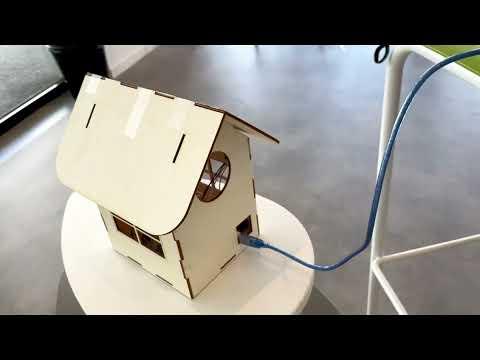
In today's fast-paced world, where automation and technological advancements continue to shape various industries, digital manufacturing has emerged as a game-changer. One such remarkable innovation is the Automatic Temperature Controlled Fan, which revolutionizes the way we manage and regulate temperature in our daily lives.
Temperature control is a critical aspect of maintaining comfort and efficiency in diverse environments, including homes, offices, factories, and even in the realm of electronic devices. Traditional cooling solutions, such as manual fans or air conditioning units, often fall short in adapting to changing conditions, leading to energy inefficiency and suboptimal performance.
The key objective of our project is to enhance energy efficiency, optimize comfort levels, and provide a convenient and user-friendly experience. By leveraging digital manufacturing techniques, we aim to deliver a cost-effective and sustainable solution that integrates seamlessly into various environments, promoting a greener and more efficient future.
Throughout this project, we will explore the design, development, and implementation of the Automatic Temperature Controlled Fan, taking into account factors such as sensor integration, data processing, and fan speed modulation. We will also emphasize the importance of user feedback and usability testing to refine our solution and ensure it meets the needs and expectations of end-users.
Supplies
Grove mini fan
Arduino UNO
Grove LCD 16x2
DHT11 sensor
2 resistors
1 transistor
1 LED
Circuit
Connect the DHT11 sensor to the Arduino UNO:
- VCC to 5V
- GND to GND
- Data to digital pin 2
Grove mini Fan:
- VCC to 5V on Arduino UNO
- GND to GND on Arduino UNO
- A4 (yellow wire) to base pin of 2N2222 transistor
- A5 (white wire) to the Digital pin 9 on Arduino UNO
2N2222 transistor:
- Emitter (pin with the arrow symbol) to GND on Arduino UNO
- Base to A4 (yellow wire) from the Grove mini Fan
- Collector to the positive terminal of the fan
1K resistor:
- Connect one leg to the base pin of the 2N2222 transistor
- Connect the other leg to the collector pin of the 2N2222 transistor
Connect the Grove 16x2 LCD to the Arduino UNO:
- Connect GND to GND
- Connect VCC to 5V
- Connect SDA to analog pin A4
- Connect SCL to analog pin A5
LED
- Positive of led to pin 13
- Negative to one end of the resistor
- Another end of the resistor to ground
Source Code
#include <Wire.h> // Include the Wire library for I2C communication
#include <DHT.h> // Include the DHT library for DHT11 sensor
#include <TimeLib.h> // Include library for time library
#include "rgb_lcd.h" // Include the rgb_lcd library for LCD display
rgb_lcd lcd; // Create an instance of the rgb_lcd class
const int colorR = 255; // Red color value for LCD backlight
const int colorG = 0; // Green color value for LCD backlight
const int colorB = 0; // Blue color value for LCD backlight
#define DHTPIN 2 // Pin number to which DHT11 sensor is connected
#define DHTTYPE DHT11 // Type of DHT sensor
#define FAN_PIN 9 // Pin number for the fan control
DHT dht(DHTPIN, DHTTYPE); // Create an instance of the DHT class
tmElements_t tm;
//creating an array for months of the year
const char *monthName[12] = {
"Jan", "Feb", "Mar", "Apr", "May", "Jun",
"Jul", "Aug", "Sep", "Oct", "Nov", "Dec"
};
void setup() {
lcd.begin(16, 2); // Initialize the LCD with 16 columns and 2 rows
lcd.setRGB(colorR, colorG, colorB); // Set the LCD backlight color
lcd.print("Temperature: "); // Display text on the first row
lcd.setCursor(0, 1); // Set the cursor to the second row
lcd.print("Fan Speed:"); // Display text on the second row
pinMode(FAN_PIN, OUTPUT); // Set the fan control pin as output
digitalWrite(FAN_PIN, 0); // Start the fan with 0 speed (turned off)
pinMode(13, OUTPUT); //LED pin as output
Serial.begin (9600);
Serial.println(__DATE__);
Serial.println(__TIME__);
}
void loop() {
int time;
int temperature = dht.readTemperature(); // Read the temperature from the DHT sensor
lcd.setCursor(12, 0); // Set the cursor to the second column of the first row
lcd.print(temperature); // Display the temperature on the LCD
lcd.print("C"); // Display the temperature unit
delay(1000);
int fanSpeed = map(temperature, 10, 30, 0, 255); // Map the temperature range to fan speed range
fanSpeed = constrain(fanSpeed, 0, 255); // Ensure fanSpeed is within the valid range
digitalWrite(FAN_PIN, fanSpeed); // Set the fan speed based on the mapped value
lcd.setCursor(11, 1); // Set the cursor to the second column of the second row
int fS = fanSpeed*100/255; //Convert the fanSpeed into percentage
lcd.print(fS); // Display the fan speed on the LCD
lcd.print("%"); // Display the fan speed unit
delay(1000);
if(hour()>=21 || hour()<=6){ //if the hour is greater than 9 PM or less than 6 AM
digitalWrite(13, HIGH); //turn on LED
}else{
digitalWrite(13, LOW);
}
}
// function to get the date from PC
bool getDate(const char *str)
{
char Month[12];
int Day, Year;
uint8_t monthIndex;
if (sscanf(str, "%s %d %d", Month, &Day, &Year) != 3) return false;
for (monthIndex = 0; monthIndex < 12; monthIndex++) {
if (strcmp(Month, monthName[monthIndex]) == 0) break;
}
if (monthIndex >= 12) return false;
tm.Day = Day;
tm.Month = monthIndex + 1;
tm.Year = CalendarYrToTm(Year);
return true;
}
// digital clock display of the time
void digitalClockDisplay(){
Serial.print(hour());
printDigits(minute());
printDigits(second());
Serial.println();
}
// utility function for digital clock display: prints preceding colon and leading 0
void printDigits(int digits){
Serial.print(":");
if(digits < 10)
Serial.print('0');
Serial.print(digits);
}