BOXY - the Judgemental Machine

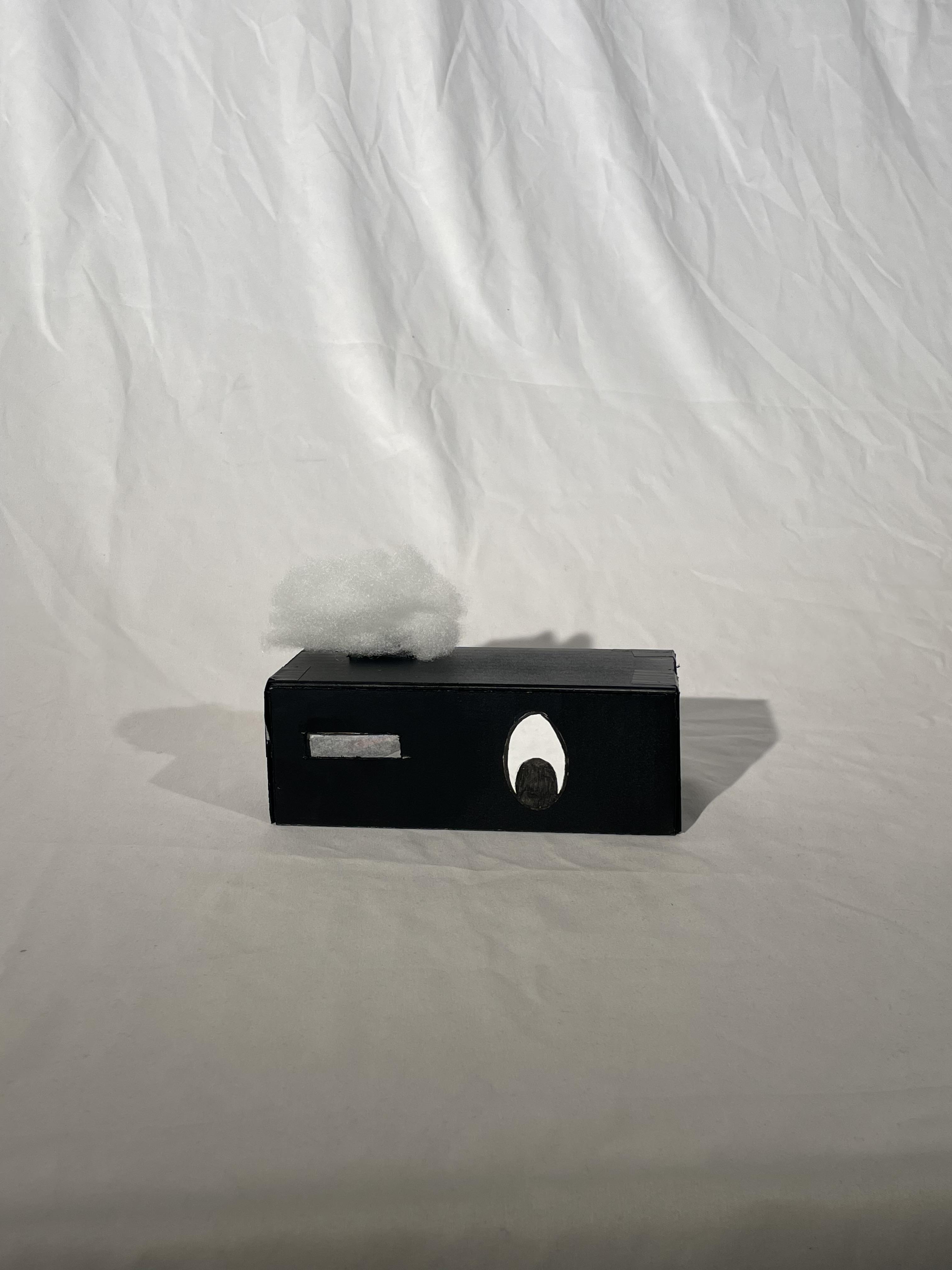
Stuck in the studio? Deadline creeping up? Questioning your life choices while staring at your model for the fifth hour straight?
Meet Boxy the Vendo, a vending machine that doesn’t just give you a drink… it gives you judgment!
Boxy isn’t here to solve your problems. It’s here to react to them. Pick your beverage wisely, because Boxy is watching. Choose boldly, and it might light up, dance, and celebrate your questionable decision. Choose poorly? Prepare for dramatic disappointment. Powered by buttons and an Ultrasonic sensor, Boxy detects your choice and responds with lights, movement, and sound; either hyping you up or emotionally evaluating you.
Is it useful? Not at all.
Is it necessary? Absolutely.
Because when studio stress hits and your day feels painfully boring, Boxy is the useless machine friend you didn’t know you needed.
Team Members by Anjana Vijayakumar, Denise Mancia, and Jessica Brindhaban.
Supplies
Components
- 1x Breadboard (large)
- 1x Arduino Uno
- 1x Ultrasonic Sensor (4-pin)
- 1x Piezo Buzzer
- 1x Servo
- 3x LED lights (Red, Yellow, Green)
- 3x 10K Ohms Resistors
- 18x Jumper Wires
Non-Electrical Components
- Cardboard
- Cotton
- Mylar
- White Paper
Tools
- Superglue
- Duck Tape
- Command Strips
- Exacto Knife
- Black Spray Paint
- Black Marker
Understanding the Inputs and Outputs
We wanted to consider that the useless machine that the sensor will control three functions:
- LED Lights
- Servo
- Buzzer
When the ultrasonic sensor detects a hand within a specific distance range (less than 54 cm), it triggers a programmed response. Depending on the detected range (which corresponds to a selected “button” or drink choice), the machine activates a combination of LEDs, servo movement, and melody playback. Each drink selection produces a different emotional reaction from Boxy - either happy, sad, disappointed, or quirky - expressed through light, sound, and motion.
Measuring the Vending Machine

During the ideation phase, we carefully sketched and measured the vending machine. Our sketch included:
- The spacing between each button
- The overall volume and proportions of the vending machine
- The placement and height where the box would sit
These measurements ensured our fabricated box would fit proportionally and function properly within the vending machine setup.
Tinkercad Diagram


While working in Tinkercad, we approached the circuit design with efficiency and minimalism in mind. We tested each component individually before integrating them together:
- Ultrasonic sensor testing
- LED testing
- Servo motor testing
- Melody playback with the buzzer
Once each component worked independently, we combined them into a single functioning system. The wiring was color-coded and carefully organized to prevent tangling. We planned the internal layout so the inside of the box would remain clean and compact rather than messy.
Melodies in Play (Composed List of Songs)
The melodies were selected and composed to match the “personality” of each drink choice. There were a total of nine drinks, including Coke, Fuse, and Monster Energy Drinks. We catered the machine's personality to praise drinks commonly enjoyed by post, such as Coke and Fuse. If the buyer selects energy drinks such as Monster or Gatorade, the machine will react negatively.
Here are the names of the nine melodies:
1) Happy by Pharrell Williams
2) Game Success Audio
3) O'Canada
4) Careless Whisper by George Michael
5) Bubbly Sound Effect
6) Tropical Audio
7) Negative Audio
8) Negative Audio
9) Negative Audio
For select songs, such as "Happy" and "Careless Whisper," we referenced sheet music and the Arduino Buzzer Tones, manually inputting the beats of the notes and adjusting them as needed.
We used three different ways to count the beats of the notes for the selected songs. One method included the traditional Arduino beat count, where beats are listed in 2,4 and 8 according to their duration in the bar. The second method utilized included declaring the variable, such as QUARTER and EIGHTH, to list out the beat duration. Lastly, we listed the beat based on the number of milliseconds.
Servo on Cue
The movement of the servo was dictated through the beat of the music. Using the void 'playNoteWithServo', it encapsulated the calculation for the buzzer beat duration. Using that, variables prompting the maximum and minimum angles for the servo swing were listed. Then, per each beat and duration of each note, the servo swung to the most it could within that range.
Downloads
Lights in Play
Our circuit incorporated three different colored LEDs, including Red, Yellow and Green to light up after the servo and the melodies played. Similar to the melodies, we arranged nine different types of light patterns to match in accordance with the colors of the drink type and the melodies of the song. There are nine light types. They were listed as follows:
1) redBlink
2) redFade
3) greenYellowBlink
4) redBeatBlink
5) rainfallEffect
6) greenYellowBlink
7) chaoticAll
8) chaoticAll
9) chaoticAll
Within the listed light names, the following patterns of lights entail blinking, fading, rainfall, and randomized light effects.
Fabrication of the Circuit
The sequence of making the circuit for our box was compacted and laid out into certain way, where we consider where the openings are and how we can hide the circuits with our fabrication of the box. The circuit was compactly arranged to fit inside the box while remaining functional and accessible for debugging. Internal components were hidden strategically within the fabricated structure.
Fabrication of the Box
The fabrication of the box was easily hand-cutted - where we cut rectangular pieces, cut openings for LEDS, servo, sensor, and outlet. In result of our box, we created a character thats able to maintain the internal components to work.
In addition to the fabrication, the box was set up onto the vending machine by putting command strips behind and sticking onto the surface of the vending machine. The result was a character-like structure capable of housing and protecting all internal components while maintaining functionality.
Downloads
Designing and Touching Up on Boxy-the-Vendo
Finally, we considered in making the box into a quirky-unusual character, where adding an eye (paper-cut out) and hair (ball of cotton) will emphasize the useless machine box as a spectacular part of the addition to the vending machine. These playful details transformed the circuit box into a quirky, expressive “friend” rather than just an electronic enclosure. The design reinforced the concept of a useless machine that reacts emotionally to your choices.
Conclusion
Overall, we successfully executed our concept and idea into a useless machine where Boxy-the-Vendo judges based on your choice of drink while using the critical components to function this little machine. This project allowed us to explore the Ultrasonic sensor component and different Arduino functions to work and act as one machine of its own. Throughout this process, we drew upon the following questions:
- How far can the sensor detect hands when pressing the button?
- What distance range should trigger each reaction?
- How long will it take to activate the machine?
- What are the most suitable inputs and outputs?
- How does the machine react to certain buttons, such as playing sounds, movement, and lights?
- Is there enough time for user engagement?
- What kind of code do I have to accomplish the task?
To approach such questions, we took a step-by-step approach by working with the sensor first to calculate distance, then the LEDS, servo, and lastly, the piezo buzzer. Within the void loop, we suggested actions should take place when the sensor goes HIGH, i.e. changes from LOW to HIGH. The current code takes actions when the sensor is HIGH, so if you leave your hand in place, it will read the HIGH signal and take the action. When a sensor is detected to be HIGH, you need to verify that its previous state was LOW. To do this, you need to remember the state of the sensor the last time you read it. This process that we’ve recognized is called the state change detection.
Navigating the following questions allowed us to note the many challenges that came from coding certain functions. We learn the importance of timing, distance, sequence of else and if conditions, coordinating, figuring out the solutions into our coding. Coordinating melodies, lights and servo movement in a singular motion was the most difficult, as each listed move held a great density of data to enact. By creating its own isolated void ‘activateButton’, we were able to use the switch component to list out the nine different buttons available and coordinate the sound and light associated with it. Once a set distance was detected through the sensor, it would trigger the if command which started the button.
If we had more time with this project, we would attempt to create a sleek design which encapsulates the personality of the robot along side a more seamless exterior design. Furthermore, to give Boxy more life, we would love to explore further movement such as eye and arm movements .