Battlecruisers Floating in Space
by meeeee2471 in Design > 3D Design
136 Views, 1 Favorites, 0 Comments
Battlecruisers Floating in Space

This project is inspired by my lifelong interest in the video games Starcraft 1 and 2. My father first introduced me to Starcraft 1 when I was seven or eight years old, and it has been a near constant in my life since then. This unique strategy type game had started something inside me. The first time I saw the cinematics, played the games, had left me in awe, playing in a world much larger than mine. Seeing the alien ships and characters had fueled my interest in the game, but the one thing that stuck with me the most was the Battlecruiser.
It was a simple design, a hammer head with a flat back, and rods on the side. It was the coolest thing I had seen. The simple presence of it flying high above everything, dwarfing anything around it, had brought a sense of joy to me that nothing else has. Ever since the first time I saw that battlecruiser, I've been trying to recreate it, making it in LEGO, in Minecraft, and anything else you could imagine. When I saw this competition, this "make it float" competition, I felt like I simply had to enter. It was the perfect opportunity, both to showcase the skills I learned in 3d modeling and animation, but to also fully flesh out something I have dreamed of ever since I was a little child.
Supplies
Blender (3D modeling/animation)
Main Battlecruiser Metal Texture Spaceship Panels PBR Material - Texture Download
Inspiration
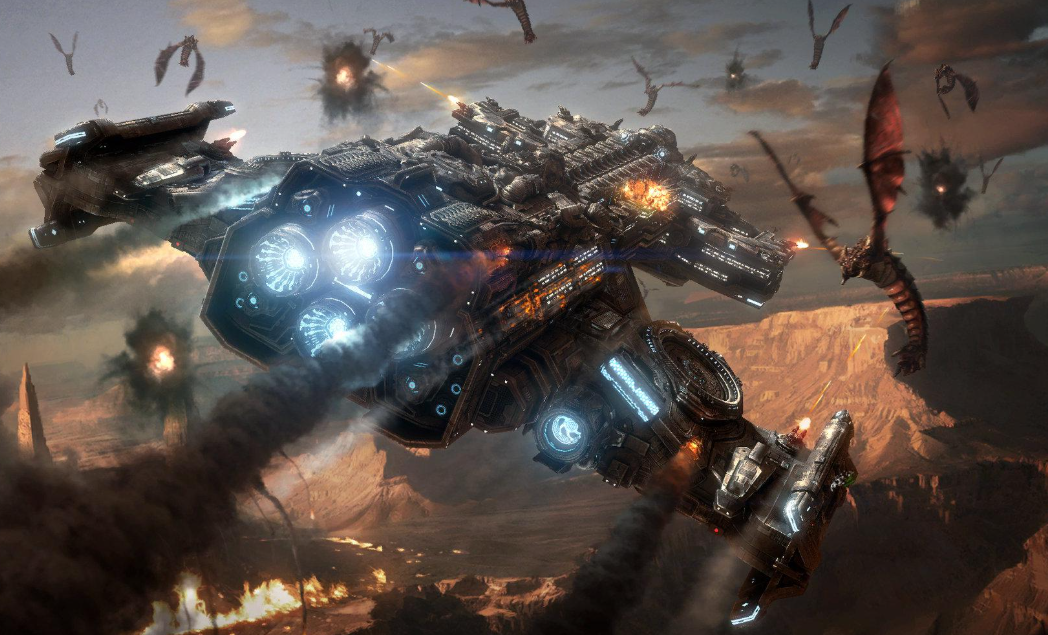

This project is a tribute to the awe I felt as a kid, watching StarCraft unfold like a myth written in metal and fire. The battlecruiser wasn’t just a unit—it was a symbol. A floating fortress. A leviathan of the sky.
I wanted to capture that feeling: the moment when a battlecruiser drifts over a cityscape, casting its shadow across rooftops and neon signs. It’s not attacking. Not yet. It’s watching. Waiting. Its engines hum like distant thunder, and the air seems to hold its breath.
This cinematic is about scale. About reverence. About the quiet before the storm. I imagined a city that’s lived under the threat of orbital power for years—where people glance upward not in fear, but in awe. Where the silhouette of a battlecruiser means something ancient and inevitable.
Technically, this scene challenged me to blend sci-fi grandeur with urban realism. But emotionally, it’s a love letter to the coolness that first drew me into StarCraft—the feeling that the sky could open up and reveal something massive, mysterious, and unforgettable.
Blocking Out the Model
Before any textures, details, or animations come into play, block design is where the soul of a model begins. It’s the stage where you define the silhouette, proportions, and emotional impact of your scene. For something as iconic as a battlecruiser, the blockout isn’t just a technical step—it’s a storytelling tool.
In this phase, I’m not worried about rivets or shaders. I’m focused on presence. How does the cruiser feel when it floats above the city? Does it dominate the skyline? Does it evoke awe, tension, reverence? These questions are answered not with detail, but with shape.
Block modeling lets me experiment quickly. I can shift the bridge, widen the hull, or reposition the head—all without getting bogged down in complexity. It’s like sketching with geometry: rough, expressive, and full of possibility.
Most importantly, block design gives me a chance to test the cinematic language of the scene. A low-angle camera looking up at a massive cruiser only works if the model’s silhouette supports it. If the shape doesn’t read, the emotion doesn’t land.
So this step isn’t just about building—it’s about feeling. And getting that feeling right means everything that follows will have a foundation worth building on.
Starting the Model

To begin shaping the battlecruiser, I started with the central hull—a large, rectangular block that serves as the backbone of the entire ship. I kept it broad and symmetrical, giving it the kind of mass that feels heavy even in zero gravity. This central structure is where the cruiser’s strength lives: thick armor, internal systems, and the raw presence that makes it feel like a floating fortress.
Once the core was in place, I added two wing-like structures on either side. These aren’t aerodynamic wings—they’re more like armored extensions, possibly housing weapons, thrusters, or sensor arrays. I extruded them outward from the hull, keeping their proportions tight and angular to match the Terran aesthetic. They help widen the silhouette and give the ship a sense of balance, like it’s bracing itself against the void.
At the front, I built the bridge using a hammerhead design. This was one of my favorite parts to block out—it gives the cruiser a distinct profile and a sense of command. The hammerhead juts forward and gives the ship its signature shadow. I imagined it as the nerve center of the vessel, with panoramic windows and tactical displays glowing inside. Even in block form, it feels like the eyes of the ship—watching, calculating, ready.
Throughout the process, I focused on silhouette and proportion. I wasn’t chasing detail yet—I was chasing presence. The goal was to make something that, even as a collection of cubes, could float over a city and make people stop what they’re doing just to look up.
Sculpting the Center

After blocking out the main silhouette of the battlecruiser, I turned my attention to the rear section—the part that will eventually house the thrusters. This area is crucial not just for propulsion, but for visual storytelling. It’s where the ship’s power feels concentrated, like the engine room of a leviathan.
I began by refining the geometry around the back of the central hull. Using tools such as extrude and subdivide, I carved out a border around the edges. I wanted this section to feel reinforced, like it could withstand the heat and stress of interstellar thrust. Even without the thrusters modeled yet, the space needed to feel like it was built to contain something massive and volatile.
I added subtle bevels to the edges and began shaping the contours where the thrusters will eventually sit. These indentations and anchor points help prepare the model for the next phase. I also experimented with symmetry and spacing—making sure the rear section felt balanced and modular, ready to receive engine geometry without disrupting the cruiser’s silhouette.
With the rear hull sculpted and ready, I moved on to modeling the thrusters. For this design, I wanted something compact—short, stubby, almost like industrial buttons embedded into the back of the ship. These aren’t sleek jet engines; they’re dense, functional, and built for raw propulsion.
I started with basic cylinders, scaled them down to match the proportions of the rear section, and positioned them symmetrically across the back face. Each thruster sits snugly in its own recessed mount, like a pressure valve waiting to ignite. I kept the geometry simple for now—just clean edges and a slight bevel to catch the light.
The short profile gives the cruiser a grounded, mechanical feel. It suggests that the ship isn’t built for speed—it’s built to move deliberately, like a tank in orbit. These thrusters aren’t flashy, but they’re powerful. I imagined them rumbling to life with a low-frequency hum, pushing the ship forward with the kind of force that makes buildings tremble.
Even without animation or glow effects yet, the placement and shape of the thrusters help reinforce the cruiser’s silhouette. They anchor the rear visually and hint at the energy stored within. Later, I’ll add emission materials and maybe some subtle greebles around the mounts to suggest heat shielding and exhaust ports.
For now, the thrusters are in place—and the ship has its engines.
Implementing Thrusters

With the thruster geometry modeled, I moved on to placing them onto the rear of the central hull. This step was all about integration—making sure the engines didn’t just sit on the ship, but felt embedded into its structure.
I started by positioning each thruster along the back face of the hull, using symmetry to keep the layout balanced. I chose a compact, button-like design for the engines, so they wouldn’t dominate the rear visually but still felt powerful and deliberate. Each thruster was nestled into the recessed section I had previously sculpted, which helped them feel like they belonged—like the hull was built around them.
Modeling the Front

For this step, I focused on shaping the front of the central hull, giving the cruiser its forward identity. I started by extruding the central block forward, keeping the proportions broad and heavy so it still felt like part of the main body. To avoid it looking too flat, I angled the top edges downward, creating a wedge-like profile that suggests motion and strength.
On top of this forward extension, I added two circular turbine-like structures, placing them symmetrically on either side of a central ridge. I wanted these to feel like mechanical intakes or auxiliary systems, so I connected them back into the hull with curved pipe geometry. The pipes helped sell the idea that these weren’t just decorative—they were functional components tied into the ship’s engineering.
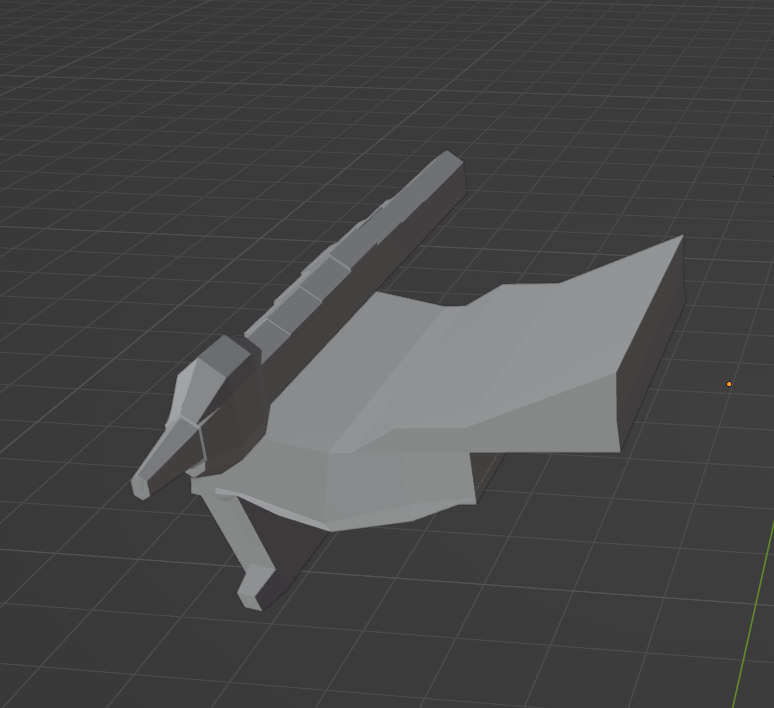
For this stage, I focused on the sides of the central hull, which help define the cruiser’s overall profile. I started by extruding geometry outward from both sides of the main body, keeping the forms blocky and symmetrical. These side extensions act like wing structures, but instead of being aerodynamic, they’re designed to feel armored and functional—as if they could house weapon batteries, hangar bays, or additional thrusters.
To avoid the sides looking like flat slabs, I added layered plating using inset faces and extrusions, which gave the surfaces depth and suggested modular armor panels. I also introduced angled edges along the outer faces, so the silhouette reads as more dynamic when viewed from below or at a distance.
Fleshing Out the Wings

After blocking out the basic side extensions, I went back in to add more detail and definition to the wings. I wanted them to feel less like flat slabs and more like functional hardpoints—places where the ship could mount secondary propulsion systems.
I started by segmenting the wing geometry, adding inset faces and extrusions along the length to create a sense of layered plating. This broke up the surface and gave the wings a more engineered look, as if they were assembled from modular armor panels.
Along the underside, I added angular indentations and support struts, which suggest structural bracing and hint at internal systems. These details make the wings feel like they’re carrying weight and function, not just floating beside the hull.
By refining the wings this way, the cruiser now feels broader, heavier, and more militarized. The side structures no longer just balance the silhouette—they actively contribute to the ship’s identity as a fortress in space.
Creating the Center "power Core"

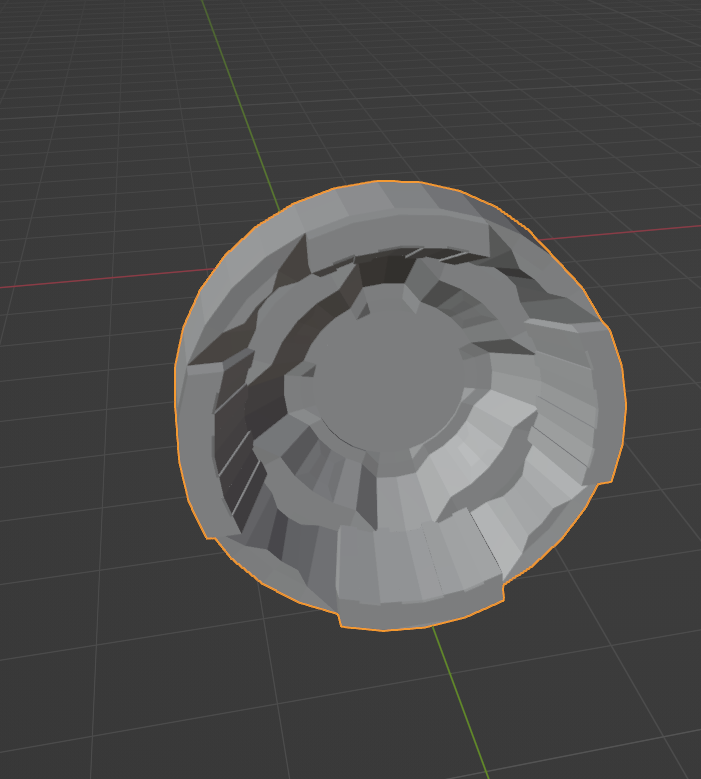
For this step, I focused on creating the central power core—the heart of the battlecruiser’s Yamato cannon. I started with a cylinder as the base shape, since it naturally suggests a chamber or conduit for energy buildup. I then beveled the edges to soften the silhouette and give it a more engineered, manufactured look.
At the front face, I carved out a recessed circular cavity, layering it with concentric rings to imply that this is where the plasma charge will gather before firing. This design choice makes the core feel like it’s channeling energy forward, ready to unleash a devastating beam.
Along the sides of the cylinder, I added vent-like insets and parallel grooves, which suggest cooling systems or energy conduits. These details help sell the idea that the core is under immense strain and needs constant regulation.
Central Bridge

Once the power core itself was modeled, I needed to create a protective hull to house it. I started with a rectangular block that I scaled and shaped to wrap around the cylindrical core, making sure it felt reinforced and armored. The goal was to give the impression that this section of the ship could withstand the immense energy output of the Yamato cannon.
I added angular plating around the sides, using extrusions and insets to create recessed panels and layered armor. These details not only break up the flat surfaces but also suggest heat shielding and structural bracing. Along the top, I modeled a series of rectangular extrusions that act like cooling fins, hinting at the massive thermal load the core would generate.
Sculpting the Front Signature "hammer Head"

After finishing the power core housing, I shifted focus to the front hammerhead section—the distinctive command deck that defines the battlecruiser’s silhouette. I began by blocking out two large rectangular side structures, positioned symmetrically on either side of the central hull. These became the “heads” of the hammerhead, giving the ship its broad, commanding profile.
To connect them, I modeled a central recessed section, slightly set back from the side blocks. This created depth and gave the hammerhead a layered, architectural feel. I added horizontal grooves and panel lines across this recessed area, suggesting reinforced plating and structural segmentation. The grooves also help catch light, breaking up the flat surfaces and emphasizing the industrial Terran aesthetic.
On top of the side blocks, I added small angular protrusions, which could later serve as sensor arrays, antennae, or turret mounts. These details make the hammerhead feel more functional and less like a simple block. I also beveled the outer edges of the hammerhead to soften the geometry and ensure the silhouette reads cleanly from cinematic angles.
The overall effect is a broad, heavy command deck that feels both fortified and authoritative. Even in this early stage, the hammerhead projects the sense of a nerve center—the place where the ship’s commanders oversee battle, directing firepower and strategy. It’s the “face” of the cruiser, and it needed to feel unmistakably powerful.
Putting It All Together

After months of modeling, sculpting, and refining, I finally brought all the components together into a single, unified battlecruiser. Every section—the rear thrusters, the front hull, the side wings, the power core housing, and the hammerhead command deck—was carefully aligned and integrated.
This wasn’t a quick build. It took months of iteration: blocking out forms, reworking proportions, experimenting with silhouettes, and constantly stepping back to ask, does this feel like a Terran battlecruiser? Each stage demanded patience—sometimes entire evenings were spent just refining a bevel, adjusting a pipe curve, or balancing the symmetry of the wings.
The result is a ship that doesn’t just look like a collection of parts—it feels like a cohesive war machine, engineered with purpose. The thrusters anchor the rear with compact power, the front hull projects strength and direction, the wings broaden the silhouette into something fortress-like, and the hammerhead bridge crowns the ship with authority. At the center, the Yamato power core pulses as the heart of the vessel, tying the whole design together.
Looking at the assembled model, I see not just geometry, but the accumulation of months of persistence—the trial and error, the late nights, the small breakthroughs that built into something monumental. This cruiser isn’t just a model; it’s the product of sustained effort, discipline, and the drive to capture both technical mastery and cinematic awe.
Texturing


I finally moved into texturing—the stage where the cruiser’s surfaces gained depth, realism, and storytelling. I applied a spaceship hull texture, using subtle variations in roughness and metallic values to break up the surfaces. This gave the hull a sense of armor plating, as if it had endured countless battles and was made for battle.
The most dramatic change came with the glowing windows and emissive details. I carefully placed rectangular light strips and clusters of windows across the hull, wings, and hammerhead bridge. These weren’t just decorative—they gave the ship a sense of scale and life, suggesting entire decks filled with crew, command centers, and engineering bays.
I chose a cool cyan-blue glow for the windows and vents, contrasting against the gray plating. This glow not only highlights the geometry but also creates a cinematic presence—the ship now feels like it’s drifting through the void, alive with energy. The emissives also help guide the eye across the silhouette, emphasizing the thrusters, bridge, and power core housing.
Adding Thrust


To bring the rear thrusters to life, I created glowing fire trails that extend outward, simulating the ship’s propulsion. This was done by combining geometry, shaders, and emission effects inside Blender.
- Base Geometry I started with simple elongated cones or stretched spheres placed directly behind each thruster nozzle. These acted as the base meshes for the exhaust flames. Their tapering shape naturally suggested acceleration and direction.
- Shader Setup In the Shader Editor, I applied an Emission shader to the exhaust meshes. I used a ColorRamp to blend from bright cyan-blue at the base (near the thruster) to transparent or darker blue at the tip, creating a natural fade-out.
- A Noise Texture was layered into the shader to add turbulence and variation, breaking up the smooth gradient so the flames looked energetic rather than static.
- I mixed the emission with a Transparent BSDF so the trails could fade seamlessly into space.
- Glow and Intensity I increased the emission strength to make the trails pop, then enabled Bloom in the render settings. This gave the exhaust a soft glow, making it feel like it was radiating energy into the void.
- Motion and Dynamics To simulate movement, I experimented with animated noise textures—sliding the noise coordinates over time so the flame patterns shift and ripple. This gave the trails a sense of constant motion, as if plasma was being ejected at high velocity.
Setting Up the Scene

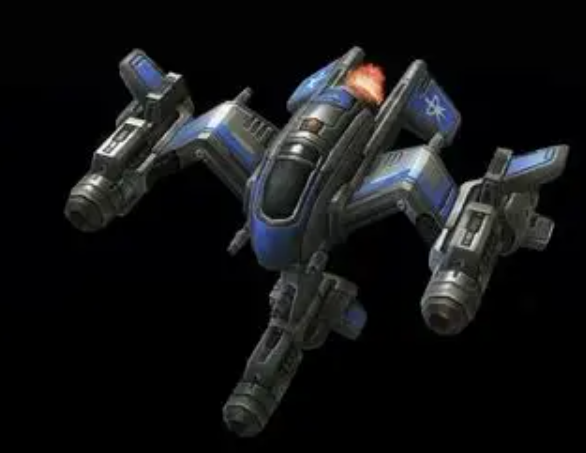
I started setting up the scene, having the large central battlecruise in the middle alongside some smaller ones. I used the Makerlab image to 3D model to generate a wraith to add more to the scene. I finally added a space image to the background to create the setting, giving us the final image.