Building a WiFi GPS Tracker With Geofencing (No SIM Card Needed!)
by ElectroScope Archive in Circuits > Electronics
243 Views, 2 Favorites, 0 Comments
Building a WiFi GPS Tracker With Geofencing (No SIM Card Needed!)
So I built this GPS tracker that works over WiFi instead of needing a SIM card and monthly plan. The whole point was to skip the expensive GSM module setup and just use the ESP32's built-in WiFi. Plus I added geofencing that sends you a text when the tracker crosses a boundary you set. Works pretty well.
The GPS module talks to the XIAO ESP32-S3, which pushes location data to a free cloud service called GeoLinker. When you leave your designated area, you get an SMS with coordinates. No cellular service on the tracker itself.
Supplies
Hardware:
- XIAO ESP32-S3 microcontroller
- Neo-6M GPS module
- External GPS antenna (usually comes with the Neo-6M)
- Breadboard
- Jumper wires
- USB cable for programming
Software:
- Arduino IDE
- GeoLinker library
- TinyGPSPlus library
- WiFiClientSecure library (included with ESP32 board support)
How It Works
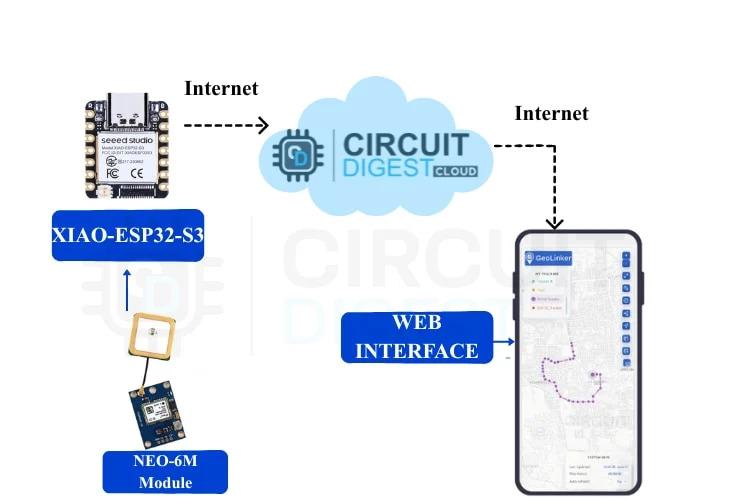
The Neo-6M GPS module receives satellite signals and figures out its position. It sends this to the ESP32-S3 through a serial connection at 9600 baud. The ESP32 then uploads that location to GeoLinker cloud every 15 seconds over WiFi.
For geofencing, you set a home coordinate with a radius (like 50 meters). The code uses the Haversine formula to calculate distance from that point. Cross the boundary and it triggers an SMS through Circuit Digest's API.
If WiFi drops, the ESP32 buffers GPS points locally. When connection comes back, it uploads everything. You don't lose data.
Wiring
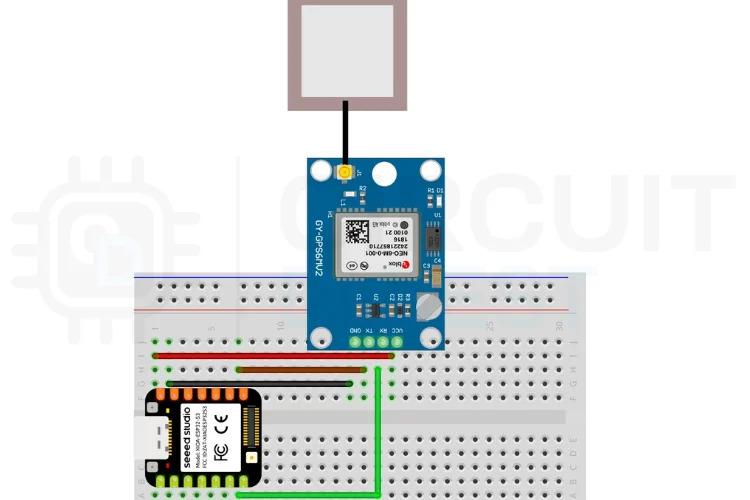
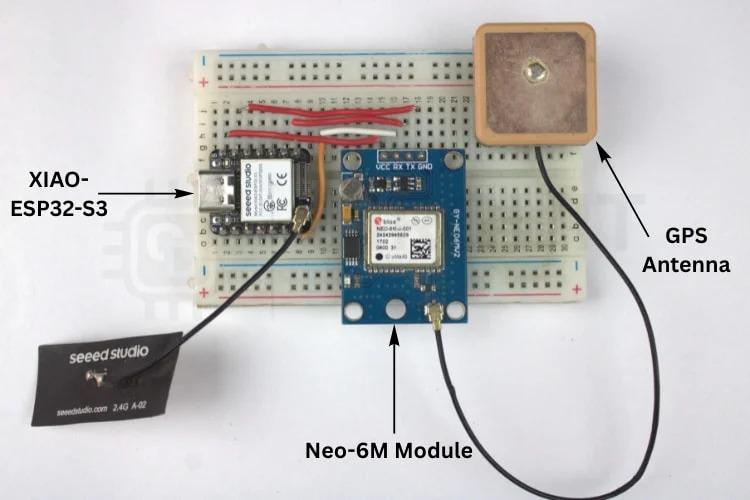
Four connections. That's it.
Connect these:
- Neo-6M VCC → XIAO 5V
- Neo-6M GND → XIAO GND
- Neo-6M TX → XIAO GPIO 44 (RX)
- Neo-6M RX → XIAO GPIO 43 (TX)
Cross the serial lines - TX to RX, RX to TX. The XIAO gives the GPS module clean 5V power. Attach your external GPS antenna to the Neo-6M. The ceramic patch antenna pulls way better signal than the module alone.
Breadboard works fine for testing. You could solder it permanent but keep the GPS antenna away from the ESP32's WiFi antenna.
Getting API Keys
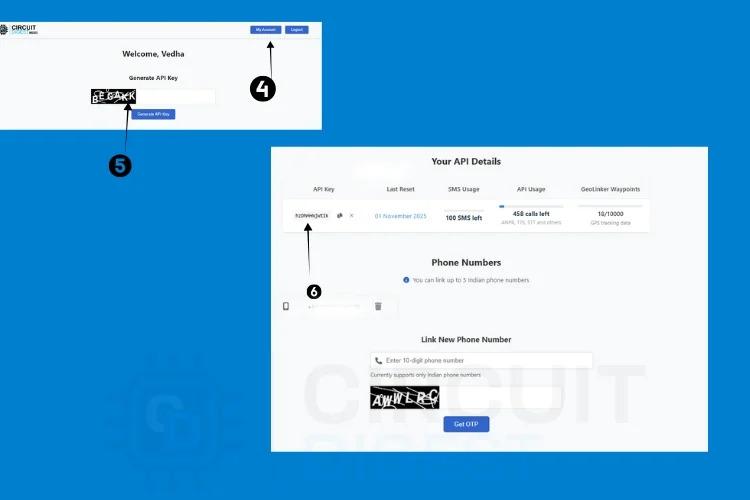

You need two keys from Circuit Digest Cloud - one for GeoLinker maps, one for SMS. Both free.
Go to circuitdigest.cloud and make an account. Basic email and password signup. Click "My Account" after logging in.
Fill the captcha, hit generate. Your API key shows up with expiration date and usage count. Copy it.
Free tier gives 10,000 GPS points and 100 SMS messages. Plenty for hobbyist use.
Link your mobile number in account settings for SMS alerts. Has to be verified before the API works.
The Code
Here's the serial setup for GPS:
Serial1 on the XIAO uses our RX/TX pins at 9600 baud for the Neo-6M.
Your network and settings:
Change the interval from 15 seconds to whatever you need. Lower numbers mean more detailed tracking but use up your data point quota faster.
Geofence setup:
Replace those coordinates with yours. Right-click anywhere on Google Maps and copy the numbers. Function returns distance in meters.
SMS gets sent when you cross the boundary:
Main loop reads GPS and checks distance:
The alertSent flag stops spam. One SMS when you leave the zone. Won't send another until you come back inside and leave again.
Testing
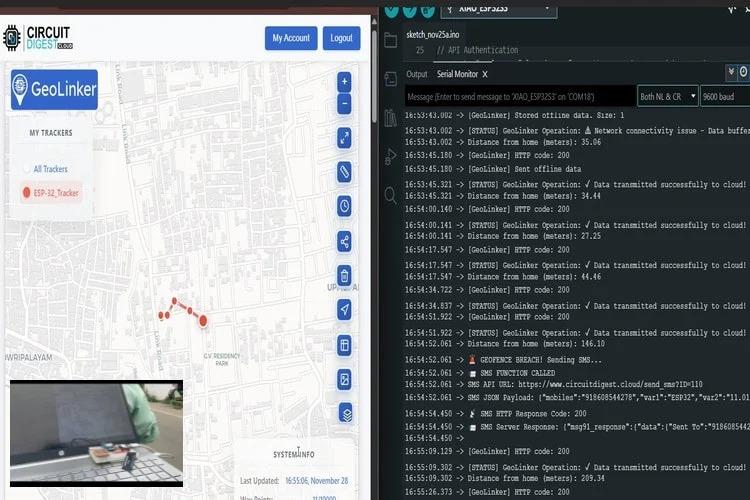
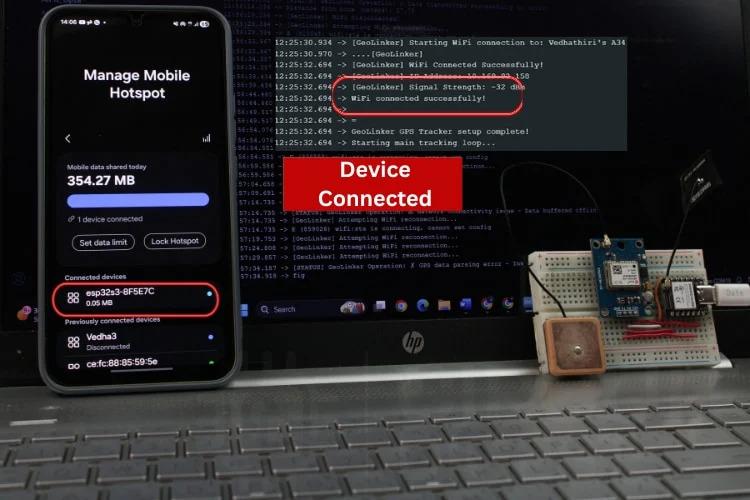
Power it through USB. ESP32 connects to WiFi in a few seconds. Check serial monitor for status.
Put the GPS antenna where it can see sky. GPS needs line of sight to satellites. Won't work inside buildings usually.
First GPS fix takes time. Maybe 10 minutes if the module is new. After that it locks faster. Serial monitor shows coordinates when it's working.
Check GeoLinker. Your device appears on the map with a trail showing movement.
Geofence Test
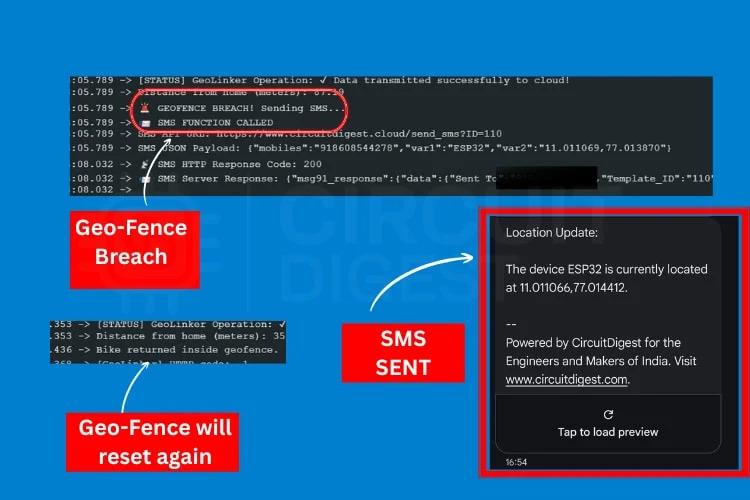
Set your office or house as home with 50-meter radius. Take it for a drive. Phone buzzes when you cross the invisible line. Text has exact coordinates.
Drive back inside the zone and the alert resets. Leave again, get another text.
WiFi Loss
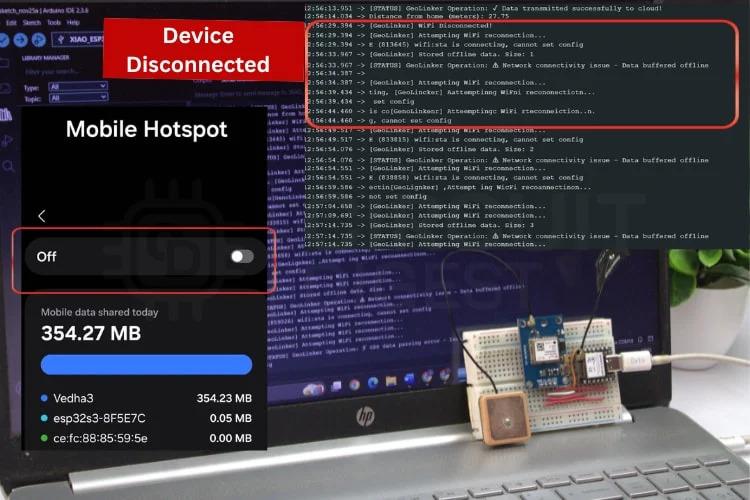
Turned off the hotspot while moving to test this. ESP32 detected disconnect and started buffering GPS points.
Turned hotspot back on. All buffered points uploaded automatically. Map showed complete route with no gaps.
Common Problems
No GPS fix: Antenna needs clear sky view. Doesn't work indoors or under trees. Check TX/RX wires aren't backwards.
WiFi won't connect: Verify SSID and password in code. Check you're in range.
Nothing on GeoLinker: Confirm API key is right and not expired. Serial monitor should show uploads succeeding.
No SMS: Verify your phone number in Circuit Digest account. Make sure you're actually crossing the boundary - print distance to serial for debugging.
Battery dies fast: ESP32 and GPS pull decent current. Need a good power source for mobile use. Deep sleep mode helps but I haven't added that yet.
Modifications
Change geofence radius by modifying the 50-meter check to whatever distance works. Multiple zones? Add more coordinate pairs and check each one.
Speed alerts are easy. GPS provides speed through gps.speed.kmph(). Add an if statement to text when it exceeds your limit.
Monitor battery with a voltage divider. Send alert when voltage drops too low.
Adjust update interval for your situation. Slow-moving stuff can update every minute. Fast tracking needs shorter intervals like 5 seconds.
Troubleshooting Details
If coordinates look wrong, the GPS might have a weak fix. Check how many satellites it's tracking - you want at least 4 for accuracy. Serial monitor shows satellite count if you print gps.satellites.value().
WiFi range on the XIAO is decent but not amazing. Open spaces maybe 50-100 meters. Through walls drops to 20-40 meters. Phone hotspot extends range since it moves with you.
SMS template ID and mobile number variables need to be set up in the Circuit Digest dashboard first. The code won't work without those configured properly.
What Works Well
Tracking cars over short trips where you have WiFi coverage. Your phone hotspot counts as WiFi coverage. Pet tracking in your neighborhood with a weatherproof case. Asset monitoring where the item eventually comes back into WiFi range.
The offline buffering means gaps in coverage don't lose data. Everything syncs when connection returns.
Route visualization on GeoLinker shows everywhere you've been with timestamps. You can scrub through the history and see exactly when you were at each point.
What Doesn't Work
Long-range tracking with no WiFi anywhere. This isn't for cross-country trips unless you keep a hotspot running the whole time. GSM trackers handle that better.
Real-time tracking needs continuous WiFi. Buffered data uploads later, which is fine for some uses but not if you need live updates.
Power consumption is higher than dedicated GPS loggers. The ESP32 WiFi radio uses juice. Battery life matters if you're running portable.
Making Changes
The 15-second update interval is in the code as updateInterval. Change that number for faster or slower updates. Faster uses more data points from your quota.
Geofence radius is in the distance check. Change dist > 50 to whatever meter radius you want. Could be 10 meters for a small area or 500 for a larger zone.
Home coordinates need to be your actual location. Copy from Google Maps by right-clicking. Format is latitude first, then longitude.
Device ID shows up in GeoLinker. Change it to something recognizable if you're running multiple trackers.
SMS message text is in the sendSMS function. Customize what gets sent in the alert.
This instruction set is entirely based on: GPS Tracker with Seeed Studio XIAO ESP32-S3