DIY Current Meter Using a Ferrite Core and Hall Sensor
by sainisagar7294 in Circuits > Arduino
40 Views, 0 Favorites, 0 Comments
DIY Current Meter Using a Ferrite Core and Hall Sensor

A simple isolated current meter for measuring higher currents with good resolution based on hall effect sensor.
Supplies

Components Required
- WSH130NL Hall Effect Sensor
- Toroidal Ferrite Core
- Enamelled Copper Wire
- 10K Ohm Resistor
- 0.1uF Capacitor
- Arduino Uno/Nano (To get digital readings)
- 16x2 LCD Display I2C (To get digital readings)
- Breadboard & Jumper Wires
- Connecting Wires
- Hacksaw / Dremel
- Sandpaper
- Super Glue / Epoxy
Story:
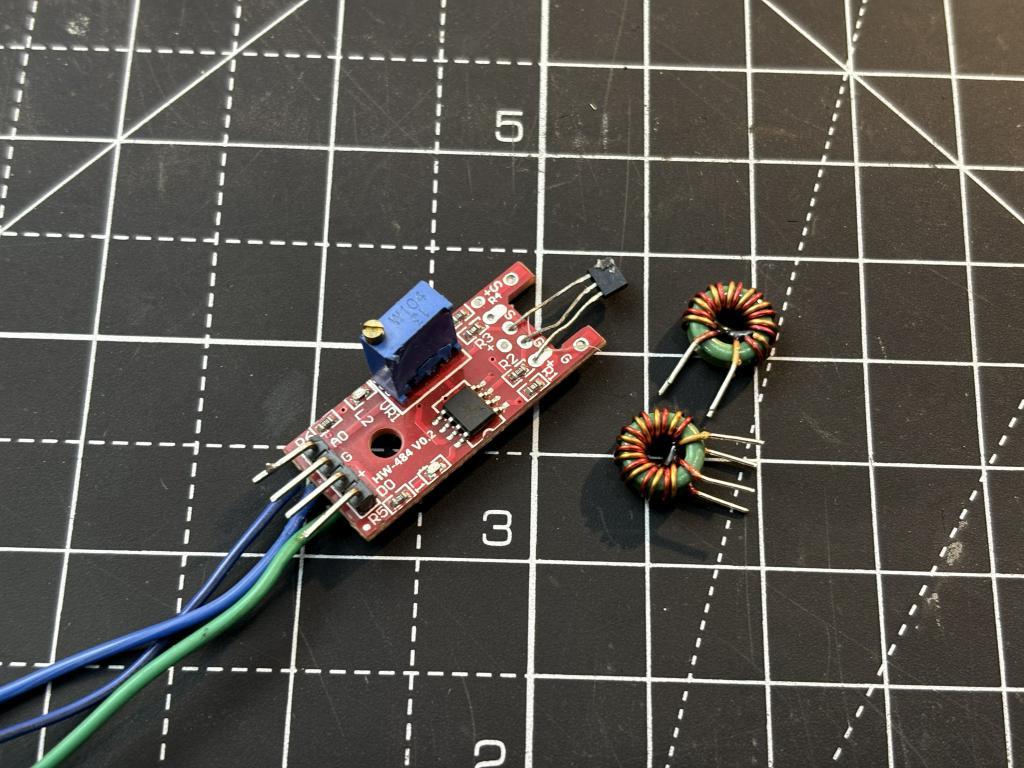

I have used too many current and power measurement meters in the past. And I always want to build a better version of the previous one. Most of my work kept revolving around making measuring and test equipment, in the hope of someday creating a revolution in the testing world. The most common method is using a shunt resistor, but it introduces voltage drop and power loss in the circuit.
I built a DC ammeter using a toroidal ferrite core and a Hall Effect sensor (WSH130NL). The idea is, when current flows through a wire wound around a toroidal core, it creates a magnetic field inside the core. For AC measurements we can just use a secondary winding and get a pretty good step down transformer producing an effective voltage which can be converted into current values. But with a DC steady signal we have to measure the magnetic flux in a different manner.
By cutting a gap in the toroidal core and placing a Hall Effect sensor in that gap. With this we can measure the magnetic flux density, which is directly proportional to the current flowing through the windings. I know this is the same thing which is used in clamp meters and that’s how the idea comes to my mind. Overall now with this approach we get an isolated, non-invasive current measurement. And by choosing the right number of windings, you can adjust the sensitivity and resolution of your ammeter to suit your needs. The same can be converted later with the help of a PCB provided by JLCPCB. As I got my MCU dev board fabricated from there in a $2 price.
How Does It Work?
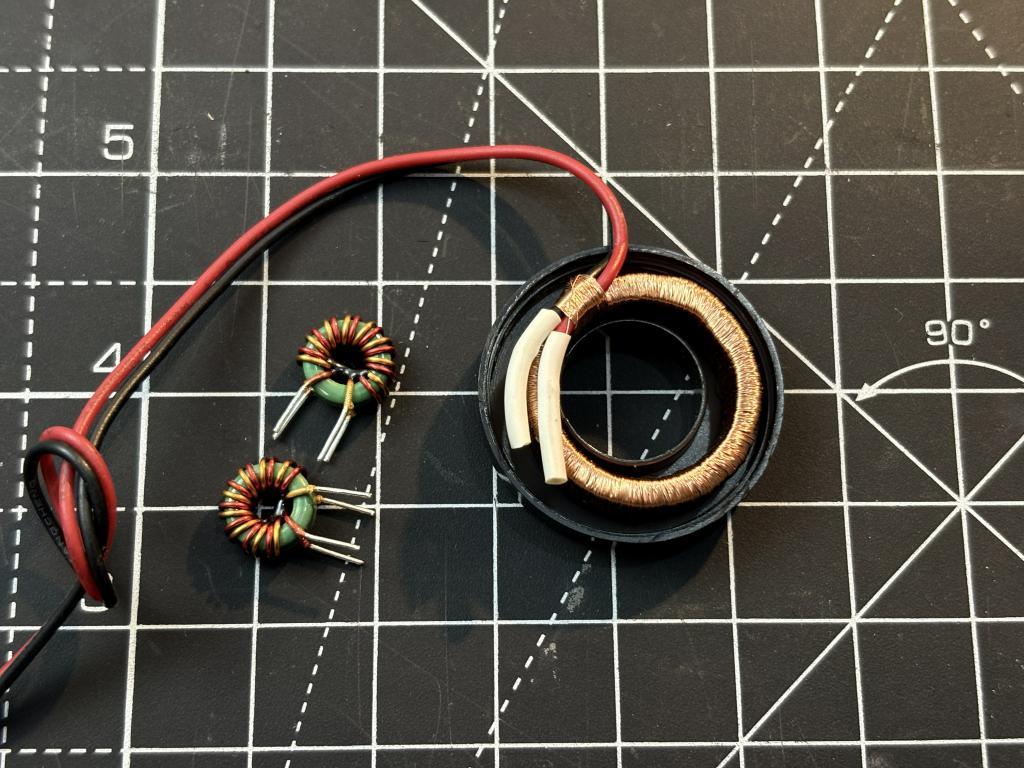
The working principle is based on Ampere's Law and the Hall Effect. Let me break it down step by step. When current passes through a conductor wound around a toroidal ferrite core, it generates a magnetic field inside the core. The key takeaway here is that magnetic flux density (Tesla) is directly proportional to both number of turns and current. So if we keep N fixed, the magnetic flux density becomes a linear function of the current.
The ferrite has a very high permeability, which means the magnetic field is mostly confined inside the core. To measure it, we need to introduce a small air gap in the toroidal core. When we cut a gap in the core, the magnetic flux that was flowing through the ferrite now has to cross this air gap. By placing a Hall Effect sensor right in this air gap, the sensor sits in the path of the magnetic flux. The Hall Effect sensor generates a voltage proportional to the magnetic field passing through it.
WSH130NL Sensor:
Better the sensor more linear will be the output with good resolution. I am using this breadkout module board which is available in the same price of the sensor.
- Wide supply voltage range (2.4V-26V)
- Temperature compensation
- Small TO-92S package
- Fast response - sub-microsecond switching times
- Low power consumption - only 2mA typical
The sensor includes on-chip temperature compensation, so as temperature changes can shift the magnetic characteristics of both the ferrite core and the sensor itself.
Building the DC Ammeter - Step by Step



The toroidal ferrite core is the heart of this ammeter. You can salvage one from an old power supply, a common-mode choke, or buy one online. The size doesn't matter too much, but a larger core gives you more room to wind wires.
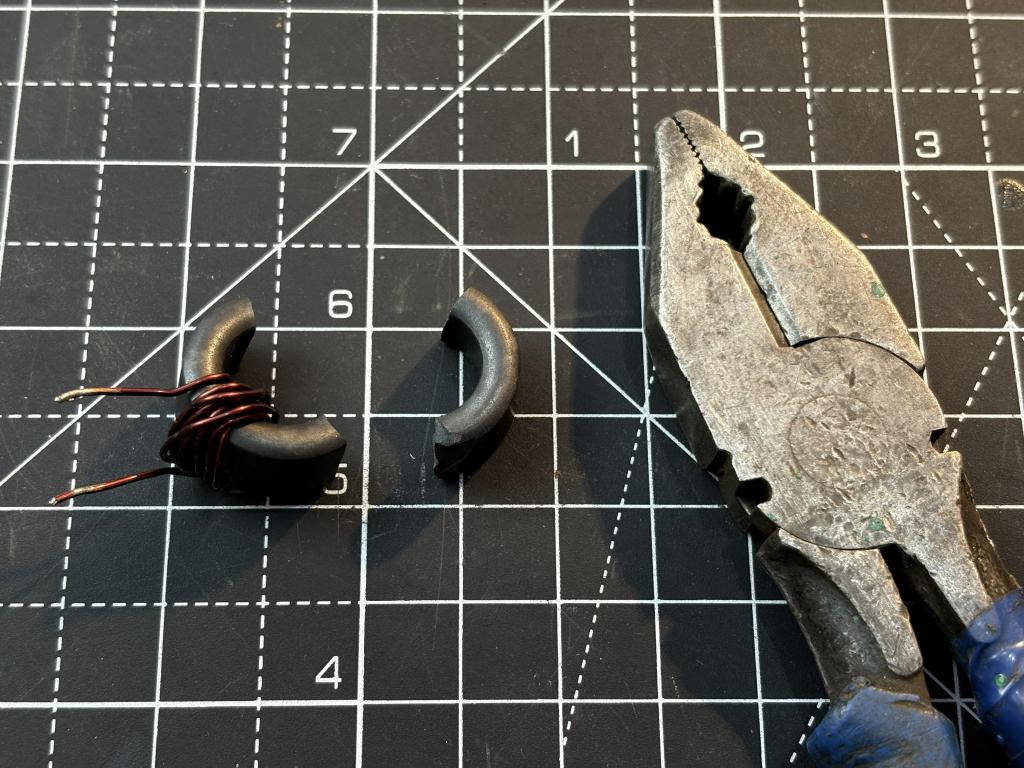
Cutting the Air Gap:
This is the most critical and tricky step. We need to cut a small gap in the toroid where the Hall sensor will sit. Let me tell you what I did, I just took a plier and broke it into two pieces. This may be non ideal but I can later glue the parts to fix it. You can use a Dremel with a thin cutting disc or a fine hacksaw blade. Cut slowly and steadily. After cutting, use fine sandpaper to smooth both cut faces. The smoother the surfaces, the smaller the effective air gap, which means better flux coupling to the sensor. The air gap should be as small as practically possible while still fitting the sensor. A larger gap means more flux leakage and lower sensitivity.
Winding the Toroid:
I used 10 turns of 24 AWG enamelled copper wire on a ferrite core.The number of windings (N) acts as a multiplier for the magnetic field. More windings mean a stronger magnetic field for the same current. Higher output voltage from the Hall sensor for the same current.nBetter resolution because small changes in current produce larger changes in voltage. Easier ADC conversion because the voltage swing is larger. For example, if 10 turns at 1A gives you 0.5V output, then 20 turns at 1A might give you 1.0V output. The higher voltage is easier to read with an Arduino ADC and gives you finer measurement steps.
However, too many windings can saturate the ferrite core at higher currents, and the core has a limited physical size. So you need to balance the number of windings with your expected current range.
Placing the Hall Effect Sensor
You can place the sensor, make sure it is flat in the middle of the gap, then secure it using hot glue and some tape. The orientation decides the polarity, but it doesn’t matter even in this case because the steady state sensor readings are common mode by VDD/2. We will talk about it in the measurements section. Wire connections are really simple:
- Pin 1 (VDD) : 5V supply
- Pin 2 (GND)
- Pin 3 (VOUT)
Taking First Reading:


The sensor output pin produces a voltage proportional to the current flowing through the windings. Now to measure this voltage either can use a multimeter and then convert the readings to current values manually. I did it by flowing a constant current from my lab bench power supply and then writing down the voltage at 1A, 2A and 3A. Which gives me an idea how the readings change.
For example at steady state, when no current is flowing the output voltage is VDD/2. When the current starts flowing it changes by some value, decreasing or increasing based on how the sensor is placed and in what direction current is flowing. Which means it is capable of measuring bidirectional current.
Steady State: attached 1
At 1A Current: attached 2
As you can see, the output is linear, the voltage increases proportionally with current. This is exactly what we expected from the theory. The linearity is key because it means we can use a simple linear equation to convert voltage back to current or just do it in excel by measuring slope.
The other method is to use an Arduino and get rid of all the conversions, Still you need to calibrate it which is explained in the section below.
Arduino Code - Converting Analog Readings to Current
Now let's bring in the Arduino to digitize the sensor output and display the measured current. The Arduino's 10-bit ADC gives us 1024 steps across 0-5V, which translates to approximately 4.88mV per step. The code reads the analog voltage from the Hall sensor, applies the calibration values (offset and sensitivity), and outputs the calculated current to the Serial Monitor and an optional LCD display.
How to Calibrate:
1. Upload the code to your Arduino with SENSITIVITY set to 0 initially
2. With no current flowing, note the voltage reading this is your V_OFFSET.
3. Pass a known current (use a bench supply and a reference multimeter) of say 1A through the windings, and note the voltage.
4. Pass another known current of 3A, note the voltage
5. Calculate sensitivity:
6. Update the V_OFFSET and SENSITIVITY defines in the code
7. Re-upload and verify against known current values
Working:


Readings at 1A, 2A and 3A shown here.
The Arduino Uno has a 10-bit ADC, which means it can resolve 1024 discrete voltage levels across its 0-5V reference range:
So if your sensor gives 0.5V per Ampere (sensitivity), the ADC can resolve:

Because over the time Arduino Nano/UNO got old, still it is the king of prototyping but, as RISC-V came into the market even with a very low price tag, industry start moving towards it. Due to the overpower speed, functions and low power features here is the my design of CH32V003 development board which can be a great alternative to arduino for this project. You can see all the details from here. And if you want to have the same board Download the Gerber files from here.
It is designed in the same form factor of a Arduino Nano. I got my fabricated one from the JLCPCB, and they have done a great job in the PCB side. I will release a full coding tutorial soon.
Outro:

The concept is straightforward: current creates a magnetic field in the toroid, the Hall sensor measures it through the air gap, and the Arduino digitizes the result. We have discussed how it is able to covert the readings efficiently with a good linearity. By trying some other approaches like using multiple widnings, for low current can give better resolution, you can also combine it with your data logger and put an OLED and covert the device into an handheld one. Although if you go to market there are some more reliable options available there too. For now I am going to measure my lab wirings with this for some time and then came with a second idea which may be more intuitive. The comments section is free for you guys.