DIY WiFi Weather Station With OLED Display (ESP32c3-SHT31 Based)
by ikarugi in Circuits > Arduino
74 Views, 0 Favorites, 0 Comments
DIY WiFi Weather Station With OLED Display (ESP32c3-SHT31 Based)


In this project, I will show you how to build a compact WiFi weather station with an OLED display.
The device connects to your local WiFi network, fetches real-time weather data and displays it on a small screen. It can be assembled as a clean enclosure build or as an open-wire minimal setup.
This guide covers wiring, firmware setup, configuration, and enclosure options.
No PCB is required — everything can be assembled using direct wiring.
How It Works
Operating Modes
The device has two modes, switched using a single button:
Indoor Mode:
Displays real-time temperature and humidity
Data is read directly from the SHT31 sensor
Outdoor Mode:
Connects to Wi-Fi
Downloads weather data from the met.no API
Uses coordinates defined in settings.h
Power Saving
The project is optimized for battery operation:
After 5 seconds — display brightness is reduced to 2%
After 20 seconds — device enters Deep Sleep
Wake-up occurs via button press
This allows long battery life even with a small Li-ion cell.
Weather API Information (met.no)
This project uses the official API of the Norwegian Meteorological Institute.
Key advantages:
Works worldwide
No API key required
High accuracy
Free and open access
Technical notes:
Europe and Scandinavia use high-resolution 1×1 km models
Global coverage is provided via ECMWF data
One of the most reliable public weather APIs available
Because of this, the project works anywhere in the world — just enter your coordinates.
Supplies


Microcontroller: ESP32-C3 SuperMini
Display: 1.8" TFT (ST7735, 128×160)
Temperature & Humidity Sensor: SHT31 (I2C)
Button: 6×6 mm tactile switch
Power: 450 mAh Li-ion battery (e.g. from disposable vape)
Other: wires, solder, solder paste
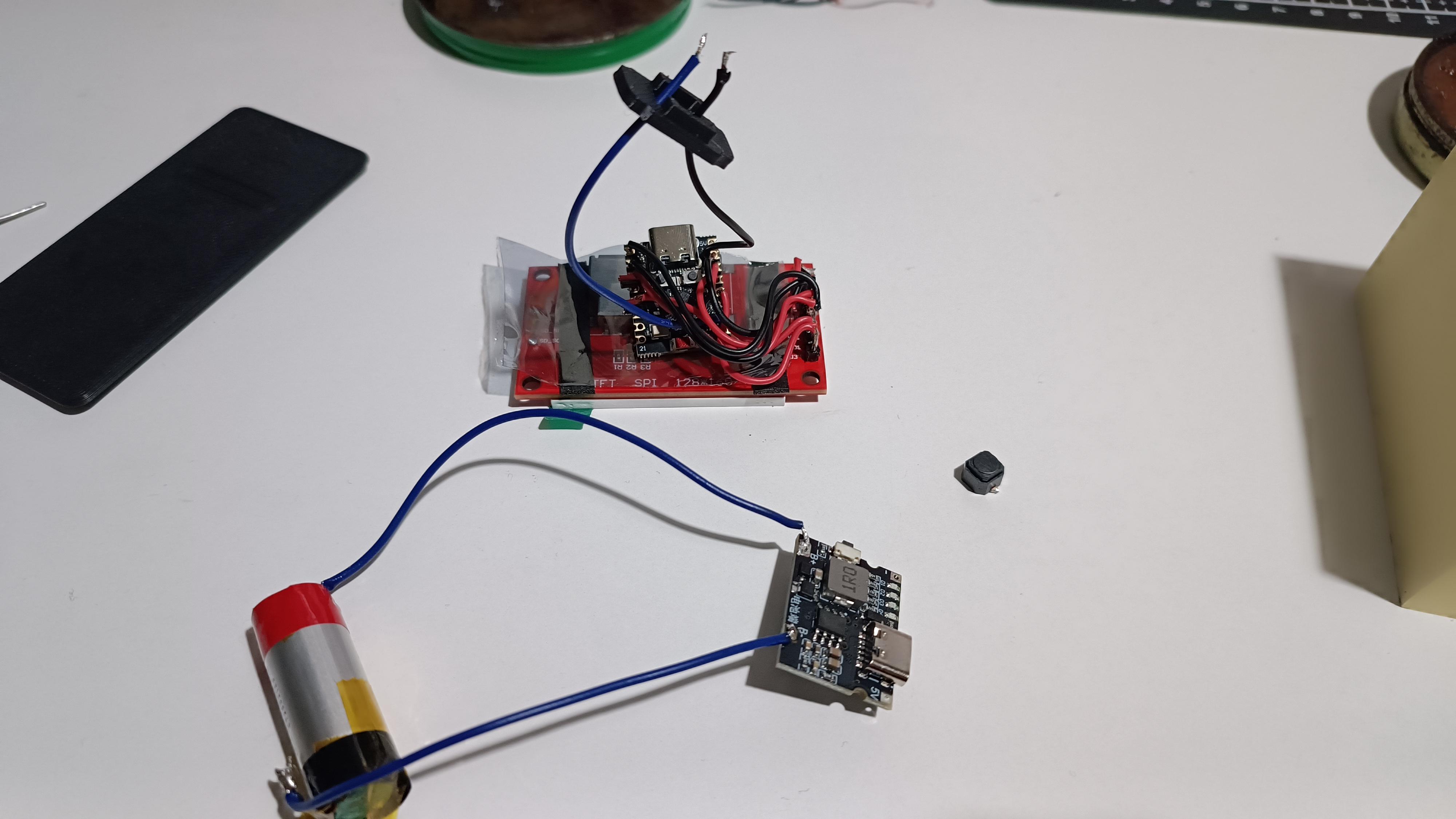
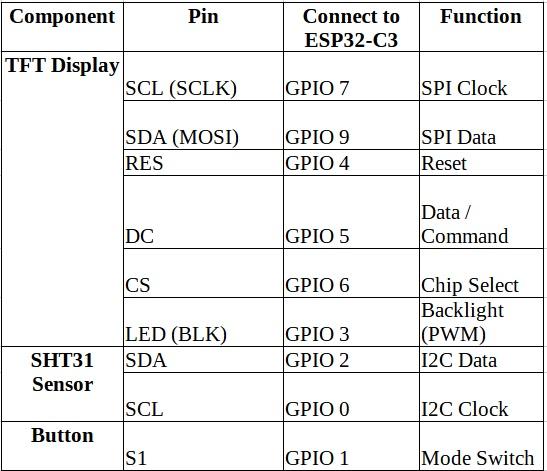
Wiring
Solder everything according to the pinout.
Don't forget 3v3 and all GNDs
If you prefer a minimal aesthetic build, you can use thick solid-core wire and create a rigid “free-form” structure without enclosure.

Preparing the Firmware
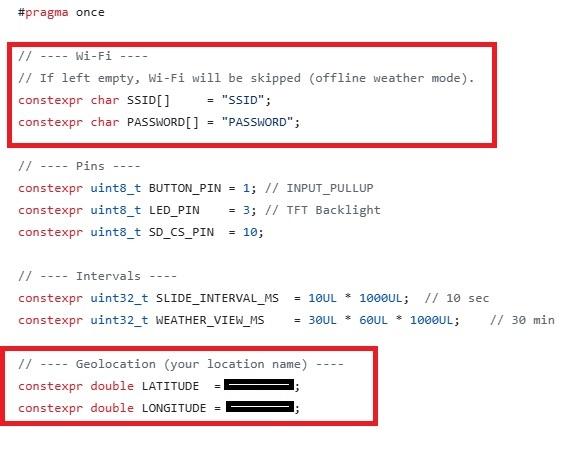
Before uploading the firmware, you must edit the settings.h file.
1. Wi-Fi Configuration
Enter your Wi-Fi credentials:
constexpr char SSID[] = "your_wifi_name";
constexpr char PASSWORD[] = "your_password";
Without this, the device will not be able to retrieve weather data.
2. Location Settings
Set your geographic coordinates for accurate weather data:
constexpr double LATITUDE = 44.444444;
constexpr double LONGITUDE = 55.555555;
You can find your coordinates using Google Maps or any online GPS service.
Uploading the Firmware
- Connect your ESP board via USB.
- Select correct board in Arduino IDE.
- Install required libraries (if needed).
- Select correct COM port.
- Click Upload.
After flashing, open Serial Monitor to confirm:
- WiFi connection successful
- Weather data received
If everything works, disconnect and proceed to final assembly


Enclosure Options
You can:
Option A – Print my enclosure
(STL files available in the project link)
Option B – Build your own enclosure
Option C – Keep it as an exposed “wire aesthetic” build
The device works in all configurations.
If you build your own version, feel free to share it.