DeLonghi Magnifica S - Home Assistant Integration With Rinse-Water Diversion
by kopytjuk in Workshop > Home Improvement
30 Views, 0 Favorites, 0 Comments
DeLonghi Magnifica S - Home Assistant Integration With Rinse-Water Diversion
.jpeg)
Getting up in the morning and waiting for my coffee maker to heat up is not very comfortable, so I decided to enable my DeLonghi Magnifica S to be accessed by Home Assistant. My goal is to have a fresh cup of coffee waiting for me minutes after my alarm rings.
The Build:
- "Virtual" buttons: I connected two relays to the PCB to bridge the "Power On" and "Coffee" button presses. Those are mounted within the machine, only a cable is used as an interface to the ESP32.
- "Rinse Problem": These machines run a cleaning cycle on startup. To solve this, I designed and 3D printed a custom water router powered by a stepper motor and limit switches. It diverts the rinse water into one mug (black in the video) and the actual coffee into my mug.
- The Brains: Controlled by a NodeMCU ESP32 integrated into Home Assistant via ESPHome.
To remotely control your coffee maker (turning it on and off, preparing coffee), you have two options:
Option A: Commercial Button Pusher
Use a smart „button pusher“ like SwitchBot or Tuya Fingerbot and attach it to the front panel. This option is less visually appealing but safer than Option B.
Option B: Relays Inside the Machine
Open the machine and bypass the switches behind the buttons you need (at least two, one for Power On and one for Preparing Coffee) using a relay. Please note that this step is not recommended for individuals without electronics experience. Additionally, when you turn on the machine, some of the wires you have direct access to may have the full line voltage (230V, for example, in Europe).
I went for Option B for the rest of this guide, but do not hesitate to stay on the safe side and go with Option A.
With Option A, you will need to set up a 3-step automation in Home Assistant to turn on the machine, divert the rinse water, and prepare the coffee. With Option B, you'll have two smart buttons in HA, one for turning on and one for preparing coffee, implicitly diverting the rinse water ramp into the right position.
Supplies


Prerequisites:
- 3D (FDM) Printer
- Soldering Iron
- Silicon Wires of different colors, heat shrink tubes
- Adhesive Putty / Mounting Putty
Bill of Materials:
- 2+ Relay Modules SRD-5VDC-SL-C (alternatively: one 2 channel module)
- 28BYJ-48 stepper motor
- ULN2003 driver board
- 2x Micro Limit Switch
- Size: 12.8mm x 6,5mm (Amazon)
- Heat-set threaded inserts
- 2x for the stepper motor
- 4x for the limit switches
- 1x for the water ramp
- Bolts, nuts & heat inserts:
- Diverter Puck:
- 3x M4x16 DIN4762 bolts
- 3x M4 DIN4032 nuts
- Stepper motor:
- 2x M4x12 ISO 7380 bolts
- 2x M4 heat inserts, depth 6mm
- Limit Switches:
- 4x M2x10 ISO 7046-2 bolts
- 4x M2 heat insert, depth 3mm
- 5V USB power supply
- USB-C socket (i.e. USB-C to 5V/GND adapter)
- ESP32 NodeMCU Board (with WiFi)
- Epzilon Prototype PCB board (3,5in x 2,0in)
Bypass the Coffee Maker's Physical Buttons




Again, please make sure that you really want to disassemble the machine! Unplug the device! Furthermore, note that you will lose the warranty of the coffee maker.
First, disassemble the machine following this video (stop at 06:00). In the end your machine should look like the first picture.
Next, disconnect the two connectors on the main board on the right side of the machine.
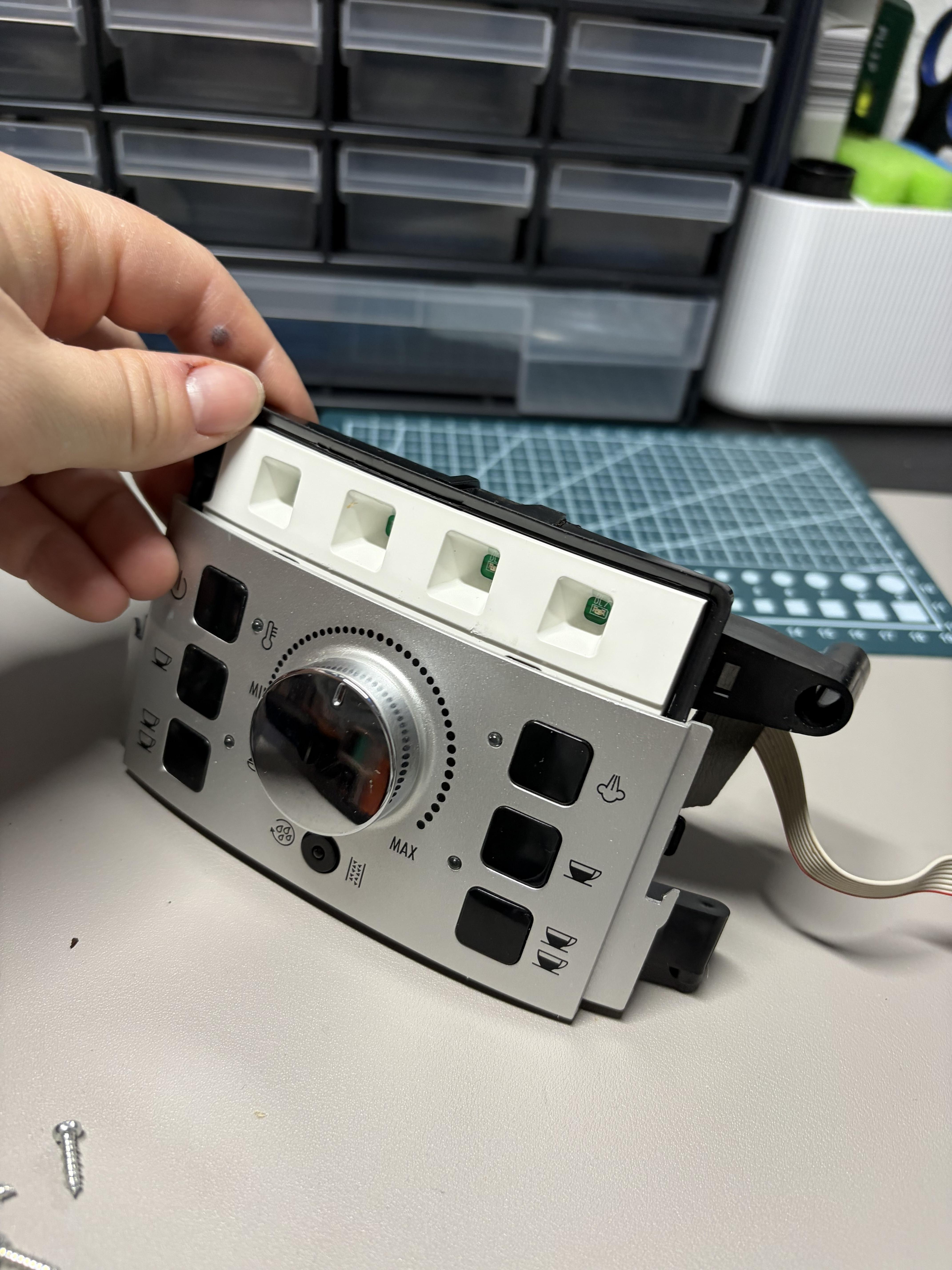
Now, you can dismount and remove the front panel. You see it in the third picture.
Open the front panel by loosening the bolts on the back side to get access to the circuit board of the front panel. You see both in the picture 3.
Next, you need to use your soldering iron to connect two wires to buttons you later want to trigger remotely. Retrospectively, I highly recommend to use wires with different color for each button to avoid confusion. You will need the Power-On button on the top left and at least one another "prepare coffee" button. Since I like my cup to be full, I went with "two cups" option button on the bottom right. Of course you could connect more buttons to fully control your coffee machine.
Next you need to assemble everything to its initial state. You should have at least four cables, as in my last picture. You can route the wires parallel to the ribbon cable.
This is the most challenging part of this guide. My sincere congratulations if you’ve made it so far! Of course, feel free to discover the internals of the machine.
Print the Parts

You will need to print the required parts:
- Rinse Water Diversion "Puck" - bottom and top part
- Rinse Water Ramp
If you have exact the same electronics as I do, print those, since they are optimized to the mounting holes of the ESP32 and relay modules:
- Relay Holder (which will installed within the machine)
- Case (with a lid) to hold the ESP32 module and the stepper motor driver board
Install the Relays and Assemble the Housing
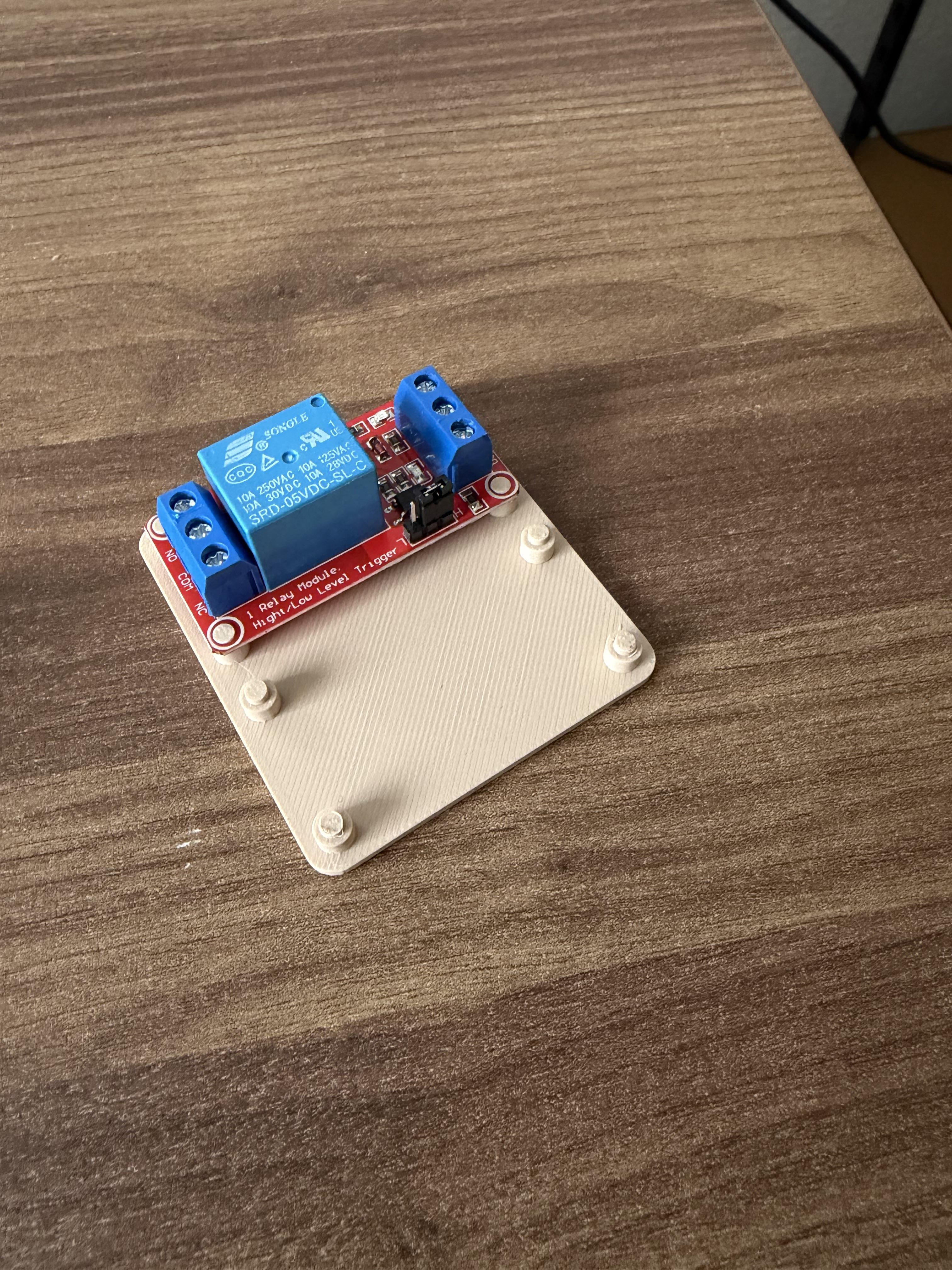


First, place the relays on top of the holder plate.
After that connect the button wires to the COM and NO (normally open) connections.
Mount the holder in the open volume of the coffee machine. I've used mounting putty to stick the holder onto the wall.
In addition, as shown in the second picture, I used a PCB board to reduce the amount of wires required to control the relays, from total 6 wires (Vcc-1, GND-1, Signal-1, VCC-2, etc.) to 4 wires: Vcc, GND, Signal-1 and Signal-2. However I do not recommend to do that, the effort is not worth the price, just use the 6 wires and manage them in the external electronics case. Just make sure to label the wires, so you can find the right connection later.
Alright, now you are ready to assemble the machine housing! In the last image, you can see how I routed the cables through the ventilation slots.
Prepare the Wires


You need to connect the wires to the two limit switches (C=black and NO=color pins).
In addition, you will need a longer cable from the stepper motor to the case with the electronics: JST 5-pin male to female adapter cable (30-40cm)
Assemble the Diverter Puck
.jpeg)
.jpeg)
Bolts, nuts & heat inserts needed:
- Diverter Puck:
- 3x M4x16 DIN4762 bolts
- 3x M4 DIN4032 nuts
- Stepper motor:
- 2x M4x12 ISO 7380 bolts
- 2x M4 heat inserts, depth 6mm
- Limit Switches:
- 4x M2x10 ISO 7046-2 bolts
- 4x M2 heat insert, depth 3mm
Connect the two pieces with the three M4x16 bolts and nuts.
Using the soldering iron attach the heat-set inserts into the puck. Start with the stepper motor inserts. Mount the stepper motor with M4 bolts.
Continue with the limit-switch inserts and mount them with respective bolts in the end.
Connecting the Electronics (optionally With an Adapter PCB)

.jpeg)
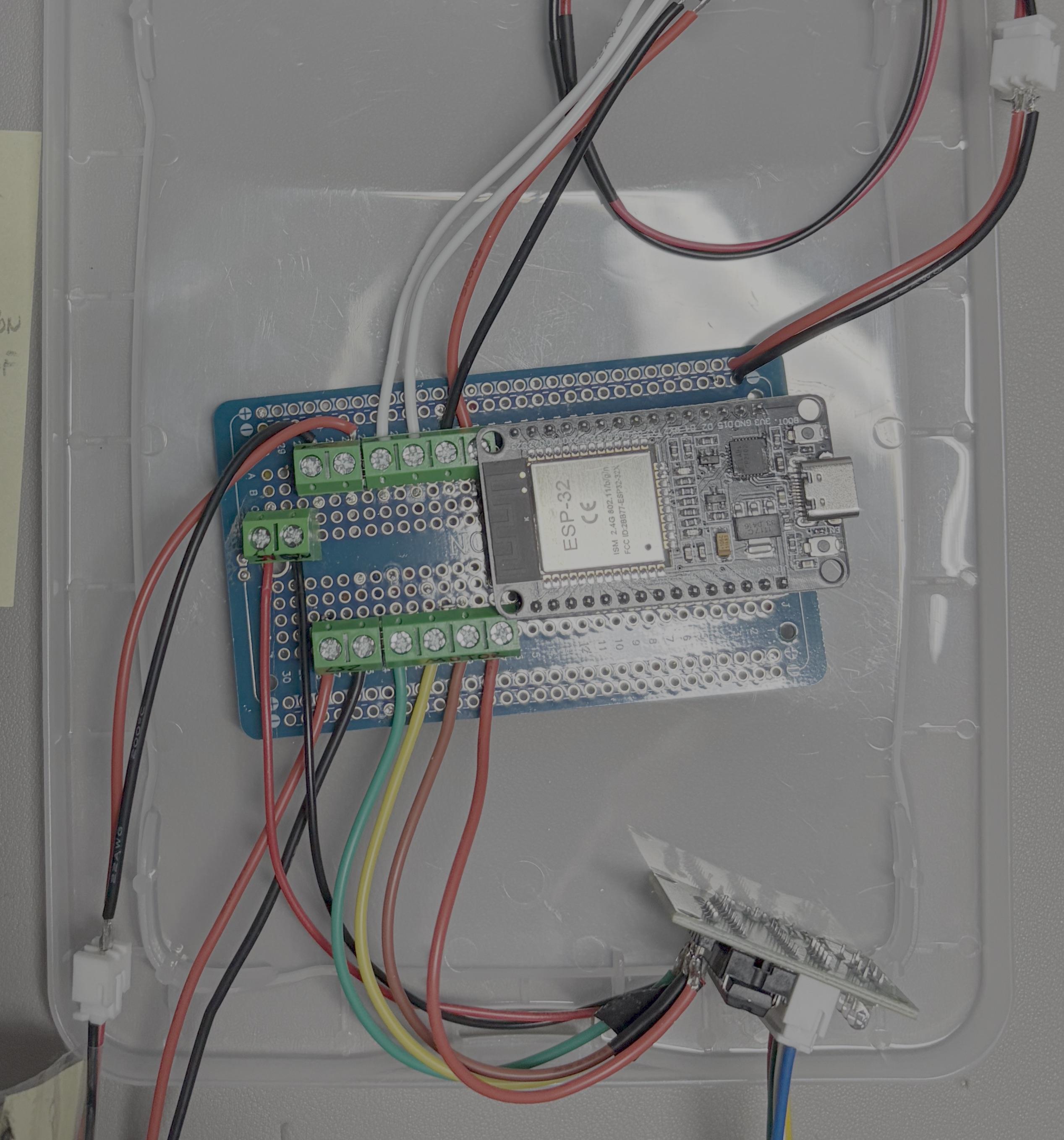
Next we need to connect all the components together.
Since I wanted all the electronics in a case, I soldered a custom PCB shield to include connectors for:
- NodeMCU breakout board
- 2x Limit Switch 2-pin connectors
- 4-pin stepper motor connector
- 2-pin 5V connector (for the USB-C power supply)
- 2-pin relay (button) connector
- 2-pin 5V/GND relay power supply connector
With the connectors I could be more flexible than soldering the wires once onto the board.
Integrating Into ESPHome
Next, you need to add the NodeMCU to ESPHome as a device, so that you can flash it remotely over WiFi.
Below you see my device config. I wrote that config using an LLM, especially the auto-off timer was important to me, so that the rinse ramp is on the right position when the machine turns off automatically. Here my timer is before the factory auto-off timer, so I am certain that the rinse water will go into my rinse water cup.
Future Improvements
- Cable management
- Auto Off of the stepper motor driver, currently the driver holds the stepper motor in its position emitting heat. On average the device needs around 2.5W when idle.