Disappearing Card Holder

The Disappearing Card Holder, a box that looks simply like a model tag dispenser, yet will make it almost impossible for you to accomplish the simple task of retrieving a tag from it. The box is intended at act as a pseudo-living entity with the sole purpose of complicating and frustrating students looking to tag their models.
The project's concept centers around a spring-piston mechanism that when depressed will withdraw its stash of tags into the box preventing someone from taking one. To complicate the process, a network of sensors and LEDs are connected to the box that (at first glace) seem to interact with the core mechanism yet in reality do not prevent the platform from retracting (adding to the user's frustration).
Supplies
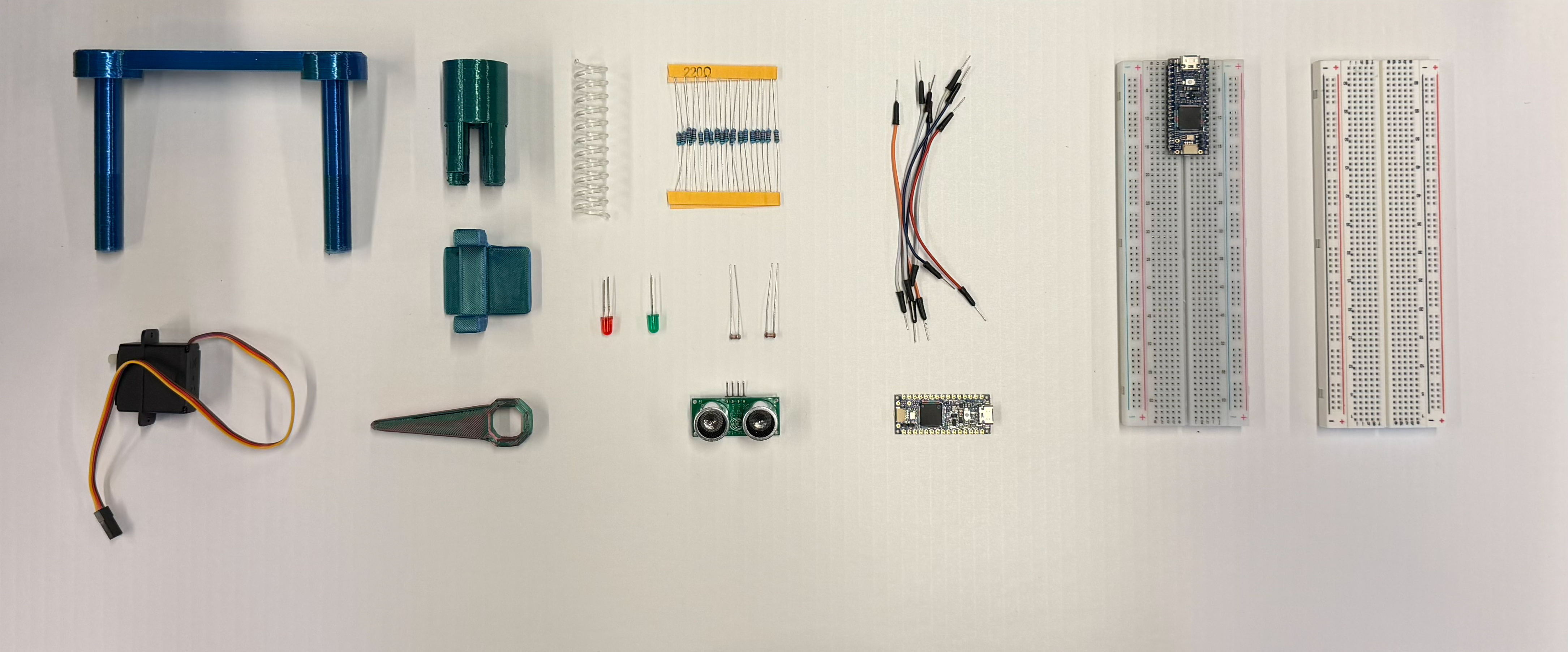

Components:
- x2 200Ω Resistors
- x2 10KΩ Resistors
- x1 Red LED
- x1 Green LED
- x2 Photoresistors
- x1 Servo Motor
- x1 Ultrasonic Sensor
- x2 Arduino Nano R4 (This project replaced one Nano with an Arduino Uno due to lack of materials)
- x3 Breadboards
- Jumper Wires
3D Printed Elements:
- Piston Platform
- Plastic Spring
- Piston Mount
- Motor Mount
- Motor Lever Attachment
Materials:
- Cardboard
- Foam (Different Sizes/Types as support)
- Cards, Tags, etc... (Dispensed Object the machine tries to keep)
Tools:
- Hot Glue Gun
- X-Acto Knife & Ruler
Concept & Prototyping

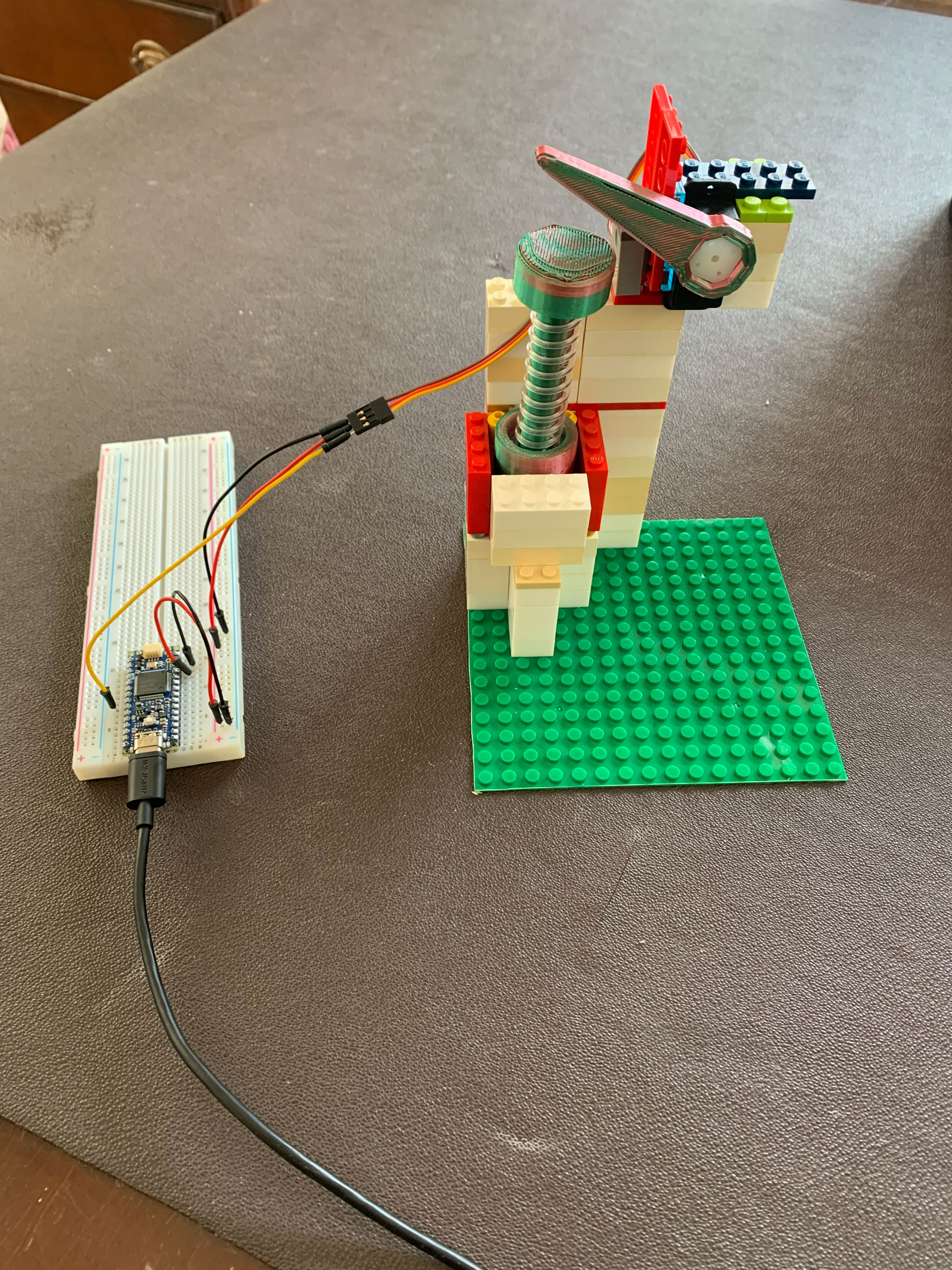
Concept
A device that retracts its supply of studio model tags when it senses someone trying to grab one. It then complicates the process with unnecessary sensors, lights and motion twitches.
Sensor-Actuator Logic
- When the Ultrasonic Sensor detects something nearby, the motor will press the spring (causing the platform to drop) . When nothing is nearby, the motor will release (allowing the platform to rise).
- If something remains nearby for long periods of time, the motor will twitch the spring to create small jitters (making it hard to insert a hand into the slot and remove a card).
- If nothing is detected for extended periods of time, the motor will apply pressure in patterns to the spring (creating small 'creature-like' animations).
- Photoresistor sensors on the sides of the box activate LEDs when covered. If both Photoresistors are covered properly at the same time they will cause a small up-down animation from the spring-motor system (this does not affect the Ultrasonic sensor and is used to merely add to the user's frustration).
Prototyping
We began by creating a prototype of our Spring-Piston system using LEGO and 3D Printed parts in order to test the position of the motor's lever arm, as well as how the spring would react. Through this, we refined our design, adding a second piston (without a spring) and extending the piston mount.
Assembly of Base and Spring Platform


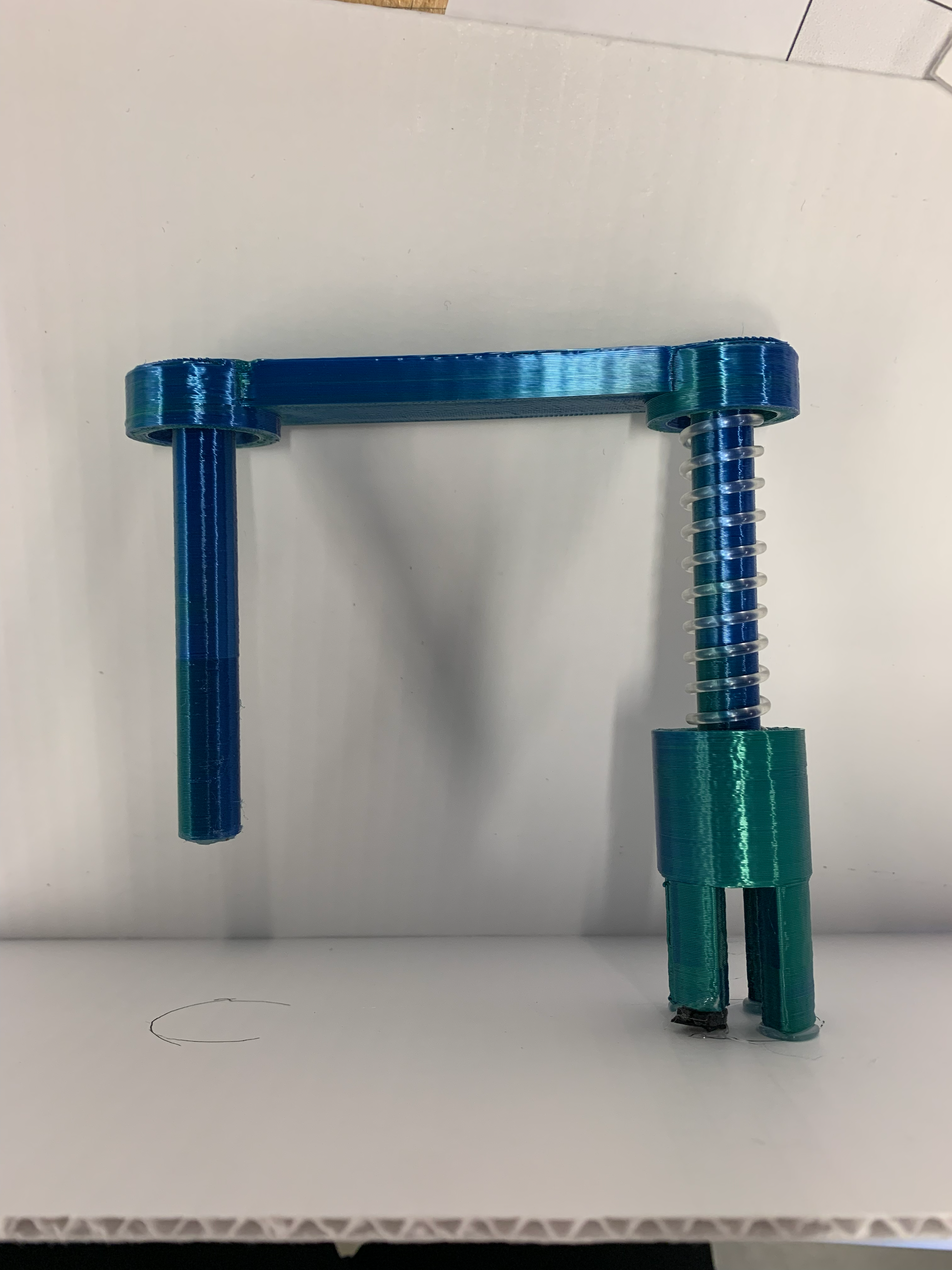
In order to make the spring compress sufficiently, we created a mount for both the motor and the piston-spring system. Both of these were glued to a base with the non-spring cylinder encased in a sleeve that allowed it to move freely vertically but not horizontally.
We created the base to be 15cm by 30cm with the piston mount positioned in the center to allow ample space for wiring and other components to be added later.
Through testing we found the optimal positioning of the motor arm (3D printed) is for it to rest slightly above the piston platform when set to 95° and was attached using one of the motor's custom brackets.
Assembly of Walls and Misleading Sensor Wiring


Next, we began adding walls (16cm high) as well as positioning a breadboard inside the box to control the wires for the Misleading Sensors. Beginning with the front facing wall, we added two holes for LEDs, as well as one hole in the center of each side wall to hold the Photoresistors.
After inserting the two Photoresistors and LEDs, wiring follows the diagram above with emphasis placed on the wires that extend outside the diagram and notated as being attached to the main breadboard (these will be shown later, for now excess wire should be pulled to the back of the box).
Placing the final back wall, we pulled the wires for the Servo Motor (as well as all wires intended to connect from the Misleading Sensors breadboard to the main breadboard) through a small hole created in the bottom of the wall.
Throughout this process, we found the most difficulty in assuring that the jumper cables remained attached to the LEDs and Photoresistors as they would often slip off when wires were accidentally moved (electrical tape would be recommended as a solution for future builds).
Wiring Main Circuit


With the walls of the box complete (and all wires for the Servo Motor and Misleading Sensors pulled outside the back of the box) wiring the main breadboard (attached to the Main Arduino Nano R4) follows the diagram above with emphasis placed on the wires running from the main board to the Motor Connectors and the Misleading Sensors Breadboard.
With wiring complete, the code linked below was uploaded to the Arduino Nano R4. Rotation values for the motor were set through calibration to between 75° and 95° though in future builds, this may require additional calibration according to fabrication precision.
Code for the Main System can be copied or downloaded below:
Downloads
Installing and Wiring Ultrasonic Sensor


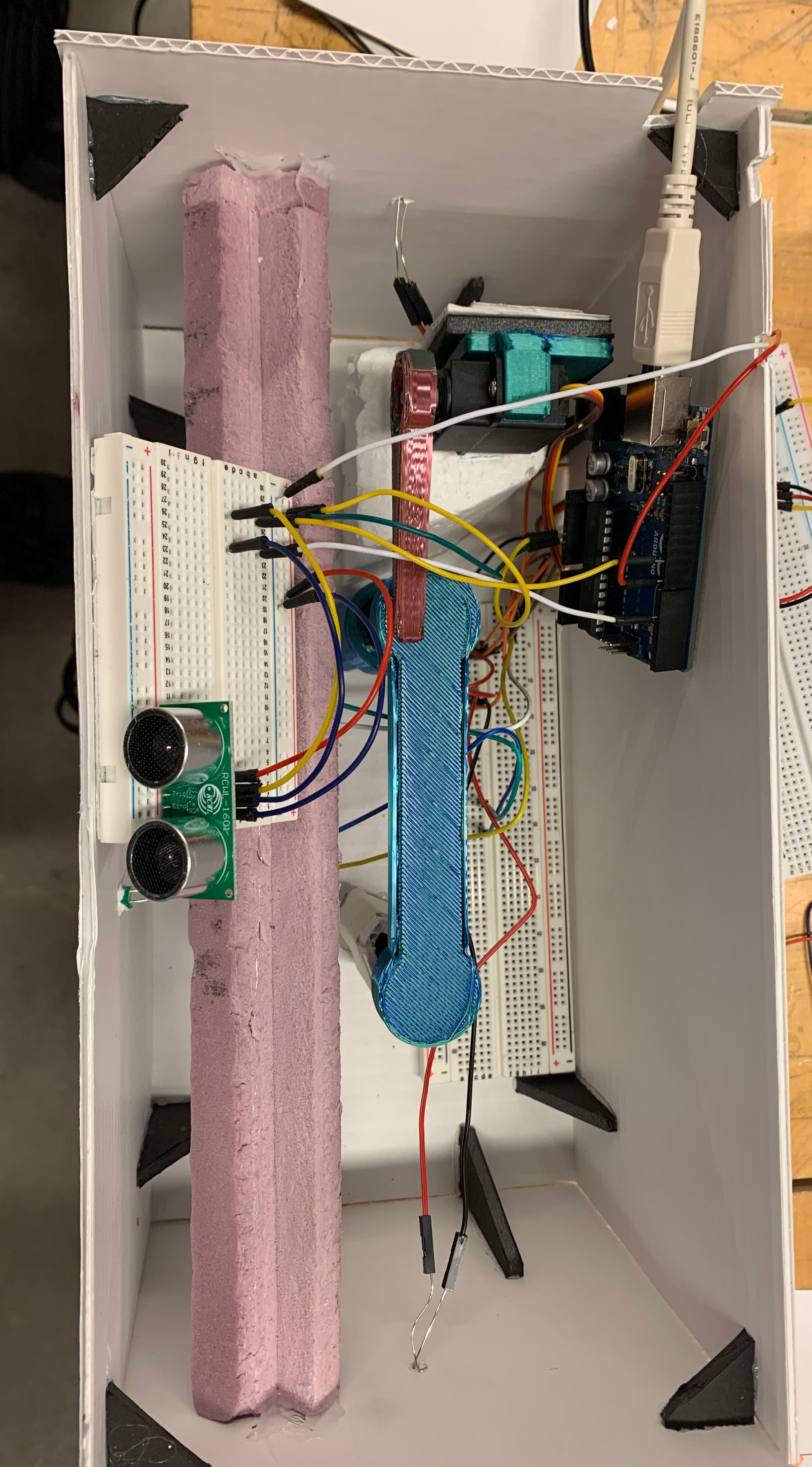
With the Main breadboard and microcontroller wired, the Ultrasonic Sensor was the last step in the process. By creating a 'stair-like' ledge for the sensor and its breadboard to sit on, the sensor could be wired to the second microcontroller.
A second microcontroller was chosen in order to enhance processing time for both systems with a simple relay wire running between the two for communication. In this build, an Arduino Uno was chosen as the second microcontroller due to a lack of a second Arduino Nano R4, however this is not necessary and a second Nano would have also sufficed.
Wiring the Ultrasonic Sensor follows the diagram above, again particular emphasis was placed on the wires running between this breadboard and the main breadboard (notated in the diagram). Finally, code for the Ultrasonic Sensor (linked below) was uploaded to the microcontroller and troubleshooted.
Code for the Ultrasonic Sensor can be copied or downloaded below:
Downloads
Final Assembly

![ARC385 [Converted].png](/proxy/?url=https://content.instructables.com/FON/NR32/MM9W8E2D/FONNR32MM9W8E2D.png&filename=ARC385 [Converted].png)


With the box's fabrication and wiring now finished, final checks of all the wiring (according to the full wiring diagram linked above) could be completed. In its finished state, the box retracts its cards whenever something enters within 30cm of it, as well as performing passive animations when no one is around or when the Misleading Sensors are triggered.
Reflection and Conclusion
Throughout this project, we encountered various challenges that shaped how our project was completed. In this process of analysis, troubleshooting and implementation, we feel that we have created a unique machine that, while 'useless' nevertheless creates interest and enjoyment (as well as quite a bit of frustration).
Obstacles:
Machine's Use: We originally designed the machine as a tissue box holder that would retract, though due to the non-rigid nature of the material (causing it to get caught beneath the lid when retracted down) we decided to switch to model tags that would provide a more rigid/stable object.
Use of Two Motors: Originally we planned to use two motors (a spring on each of two pistons with a motor controlling each side). Due to the 5v voltage limit of the Arduino Nano R4 we could only connect one Servo Motor without using external power. Because of this, the decision was made to utilize a single motor on one side, leaving the other cylinder in a sleeve to restrict its lateral movement.
Processing Power of a Single Arduino: During TinkerCAD simulations it was discovered that a single microcontroller struggled to process the Ultrasonic Sensor's data along with the main system code (due to the use of nanosecond delays between sending and receiving signals). As a solution, a second microcontroller was added to control only the Ultrasonic Sensor and relay its results to the main microcontroller using binary data.
Wiring Layout: While constructing the machine, we encountered many obstacles in wiring the various components due to the large nature of the machine. By splitting the wiring across three breadboards we were able to achieve three main wiring points which would then be related back to a single controller thereby simplifying the wiring process.
Lever Arm Rotation: In calibrating the motor arm's rotation we encountered various problems in over/under rotating the arm as well as in rotating it too slowly causing the motor to jam due to built up friction and elastic energy from the spring.
Reflection:
This project gave us the opportunity to experiment with sensors as a way of creating an interaction between a user an an object. Our research into sensor calibration (both for Photoresistors and Ultrasonic Sensors) will prove invaluable in future projects with increased complexity.
The project's exploration of creative ways of translating rotational movement into linear movement was also extremely interesting and yielded unconventional results centered around randomness that we found extremely compelling.
Finally, through this project we were able to explore ways of creating small movement and environmental interactions (through passive animations) that allowed us to learn how motion can be used as a storytelling tool to create something that feels alive through simple motors.
We found this project to be an extremely compelling way of testing our ability to realize a concept using simple electronics and mechanical systems. We feel that this project has given us the opportunity to expand our knowledge of what is possible using physical computing beyond its traditional uses.