ESP32 Password Access System Built With ACEBOTT Smart Home Kit
by Aula Jazmati in Teachers > 4
19 Views, 0 Favorites, 0 Comments
ESP32 Password Access System Built With ACEBOTT Smart Home Kit

This project demonstrates how to build a password‑based access control system using the ACEBOTT QE024 ESP32 Smart Home Education Kit (Level 2). The system uses a capacitive touch keypad to enter a password, which is processed by the ESP32 controller. If the password is correct, the door lock opens. If the password is incorrect, an alarm is triggered.
This tutorial is ideal for students, makers, and STEM educators who want to explore smart‑home security concepts using modular and beginner‑friendly hardware
Supplies

- ACEBOTT QE024 Smart Home Education Kit (Level 2)
- ESP32 mainboard (included in the kit)
- Touch keypad module
- Servo motor / smart lock
- Buzzer module
- Jumper wires
- USB cable
- Optional: LCD display
🛠️ How the System Works

User enters password on the touch keypad
ESP32 compares the input with the stored password
Correct password → servo unlocks
Wrong password → buzzer alarm
Assembly and Wiring the Components

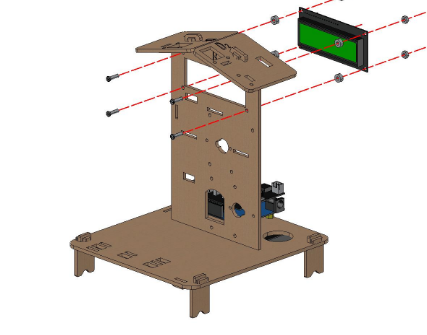


![23478].PNG](/proxy/?url=https://content.instructables.com/FUO/P5PP/MMDSIT7Y/FUOP5PPMMDSIT7Y.png&filename=23478].PNG)


All mechanical parts are laser‑cut acrylic and fit together without screws. Follow the kit’s official Assemble documentation – Level 2 for detailed visuals.
Connect the touch keypad to the ESP32 board using jumper wires. Connect the servo motor to the output pin. Attach the buzzer to another output pin. Make sure all connections are secure.
Programming the ESP32
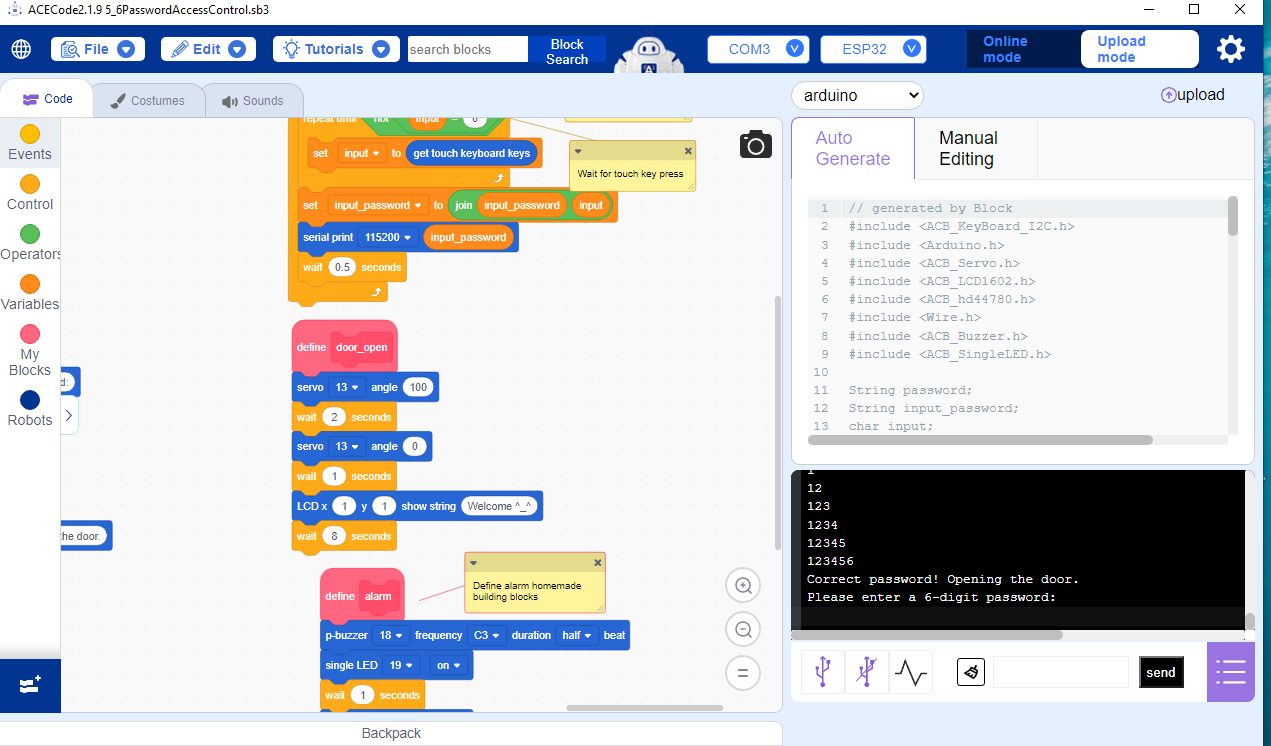
Upload your code to the ESP32 using Arduino IDE or Acecode (from ACEBOTT )
Demo Videos
 #esp32 #coding)

Here are two short demo videos showing the system in action:
Conclusion
This project shows how the ACEBOTT ESP32 Smart Home Kit can be used to build a functional and educational access‑control system. It’s a great introduction to smart‑home security, embedded programming, and modular electronics.