ESP32-S3 Compact Voice Assistant Powered by Xiaozhi AI
by techiesms in Circuits > Electronics
196 Views, 1 Favorites, 0 Comments
ESP32-S3 Compact Voice Assistant Powered by Xiaozhi AI


This project is a compact, real-time AI voice assistant built around the ESP32-S3 and powered by Xiaozhi AI firmware. It integrates a digital microphone, speaker, OLED display, RGB lighting, battery management system, and physical control buttons into a fully custom-designed PCB and 3D-printed enclosure.
The system supports wake-word detection or manual activation, streams audio to the Xiaozhi cloud for Speech-to-Text, Large Language Model processing, and Text-to-Speech generation, and returns intelligent responses within seconds. The assistant provides multi-modal feedback through audio playback, on-screen text, emotional indicators, and RGB lighting effects.
Beyond basic conversation, the project includes advanced capabilities such as customizable personality, multi-language support, memory-based dialogue, PDF-based custom knowledge integration, and Home Assistant connectivity for smart home control. All of this runs on a lightweight embedded platform without requiring users to write any backend code.
This project demonstrates how powerful, low-latency AI interaction can be achieved on compact hardware by combining optimized firmware, efficient cloud communication, and thoughtful system design.
Supplies

Main Electronics:
- ESP32-S3 — Main controller with Wi-Fi connectivity
- INMP441 — Digital I2S microphone for voice capture
- MAX98357 — I2S amplifier for speaker output
- 4–8Ω Speaker
- 0.96” I2C OLED Display
- RGB LED (common cathode/anode based on design)
- 3.7V Li-Po Battery
- TP4056
Input & Control:
- Push Buttons (Volume Up, Volume Down, Center/Wake)
- Onboard ESP32 buttons (RST & BOOT – for flashing and reset)
PCB & Assembly:
- Custom PCB (or Breadboard for prototype)
- Pin headers
- Jumper wires
- Resistors (for buttons / LED current limiting)
- Mounting screws & standoffs
Enclosure:
- 3D printed enclosure
- Speaker grill opening
- Microphone opening
- Window for OLED
Circuit Design & PCB Layout


After finalizing the system architecture, the complete schematic was designed and converted into a custom compact PCB.
Schematic Overview:
- Main Controller: The core of the system is the ESP32-S3 (N16R8 variant) featuring 16MB Flash and 8MB PSRAM. It handles Wi-Fi connectivity, audio streaming, firmware execution, and peripheral control.
- Audio Input: Voice capture is done using the INMP441, a digital I2S microphone directly connected to the ESP32-S3.
- Audio Output: Audio playback uses the MAX98357, configured for high gain and connected to an 8Ω, 2W cavity speaker for clear output.
- Push Buttons: Four push buttons are included:
- Volume Up
- Volume Down
- Record
- Replay
- Volume control is supported by the firmware. Record and Replay buttons are included for future custom firmware flexibility.
- Power System:
- Battery charging is handled by the TP4056.
- A 3.3V LDO regulator (HT783) provides stable voltage for the ESP32-S3 and peripherals.
- USB Type-C is used for programming and charging.
PCB Design:
After completing the schematic:
- A compact custom PCB was designed.
- The OLED is placed on the top side.
- The speaker is mounted below the OLED in a dedicated slit area to save space.
- I2S traces were kept short for stable audio performance.
Before manufacturing, the Gerber files were checked using a DFM tool to ensure no copper clearance or outline spacing issues existed.
Sponsored by NEXTPCB: Your Trusted PCB & PCBA Partner:
NextPCB is a professional PCB fabrication and PCB assembly (PCBA) service provider, part of the Huaqiu Group.
They support:
- PCB prototyping and mass production
- Multilayer boards
- HDI boards
- Flexible and rigid-flex PCBs
- SMT assembly and turnkey PCBA solutions
Their DFM analysis tools help identify design issues before manufacturing, reducing errors and saving development time. Competitive pricing and scalable production make them suitable for students, hobbyists, startups, and professional hardware teams.
For this project, the Gerber files were uploaded, verified, and manufactured to achieve a clean, compact, and high-quality PCB finish.
PCB Assembly Assembly Process:
- Soldered all SMD components first.
- Mounted the TP4056 module on the bottom layer.
- Soldered through-hole components.
- Fixed the speaker using nuts and bolts.
- Mounted the OLED display on top and soldered from the bottom.
After assembly, the complete hardware became a compact, fully integrated voice assistant ready for firmware flashing.
Downloads
3D Enclosure Design

Before final demonstration, a custom 3D printed case was designed to give the project a clean and compact finish.
3D Case Design:
- A custom enclosure was modeled to fit the PCB precisely.
- The design keeps the device compact and handheld.
Openings were included for:
- OLED display
- Speaker output
- Microphone input
- Buttons
- USB Type-C port
The goal was to achieve a neat and space-efficient form factor.
Hardware Adjustment for Proper Fit:
After printing the enclosure and test-fitting the PCB:
- The terminal connector and JST connector made the PCB uneven.
- Both connectors were removed.
- The speaker and battery were soldered directly to the PCB to maintain a flat profile.
- A new ON/OFF switch with a longer shaft was installed to properly align with the enclosure cutout.
This ensured the PCB sat flat inside the case.
Final Assembly:
- The PCB was placed inside the enclosure.
- The speaker and internal components were aligned properly.
- The enclosure was secured using screws.
The final result is a compact, clean, and handheld AI voice assistant device ready for operation.
XiaoZhi AI – Features & Capabilities

Each time you speak, the system follows a real-time voice interaction pipeline powered by XiaoZhi AI.
1. Voice Capture & Wake Trigger:
The onboard microphone continuously monitors audio input.
Interaction begins when:
- The wake word “Hi-ESP” or “Jarvis” is detected, or
- The boot button is pressed to manually start listening
Once activated, the ESP32-S3 records your voice locally.
2. Cloud Communication:
After recording:
- The ESP32-S3 connects to the internet via Wi-Fi.
- The captured audio is securely transmitted to the XiaoZhi cloud platform.
The cloud handles speech recognition, intent understanding, and AI response generation.
3. AI Processing Pipeline:
Inside the cloud:
- Audio is converted into text (Speech-to-Text).
- The text is processed using large language models.
- A contextual reply is generated.
- The reply is converted back into speech (Text-to-Speech).
A streaming architecture ensures very low latency and smooth, natural interaction.
4. Multi-Modal Feedback:
The response audio is streamed back to the device.
Simultaneously, the ESP32-S3:
- Plays the reply through the speaker
- Displays messages and emotion indicators on the OLED
- Controls RGB lighting effects
This creates a combined audio and visual interaction system.
5. Real-Time Interaction Loop:
The complete cycle—from speaking to hearing the reply—finishes within seconds due to:
- Stable Wi-Fi connectivity
- Lightweight firmware
- Optimized cloud inference
- Efficient device-side logic
Platform Capabilities
Beyond the core voice pipeline, XiaoZhi AI provides advanced features:
Free Cloud Platform:
- Speech-to-Text
- Text-to-Speech
- Large Language Model conversations
- No credit card required
- Single unified cloud account
Customization:
- Custom assistant name
- Multiple dialogue languages (English, Chinese, Hindi)
- Multiple TTS voice models
Personality Configuration:
The assistant can be configured to act as:
- Friendly
- Humorous
- Professional
- Or any defined persona
Memory Support:
- Remembers previous conversations
- Enables context-aware replies
- Supports continuous dialogue
Multiple LLM Options:
Users can choose between different language models depending on performance needs.
Advanced Tuning:
Voice recognition speed and system parameters can be adjusted for optimized performance.
External Service Integration:
Supports integration with:
- Weather services
- Music platforms
- Custom knowledge bases
- Smart home systems
Chat History Logging:
Maintains a detailed line-by-line conversation history.
No Coding Required:
The firmware handles:
- Audio processing
- AI integration
- Cloud communication
- Device control
This makes the system accessible to makers, students, and IoT developers.
Flashing the XiaoZhi Firmware
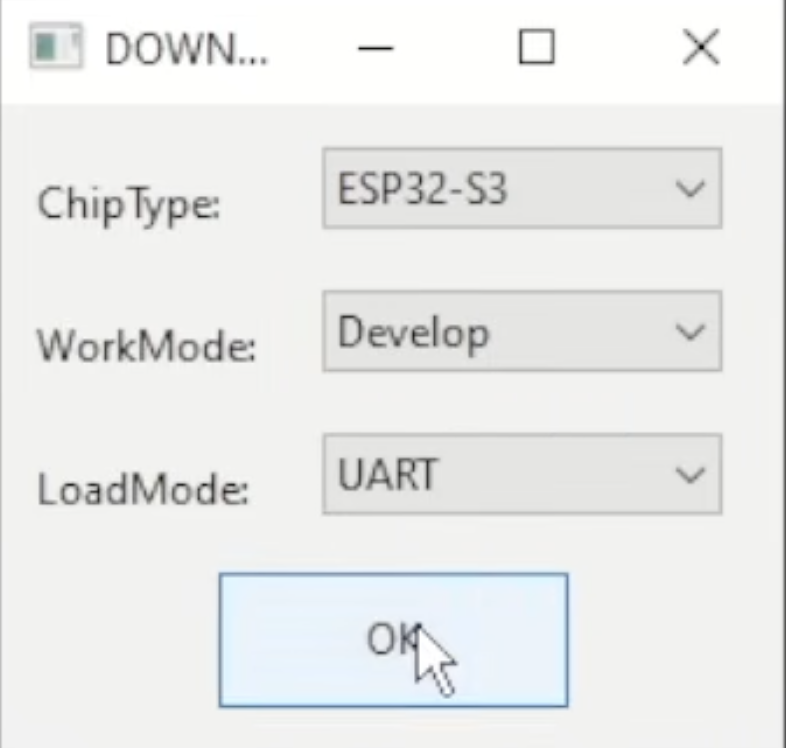

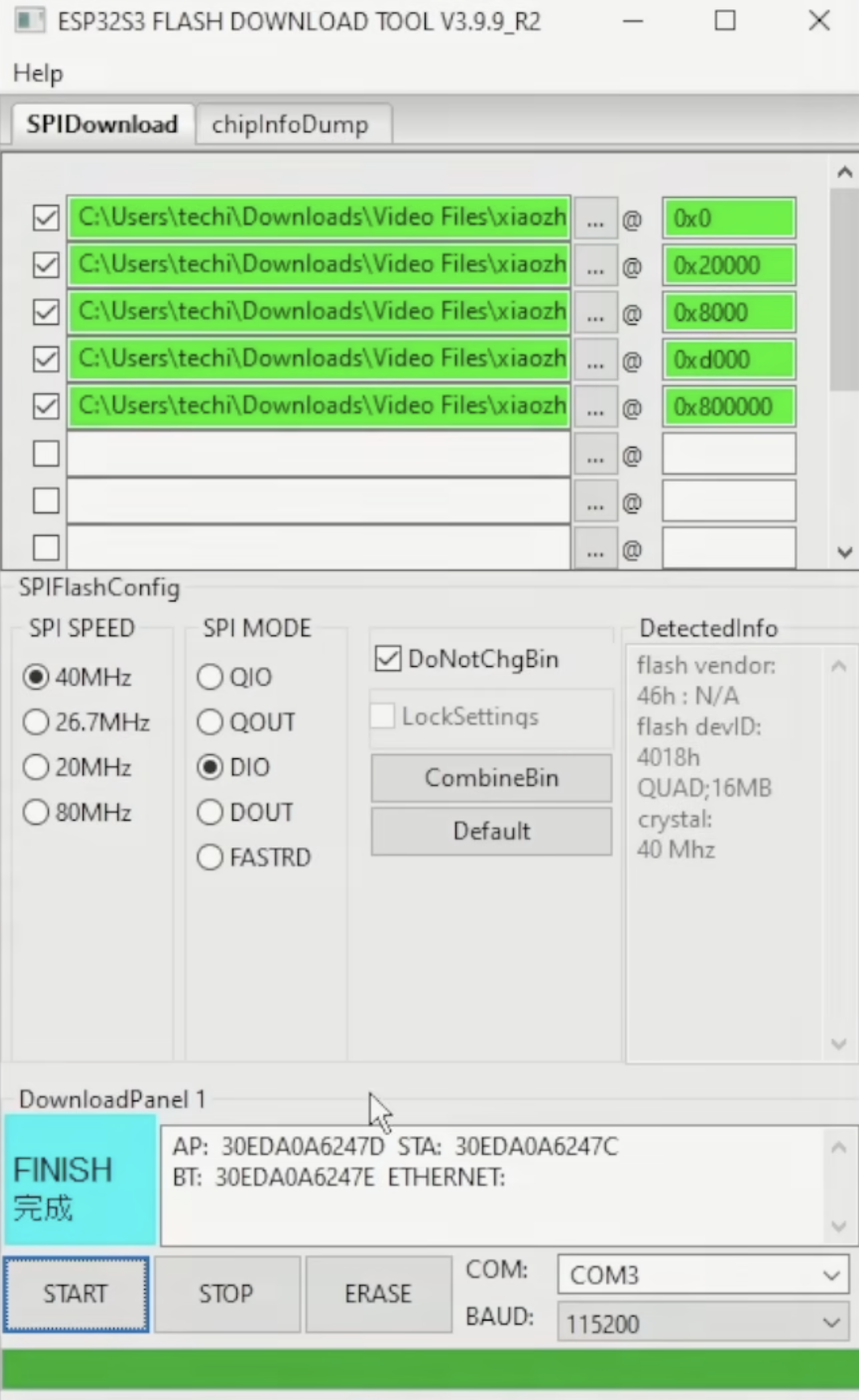
To run the assistant, you must flash the official Xiaozhi AI firmware onto your ESP32-S3 board.
Follow these steps carefully.
Download Required Tools and Files:
Download the five required firmware binary files:
Flashing the Firmware:
- Connect the Hardware:
- Connect the ESP32-S3 board to your computer using a USB cable.
- Ensure the correct USB driver (such as CH340C) is installed.
- Note the COM port assigned to your board.
- Erase Existing Firmware:
- Open the Flash Download Tool.
- Select ESP32-S3 in the chip section.
- Choose the correct COM port.
- Click the “Erase” button to clear the existing firmware.
- Wait a few seconds until the process completes.
- Add the Firmware Binary Files:
- Click the three dots (…) to add each binary file.
- Add them one by one with the correct flash addresses:
- bootloader.bin — 0x0000
- xiaozhi.bin — 0x20000
- partition-table.bin — 0x8000
- ota_data_initial.bin — 0xD000
- generated_assets.bin — 0x800000
After adding all files:
- Check all five boxes next to the files.
- Select the correct COM port again.
- Start Flashing
- Click the “Start” button to begin flashing.
- The process takes a few seconds.
- Once completed, the device will reboot automatically.
- The firmware is now successfully installed and the device is ready for initial configuration.
Home Assistant Integration


XiaoZhi AI supports integration with external services such as Home Assistant. This allows the voice assistant to control smart home devices using the MCP (Multi-Capability Platform) system.
Enable Home Assistant via MCP:
In the XiaoZhi cloud console:
- Open your device settings.
- Go to the MCP section.
- Add a new MCP endpoint.
- Enter your Home Assistant server details (local or cloud URL and authentication token).
Once configured, XiaoZhi can communicate directly with your Home Assistant instance.
How It Works:
When you give a voice command such as:
“Turn on the studio lights”
The system processes it as:
Voice input → Cloud AI processing → MCP command → Home Assistant → Device control
The AI understands the intent and sends the appropriate command to Home Assistant, which then controls the connected appliance.
Demonstration Example:
In the demo, the assistant successfully:
- Turned on studio lights
- Controlled devices connected in a lab setup
This shows that XiaoZhi AI can act as a smart home controller, not just a conversational assistant.
What This Enables:
- Control lights, fans, plugs, and switches
- Trigger automation routines
- Integrate with existing Home Assistant dashboards
- Expand the assistant beyond simple Q&A functionality
With MCP integration, the device becomes a complete voice-controlled IoT hub
Custom Knowledge Base

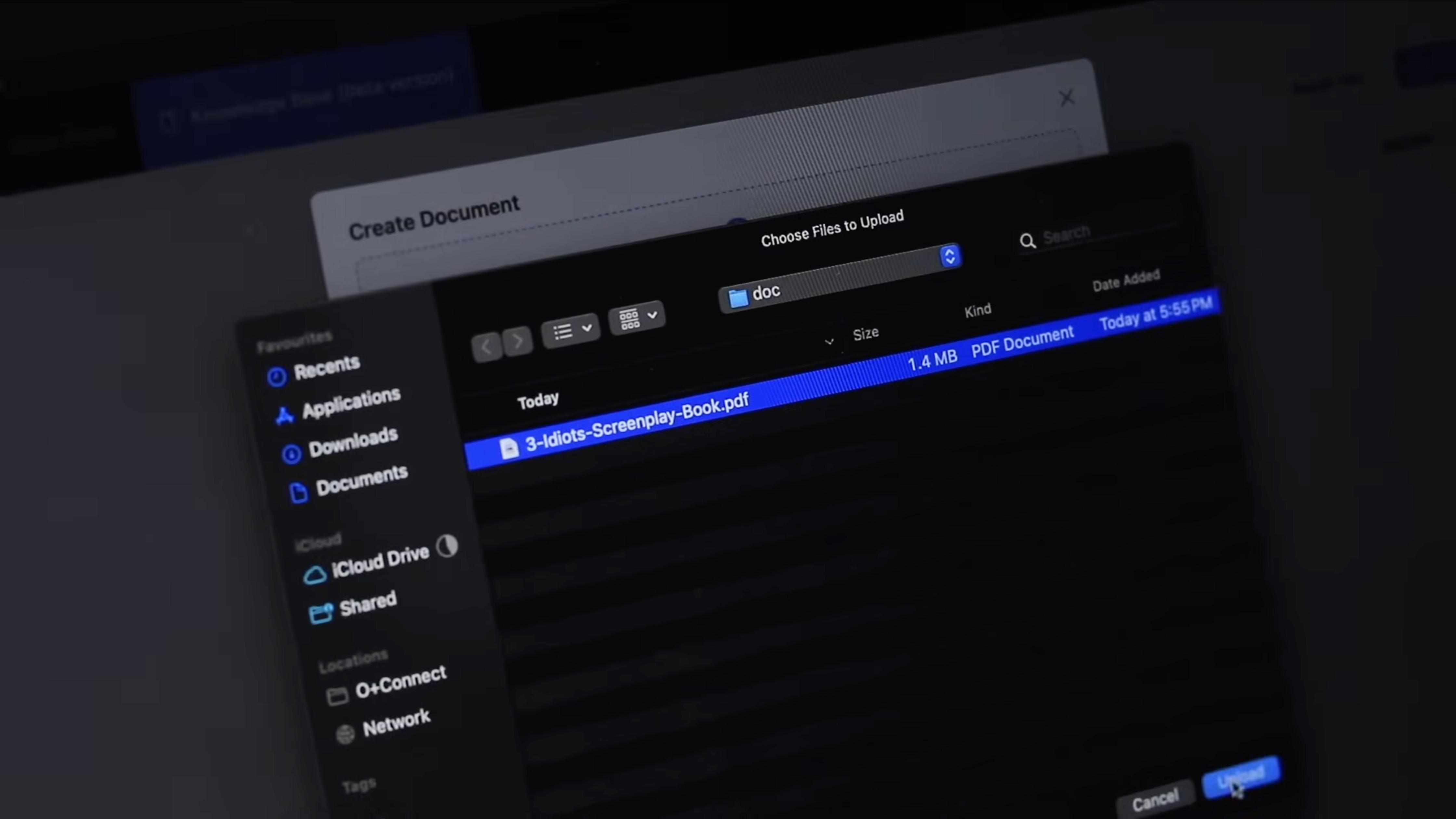


XiaoZhi AI allows you to upload PDF documents to create a custom knowledge base. This enables the voice assistant to answer questions directly from your uploaded content.
Uploading a PDF Document:
- Open the XiaoZhi cloud platform dashboard.
- Go to the Knowledge Base or document upload section.
- Upload your PDF file.
Once uploaded, the system processes the document and makes it available for question-answering.
Demonstration Example:
In the demonstration, the script of the movie 3 Idiots was uploaded to the platform.
After uploading, the assistant was able to answer questions such as:
- What is the real name of the character Rancho?
- XiaoZhi AI said: The real name of Rancho is Phunsukh Wangdu.
- What are the names of Rancho’s friends?
- XiaoZhi AI said: Rancho’s two close friends are Farhan Qureshi and Raju Rastogi.
The AI responded accurately based on the content of the uploaded PDF.
How It Works:
When a question is asked:
Voice input → Speech-to-text → Document search → Context extraction → AI response → Text-to-speech
The system retrieves relevant information from the uploaded document and generates a precise answer.
Why This Is Useful:
This feature is especially helpful for students and learners.
You can upload:
- Study materials
- Notes
- Reference books
- Project documentation
Then ask questions like:
- Explain a formula
- Define a concept
- Clarify a doubt
- Summarize a topic
The assistant acts like a personal tutor by answering based only on your uploaded material.
This turns the device from a simple chatbot into a personalized learning assistant.
Conclusion
This custom-built ESP32 AI voice assistant proves that powerful conversational AI is no longer limited to high-end hardware. With Xiaozhi AI firmware, the device delivers extremely low latency, natural interaction, and fast responses across a wide range of queries.
It supports multiple languages, allows users to define custom personalities, and even enables PDF uploads to build a personalized knowledge base. This transforms the assistant into more than just a chatbot — it becomes a study companion, information hub, and intelligent helper.
Through Home Assistant integration, the system extends into real-world IoT control, allowing users to manage lights, appliances, and automation routines using simple voice commands.
One of the strongest advantages of this project is accessibility. No coding is required to set up and configure the assistant, making it suitable for makers, students, and IoT developers who want to explore AI without building complex backends.
Whether you choose to build it yourself using the open files or use a ready-made version, this project demonstrates how embedded hardware combined with cloud AI can create a compact, customizable, and practical voice assistant for everyday use.