Fidget Star

I made a fidget star, and I made it because it is very cool and easy to do.
Supplies
3d printer, filament, and a computer that can run tinkercad

open tinkercad and make a new project


add a star and set its points to even numbers (6,8 are recommended) its size to 100 (Radius is .733) (Height is 50)

you would want to duplicate the star and turn it in to a hole
you may want to add some colors to it right now if you need 2 colors

then set the size to L:94, W:94

shift click or drag across the 2 shapes and duplicate them 5 times


then set the following values, NON-HOLES 100, HOLE 94


set the values NON-HOLE 88, HOLE 82


set the values NON-HOLE 76, HOLE 70
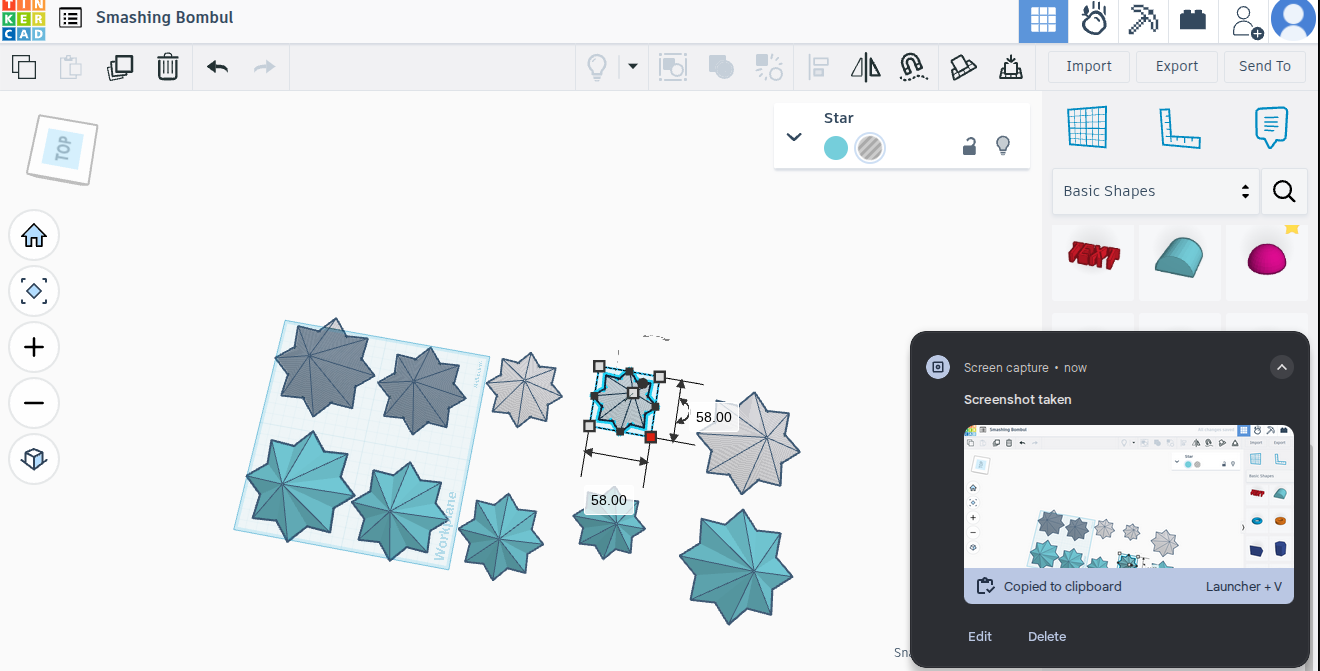

set the values NON-HOLE 64, HOLE 58


set the values NON-HOLE 52, HOLE 46

align the individual parts with "l" with the middle dot then Ctrl+g to union do this 5 times (yellow)

you then click Ctrl+g to group the hole and shape (NOTE you have to download the video) highlighted part is the button to click

after you do this with ALL of the parts you align ALL 5 and click "l" on your keyboard to align

Then you Ctrl+g but if your design is multicolor then after you do the grouping go to the color (right next to the hole) and click it then go down to mulitcolor and select "on"


then add a box and turn it into hole that is 110x110x50 and Ctrl+g

then you duplicate the shape and raise it by 10mm and then rotate it 180 degrees

after you ctrl+g it should look like this if it does not consult the other steps
print and enjoy :D