GPS and Compass Build

The project consisted in the design and manufacture of a simple, portable GPS and Compass based on the Arduino Pro-micro board. This being rather limited in resources the emphasis was on being as economical as possible in the programming and several software versions were abandoned as their size went beyond the MCUs limits.
The magnetometer used for the measurement of the bearings was the HMC5883L board and the GPS receiver was a NE0 -6M v2 module.
The display was a 1.3" I2C driven SH1106G OLED.
The case was a homemade PLA 3D printed one of my design.
No additional resistors/capacitors or other passive components are necessary for this project as all boards accept 5v and the circuit runs happily even off the 5v pin of the arduino.
In spite of the fact that the unit was desired to be small it was decided to add 4 AAA batteries as power sources, these being inserted into the RAW pin of the arduino via an on/off switch.
Total peak current drawn is around 100ma with the display on but a timing interval was added in the program to turn off display after 5 mins. The push switch serves to wake up the device as well as to toggle the compass dial with the GPS data and to Calibrate the compass module.
An reset switch can be added to reset the arduino although this is probably unnecessary as the power switch serves also as a reset.
I want to point out from the start that although the Compass works seamlessly the GPS module is rather fussy and needs a clear view of the sky. The antenna has to have a minimal degree of wiring and hardware around it. Even then it may take several minutes for a proper fix and lat/long to show although the clock comes on earlier than the coordinates.
Supplies
Supplies needed:
Arduino pro-micro or Leonardo
NEO 6M v2 GPS receiver board + antenna
HMC5083L I2C Magnetometer board
1.3" Oled 128 x64 I2C
Slide switch ON/OFF SPST
Push to make switch ( opt. see below)
perforated protoboard
circuit board pins and sockets
Circuitry

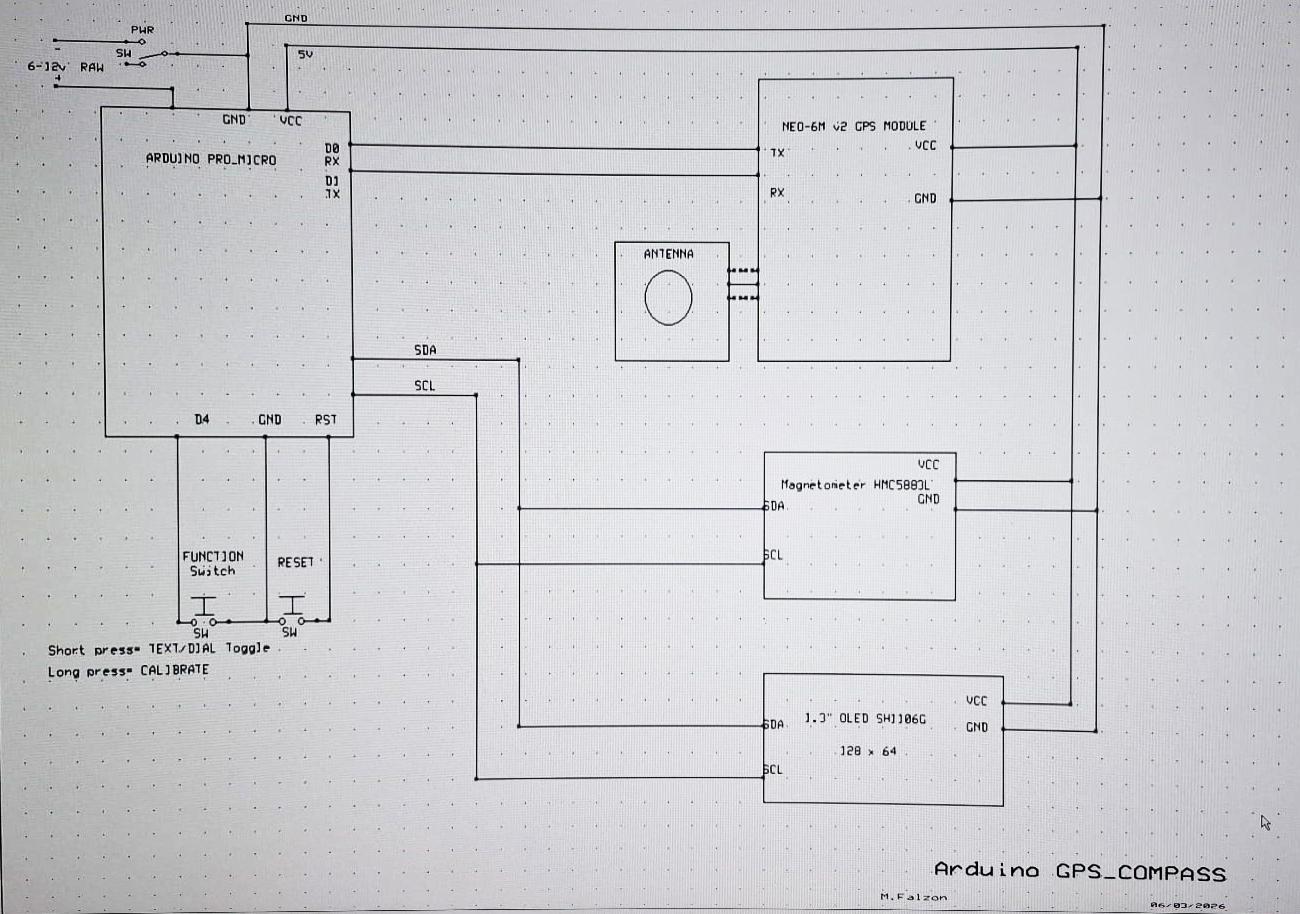
The Arduino Pro Micro has a USB connector but no reset button and in the testing stage it was found essential to plug the module into a breadboard and wire up a switch between the RST and the GND pins. Wiring to the other modules followed the tracks seen in the adjoining circuit schematic. The wiring is in fact pretty straightforward. One should make sure to connect the I2C (SCL and SDA) lines correctly i.e. Arduino SCL(PIN3) to both the OLED and the Magnetometer SCL and Arduino SDA(PIN2) to the OLED and Magnetometer SDA pins.
Arduino and the other two boards were all mounted on a piece of PCB Prototype circuit board of the type that have rounded tabs on both sides of the perforations. These are very practical for small circuits of this type providing easy connections with a minimum of wiring. Since we are dealing with low frequencies layout is not critical. Originally I had planned to mount the antenna with its back on a small sheet of copper grounded to the board but for practical reasons this idea was abandoned and the antenna slotted directly behind a 1mm thick section of the PLA front panel. This was thought to provide the best chance of the GPS signal getting through.
Similarly correct TX/RX connections are essential for the GPS to work. Arduino TX(PIN1) to GPS Module RX and Arduino RX(Pin0) to GPS Module TX.
The Pro micro has proved a trifle troublesome. Firstly I discovered that the chinese clones have to be addressed as Sparkfun Pro micro so one has to make sure to download the Sparkfun boards and add them to the Arduino board list. Secondly one has to choose the right model. Mine was a 5v 16MHz while the default is a 3.3v 8MHz.
I have had to burn the bootloader (several times) on the Arduino as I found it was repeatedly being harassed by Windows in finding its Ports. I used a trusty old Arduino Uno for this purpose and having loaded the Arduino ISP program from the Examples I proceeded to wire up the two Arduinos together namely
Arduino UNO Arduino Pro micro
5v VCC
GND GND
10 RST
11 16
12 14
13 15
The Programmer is chosen as Arduino as ISP and then one proceeds with the bootloader burn.
This finally got the Pro micro to behave and load but be ready to have to repeat it if for some reason the board
gets demented again.
The power switch used is a sliding ON/OFF one that was installed in the front panel and the all important function switch that works as a
1.wakeup(push);
2.GPS/Dial Compass(toggle);
3.Compass calibrate START/STOP(long press);
4.Erase EEPROM Calibration(switch held down for 4 secs)
was an onboard mini push button switch with a 3D printed extension to a hole at the back.
A similar arrangement was made for an onboard Arduino reset switch but this was only used in the development phase and it was thought that extending this to the outside was unnecessary.
An ordinary chassis mounted push switch can be used instead of the onboard one and connected to D4 and ground.
Testing


While trying the circuit inside you will find it hard or impossible to establish a fix on any satellite but the compass will work because obviously this needs no satellite guidance but although it might point precisely, it might not and might need calibration by setting it into Calibration mode and physically turning the gadget in figure-of-8 loops. This should restore its orientation but again one must be very careful that no magnetic items are around as these would cause distortion of the needle travel and dilation of the scale to one or other side. I discovered that a tiny magnet started to have an effect from over 30cms away and a mobile can make it turn 360 degrees simply by hovering over it.
From the GPS signal when available one can of course gather a lot more data apart from coordinates and time/date e.g. speed, altitude, COG etc. However in view of the limited memory available on the micro and the size of the screen it was thought that these must be left out of the final program. In the picture below one can see Speed and GPS COG being listed during a preliminary test.
The on board power supply is provided by 4 x AAA batteries, preferably alkaline as the rechargeables reach only 4.8v and if this is fed to the RAW the final VCC on the modules will be much lower than the desired 5V. The whole system could possibly be made to work off 3.3v but I have not tried this.
To harmonize the battery pack to the unit, this was designed to sit at the back and built into the case itself using 3 double AAA spring+ tag strips and two separate ones to complete the series . Of course the builder need not follow this and can use ready made holders but such contacts as I used make it possible to adapt the power pack to your geometry. These brackets are sold in quantities from the usual oriental sources.
I am including a copy of my final version of the program for those who want to have a go. I am not responsible for the inevitable trials and tribulations in getting your own setup to work. I have had to struggle too :)
However at present it works and does all it is supposed to do given the limitations I mentioned. I am posting a copy of the 3D case I made for the project on cults.com. Anyone interested can look it up there under
GPS and Compass Case for Arduino project (mfalzon).
https://cults3d.com/en/3d-model/gadget/gps-and-compass-case-for-arduino-project
Good luck and have fun!