Geodesic Star Dome (DIY Mini Planetarium)
by Carbon-Based in Design > Art
300 Views, 1 Favorites, 0 Comments
Geodesic Star Dome (DIY Mini Planetarium)

Welcome to my first Instructable! In this guide, I’ll show you how to build a geodesic sphere that you can scale to any size and then turn into a star dome. By painting constellations on the outside, when you look at it, you can see the night sky as if you’re viewing it from the outside (like the invaders perspective), giving you a unique opportunity to see something new. This project is perfect for DIY, art, or astronomy, and I’ll walk you through each step so you can create your own night sky display.
Supplies
Materials
- Cardboard – recycled pizza boxes work great
- Paint – black for the dome, white (or other colors) for stars/constellations
- Printer & printer paper – for star/constellation templates
- Adhesive: (in order from "best" to "this should be reviewed by Randall Munroe ")
- Hot glue – easiest and fastest, recommended
- PVA (Elmer’s or similar) – strong when dry, slower setting
- Craft glue (Tacky glue) – thicker, longer drying time
- Contact cement – Why
- Epoxy resin – Basically, you’d end up with a cardboard dome that could survive a hurricane, but building it would feel like performing open-heart surgery on a pizza box.
- Liquid Nitrogen – Would last until bonds melt
Tools
- Cutting tool – craft knife, utility knife, or scissors (laser cutter optional)
- Ruler / straight edge – Precision Triangles™
- Cutting mat or protective surface – to protect your work surface
- Paintbrushes / sponges – for painting the dome and stars
- Pencil / pen – for marking triangles and templates
Optional Items
- Tweezers – for placing small stars or decals (or even rhinestones)
- Clips or clamps – if using slower-drying glue
- Masking tape – temporary holds during assembly (really good to have some, you can leave this on and paint over it)
- Star stickers or metallic pens – for decorating instead of painting
- Sandpaper – to smooth edges of cardboard if needed (sometimes works, depending on what cardboard you use)
Prep Cardboard
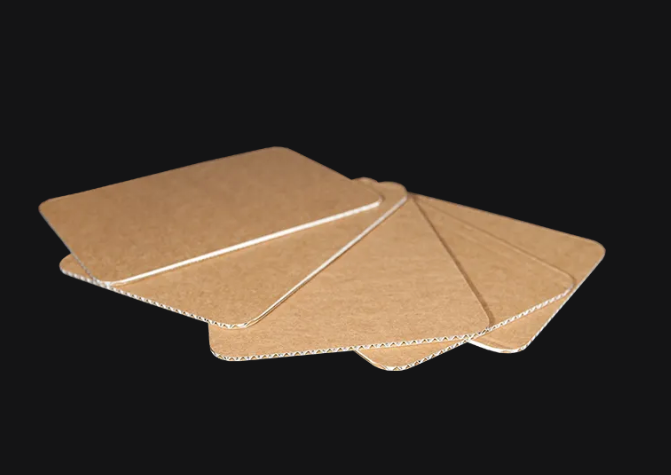
You can use any cardboard for this project, but there are a few things to keep in mind. If you’re making a small dome, thin cardboard with a single solid layer works best since it’s easy to fold. For a larger dome, big enough that a hamster could give a TED talk inside, (10 hamsters wide), 1-ply cardboard with that wavy layer should be used for extra strength. Make sure you have more than enough cardboard and that it’s easy to work with. Pizza boxes are perfect for this, and you might even find some leftover pizza in one! If you want to save money or be eco-friendly, supermarkets give away cardboard boxes from appliances or fridges that you can use for free.
Decide Dome Size™
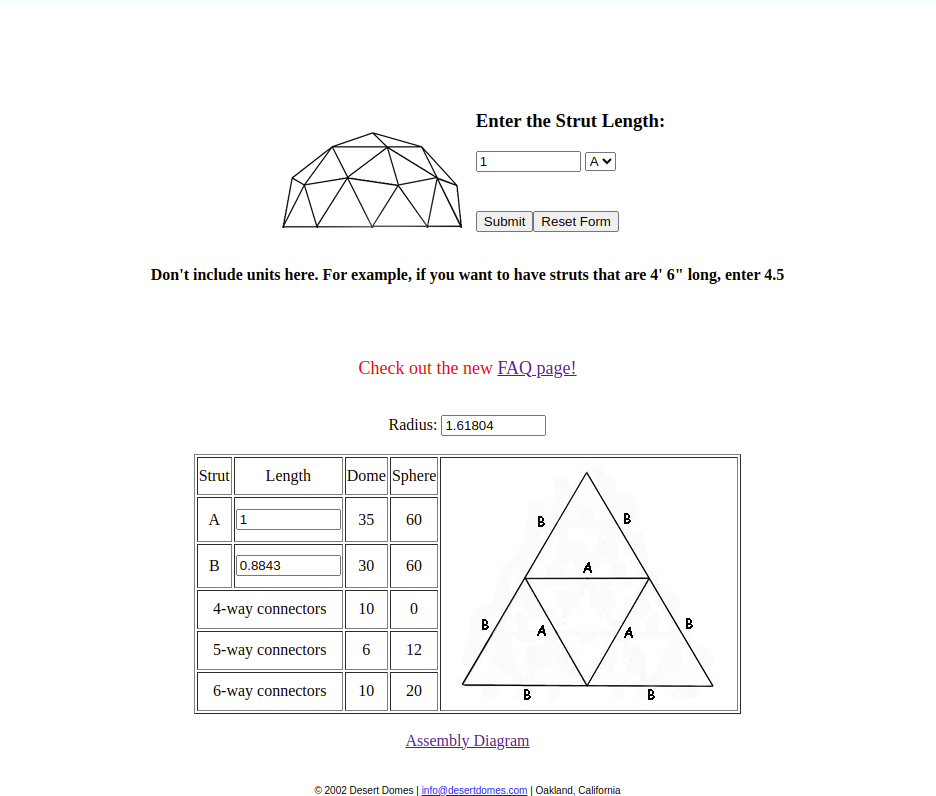
This is the part where you decide how big you want your dome to be.
- You can go to the Desert Domes website.
- From the image above, decide how long you want the "A" length to be.
- Then, enter that value into "Enter Strut Length" (make sure "A" is selected from the drop-down list) and click Submit Form.
- The site will calculate the dome radius (remember: radius, not diameter) along with the "B" side length.
- If the site ever goes down, you can calculate it yourself:
- the radius is exactly 1.618 × A,
- and the B value is 0.884 × A.
Cut Triangles (laser Method on Step Six)
After deciding how big you want your dome, it’s time to cut out the triangles. The most widely used—and therefore the best—method for cutting triangles out of cardboard is to either print and cut out a template first, then use it to trace the triangles, or draw your own template.
Printing Method


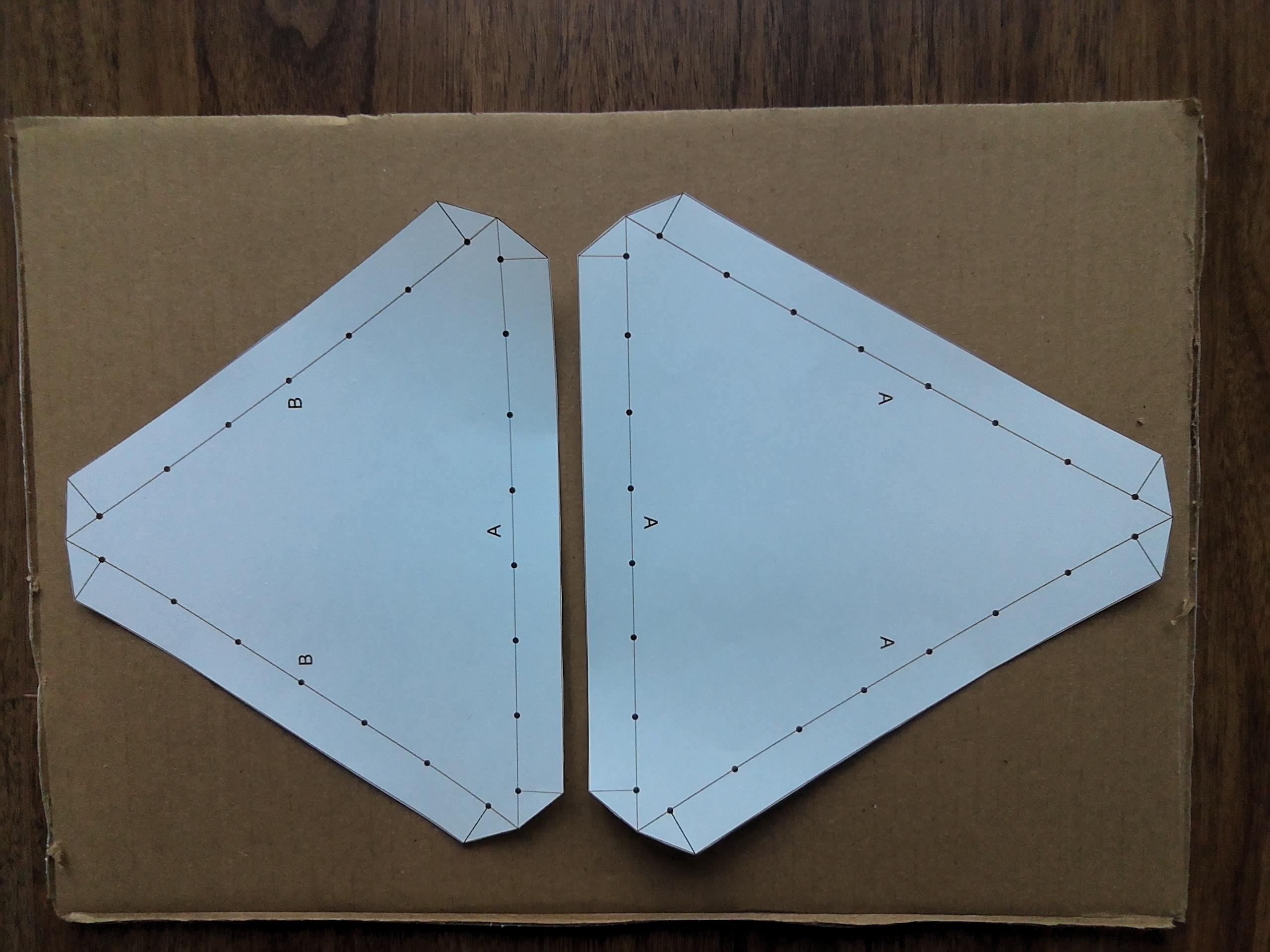


I would personally only recommend this process if you have access to your printer’s scaling system. Most printers automatically scale your screenshot or downloaded template to fit an A4 sheet of paper and add margins to the sides. The main benefit of using the printer is that it eliminates any errors that could occur during the hand-drawing process.
Steps:
- Download both AAA and ABB templates.
- Print them at your chosen size.
- Cut out the templates, following the outermost black line.
Now that you have the two templates (AAA and ABB), you need to trace 10 AAA and 30 ABB triangles onto your cardboard.
Tip: Alternating the triangles (one up, one down) is the best way to save space.
I recommend tracing onto the glossy side of the cardboard for two reasons:
- The side you trace on will usually be the inside, so any slip-ups won’t be visible, and you won’t need to erase anything.
- With the glossy side inside, the rough side will be on the outside, which is generally easier to paint.
After tracing the templates, you can cut off the flaps and trace just the inside triangle (In each triangle you already drew)—this will be useful later.
If you’re using 3-layer cardboard, lightly score along all the lines, cutting only the first layer. This will make folding easier and provide a guide. Then, cut all the way through the outermost lines, making sure to place a piece (or two) of sacrificial cardboard underneath to protect your work surface.
Hand Drawn Method (preferred)
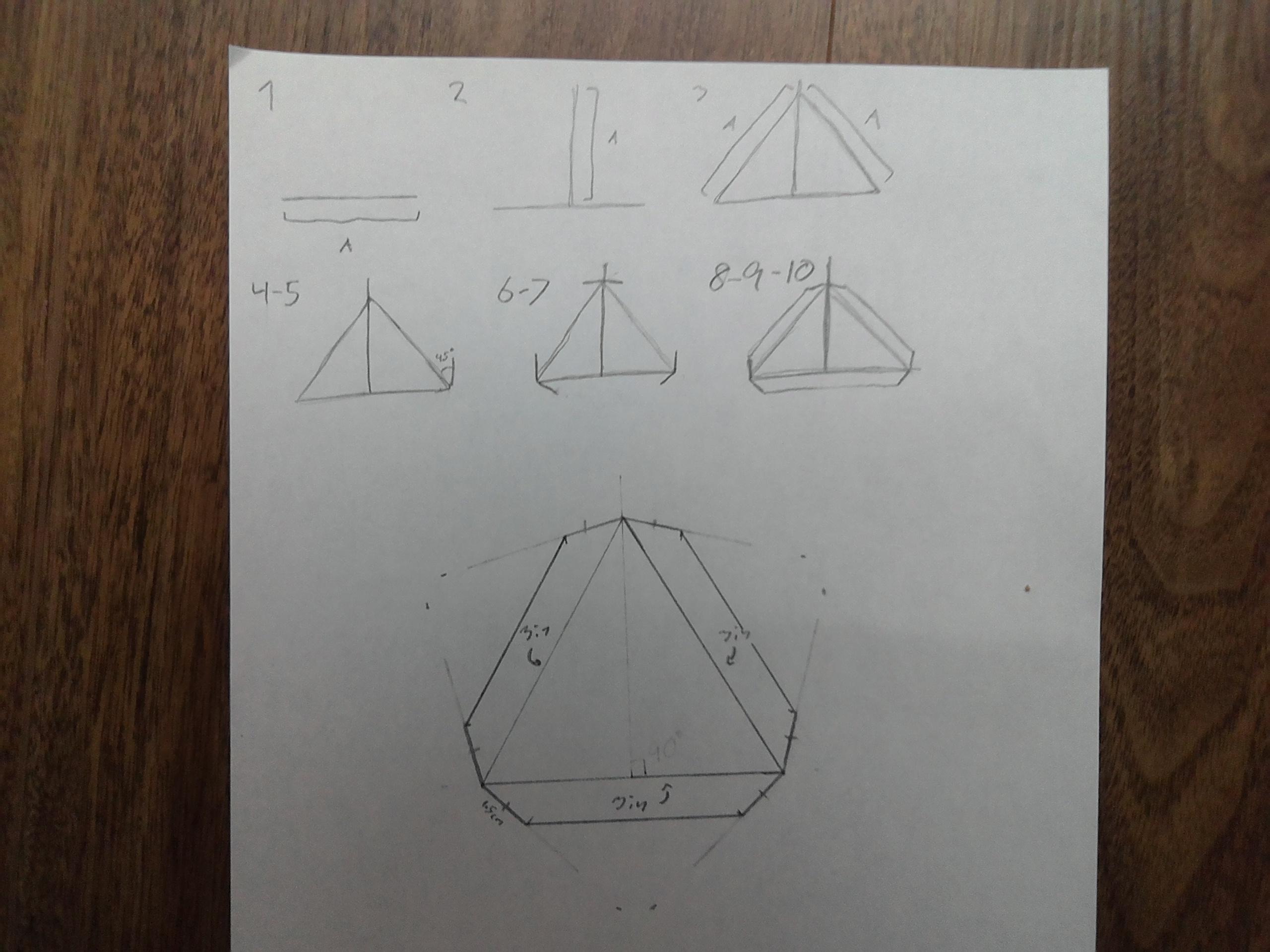
best non-LASER method to cut triangles
(LASER is technically an acronym)
- Obtain some paper. (thicker is better, and cardstock works the best)
- Obtain a ruler and a pro tractor
Now you need to draw the triangles
"A" and "B" values can be obtained from Step 2
AAA Triangle
- On your piece of paper draw a line with the length of your A value
- Using your protractor draw a perpendicular line in the center of your first line that is as long as the first line
- From the two ends of the first line draw two lines (one line on each end) the length of your first line that end at the second line you drew (the perpendicular line)
- Place a protractor at one corner of the triangle, centered on the vertex. Align the baseline of the protractor with the side of the triangle.
- From the triangle edge (the same edge you aligned the baseline on), measure 45° outward (away from the inside of the triangle) and make a small pencil mark.
- Repeat steps 4-5 for both ends on all sides of the triangle
- Using a ruler, draw a straight line from the corner (the same corner you centered the protractor on) of the triangle through the 45° mark. This line defines one side of the flap.
- Measure the desired flap width (around 1 cm for smaller triangles) along the extended triangle side (0 cm/in on your ruler should be on the vertex) and mark that point.
- From the end of the flap width mark, draw a line parallel to the triangle’s side until it meets a 45° line. You now have one complete flap.
- Repeat steps 7-9 two more times
Mark all 3 sides with a little "A" - this helps you remember what triangle template this is
Cut out the template along the outermost lines
ABB Triangle
- Repeat steps 1-10, but in step 3, the 2 new lines you draw should be the length of your B value.
Mark 2 of the shorter sides with a little "B", and the remaining side with a "A" - this helps you remember what triangle template this is
Cut out the template along the outermost lines
Now that you have the two templates (AAA and ABB), you need to trace 10 AAA and 30 ABB triangles onto your cardboard.
Tip: Alternating the triangles (one up, one down) is the best way to save space.
I recommend tracing onto the glossy side of the cardboard for two reasons:
- The side you trace on will usually be the inside, so any slip-ups won’t be visible, and you won’t need to erase anything.
- With the glossy side inside, the rough side will be on the outside, which is generally easier to paint.
After tracing the templates, you can cut off the flaps and trace just the inside triangle (In each triangle you already drew)—this will be useful later.
If you’re using 3-layer cardboard, lightly score along all the lines, cutting only the first layer. This will make folding easier and provide a guide. Then, cut all the way through the outermost lines, making sure to place a piece (or two) of sacrificial cardboard underneath to protect your work surface.
You can look at pictures 3-8 in step 4 for more details on tracing & cutting
LASER Method
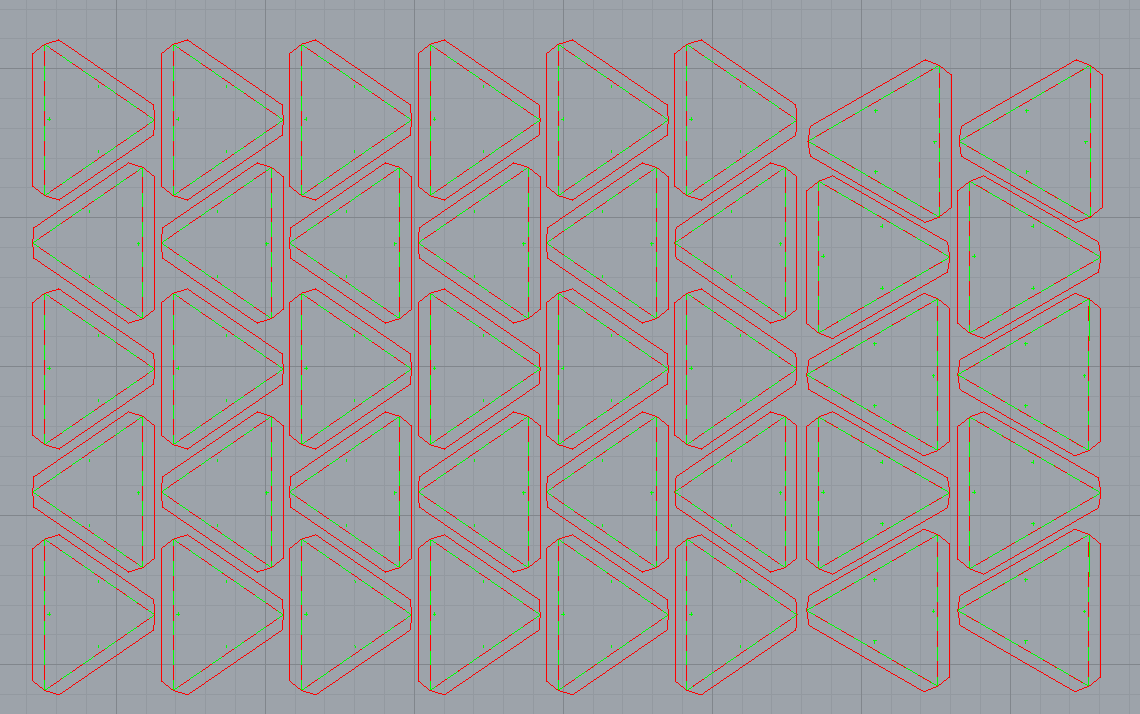
For examples later on, I will mostly be using the triangles I cut with a laser cutter. If you also want to use a laser cutter, open or download one of the attached files and adjust it as needed for your setup. I can’t give exact step-by-step instructions because:
- I don’t know what systems other people use,
- Laser cutters vary widely in software, settings, and safety requirements.
The system I use (Rhino 8 with a VLS laser) requires me to download and import the file into Rhino and then “print” it to the laser, just like a regular printer.
A laser cutter is the best option because it produces perfectly accurate and repeatable triangles. When building a geodesic dome, even small measurement errors can add up and cause gaps or misalignment later on. With a laser cutter, every triangle is cut to the exact same size and angle, which makes assembly faster, cleaner, and far less frustrating. It also saves time when cutting many pieces and results in crisp edges that fold more predictably, and completely omits the need for templates.

Painting
Paint your triangles black (or purplish black).
It is not necessary to paint the flaps (but still do).
You can do this after assembling the dome. Read the next step to figure out what will work best for you.
Build Your Dome
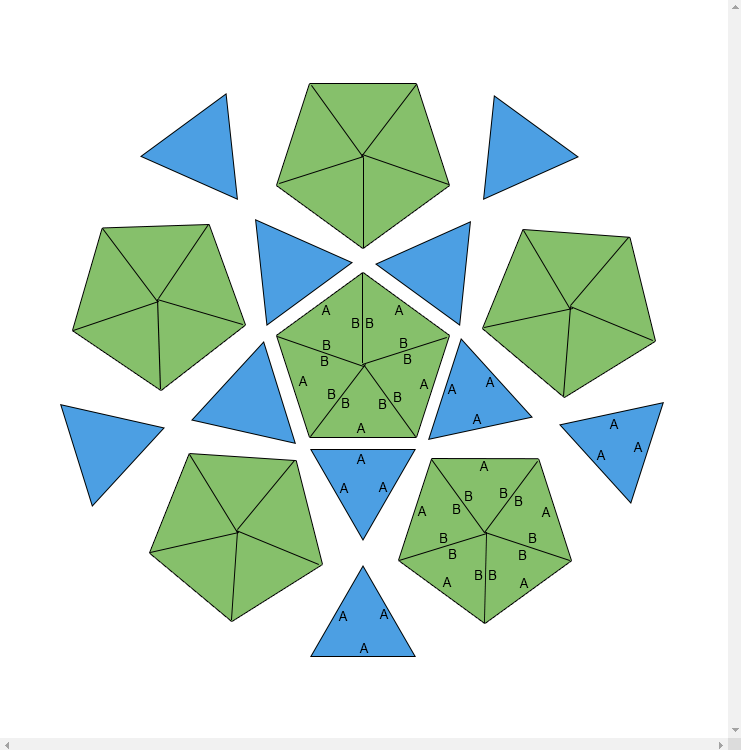
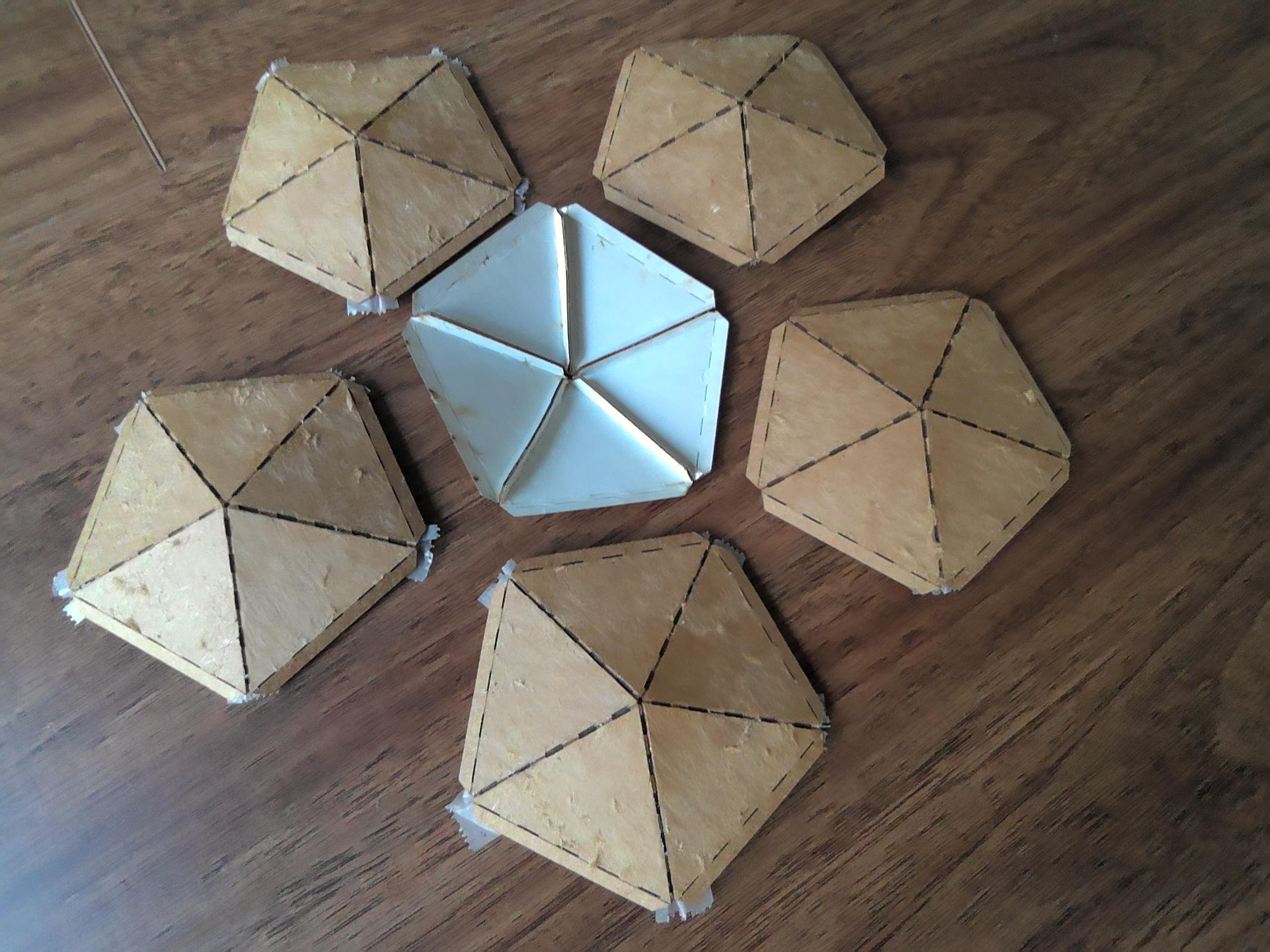
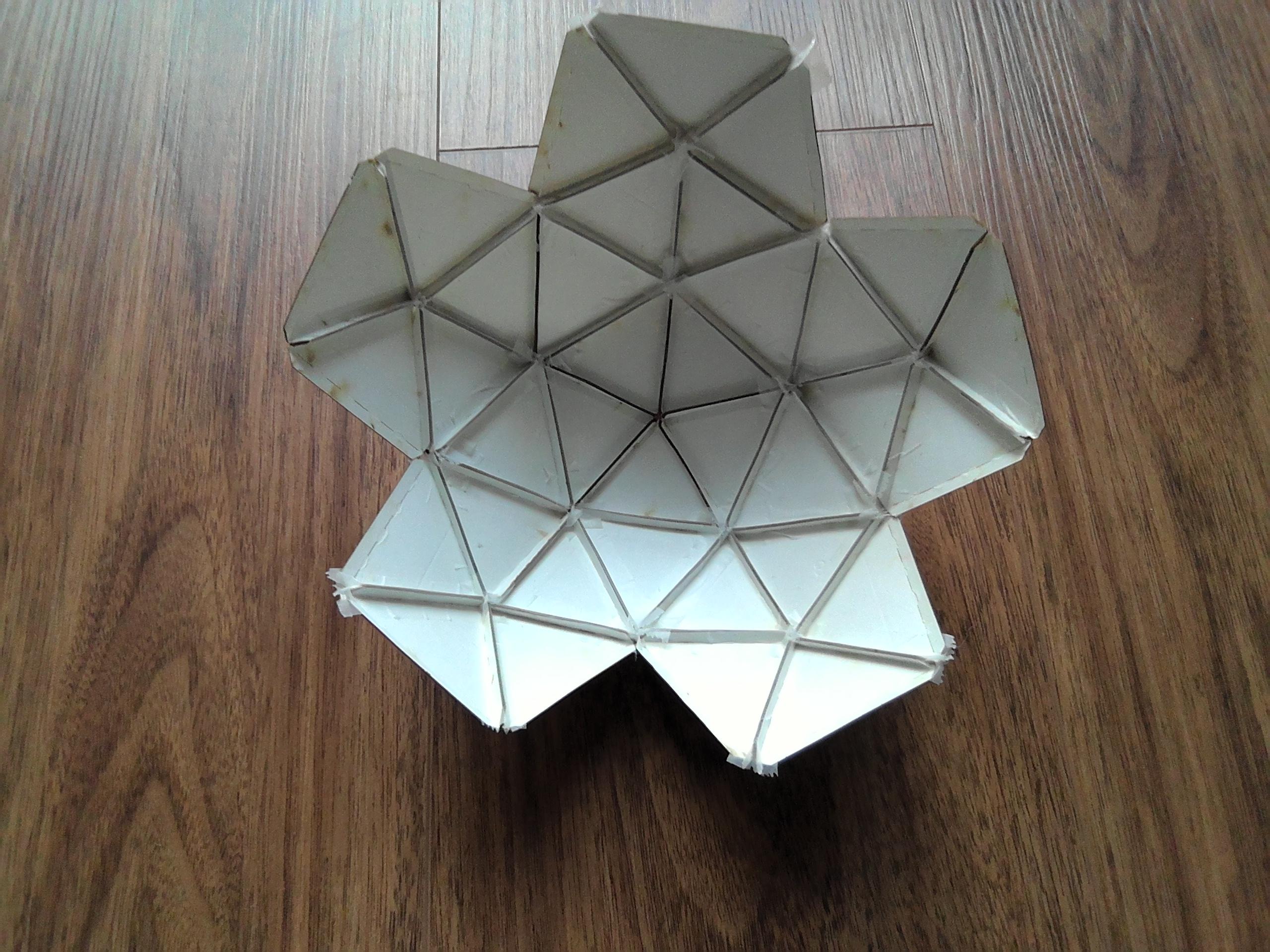
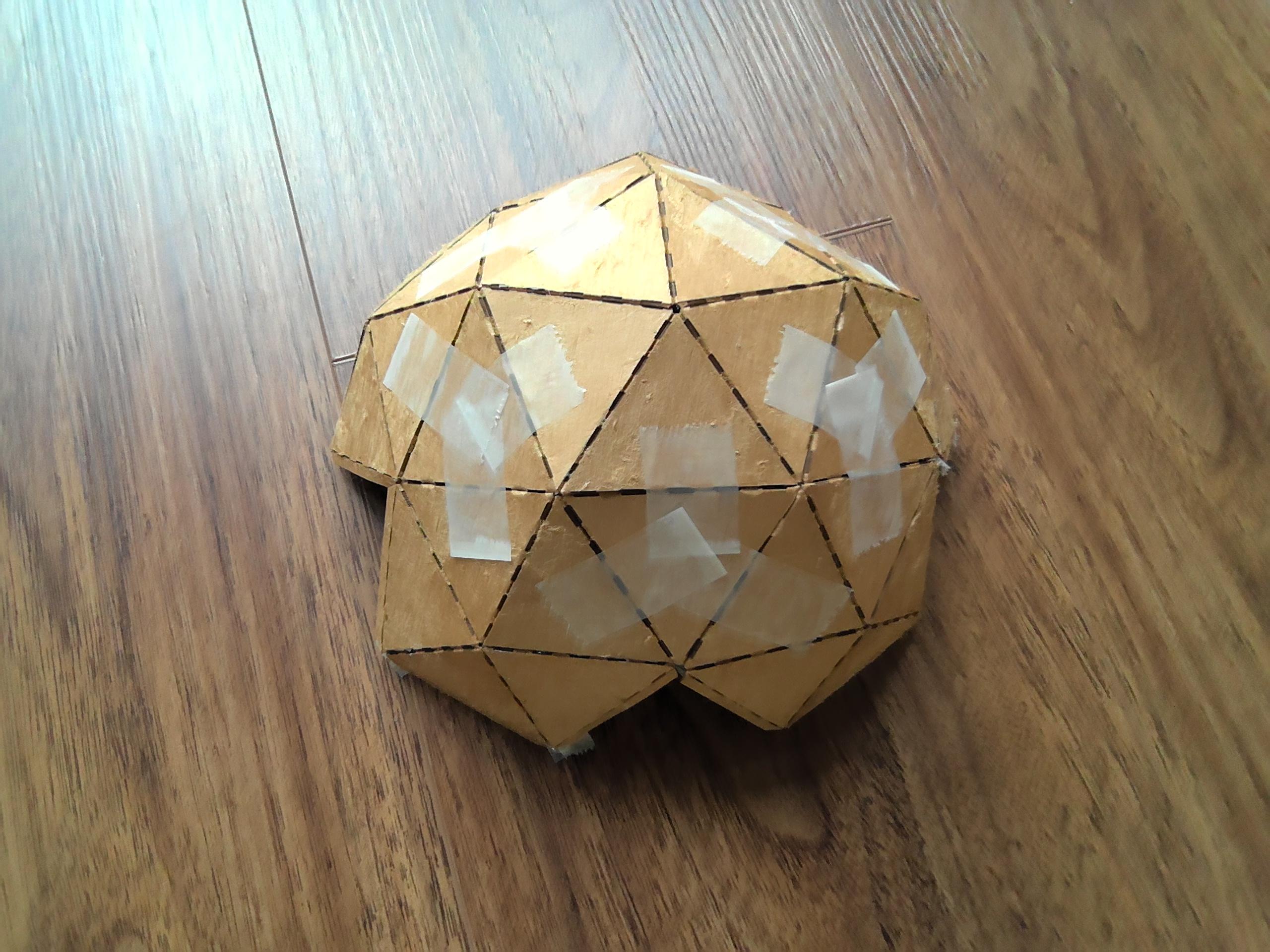

The time has come.
If you, like me, have jumbled together all of your triangles, now is the time to sort them.
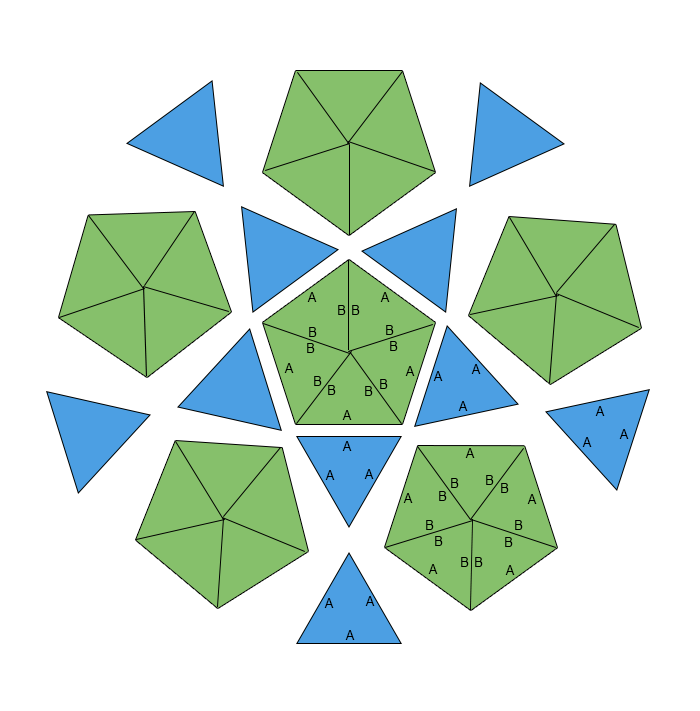
Using the attached image as a guide, (ie; A's only to A's and B's only to B's) you can finally begin to assemble your dome. For TED-Talk domes, it's best to start from the outside in, leaving the center pentagon for last. for smaller domes, start from the middle.
Small domes:
- Pre-fold all the flaps
- Separate all ABB triangles into six groups of five
- Using tape on the outside to hold a pentagon together, flip it over so the concave side is facing you, making sure that is where the flaps are, glue them together with your preferred method.
- If you have and used masking tape on the outside (convex) part of the pentagons, you can leave it on as it will be easy to paint over.
- Once you have finished 6 pentagons, use the same technique (or whatever you found works for you) to join in the remaining 10 AAA triangles.
- If you haven't painted your triangles, now is a good time to paint your dome.
Big Domes:
- Separate all ABB triangles into six groups of five
- Using tape on the outside to hold a pentagon together, flip it over so the concave side is facing you, making sure that is where the flaps are, glue or staple them together.
- If you have and used masking tape on the outside (convex) part of the pentagons, you can leave it on as it will be easy to paint over.
- Once you have finished 6 pentagons, use the same technique (or whatever you found works for you) to join in the remaining 10 AAA triangles.
- If you haven't painted your triangles, now is a good time to paint your dome.
...If your triangles start rebelling, just remind them they're part of a greater cosmic plan...
Accurate Star Installation
The Stellarium Method Demonstrated In The Next Step Is Not 100% Accurate! If You Need/Want A 95% Accurate Star Dome, Please Follow Along With Any Of These Methods.
1: Stellarium + Dome/Grid Plugins
Stellarium itself doesn’t output a geodesic grid, but you can:
- Use Stellarium to position stars how you want.
- Export the sky view as an image (which you already did).
Then generate the geodesic overlay with:
- Blender + Astro add-ons
- OpenSCAD scripts
- Geodesic dome generators that can overlay images
2: Geodesic Dome Generators
These let you overlay images (like your star field) onto a dome net/grid.
Here's a good one:
GeoDome Tools (online)
- Generates a triangular grid for any dome frequency
- Exports SVG/PNG overlays
- You can place your star image beneath it
You can use these to help you:
- PolyDome.net (dome calculator)
- Geodesicworks.com
- 3D-Print Geodesic Dome SVG generator
These give you net/triangular pattern masks you can overlay on your sky image in an editor.
3: Planetarium & Dome Mapping Software
For projecting onto real domes, software can produce geodesic meshes with star data:
Options
- DomeMaster / Fulldome formats
- Blender Fulldome Add-Ons
- WorldWide Telescope fulldome mode
They output:
Fisheye star projections
Spherical meshes
Geodesic cloth nets
4: DIY with Blender / 3D Tools
If you’re comfortable with a 3D tool, you can:
- Create a geodesic sphere mesh
- Map your Stellarium texture onto it
- Render the mesh with wireframe (star field + geodesic grid)
- Export as flat drawing or printer pages
5: Printable Templates Websites
These have geodesic nets (not star maps, but the grid):
Printable geodesic dome net diagrams
SVG grid overlays
Search terms:
“Geodesic dome pattern printable”
“Full dome projection grid printable”
You can then overlay your star image behind them.
Manual Star Installation
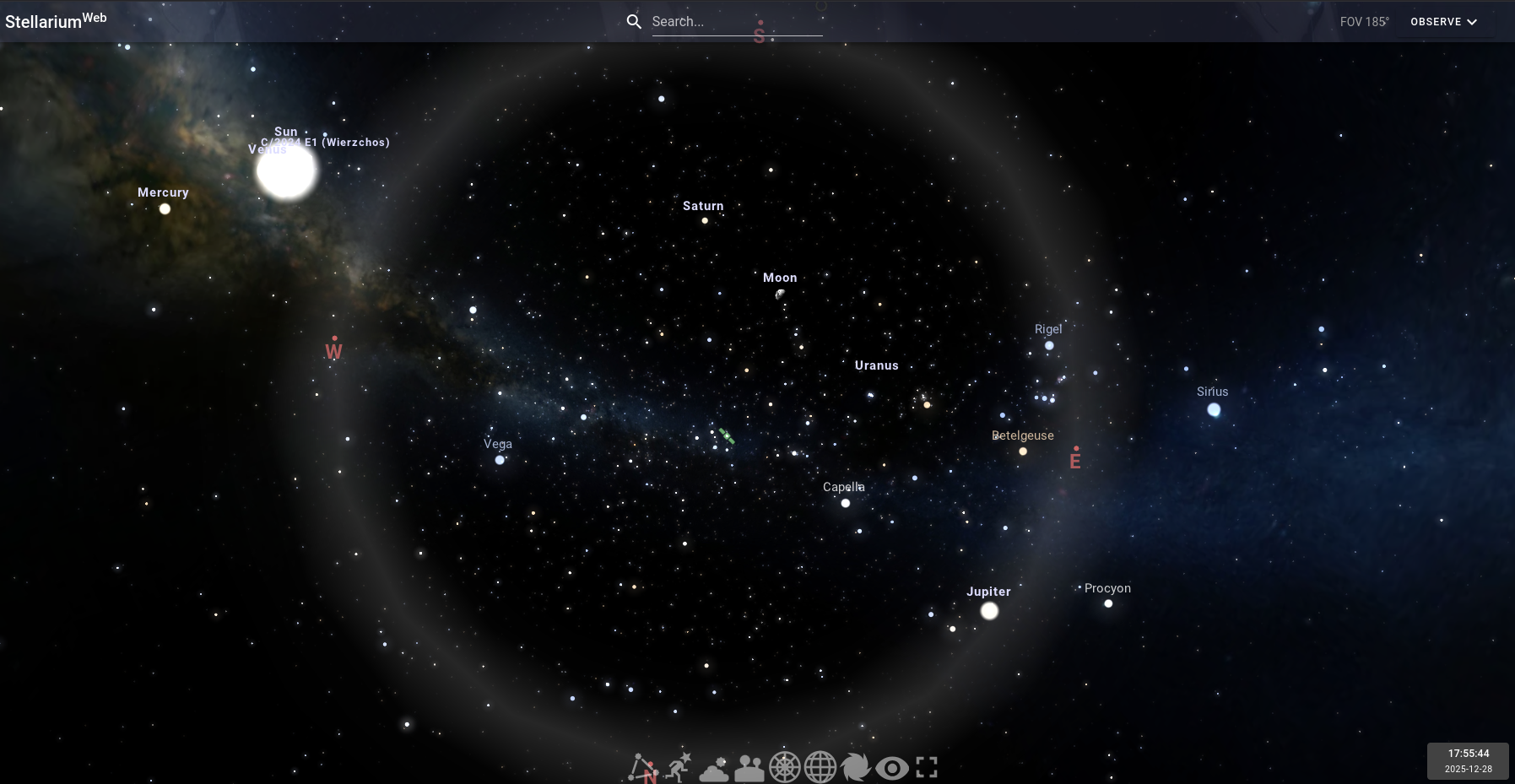
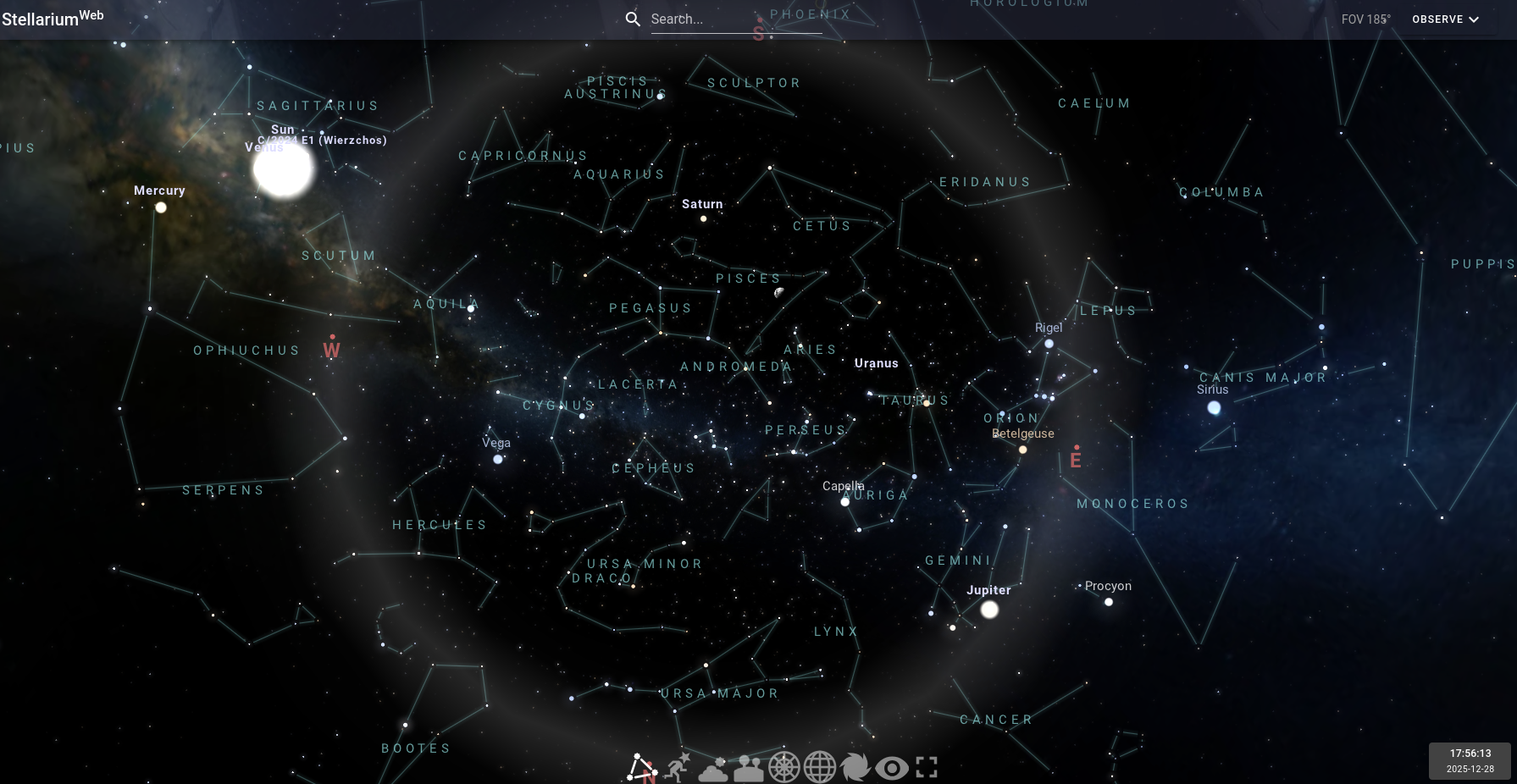

Good thing about this is that anyone can do this with any night sky.
You can make it an important night (or day if you turn off atmosphere)
- Open Stellarium
- Turn off atmosphere, landscape, and deep sky objects.
- Turn on constellations.
- Set Time and date to whatever you want
This is the part where things get difficult (or not =P)
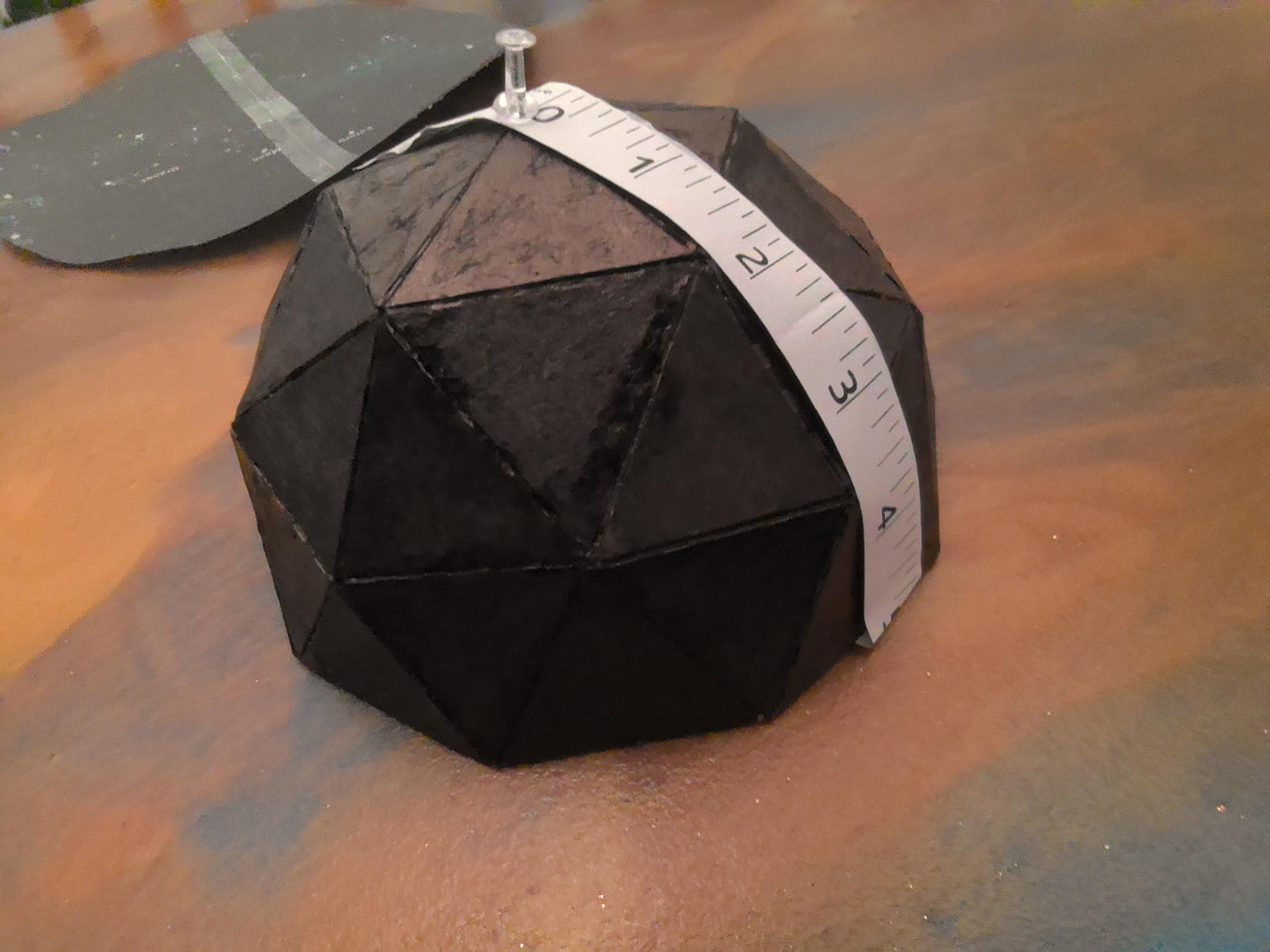
- Measure from the top of your dome to the bottom edge (one fourth of the total circumference)
- Write that number down
You will need to print a "star template" that is twice as wide as the number you just wrote down
Following along with attached images 3+, do the following.
- Find a good view in Stellarium.
- Capture the sky you’re over the moon about. (Take a roughly square screenshot of your chosen view. You can, and should use the ring/halo to line up your screenshot)
- Open your screenshot in your default image editor.
- Scale your screenshot so that it is twice as wide/tall as the number you wrote down.
- If your scaled screenshot (which from now on I'll be referring to as your "image") is bigger than anything your printer can print,
- Draw a rectangle the size of the paper your printer prints (usually A4 which is 8.5 by 11 in) onto your image,
- Move it into a corner of your image, then copy and paste it so that your image has a grid of A4 paper on it,
- Now take a screenshot of each of those "cells". Print all of those screenshots. make sure to remove margins.
- Tape all those papers together.
- If your scaled screenshot is smaller or equal to the size of an A4 piece of paper, Draw a rectangle the size of the paper your printer prints (usually A4 which is 8.5 by 11 in) onto your image (this is for dealing with auto scaling on your printer).
- Make sure whatever you want to paint onto your dome fits inside the rectangle (if not refer to step 5a - 5d), take a screenshot of the rectangle (screenshot should start at one corner of drawn rectangle and end at the opposite corner), then print that screenshot. Make sure that margins are removed so the whole page is printed on.
Certain Chatbots can help you with this task if you are unable to follow the given instructions.
Manual Star Installation




Jokes on you if you thought I could fit this in one step. Anyway...
Now that you have a printed star template, you must inflict a mortal wound upon your precious dome and multiple mortal wounds upon your template,
Poke holes in all the meaningful stars on your template big enough that you can make a mark through the hole.
Find the very center of your template, line it up on the very top of your dome, and secure if in place with a thumbtack.
- Fold one side down and tape it in place onto a bottom edge of your dome.
- Through the holes in your template start making marks for where the stars should be.
- Moving in any direction fold down the paper in adjacent unmarked triangles, using the marked triangles to line up your template, begin making marks around your dome.
- Once you are done,remove the thumbtack and template and gaze in awe at your star dome.
- If you want, you can draw lines in between stars and label constellations.
- Enlarge important stars, add planets, add the sun, etc.
You can poke holes where the stars are and put a tealight in your dome, if your dome is small enough.
An easier way to do this is to:
- Pin the center of your template to the top of your dome,
- Pin down the whole rest of the template on the corners where 5 triangles meet,
- Use a marker to make marks on your dome where you made holes in your template
- If you want, you can draw lines in between stars and label constellations.
- Enlarge important stars, add planets, add the sun, etc.
The attached pictures show this method.
DO NOT put anything flammable near or in your dome!!! When I said tealight, I meant an electronic one.
Congrats! clap clapclapclap for your hard work and for looking at my Instructible!