Grumpy Cat
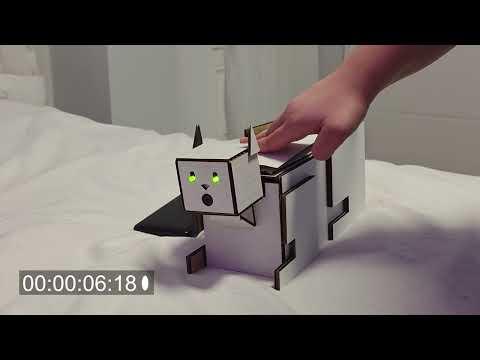
This project is a moody robotic cat that reacts to how you pet it. Pet it wrong, rush it, or annoy it too long, and it hisses in protest. Stroke it gently and in rhythm, it stays calm, wagging its tail with bright green eyes, and then hisses in protest. There is no winning with this cat. It is one grumpy cat.
The system uses an Arduino to read sensor input and control the outputs. An ultrasonic distance sensor measures the position of the user’s hand above the surface, allowing the program to detect the motion of a petting stroke across a defined distance range. A pressure plate confirms that the user is actually touching the object, so only intentional strokes are counted. The servo motor drives the tail, which continuously sways back and forth during idle. The timing of this motion sets the rhythm the user is hinted at to follow while petting. The LED eyes communicate the creature’s state, appearing green when calm and turning red when irritated. If strokes are off-beat or inconsistent, or if the interaction continues too long, the system triggers a response: the tail stops, the eyes turn red, and a buzzer emits a short hiss before the system resets to idle. At the start of each new interaction cycle, the system randomly rerolls the tail-sway speed and the allowed interaction duration, so the expected rhythm and tolerance for petting change slightly each time.
Supplies
Core Electronics
- Arduino board (Uno / Nano / similar)
- Ultrasonic distance sensor (HC-SR04)
- Used to detect hand position during strokes
- Servo motor (micro servo, e.g., SG90)
- Drives the tail motion
- Piezo buzzer
- Produces the hiss sound
- Pressure plate, homemade from tinfoil
- Detects when the user is actually pressing the cat
Lighting
- 2 × Green LEDs (eyes)
- 2 × Red LEDs (eyes)
- 4 × current-limiting resistors (≈220–330 Ω)
- One for each LED
Wiring / Breadboard
- Breadboard
- Jumper wires (male–male and male-female)
Power
- USB power from Arduino
- or
- External 5V supply
Materials
- Cardboard
- Hot glue
Tools
- Hot glue gun
- lasercutter
Laser Cut

Cut the parts from a sheet of cardboard using your laser cutter. After, remove all pieces from the sheet and keep them organized for assembly.
The Head

Use the laser-cut pieces for the head and slot them together to form the box structure shown. Secure the joints with hot glue.
Insert the LED eyes and buzzer into the holes on the front face, and mount the ultrasonic distance sensor (UDS) inside the head so it faces toward the back of the cat.
The Back


Create the pressure plate using two small cardboard plates. Cover the inside faces of both plates with tinfoil and attach a wire to each foil surface. When the two foil surfaces touch, the circuit closes and the Arduino detects a press.
To assemble it, glue one edge of the plates together while holding them slightly open. This creates a simple hinge. Once the glue cools, its slight flexibility allows the plates to compress when pressed, letting the foil surfaces touch and complete the circuit.
The Tail

Place the servo motor between the cardboard layers in the tail mount so it is tightly sandwiched in place. The layered cardboard pieces hold the servo securely without additional hardware.
Attach the tail piece to the servo arm so it moves when the servo rotates. Once installed, the servo will drive the tail’s swaying motion during operation.
The Body
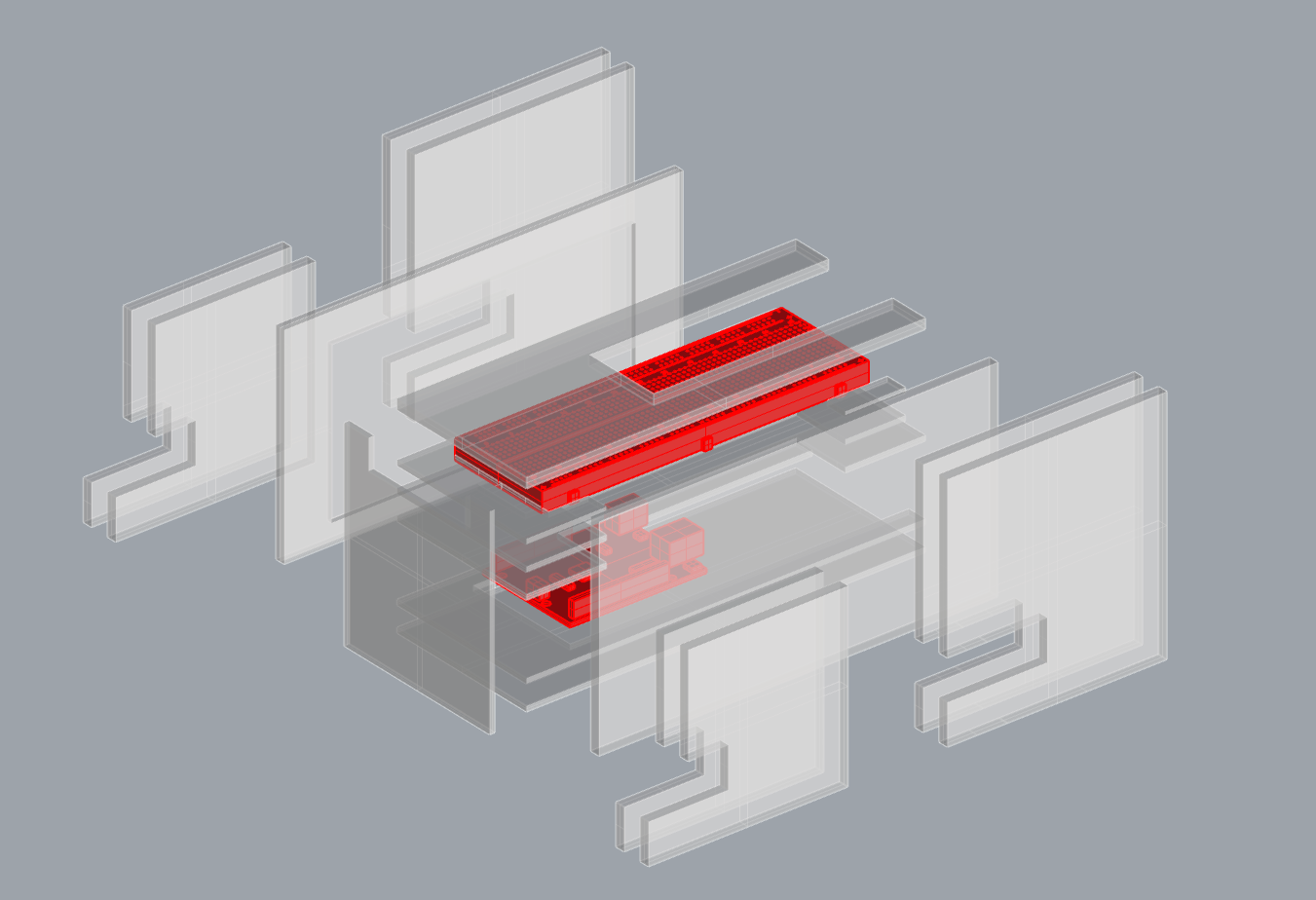
Slot the laser-cut cardboard panels together to form the body structure.
Place the Arduino on the bottom layer of the body and the breadboard on the top layer. The layered structure keeps the electronics organized and leaves space for wiring between components.
The Wiring


Connect all components according to the wiring diagram.
Wire the ultrasonic sensor, LED eyes, buzzer, pressure plate, and servo motor to the Arduino through the breadboard. Use resistors for the LEDs and connect power and ground rails on the breadboard to the Arduino’s 5V and GND pins.
Ensure all connections match the tinkercad diagram
https://www.tinkercad.com/things/6EL4ha9GQZG-swanky-gaaris-kup/editel?returnTo=https%3A%2F%2Fwww.tinkercad.com%2Fdashboard&sharecode=YrXGYrwMWxjSBiEj2JKTTgKT_RnHf6nqXq1vAL9HLOY
Putting It All Together


Place all assembled sections into the body: the head with sensors and LEDs, the pressure plate back, and the servo tail module. Route the wires neatly through the interior and connect them to the breadboard and Arduino as shown in the wiring diagram.
Once everything is secured inside the body, close the structure and plug the Arduino into an IDE to program it.
Here is our script
Downloads
Pet

Pet the cat
Conclusion
This project explored how simple sensors and actuators can be combined to create an interactive object that reacts to touch. The system uses an ultrasonic sensor to track the movement of a hand along the cat’s back, a pressure plate to confirm contact, and LEDs, a servo tail, and a buzzer to communicate the creature’s state.
A significant portion of the work involved improving the stroke detection logic. Because the ultrasonic sensor only measures distance, the code had to interpret a petting gesture from a sequence of changing readings instead of a single input. Early versions of the program often misinterpreted movement or triggered unintentionally, so I modified the distance thresholds, stroke direction logic, and rhythm tolerance several times. This process highlighted how sensitive interactive systems can be to small parameter changes.
Fabrication also introduced several difficulties. The cardboard construction worked well for quickly prototyping the body and mounting components, but some parts needed iteration to function reliably. The tinfoil pressure plate, for example, needed adjustments to balance sensitivity and stability. If the plates were too close together the circuit stayed closed, while too much separation made it difficult to trigger. Mounting the servo within the cardboard layers also needed careful spacing to ensure the tail could move freely without shifting the motor.
Another issue during development was interference in the ultrasonic readings. Because the sensor was mounted close to the body of the cat, it could occasionally detect nearby surfaces or parts of the structure. This required additional tuning in the code to ignore extreme or inconsistent readings. Similarly, combining multiple components in the circuit introduced bugs where the timing of one action affected another, validating the importance of testing each subsystem before integrating them.
Through this process, the project demonstrated how interactive prototypes often require iteration across both hardware and software. Adjustments to the physical structure, sensor placement, and code logic all influenced the final behavior. While the system still feels experimental, the process provided insight into how gesture detection, timing, and physical design coordinate within an embedded system. Future versions could improve reliability by using a more robust pressure sensor, better internal mounting for components, and additional filtering or smoothing of the ultrasonic data.