HackerBox 0124: Bus Driver

Welcome to HackerBox 0124. Experiment with the ESP32 Bus Pirate, an open-source firmware project implementing a multi-protocol "Swiss Army Knife" hardware hacking tool inspired by the legendary Bus Pirate. Configure the ESP32-S3 N16R8 Core Development Board. Assemble the exclusive HackerBox ESP32 Bus Pirate platform for leveraging the ESP32 Bus Pirate firmware. Assemble an exclusive adapter board to exercise the ESP32 Bus Pirate's SubGHz Mode leveraging a CC1101 Wireless Radio Module. Assemble an exclusive adapter board to implement the ESP32 Bus Pirate's RF24 Mode leveraging a Nordic nRF24L01 Wireless Radio Module. Assemble an exclusive adapter board to exercise the ESP32 Bus Pirate's Ethernet Mode leveraging a WIZnet W5500 Wired Ethernet Module. Assemble an exclusive adapter board to implement the ESP32 Bus Pirate's RFID Mode leveraging a PN532 NFC RFID Module. Sense, drive, and decode signal lines and communication buses with the ESP32 Bus Pirate using jumper connections, SDK08 ultra-mini test hooks, and a TXS0108E bidirectional voltage level shifter as necessary for various target systems. Explore cybersecurity CTF (Capture the Flag) competitions.
There is a wealth of information for current and prospective members in the HackerBoxes FAQ. Almost all of the non-technical support emails that we receive are already answered there, so we'd really appreciate it if you can take a few minutes to read the FAQ.
Supplies
This Instructable contains information for getting started with HackerBox 0124. The full box contents are listed on the product page for HackerBox 0124 where the box is also available for purchase while supplies last. If you would like to automatically receive a HackerBox like this right in your mailbox each month, you can subscribe at HackerBoxes.com and join the party. Subscription members save at least $15 every month and automatically receive each new HackerBox shipped immediately off the production line.
A soldering iron, solder, and basic assembly tools are generally needed to work on the monthly HackerBox. A computer for running software tools is also required. Have a look at the HackerBox Workshops for tools and supplies along with a wide array of introductory activities and experiments.
The most import thing you will need is a sense of adventure, hacker spirit, patience, and curiosity. Building and experimenting with electronics, while very rewarding, can be tricky, challenging, and even frustrating at times. The goal is progress, not perfection. When you persist and enjoy the adventure, a great deal of satisfaction can be derived from this hobby. Take each step slowly, mind the details, and don't be afraid to ask for help.
WEAR SAFETY GLASSES WHEN SOLDERING, WHEN TRIMMING WIRE LEADS, OR WHEN CUTTING, DRILLING, ETC.
ESP32 Bus Pirate

ESP32 Bus Pirate is an open-source firmware project run on an ESP32-S3 microcontroller to implement a multi-protocol hardware hacking tool... An electronic "Swiss Army Knife" inspired by the legendary Bus Pirate.
The ESP32 Bus Pirate firmware supports sniffing, sending, scripting, and interacting with various digital protocols (I2C, UART, 1-Wire, SPI, etc.) via a serial terminal or web-based CLI. It also communicates with radio protocols including Bluetooth, Wi-Fi, SubGHz, and RFID.
ESP32-S3 Core Board N16R8
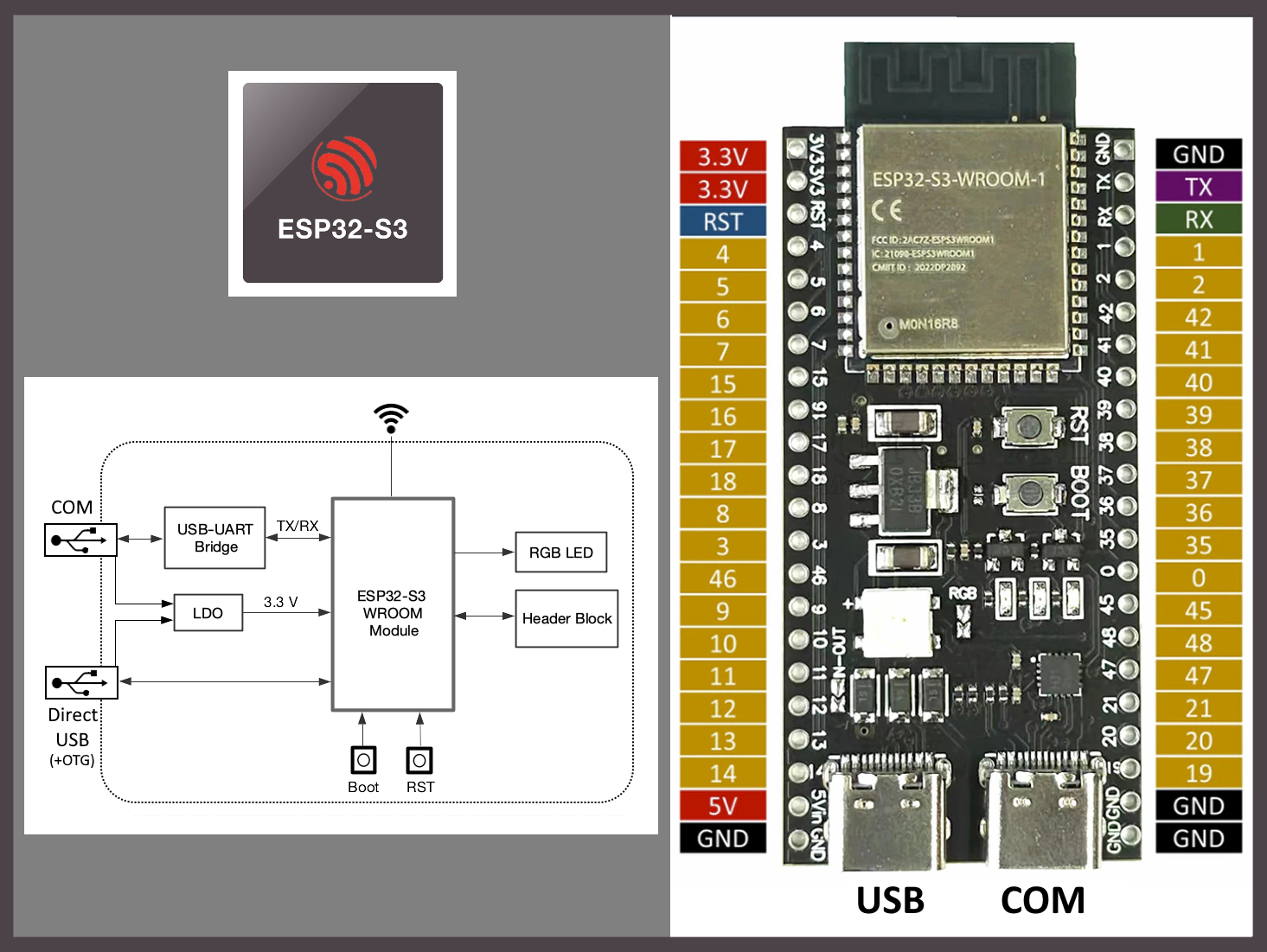
The ESP32-S3 Core Board is a development board featuring the ESP32-S3-WROOM-1 SoC module that integrates Wi-Fi and Bluetooth Low Energy functionality. The ESP32-S3 has support for vector instructions in the MCU, which provides acceleration for neural network computing and signal processing workloads. The N16R8 variant of the WROOM-1 module includes 16 MB of Octal SPI Flash and 8 MB of Octal SPI PSRAM.
PRIOR TO SOLDERING, Power up the Core Board and Load a Test Program
The Core Board can be powered through either USB port, but for now, let's just use the COM USB port.
The factory loaded firmware should cycle colors on the onboard RGB LED and also output status messages to the serial monitor.
There is a small red power LED that is always illuminated as well as two other small LEDs (RX-blue and TX-green) that will flicker when the serial interface is in use.
If necessary, install the Arduino IDE.
Within the IDE, use Tools > Board > Boards Manager to search for ESP32 (by Espressif Systems). Select that board package and hit install.
Select Settings:
Tools > Board > esp32 > ESP32S3 Dev Module
Load Example Sketch:
File > Examples > ESP32 > GPIO > BlinkRGB
This example cycles colors on the onboard RGB LED (GPIO 48) similar to the factory loaded example, but you can change the timing and/or colors in the sketch code, compile/upload again, and see that the loaded code is executing according to your modifications.
ESP32 Bus Pirate Assembly
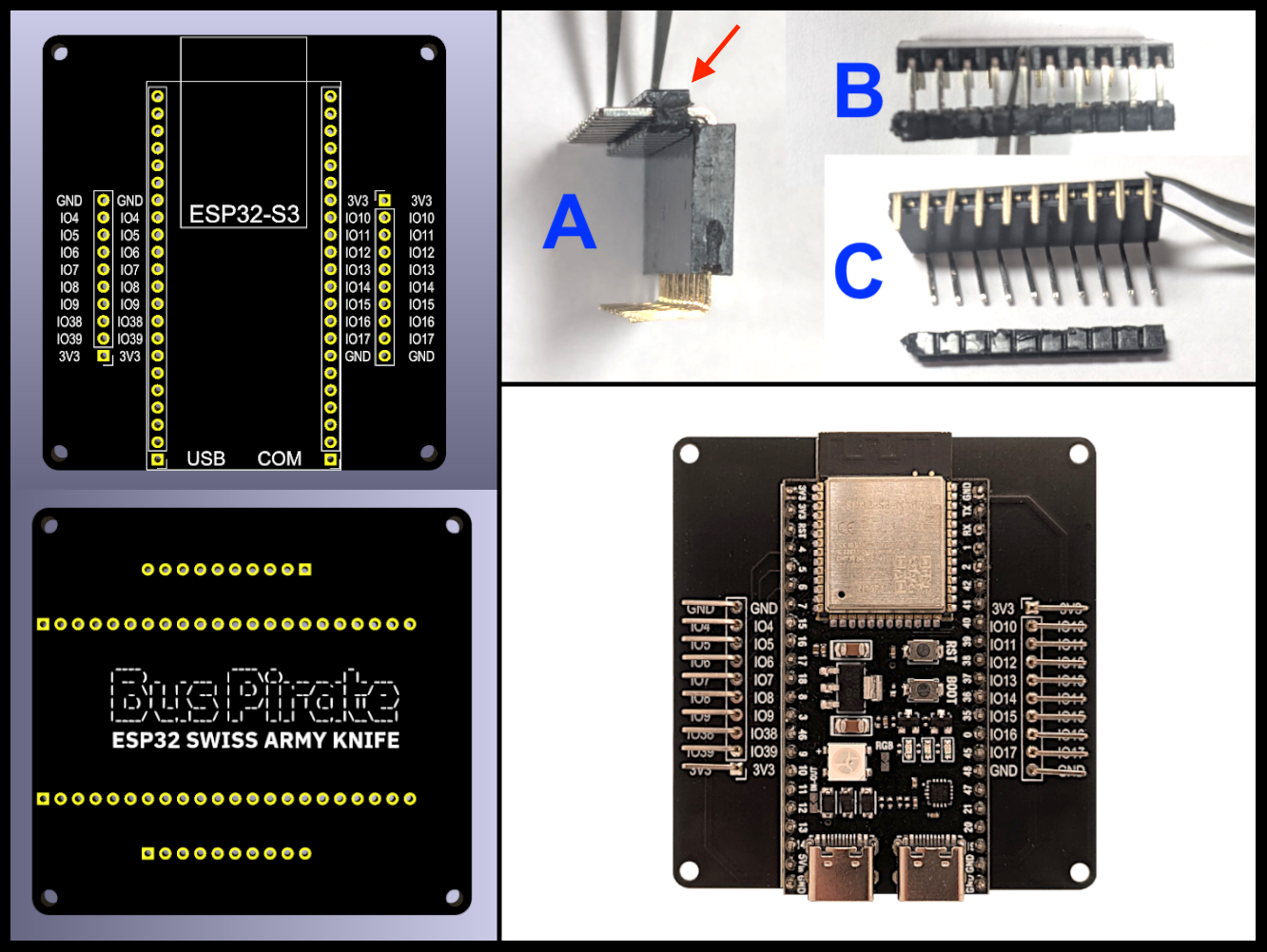
ESP32 Bus Pirate PCB supports the ESP32-S3 Core Board and two ten pin headers, as shown above.
The ten pin headers can be cut from the provided 40 pin right angle male header.
The ten pin headers can be soldered "as is" onto the ESP32 Bus Pirate PCB. However, the black plastic insulation on the male header (see red arrow in Figure A of image above) will position the male pins apx 4 mm above the PCB, as opposed to the more desirable 1.27 mm. If this additional pin height doesn't bother you, it is fine to just leave the insulation in place. Doing so is a bit easier that using this trick...
Trick to position the male header pins 1.27 mm above the PCB (less easy)
Cut loose a ten pin section of right angle male header.
Insert the ten pin male header into a ten pin female header sockets as sown in Figure A.
Gently slide the plastic insulator down to the end of the male pins as shown in Figure B.
Remove the insulator entirely as shown in Figure C being very careful to keep the male pins (now disconnected) fully inserted into the female header.
Insert the (newly disconnected) male pins into the ESP32 Bus Pirate PCB and hold the female socket firmly against the PCB.
Solder the male pins from the back side of the PCB while holding everything in place with the female socket.
Slide the female socket off of the male pins and keep it for use with adapter assembly in a later step.
The male pins should now be parallel to the PCB at a height of almost exactly 1.27 mm as shown in the photo of the completed ESP32 Bus Pirate assembly.
Solder the ESP32-S3 Core Board
Noting the orientation of the USB connectors, insert the ESP32 Core Board into the ESP32 Bus Pirate PCB. Solder the ESP32 Core Board into place.
Flash the Firmware
Use the ESP32 Bus Pirate Web Flasher to program the ESP32 Bus Pirate firmware directly from a web browser. When presented with various options for boards, select "ESP32-S3 N16R8".
After the flashing is complete, switch the USB cable over to the port labeled "USB" (not "COM"). Run a serial terminal (or even the Arduino IDE Serial Monitor) set to 115200 board. Interface with the ESP32 Bus Pirate's interactive command-line interface (CLI). Additional serial terminal pointers are detailed here including options for various operating systems.
Once connected, type help and explore!
From the serial terminal, you can configure Wi-Fi and then also access the CLI from a browser as shown here.
Visit the ESP32 Bus Pirate Wiki for detailed documentation on every mode and command.
Get Connected

The ESP32 Bus Pirate can be used to sense, drive, and decode signal lines and communication buses. Connections to signal lines can be made using the provided DuPont jumper wires, or the provided test clips as necessitated by the target system.
The default mode (see Available Modes) is HiZ, which supports commands such as logic, analogic, and wizard to explore signals connected to individual I/O pins. Similarly, modes like DIO (digital IO), 1WIRE, 2WIRE, 3WIRE, UART, I2C, SPI, I2S, and JTAG allow exploring specific communication protocols on given I/O pins.
Shifting Voltage Levels
The ESP32 MCU is most happy connecting to just 3.3V logic levels. The TXS0108E Bidirectional Voltage Level Shifter (datasheet) can be used to translate the 3.3V signals to and from (bidirectionally) other logic levels between 1.2V and 5.5V. Note that VA must always be <= VB.
For Target Hardware Voltages between 1.2V and 3.3V:
- Connect the Target Hardware to the A side of the TXS0108E
- Target Vcc to VA
- Target IOs to A1-A8
- Connect the ESP32 Bus Pirate to the B side of the TXS0108E
- ESP32 3V3 to VB
- ESP32 IOs to B1-B8
- Connect VA (Target Vcc) to OE (Output Enable) of the TXS0108E
- Connect A and B grounds together and to GND of the TXS0108E
For Target Hardware Voltages between 3.3V and 5.5V:
- Connect the ESP32 Bus Pirate to the A side of the TXS0108E
- ESP32 3V3 to VA
- ESP32 IOs to A1-A8
- Connect the Target Hardware to the B side of the TXS0108E
- Target Vcc to VB
- Target IOs to B1-B8
- Connect VA (ESP32 3.3V) to OE (Output Enable) of the TXS0108E
- Connect A and B grounds together and to GND of the TXS0108E
Bus Pirate Adapters

The original (Dangerous Prototypes) Bus Pirate 5 is shown in the upper left of the image above. They can be purchased here along with a variety of cool accessories. That image also shows a number of adapters that are available to plug into the ten pin header of the Original Bus Pirate 5. Inspired by these adapters and the associated ten pin connector, a number of adapters for the ESP32 Bus Pirate are presented below. An Original Bus Pirate 5 Adapter may work with the ESP32 Bus Pirate and an ESP32 Bus Pirate Adapter may work with the Original Bus Pirate 5 - or they may not. Careful experimentation is, of course, always encouraged.
SubGHz Radio Adapter

The ESP32 Bus Pirate's SubGHz mode targets radio frequencies below 1 GHz using the CC1101 SubGHz radio module.
Assembly Notes
The blue PCB featuring the HackerBox RF Hacker Skull graphic is used for both the SubGHz Radio Adapter and the RF24 Radio Adapter. It is the same PCB for either adapter application.
The connector used for the Adapter is a Right Angle Ten Pin Female Header Socket. It is important to position the socket perfectly parallel to the PCB while soldering the pins. This can be done by resting the plastic portion of the socket on another PCB and holding that second PCB edge-to-edge (and perfectly coplanar) with the adapter PCB being soldered. Using the ESP32 Bus Pirate as this second PCB further affords mating the male and female headers together to provide additional stability while soldering (assuming the 1.27 mm trick was used).
Be careful to solder the female header socket into the row of through-hole pads closest to the PCB edge as shown. The second row of through-holes (4mm inland from the first) is for optional mounting of straight (not right angle) header pins. The optional straight header pins may be used with female DuPont jumpers to operate the adapter's functionality by wiring it to some other MCU instead of only the ESP32 Bus Pirate. This optional additional flexibility can be easily extended any time in the future but is beyond the scope of the current discussion.
These notes for assembling the SubGHz Radio Adapter apply equally to the other adapters presented below.
Connecting an Adapter
Always be sure to match the 3V3 pin of the adapter to the 3V3 pin of the ESP32 Bus Pirate.
Also be sure to match the GND pin of the adapter to the GND pin of the ESP32 Bus Pirate.
The ESP32 Bus Pirate has two male header connections - primary and secondary. The ESP32 Bus Pirate's primary male header connection is the one on the right side of the PCB with IO pins labeled 10-17.
Configure the Adapter
From the ESP32 Bus Pirate CLI, enter mode subghz as shown in the Demo Animation near the bottom of this page.
For the pin configuration step, simply enter the IO pin numbers that line up with each corresponding pin label on the adapter for whichever of the ESP32 Bus Pirate's male header connections is in use.
RF24 Radio Adapter

The ESP32 Bus Pirate's RF24 mode leverages Nordic's nRF24L01 transceiver operating in the 2.4 GHz ISM band. The transceiver is often found in wireless devices such as computer mice, keyboards, and game controllers. It also supports common 2.4 GHz band communication protocols such as Bluetooth and Wi-Fi.
Ethernet Adapter

The ESP32 Bus Pirate's Ethernet mode uses WIZnet's W5500 chip. The W5500 is a Hardwired Internet controller with an integrated full TCP/IP stack, enabling Internet connectivity via SPI with up to 80MHz speed. It combines 10/100 Ethernet MAC and PHY for stable connectivity and supports a variety of network protocols including TCP, UDP, and IPv4.
ESP32 Bus Pirate leverages the official ESP-IDF Ethernet driver, the lightweight IP (lwIP) TCP/IP stack, and supports Dynamic Host Configuration Protocol (DHCP).
RFID Adapter
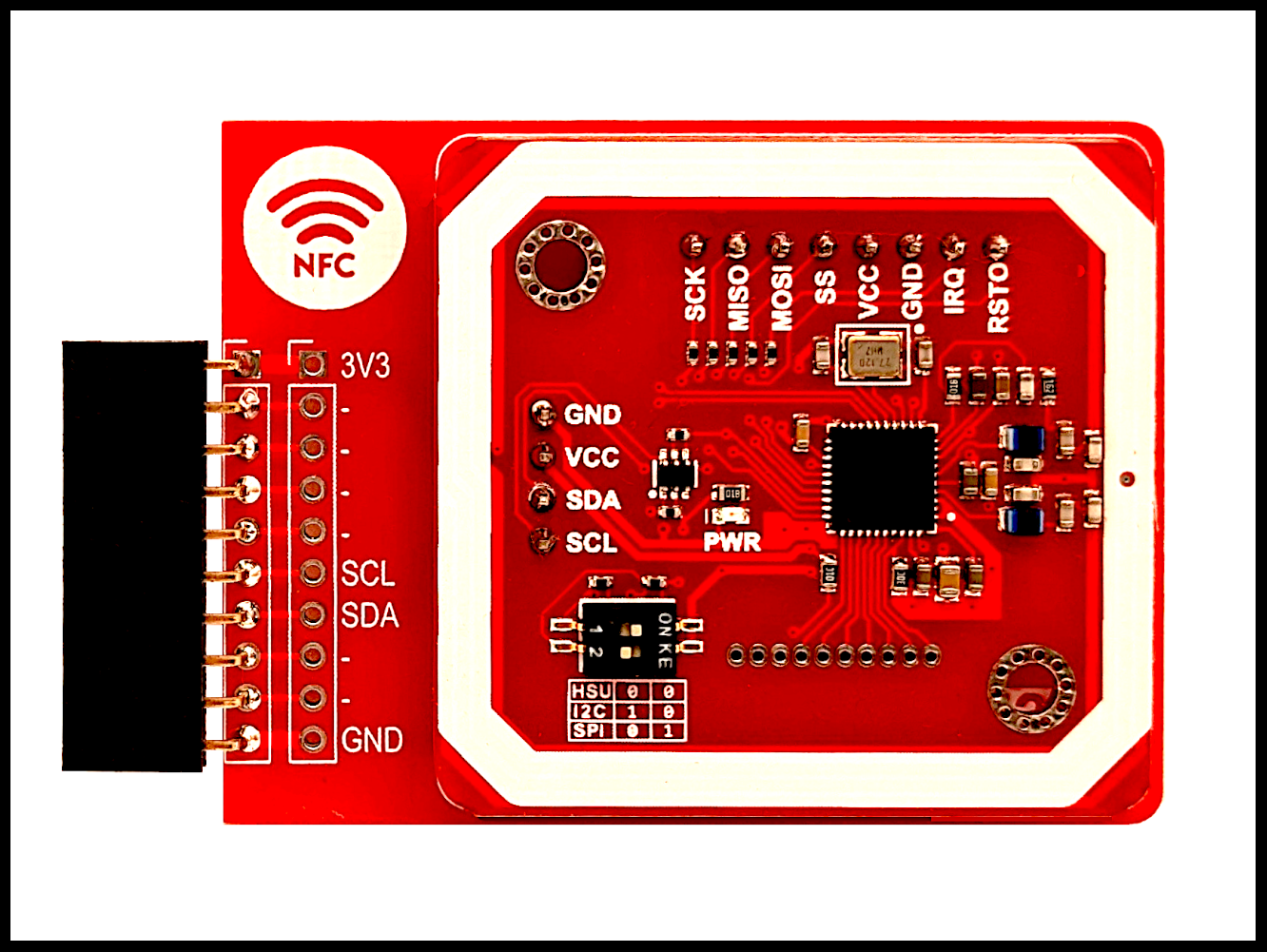
ESP32 Bus Pirate's RFID mode targets 13.56 MHz NFC/RFID tags using a PN532 reader connected via I2C. It supports common tag families such as MIFARE Classic (1K/4K/Mini), NTAG/Ultralight, and basic FeliCa operations.
As explained on the linked page above, set the jumper switches to "10" to put the PN532 into I2C mode.
Console Modchips

Hackaday: For a late-1990s engineer with good soldering skills, many a free pint of beer could be earned by installing modchips on the game consoles of the day. Modchips were usually a small microcontroller connected with a few wires to selected pins on the chips or pads on the board that masked or overrode the copy protection and region locking.
Wikipedia: Modchips operate by replacing or overriding a system's protection hardware or software. They achieve this by either exploiting existing interfaces in an unintended or undocumented manner, or by actively manipulating the system's internal communication, sometimes to the point of re-routing it to substitute parts provided by the modchip. Most modchips consist of one or more integrated circuits (microcontrollers, FPGAs, or CPLDs), often complemented with discrete parts, usually packaged on a small PCB to fit within the console system it is designed for. They typically require some degree of technical skill to install since they must be connected to a console's circuitry, most commonly by soldering wires to select traces or chip legs on a system's circuit board.
Capture the Flag

Capture the Flag (CTF) is a cybersecurity competition that is used to test and develop computer security skills. It was first developed in 1996 at DEF CON, the largest cybersecurity conference in the United States which is hosted annually in Las Vegas, Nevada. CTF participants attempt to find text strings, called "flags", which are secretly hidden in purposefully vulnerable programs or websites. They can be used for both competitive or educational purposes. In two main variations of CTFs, participants either steal flags from other participants (attack/defense-style CTFs) or from organizers (jeopardy-style challenges). A mixed competition combines these two styles. Competitions can include hiding flags in hardware devices, they can be both online or in-person, and can be advanced or entry-level. The game is inspired by the traditional outdoor sport with the same name. CTFs are used as a tool for developing and refining cybersecurity skills, making them popular in both professional and academic settings. (Wikipedia)
Starry Dynamo in the Machinery of Night

We hope you are enjoying this month's HackerBox adventures into electronics, computer technology, and hacker culture. We aim to curate a challenging and rewarding experience of learning through experimentation and exploration. Thank you for joining us on this journey.
Reach out and share your success in the comments below. Email support@hackerboxes.com anytime with questions or whenever you need some help.
Hungry for more? Surf over to HackerBoxes.com and join us as a monthly HackerBox subscription member. You'll get a cool box of hackable gear delivered right to your mailbox every month and you'll enjoy a generous member discount.
Please consider sharing this free Instructable with others who may be interested in learning about these subjects. Word of mouth advertising is the greatest compliment that we can receive. We sincerely appreciate your support.