HandPi Kiosk: Gesture-Controlled Kiosk Player on Raspberry Pi OS Lite
by ThanUndone in Circuits > Raspberry Pi
47 Views, 1 Favorites, 0 Comments
HandPi Kiosk: Gesture-Controlled Kiosk Player on Raspberry Pi OS Lite
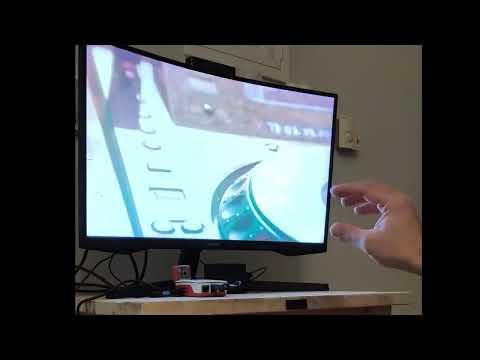
As the Raspberry Pi platform has evolved, it is now capable of real-time computer vision and interactive media applications. When paired with Raspberry Pi OS Lite, background services and GPU overhead are minimized, allowing more resources for MediaPipe hand tracking and low-latency video playback.
HandPi Kiosk is an open-source gesture-controlled video player designed to run headless on Raspberry Pi OS Lite.
It uses MediaPipe for hand tracking and MPV for fullscreen video playback.
The system auto-starts on boot, loops a MAIN video, and allows users to browse and control secondary videos entirely via hand gestures.
The project can be adapted for kiosks, exhibitions, and installations where touchless interaction is required.
Before You Begin:
This project was tested on:
- Raspberry Pi 5 (8 GB RAM)
- Raspberry Pi 400 (4 GB RAM)
Both systems were running Raspberry Pi OS Lite (64-bit, Bookworm) and provided reliable performance for MediaPipe.
Supplies

Hardware
- Raspberry Pi 5 or Raspberry Pi 4 / 400 ~ €60–€90
- USB webcam (Full HD) or Raspberry Pi Camera Module V3 ~ €25–€35
- HDMI compatible display ~ €80–€150
- Speakers (optional) ~ €10–€30
Software
- Raspberry Pi OS Lite (64-bit, Bookworm) — Free
- Python 3 — Free
- MediaPipe — Free / Open source
- MPV — Free / Open source
- OpenCV — Free / Open source
How It Works

- MPV starts in fullscreen on boot
- MAIN video loops continuously
- Gesture-controlled menu opens on demand
- Secondary videos play once, then return to MAIN
- No mouse, keyboard, or touch input required after installation
- The kiosk runs directly on the Linux console (no desktop environment).
Gesture Controls
.jpg)
MAIN video
- Thumb + Index (hold) → Open menu
- Thumb + Pinky (hold) → Next video
Menu
- Thumb + Middle (hold) → Scroll
- Thumb + Ring (hold) → Play selected
Playback
- Palm (hold) → Pause / Resume
- Thumb + Index (hold) → Return to MAIN
- Thumb + Pinky (hold) → Next video
- Thumb + Middle / Ring (hold) → Volume up / down
Gestures use stability frames, hold duration, and cooldowns to avoid false triggers.
Get the Code and File Layout
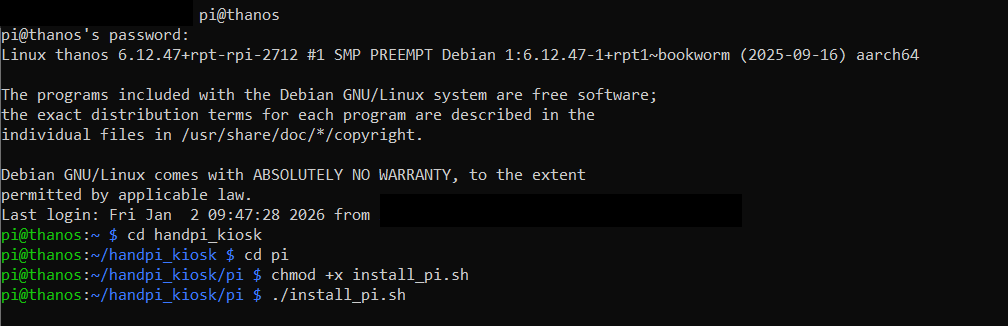
The full project is available on my GitHub repository (https://github.com/Thanos3G/HandPi-Kiosk). To install it, clone the repository on your Raspberry Pi and run the included install script.
Project Structure (Raspberry Pi)
All specific Raspberry Pi files are located in the pi/ folder:
Add Your Videos
- Place exactly one video in videos/main/
- → this is the looping MAIN video
- Place any number of videos in videos/secondary/
- → these are browsed and played via gestures
- Secondary videos are loaded alphabetically, so name them 01_, 02_, etc.
Once the install script has completed and videos are in place, reboot the Raspberry Pi.
The kiosk will start automatically.
Customization
.jpg)
- Gesture thresholds are defined in main_pi.py
- Overall it worked better with Full HD USB camera but Pi Camera V3 wasn't that bad
- Menu OSD is optimized for 1920×1080 but can be adjusted
- USB audio devices are preferred, HDMI is fallback
If the kiosk does not start, check the systemd service: