How to Build a Laser-Cut Magic Mirror Frame (3mm Plywood + Raspberry Pi)
by Fred2Nice in Workshop > Laser Cutting
33 Views, 0 Favorites, 0 Comments
How to Build a Laser-Cut Magic Mirror Frame (3mm Plywood + Raspberry Pi)


I wanted to build a Magic Mirror, but instead of buying a ready-made frame, I decided to design and fabricate the entire frame using laser cutting.
The mirror itself measures 620 × 375 mm, which is relatively large compared to the cutting area of most small diode lasers. My laser cutter uses a 10W diode, and the plywood sheets I had available were only 210 × 145 mm. That meant the frame had to be designed as a modular assembly made of many laser-cut parts.
To solve this, I built a small parametric web tool that generates the SVG files needed to cut the frame automatically. By entering the mirror size, material thickness and sheet size, the app generates all the parts required for the frame.
The final frame is made from 3 mm plywood, using finger joints and layered parts to create the rabbet and the structure. In total the project required 10 cutting sheets and about 56 pieces.
Behind the mirror, the electronics are simple: a Raspberry Pi 5 and an HDMI display, running the MagicMirror software to display time, weather and news through the two-way mirror.
This project is both a Magic Mirror build and a real-world test of the frame generator. I’m sharing the tool for free — www.framistik.com - it works well for my use case, but it may not fit every setup. Still, it may help others design laser-cut frames for mirrors, displays or similar projects.
In this guide I’ll show how the frame was designed, cut, assembled and integrated with the electronics.
Supplies
Materials
- Two-way mirror – 620 × 375 mm (6 mm thickness)
- Plywood sheets – 3 mm thickness (210 × 145 mm sheets used for this project)
- Wood glue
- Black cardstock or black paper (to block light behind the mirror)
- Wood stain (walnut or similar finish)
- Wood battens for screen support
Electronics
- Raspberry Pi 5
- HDMI display (USB powered monitor)
- HDMI cable (preferably ultra-flat to reduce space)
- MicroSD card for the Raspberry Pi
- Power supply for the Raspberry Pi
Tools
- Laser cutter (10W diode laser)
- Laser cutting software (LightBurn or similar)
- Clamps (for assembly and gluing)
- Sandpaper (medium and fine grit)
- Brush or cloth for wood stain
Optional
- Camera module (for face recognition or presence detection)
- Buttons or microphone for interaction with the mirror
- Wall mounting hardware
Designing the Frame With a Parametric Generator


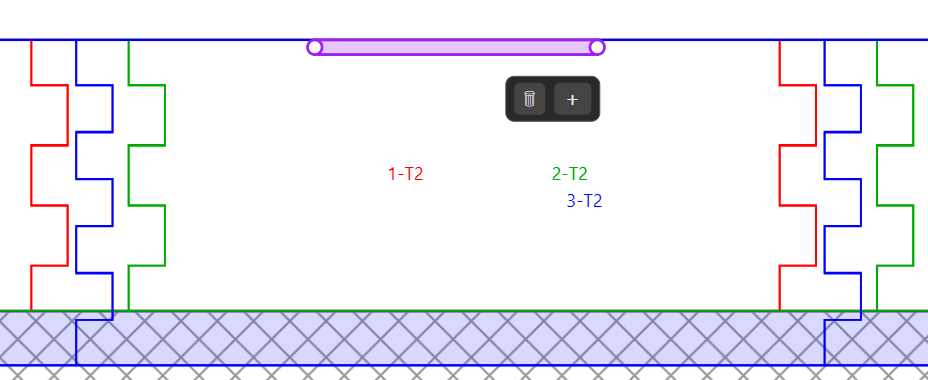
Designing the frame was actually the most complex part of the project.
Because the mirror measures 620 × 375 mm, and my laser cutter can only cut relatively small sheets (210 × 145 mm), the frame had to be designed as a modular structure composed of many interlocking parts.
To make this easier, I created a small web application that generates the frame automatically.
Instead of drawing every part manually in CAD, the generator allows you to define a few parameters:
- mirror width and height
- material thickness
- sheet size for laser cutting
- kerf / tolerance
- structural layers (rabbet, backing layers, sidewalls)
From these parameters, the tool generates:
- the complete frame structure
- all finger joints and rabbet layers
- SVG cutting sheets ready for the laser
For this project the generator produced:
- 10 SVG sheets
- about 56 individual parts
Each sheet can be directly imported into a laser cutting software such as LightBurn.
The goal of this tool was simply to save time and avoid repetitive CAD work, especially when working with parametric designs.
I originally built it only for this project, but I decided to make it public and free to use.
It works well for my needs, but since every laser cutter, material and workflow is different, consider it more as a helper tool or starting point rather than a universal solution.
In the next step we’ll see how the parts were cut using a 10W diode laser.
Laser Cutting the Parts
Once the frame was generated, the next step was to cut all the parts with the laser.
The generator produced 10 SVG cutting sheets, each containing several parts of the frame. These files were imported directly into the laser cutting software (in my case LightBurn).
The material used was 3 mm plywood, cut on a 10W diode laser. Because the sheets were relatively small (210 × 145 mm), the frame had to be split into many smaller parts that could later be assembled.
In total the project required around 56 pieces.
Cutting process
The SVG files were prepared so that all parts could be cut in a single pass per sheet. Finger joints and structural elements were already integrated in the design.
Before cutting the full set of parts, it’s a good idea to:
- run a small test cut to verify the kerf and fit
- check the focus of the laser
- ensure the plywood is flat and dry
Small variations in plywood quality can affect the final result.
Things that affected the cut
During the cutting process a few factors had a noticeable impact:
Laser focus
A slightly incorrect focus can reduce cutting quality, especially on finger joints.
Plywood quality
Some sheets had uneven glue layers, which made certain cuts harder.
Wood humidity
Moisture in plywood can change how clean the cuts are.
These issues are fairly common with diode lasers and inexpensive plywood.
Despite that, the result was good enough for assembly, and most parts came out clean and precise.
Once all pieces were cut, the next step was to assemble the frame structure and glue the layers together.
Assembling the Frame


.jpeg)
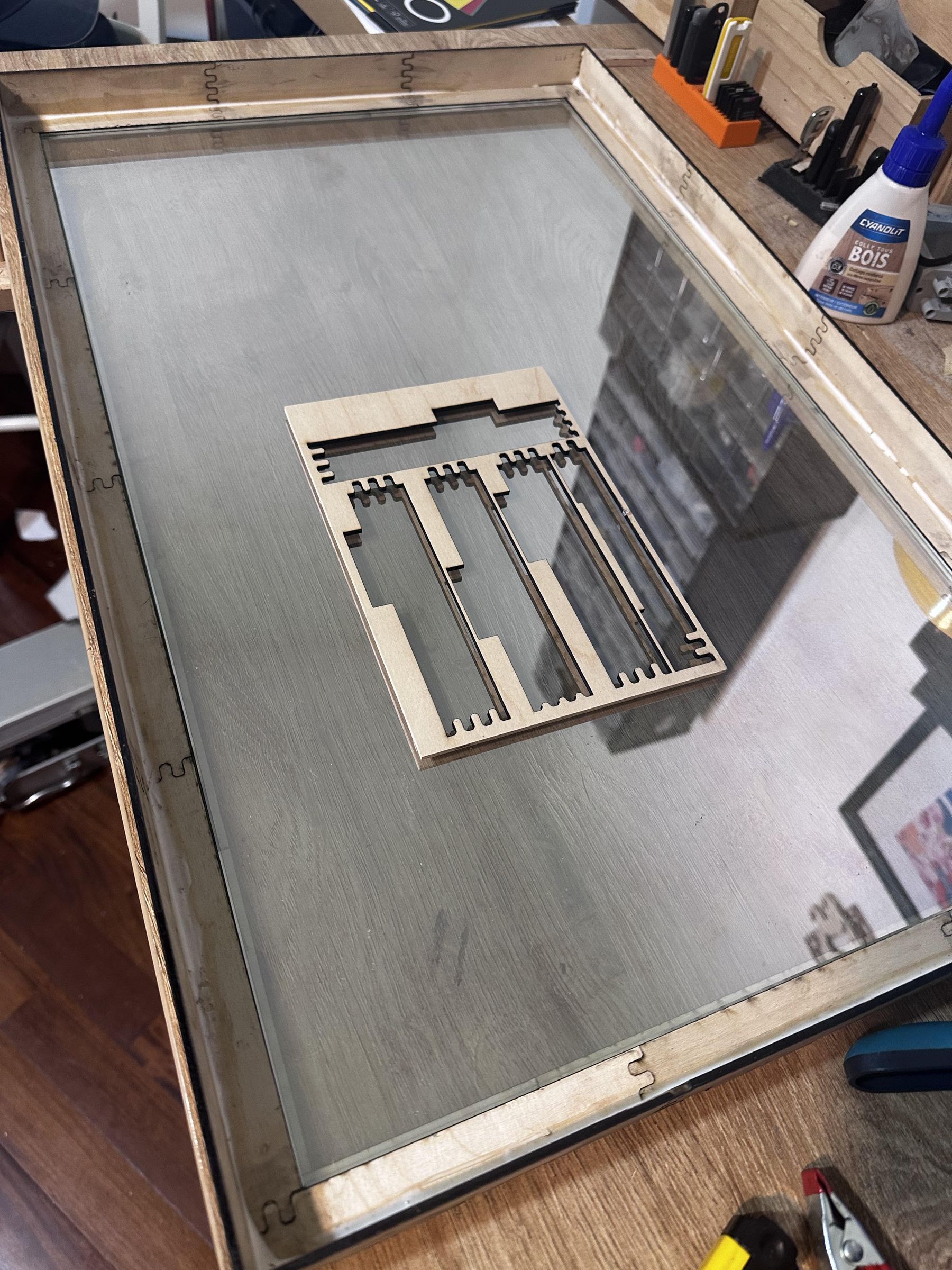
Once all the parts were cut, the frame could be assembled.
The structure of the frame relies on layered elements and finger joints. The mirror sits in a rabbet layer, while two backing layers provide the depth needed to accommodate the 6 mm thick mirror.
The sidewalls are made from single-layer pieces that connect to the rabbet structure using finger joints.
Dry fitting first
Before applying glue, it is highly recommended to assemble the parts dry to check that everything fits correctly.
This step helps verify:
- the fit of the finger joints
- the alignment of the layers
- the overall geometry of the frame
Even small kerf variations can slightly change how tightly the parts fit together.
Gluing the layers
Once the dry fit looks correct, the frame can be glued.
The process is straightforward:
- Apply wood glue on the contact surfaces.
- Assemble the rabbet and backing layers.
- Add the sidewalls.
- Use clamps to hold everything in place while the glue sets.
Clamping is important to keep the structure square and avoid small gaps between parts.
Lesson learned
One important lesson from this build:
do not rush the gluing step.
During my first assembly I glued some parts before properly clamping them, which introduced a small amount of play in the structure. It’s not visible once finished, but taking the time to clamp everything first would produce an even cleaner result.
Once the glue is dry, the frame becomes very rigid, thanks to the layered structure and the finger-joint connections.
The next step is to finish the wood and prepare the frame for the mirror and electronics.
Installing the Screen and Electronics


Once the frame is assembled and finished, the final step is installing the screen, the electronics, and preparing the back of the mirror.
The mirror is placed in the rabbet of the frame, and the display sits directly behind it. For this project I used a USB-powered HDMI monitor connected to a Raspberry Pi 5 running the MagicMirror software.
Because every screen has slightly different dimensions, the frame generator does not yet include a built-in mounting system for the display. Instead, the screen is simply held in place using small wooden battens fixed inside the frame.
Small support pieces can be cut and glued to the frame, allowing the battens to press gently against the screen and keep it properly positioned.
This approach is simple and flexible, and makes it easy to adapt the frame to different monitors.
The Raspberry Pi is then placed behind the screen and connected with:
- an HDMI cable
- the display power cable
- the microSD card containing the MagicMirror setup
Blocking light behind the mirror
To improve the two-way mirror effect, it is important to block any light coming from the back of the frame.
For this build, a sheet of black cardstock was fixed across the entire rear surface. This prevents light leaks that could otherwise make the mirror effect weaker.
Once everything is in place — mirror, screen, Raspberry Pi and the rear masking — the Magic Mirror is ready to run.
After powering the Raspberry Pi, the display becomes visible through the mirror, showing the information panels while still functioning as a normal mirror.
Final Result and Lessons Learned


After installing the mirror, the screen, and the Raspberry Pi, the Magic Mirror is fully operational.
Through the two-way mirror, the display shows useful information such as time, weather, and news, while still functioning as a regular mirror when the screen is dark. The effect works surprisingly well, especially once the rear of the frame is properly masked to prevent light leaks.
For a first build, the result is very satisfying. The frame is rigid, the laser-cut joints worked as expected, and the layered design made it possible to build a relatively large frame using only small plywood sheets.
What worked well
- The parametric frame generator made it much easier to design a complex structure.
- Finger joints and layered construction provided good rigidity.
- Even with a 10W diode laser, cutting all the parts was completely achievable.
- The modular design made assembly straightforward.
What I would improve next time
A few things could be refined in a future version:
Kerf and tolerances
Some joints could be slightly tighter for stronger friction fits.
Sidewall rigidity
Adding a second sidewall layer might make the frame even stronger.
Screen brightness
The display is a bit bright behind the mirror. Adjusting black levels will improve the mirror effect.
Integrated screen supports
In the future, the frame generator could include positioning elements for the display and electronics.
Frame generator
At first I thought building this frame generator would be relatively simple. In reality, it turned out to be much more complex than expected, even for me — and I’ve been a professional developer for more than 30 years 🙂
Handling all the parameters involved in laser cutting (material thickness, kerf, joints, layered structure, sheet layout, etc.) required quite a bit of work.
Since the tool was already developed for this project, I decided to clean it up and make it available for others to use.
If you’d like to try it, the generator used for this frame is available here:
But even in its current state, the Magic Mirror works well and was a great test of the frame generator in a real project.
If you build something similar, I’d love to see the result !