How to Design a Sculptural Chair


This project explores the design of a sculptural chair in Blender, combining curved metal construction, shaped wood seating, and soft comfort elements in a clear, step-by-step workflow.
Downloads
Supplies
Supplies – Digital
Blender (for modeling and visualization)
Supplies – Real-Life
Structural Materials
- Steel or aluminum tubing (main frame)
- Bronze or brass tubing (decorative elements)
Seat & Comfort
- Laminated bent birch plywood (seat base)
- Foam padding (comfort layer)
- Velvet fabric ( fabric comfort elements )
Finishing
- Wood stain or oil finish (dark tone)
- Metal powder coating or patina finish


Main Frame – Metal Construction (Defining the Shape)
I started by creating the main shape of the chair using basic curves. These curves allowed me to freely define the overall silhouette and proportions of the metal frame. I adjusted the curve points until the shape felt balanced, stable, and visually elegant.
Real-life production:
In real manufacturing, this stage would correspond to design drafting and bending templates, where the exact geometry of the metal tubes is planned before production begins.
Metal Construction (Tube Thickness)
After finalizing the curve shape, I went to Object Data Properties and increased the Depth value of the curves. This turned the curves into round tubes, giving the frame a realistic metal construction appearance.
Real-life production:
This represents the choice of tube diameter in real life. Metal tubes are selected based on structural strength and aesthetics, then bent to shape using pipe or CNC tube-bending machines.
Main Frame – Decorative Ornaments
In this step, I extracted selected parts of the metal frame and created decorative tube-like ornaments along the structure. These elements add visual rhythm and contrast, giving the chair a more refined and crafted feel.
Real-life production:
Such details are often created as separate bronze or brass elements, either cast or added as decorative sleeves, then welded or mechanically attached to the main frame.


Under-Seat Support Structure
For the under-seat support, I extracted lines from the seat area and converted them into curves. Using the same method as before, I added depth to the geometry to form structural tubes that support the seating surface.
Real-life production:
This corresponds to reinforcement bars placed beneath the seat in real chairs. These supports prevent sagging and distribute weight evenly across the frame.


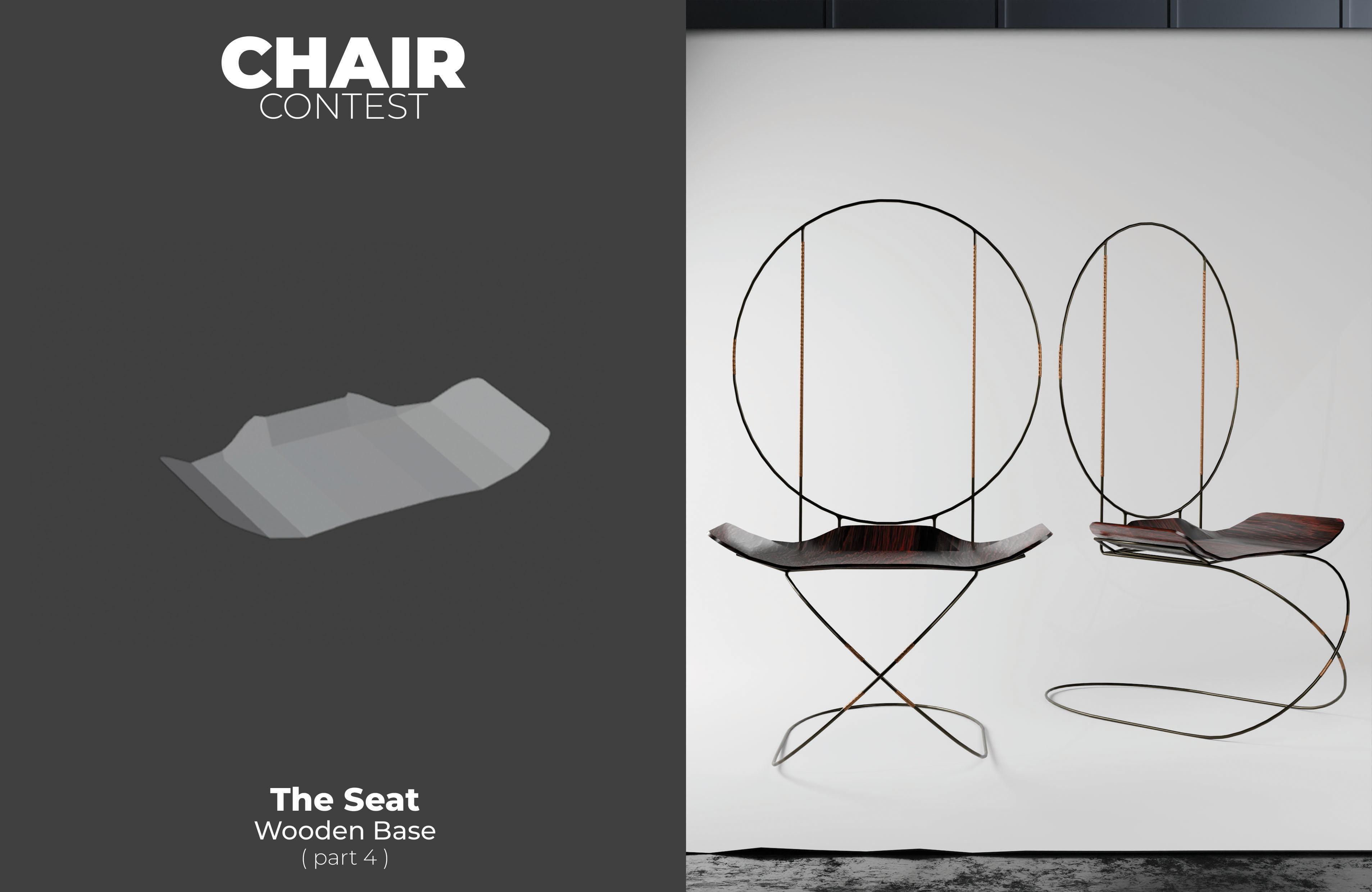

Seat – Base Shape
I started the seat by creating a basic plane. This plane represents the initial wooden seating surface and serves as the foundation for shaping the seat’s form.
Real-life production:
This step reflects cutting a flat wooden board that will later be shaped and refined for comfort and ergonomics.
Seat – Shaping and Refinement
I added more edge lines to the seat and began shaping it into a smooth, curved, and elegant form. The goal was to create a seat that looks comfortable while maintaining a light, sculptural appearance.
Real-life production:
In physical production, this would be done through CNC milling or steam bending, allowing wood to be shaped smoothly without losing strength.
Seat – Mirror Modifier
To maintain symmetry, I applied a Mirror Modifier. This ensured both sides of the seat remained perfectly balanced while allowing me to work efficiently on only one side.
Lower Backrest Transition
I created the lower backrest by extruding selected edges from the seat and adjusting them to form a smooth transition between the seat and the backrest area.
Real-life production:
This represents ergonomic shaping, where the seat naturally transitions into the reminding back support to improve comfort.
Seat – Surface Smoothing
I applied Shade Smooth to soften the surface and remove harsh shading, making the seat look more refined and natural.
Real-life production:
This step matches sanding and surface finishing, where rough edges are smoothed before final assembly.
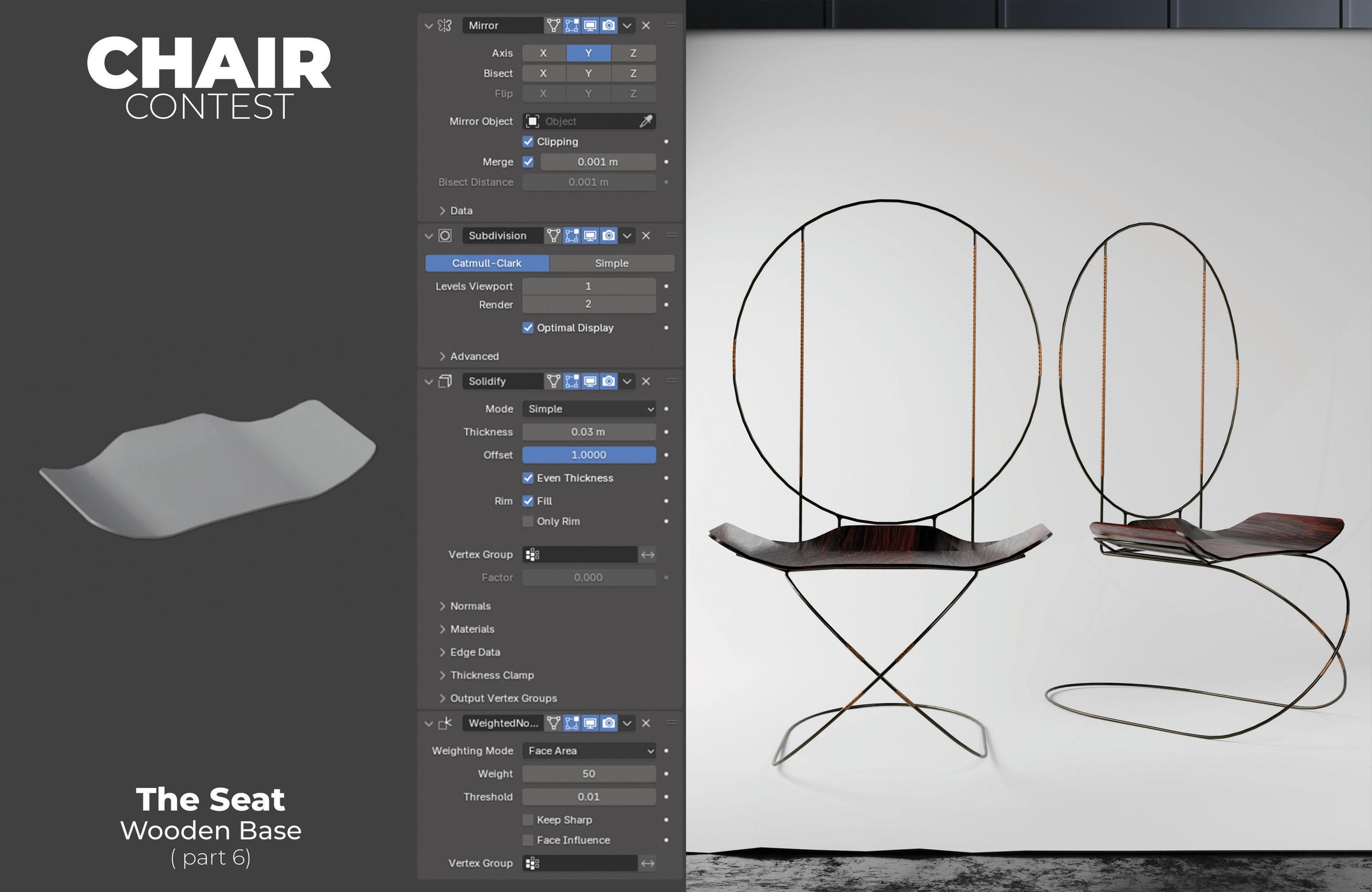
Seat – Subdivision and Thickness
I added a Subdivision Modifier to refine the shape further, followed by a Solidify Modifier to give the seat realistic thickness. I also applied Weighted Normals to prevent shading issues and maintain clean edges.


Comfort Layer – Pillow Seat
For the comfort layer, I extracted selected planes from the wooden seat and turned them into a cushioned surface. I extruded the geometry, added bevels to soften the edges, and applied Shade Smooth.
Real-life production:
In real life, this would be made from foam padding shaped to the seat, then covered with fabric or leather for comfort.


Ergonomic Backrest
I extracted selected parts of the metal backrest ring and connected them using Bridge Edge Loops to form the backrest structure. I adjusted and refined the geometry adding subtle movement to the surface so the fabric feels more natural and relaxed.
Real-life production:
The fabric is stretched and sewn onto the metal frame to form the backrest, creating a tensioned surface that provides comfort while remaining flexible and supportive.

Materials and Final Assembly
In the final step, I applied materials to all parts:
- Metal for the main construction
- Bronze for decorative elements
- Wood for the seat structure
- Velvet fabric for the seating and comfort areas
This brings the entire chair together visually and helps communicate how different materials interact in the final design.
Real-life production:
This stage represents final finishing and assembly, including powder coating or plating metal parts, upholstery work, and final quality inspection.