Modular Healing Centre Concept: Solar Panels, Ventilation & Structural Design in Fusion 360
by risciik in Design > 3D Design
11 Views, 0 Favorites, 0 Comments
Modular Healing Centre Concept: Solar Panels, Ventilation & Structural Design in Fusion 360

This project is based on designing a modern bus-like stop design using Fusion 360. The objective is to create a design that incorporates both modern architectural elements and strong details such as a layered roof, reinforced columns, solar panels for sustainability, and fans on the ceiling for ventilation.
The design was inspired by modern bus stops with elements of renewable energy while maintaining clean lines and minimalism. The focus was on maintaining symmetry while ensuring proper alignment and proportions to produce a realistic modular healing reconciliation center.
This is a step-by-step process on how to design a bus stop using Fusion 360 from scratch.
Supplies
Design and Modeling
- Computer
- Fusion 360
Fabrication
- Wood sheets (plywood or MDF)
- Laser cutter
- 3D printer (for detailed parts like fans)
- PLA filament (if 3D printing components)
Assembly
- Super glue
Creating the Platform and Roof Structure

I began by sketching a rectangle on the base plane to create the bottom platform of the healing center. After extruding it, I created the upper roof structure using two additional rectangular sketches.
To position the roofs correctly in 3D space, I used Offset Plane to raise the sketches to the desired heights. Each platform was given slightly different dimensions to create a layered architectural effect.
Adding the Mini Support Pillars Between the Roofs

In order to knit these two top roof sections together, I added a row of tiny vertical supports.
First, I drew one support shape on the underside of the upper roof. Then I used a rectangular pattern to repeat this shape evenly across the surface.
In order to ensure symmetry and spacing:
- I used midpoint constraints to center the initial sketch.
- I ensured equal spacing in the pattern.
- I made sure that the number of instances was even to ensure balance.
After this was all lined up, I extruded these supports downward “to object,” choosing the surface of the lower roof.
Designing the Benches

The benches were built directly on the base platform.
First, I created a long rectangular sketch centered along the length of the base and extruded it upward to form the seat foundation.
Next, On top of that, I created a slightly wider rectangular shape to form the seating surface.
The same process was repeated symmetrically to create the second bench.
To add extra structural stability, I also created connectors between the bottom sections of the benches where they are not easily visible.
- I sketched several narrow rectangles connecting the lower bench bases.
- Inside each rectangle, I added circular cutouts before extruding them, creating small vent-like openings.
- These connectors act as reinforcement between the benches while also allowing airflow through the structure.
Adding Solar Panels to the Roof

To represent solar panels, I created a new sketch directly on the top surface of the highest roof.
I drew one rectangle to represent a single panel. After dimensioning it properly, I used the Rectangular Pattern tool to duplicate the panel across the roof surface.
To keep everything aligned:
- The first panel was centered carefully.
- Equal spacing was applied between panels.
- The pattern was mirrored when necessary to maintain symmetry.
Once satisfied with the layout, I extruded the panels slightly upward to give them physical depth.
Creating the Main Structural Pillars


For the four corners:
- I created spline sketches forming curved, bent shapes resembling soft right-angle supports.
- Each curve extended both vertically and horizontally to create a flowing structural design.
In the center of the longer side near the benches:
- I added a narrow rectangular support for additional reinforcement.
After sketching all six support shapes, I extruded them using “To Object” and selected the underside of the bottom roof.
To ensure proper assembly in the real-life model, I extended the sketch to a bigger circular bases and extruded it slightly, to ensure proper gluing. On both the top and bottom.
This step gave the structure both visual character, practicality and structural realism.
Modeling the Hanging Fans

Three ceiling-mounted fans were added beneath the lower roof.
For each fan:
- I sketched a large circle on the roof underside.
- Inside it, I sketched a smaller concentric circle to create the protective guard ring.
- Both were extruded downward to form the housing.
- A very small center circle was extruded to create the motor hub.
To create the blades:
- I sketched one rectangle extending outward from the center hub.
- I used circular pattern to duplicate it at 90° intervals (4 blades total).
- I refined each blade by sketching a half-circle at the outer edge for a smoother appearance.
- Then I extruded and joined all components.
Finally, I copied the completed fan and aligned it so there were three evenly spaced fans under the roof.
Creating the Glass Panels

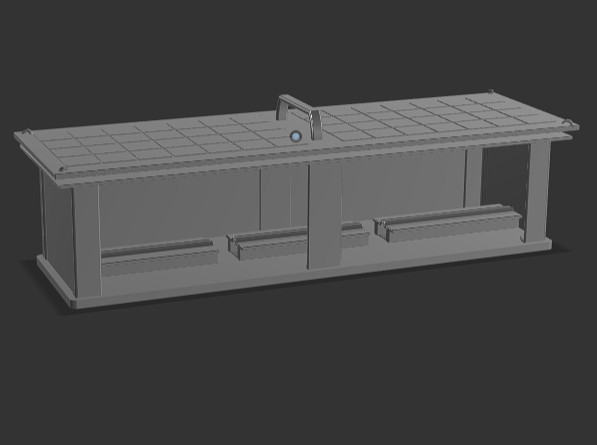
So, to enclose the structure and make it look more realistic, I added glass panels to the sides of the bus stop.
Firstly, I created a new sketch on the ground plane. I sketched rectangles that begin in one of the corner panel edges and extended it to the other edge.
I repeated the process for the following sides:
- Longer side of the bus stop
- Both shorter sides
Next, I selected the alignment and proceeded to use Extrude → To Object to select the underside of the lower roof.
Each glass panel was created as a new body to ensure it was kept separately from the structure.
Final Refinements and Finishing Touches

I added some small fillets to certain edges (1-2mm), like the corners of the roof, the benches, and the supporting parts. This helps to remove any harsh edges, making it look more realistic and asthetic.
Next, I used the Appearance tool to add material to the design. The structural parts have metallic colors, while the benches have wood colors, the panels have tinted glass, and the solar panels and fans have darker colors. This helps to make it look more realistic, like a real Rehabilitation area.
After making all the necessary changes, the design of the Modular Healing Centre is complete.
Bringing the Design Into the Real World


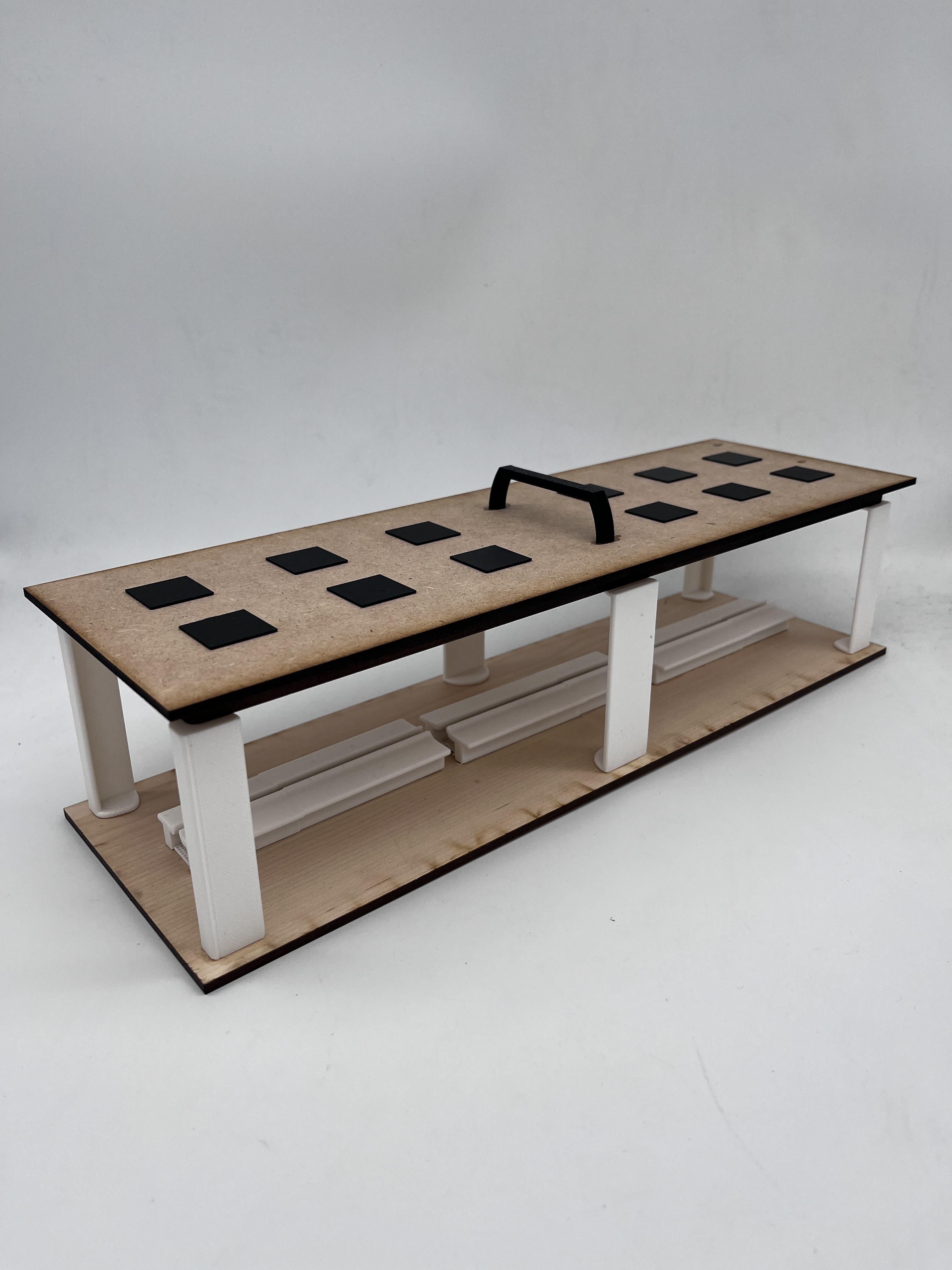

Once the digital model was complete, the next step can be to make the design into a physical model.
To make the main frame, wood sheets (Plywood/MDF) were cut using a laser cutting device. Other components like the fans in the ceiling and the solar panels could be made using a 3D printing device, which would provide better details and accuracy using PLA material.
After all the components were ready, the model was assembled using super glue to hold the components together, including the different levels, pillars, and other details of the model.
In the physical model, not all the details of the original Fusion 360 model are necessary. For example, the physical model had fewer solar panels and excluded the glass panels, which made the process easier while preserving the main components of the modular Modular Healing Centre.
Final Concept: Rapid-Deploy Modular Healing Centre

The design is for a quick-to-deploy modular healing center that is transportable and modular in hard to reach locations. The structure is designed with strong roof hooks to allow for helicopters to be able to bring it to locations inaccessible by ground transport, due to terrain or aftermath of a natural disaster.
The design is useful in disaster zones, especially in hot locations where houses and roads are damaged, and the structure will provide a rest or healing location for those traveling to and from relief locations. The solar panels will provide a self-sustaining power source for the operation of the ceiling fans and ventilation, providing a cool environment for those using the structure.
The structure is modular, and several structures can be combined to create a larger relief center, or a single structure can be placed along travel routes or near relief locations. The design concept illustrates how computer design tools such as Fusion 360 can be used to create useful structures that are sustainable, portable, and comfortable for those using the structures.
Well-designed small structures can make a big difference when people need help the most.