People's Chair


Making a People's Chair is fun and rewarding. All you need is some basic CAD knowledge and access to a laser cutter and/or CNC machine if you want to make it full sized. For this project, I made the chair at a full size, which can support an adult, but all the pictures are of a smaller version as the full sized one has not been CNCed yet. The final product is CNC ready with all the tolerances set correctly.
Supplies
- Basic CAD knowledge
- Access to a laser cutter/CNC machine
- Materials for laser cutter/CNC machine
- Masking tape
- Glue (wood glue works well but any glue will work)
Designing the Chair

The first thing I did was make a rough draft of what I wanted the chair to look like. On the second iteration, I went more in-depth so it would be more structurally sound and look nicer.
CAD the Chair
This is definitely the hardest step. I used Onshape because I have access to it and I know how to use it, but any CAD software will work. If you don't know how to use a CAD software, I would recommend messing around on it for a little bit of time to get used to it. There are five different pieces needed to make this chair. The chair pieces will end up being full sized, don't be alarmed. If you don't want them full sized, you can down scale them at the end. Do not try to scale them when making them because it will throw everything off.
Let's get to it!
Making the Main Pieces/side Pieces


This is the main part of the chair. It includes the two side pieces and the start to the middle piece.
- Draw the inside line of the chair.
- Then go around it with a 0.197in or 0.5cm offset. Make sure to go on both sides of the line.
- In Onshape, there is a sketch fillet tool. If the program you are using has one, fillet the top of the headrest, the connection from the backrest to the seating part, the connection from the seating part to the leg rest, basically anywhere that has a curve or you want to have a curve.
- Draw the supports that will connect the sitting part with the legs.
- Extrude the sketch, making sure to get the supports, but not the triangles created by them, to the thickness of your material. Mine was 0.5in.
- Scale the extruded part to make it as big as you want. The scale tool is in the transform tool in Onshape. I scaled it by 13.8938, which was the size I figured out would work well for a full sized chair. This made the total length around 55in.
- Fillet any areas that you want rounded that didn't already get rounded.
Good job! Now that the basic drawing of the main pieces is done, we need to add the cut outs for the slats.
- Make a sketch on top of the chair.
- Make a point where the fillets end. Look at the photo with red circles for help.
- At each point, make a line going towards the center of the chair. Make sure it is exactly 90°. Make the line the thickness of the material plus your tolerance. Mine was 0.005in.
- Make two rectangles on each side, making sure that they are the width of your material thickness plus tolerance. The length should be 6.1in.
- Connect the rectangles with the lines you drew two steps ago. Just make a line from the rectangles to the end of the line. Also connect the two rectangles. If possible, make these lines construction lines so they won't cause problems later.
- Find the equal tool and set all the lines equal to each other. Sometimes it doesn't work. If that happens, try setting all the lines equal to the first line.
- If you didn't already, repeat steps 4-6 on the backrest, sitting, and footrest areas.
- Extrude remove the rectangles we just made. There should be 6 of them in total.
The final thing we have to do is make the cutouts for the cross supports on the bottom. If you don't plan on sitting on the chair or don't want to do this step, you can skip it.
- Make a sketch on top of the chair.
- On the bottom piece, make three rectangles relatively evenly spaced. There's no need to measure the spacing, just eyeball it. The top of the rectangles need be on the top of the bottom cross piece. The length is half of the bottom cross piece, for mine that was 2.971159in or 7.54674386cm. The width is the width of your material. If this is confusing, look at the last three photos, those should help.
- Now extrude remove the three rectangles.
Nice job! You have completed the base for the chair. Everything else is at least a little easier than this.
Making the Middle Piece


The hinge has a headrest shaped like a head. To make sure that the headrest doesn't just snap off we need to have a special support that makes the middle chair piece a little different. Since there is only one small change needed, this step is quick and easy.
- In a different part studio or another document, copy the base chair into this part studio. In Onshape, you can use the derived tool.
- Make a sketch on the top of the chair.
- Draw a rectangle that goes past the top of the chair. Connect it back to the first cutout. In Onshape, you will have to draw the rectangle with lines because the rectangle tool doesn't draw rectangles off axis.
- Extrude remove the rectangle.
Congrats, you have now completed all of the main pieces!
Making the Hinge


The hinge was the most annoying piece to prototype, but is definitely the coolest piece. I had to figure out how to make a pattern that bends, what the correct length was, and make sure that it bent enough. Lucky for you, I did all of that so you only have to follow along.
- In a new part studio or document, make a rectangle that is 20in wide and 80in tall. Make a line centered from the top of the rectangle that is 3.333in long. From the top of the line, make a circle with a radius of 5in.
- Extrude the sketch to the thickness of your material.
- Make a new sketch on top of the extrude. Make the hinge pattern, it will end up looking like the second photo. Draw four lines each 0.5in apart. On the second line, draw three squares 0.5in by 0.5in, one all the way to the left, one centered in the middle, and one all the way to the right. On the fourth line, draw two more squares, one 4.75in from the left side and one 4.75in from the right side.
- Extrude remove the gaps you created. Look at picture three for help.
- Linear pattern extrude 2, direction top plane, distance 2in, instance count 37. All of those most be correct otherwise something will fail. You will notice that part of the bottom was not patterned, this is intentional.
- Make a sketch on top of the hinge. Use the use tool to project the lines of the pattern to this sketch. It may give you a message saying that some external faces are missing, just ignore it. Draw a line at the last pattern making sure not to include the two squares coming down.
- Extrude remove the bottom pattern less part.
Making the Slats


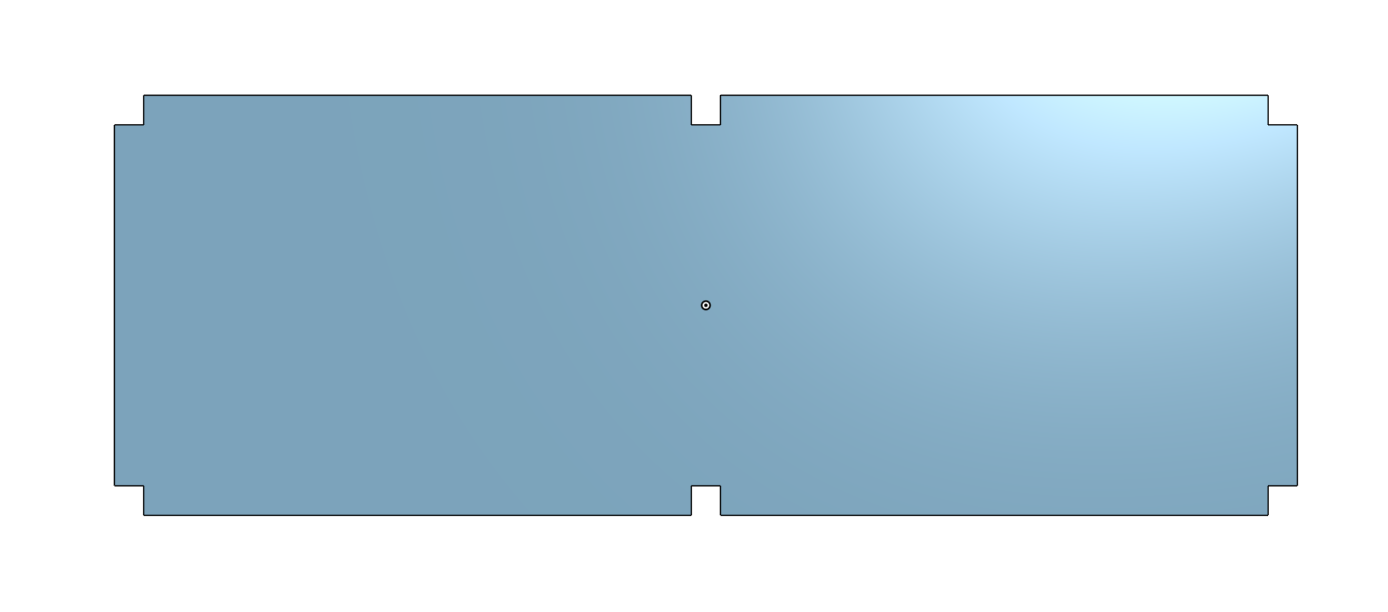


These are probably the easiest pieces to make. The first one is basically just a rectangle and the second one is an upside down T.
The basic slats:
- Open a new part studio or document.
- Draw a rectangle that's 20in wide and 6.1in in height.
- Extrude that rectangle to the thickness of your material.
- Make a new sketch on the top of the extrude.
- Draw two rectangles, one on the top and one on the bottom. The rectangles are 19.01in in length and 0.5in in height. Make sure to offset the rectangle by the material thickness, which means that if your material thickness is not 0.495in, your rectangle length is not going to match mine.
- Extrude the two rectangles to your material thickness.
- Make a new sketch on top of the extrude.
- Make two rectangles that are 0.5in in height and your material thickness in width. Make sure that the middle of the rectangle is lined up with the middle of the extruded rectangle.
- Extrude remove the two rectangles.
The headrest support slats:
- In a new part studio or document, copy or derive the basic slat.
- Make a sketch on the top of the part.
- Draw a rectangle to cover up one of the middle holes we made earlier.
- Extrude the rectangle. Make sure the extrude is set to add, merge with all, and the material thickness for depth.
- On the edge of the slat, make a rectangle that is 4in wide and the material thickness tall. Make sure this is on the side that we covered the hole in earlier. Also make sure the the center of the rectangle is centered with the slat center.
- Extrude the rectangle with a depth of 13.5in.
- Fillet the connection point between the two pieces. I did a 4.5in radius.
- Fillet the top. I did a 2in radius so it would be rounded in a half circle.
Good job! There's only one piece left to make!
Making the Bottom Braces


These are optional. They are mainly used for crossbody support for a full sized chair. If you didn't put the cutouts at the bottom of the chair, then you can't do this step and just skip ahead to the next one.
- In a new part studio, draw the first picture. To break it down, start with a 30.952in by 5.481in rectangle. Draw a line going down to the bottom 5.481in into the rectangle. Draw another line that touches the bottom that is 5.481in into the rectangle from the other side. Draw one more line that is in the middle of the rectangle. On the line furthest the the left, draw a rectangle that goes to the right and only halfway up. The width of the rectangle will be your material thickness. Do the same thing for the middle line, but making sure the rectangle is centered on the line and on the rightmost line making sure the rectangle is on the left side of the line.
- Extrude it to the thickness of your material.
- Fillet the top corners. I did 5.481in radius to match with the cutouts.
Way to go! You have finished all the pieces! If you plan on laser cutting, you can skip ahead to step 9. If you plan on CNCing, continue with step 8.
Getting It CNC Ready


If you want to CNC the chair, you need to add singlets to all the connection points. This is because the CNC router bit is round so it can't make square corners. To counter this, we add singlets, which is where the router bit goes past the connection point slightly to make it a 90°. This isn't that hard, just tedious and annoying to do on every connection point.
- Pick a piece, any piece to start with. I chose the main piece.
- Make a sketch on the top of the piece.
- Where the cutout ends, make square 0.138in on both sides. Refer to picture one.
- Do this to all the cutouts.
- Extrude remove the squares.
- If you want it to look nicer, you can fillet the corners.
- Repeat step 2-6 on all the pieces, making sure to singlet all the connection points.
Now your chair is CNC ready!
Exporting


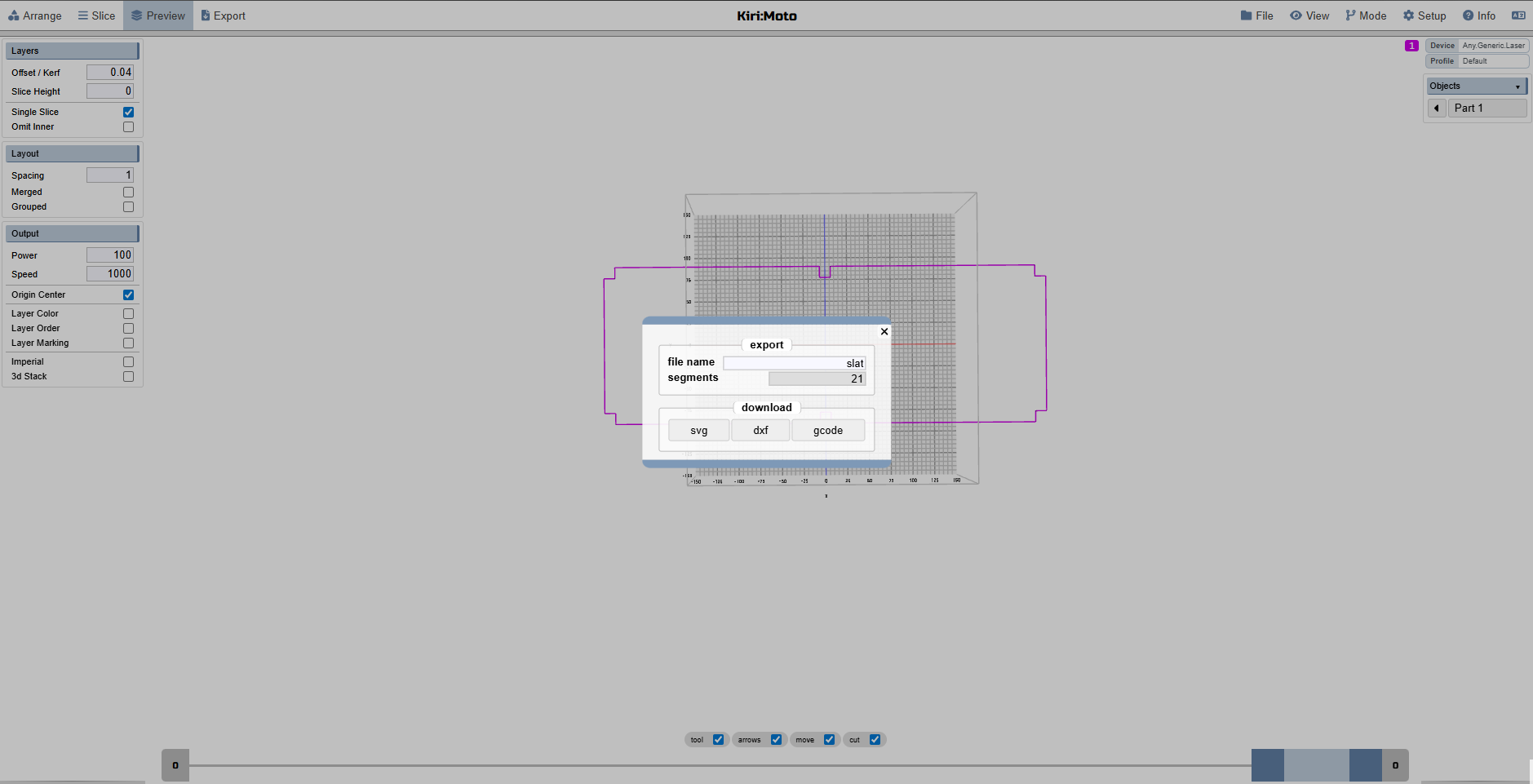
If you want your chair to be smaller, now is the time. Just scale every piece by the same amount. You will have to do some math to get a size that you want. I believe in you. Then follow the steps to export. I do not know that much about laser cutting and exporting to laser cutters, so if you know what you're doing, disregard my steps and instructions, this is just what worked for me.
For exporting in Onshape:
- Get the Kiri:Moto extension. Go to the home page and click on app store in the top right corner, from there subscribe the Kiri:Moto. It is free, they just call it subscribing.
- Then in your document, click the plus and then applications. Kiri:Moto should show up, click that.
- Import one of the pieces. The import button is in the top right. The settings for mine were offset:0.04, slice height:0. Yours may be different.
- Go to preview to make sure everything looks correct and then export and download as a svg. It's a good idea to name the pieces so you know what is what.
- Repeat this for all the pieces, making sure that you delete the last piece before putting the new one in.
For exporting from another CAD software:
- The best way is to look it up specifically for the software you're using. A general thing to try is to see if you can directly export to svg since some software lets you do that.
Now we have to get the files to the laser cutter. I used Adobe Illustrator to put the svg file into and then send it out to the laser cutter. There's definitely other ways to do this, just this is the way I know how to. You need two side/main pieces, one middle piece, five basic slats, one headrest support slat, three bottom braces, and one hinge. You can copy them in Adobe Illustrator so you don't have to download each one multiple times. Send the files to the laser cutter and sit back and smell the amazing fumes.
If you are CNCing the chair, I can't help you. If you have a CNC, you should know how to use it or know someone that does, so ask them or look it up. Sorry.
All of the files here are for the full sized chair. You should be able to import them and resize them, although I don't know where or how.
Finished Product


Now here's the fun part, putting it all together! I sadly don't have any photos of putting it together because I got too excited and forgot to take photos, but don't worry, by this point you should know how it goes together, and if not, I'll guide you through it.
- Slide the bottom braces into place, making sure the middle chair piece is in the middle. No need for glue, these just help keep the chair aligned.
- Glue the slats on. There's no order as long as the top is the headrest support slat. I would wait a little bit for the glue to dry before the next step.
- Glue the hinge. Start with the top, lining it up with the top of the headrest support slat. Put a line of glue down the edge on both sides. It is helpful to have a second person for this step. Tape the hinge to the base in all the critical spots, like next to the curves.
- After the glue dries, take the tape off and you have created yourself a People's Chair!!!!!!
Good luck making your very own People's Chair and thank you for reading.
Credit to my teammates who helped design the chair.