RP2350 GPIO Input Leakage Current Measurement on Pi Pico 2 W Using Kitronik Inventor's Kit for Raspberry Pi Pico
by kevinjwalters in Circuits > Microcontrollers
49 Views, 0 Favorites, 0 Comments
RP2350 GPIO Input Leakage Current Measurement on Pi Pico 2 W Using Kitronik Inventor's Kit for Raspberry Pi Pico

The Raspberry Pi Pico 2 was launched in August in 2024 using the new RP2350 microcontroller. This microcontroller has a GPIO input flaw which was discovered when it was tested a month before release by a hardware designer upgrading from the RP2040. This was noted in the datasheet and became Errata RP2350-E9.
The flaw can be demonstrated with just a button using a 47k pull-down resistor on a GPIO digital input - the value remains high after the button is released. It can be examined more closely by varying a voltage through a suitable resistance to a pin and measuring the voltage drop across the resistor. The Kitronik Inventor's Kit for the Raspberry Pi Pico can be used with a Pi Pico to test a Pi Pico 2 measuring this problematic leakage current. The RP2040 and RP2350 do not have digital-to-analogue converters (DACs) but high frequency pulse-width modulated (PWM) output can be smoothed with a capacitor to provide reasonable quality analogue output.
A program written in CircuitPython was used on a Pi Pico W to test a Pi Pico 2 W and produce CSV output for plotting. A Seeedstudio Grove 4-Channel 16-bit ADC featuring the Texas Instruments ADS1115 was used for a more accurate second opinion on the voltage drop. A revised version of the software uses a simple technique to improve the accuracy of the measurements by briefly disabling the PWM to remove the associated ripple.
The version, in silicon terms a "stepping", of the microcontroller with this flaw is A2. This has been fixed in the A3 and A4 revisions of the chip. When these are available the test will be repeated and the results added to this article for comparison...
If Picos with attached headers are used then no soldering is required.
Supplies
- Kitronik Inventor's Kit for the Raspberry Pi Pico: Kitronik | CPC Farnell
- Signal Generator: Pi Pico or Pi Pico W (with headers) - latter was used for this article: DigiKey | CPC Farnell
- Board Under Test: Pi Pico 2 or Pi Pico 2 W (with headers) - latter was used for this article: Digikey | CPC Farnell
- Optional: Texas Instruments ADS1115 (take care to avoid fakes)
- Seeedstudio Grove - 4-Channel 16-bit ADC(ADS1115) - used in this article: seeed studio | PiHut
- ADS1115 16-Bit ADC - 4 Channel with Programmable Gain Amplifier - STEMMA QT / Qwiic - features in the Fritzing diagram: PiHut | DigiKey
- Suitable cables for connecting to a breadboard.
- Optional: electrolytic 100uF capacitor - a better choice of capacitor, 10uF-47uF okay too.
RP2350 GPIO Digital Input Issue - Errata 9 Recap
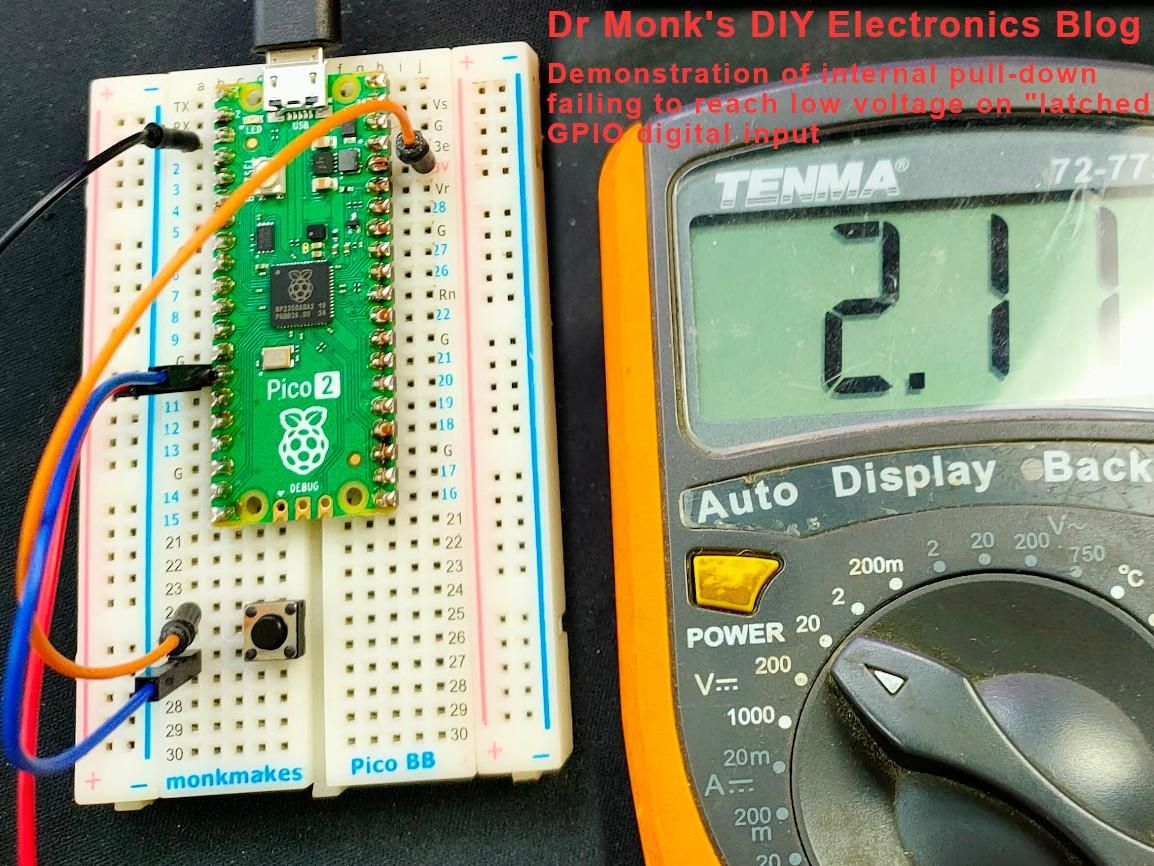
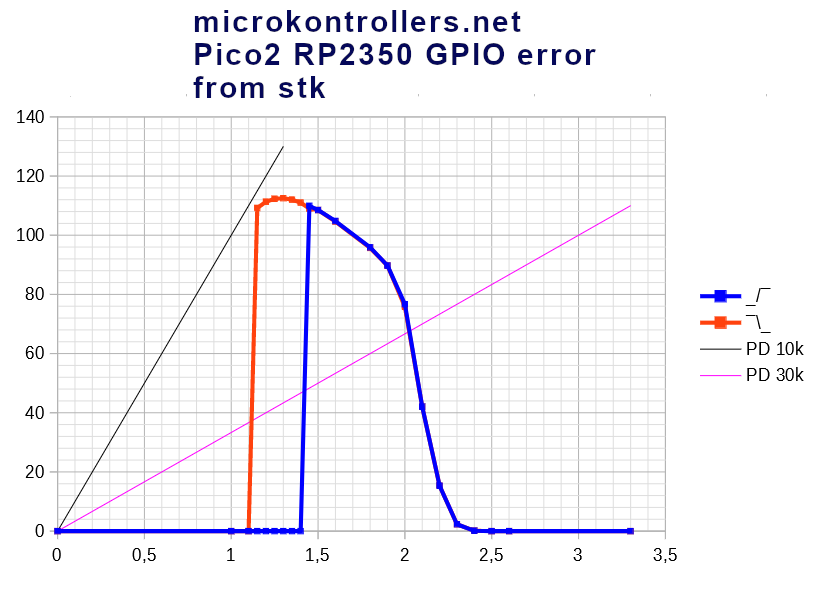

The RP2350 GPIO flaw was discovered during the development of a new Bus Pirate board just before the RP2350 was generally available and documented in the errata in the datasheet. Subsequently numerous people stumbled across this flaw when trying to use pull-down resistors, capacitive touch with resistors to ground and devices/components with high impedance or very high frequency outputs. The errata description was improved to reflect all of the conditions that trigger it.
The plot from the datasheet (third image above) shows the leakage current including how it's slightly worse with the schmitt trigger enabled. This plot will be for a rising voltage. The second image shows a plot from a post on mikrocontroller.net for both rising voltage in blue and falling voltage in red.
RP2350-E9 Errata
This is the first half of the description in the datasheet.
For GPIO pads 0 through 47:
Increased leakage current when Bank 0 GPIO pads are configured as inputs and the pad is somewhere between VIL and VIH (the undefined logic region).
When the pad is set as an input (input enable is enabled and output enable is disabled) and the voltage on the pad is within the undefined logic region, the leakage current exceeds the standard specified IIN leakage level. During this condition the pad can source current (the exact amount is dependent on the chip itself and the exact pad voltage, but typically around 120μA). This leakage will hold the pad at around 2.2 V as that is the effective source voltage of the leakage, and can only be overcome with a suitably low impedance driver / pull.
The pad pull-down (if enabled) is significantly weaker than the leakage current in this state and therefore isn’t strong enough to pull the pad voltage low.
Driving / pulling the pad input low with a low impedance source of 8.2 kΩ or less will overcome the erroneous leakage and drive the voltage below the level where the leakage current occurs, so in this case if the pad is driven / pulled low it will stay low.
This description doesn't make it clear to non-experts that this issue does not affect the GPIO when used as an analogue input.
CircuitPython Warning From digitalio
Warning
digitalio.DigitalInOut on Raspberry Pi RP2350 A2 stepping has some limitations due to a GPIO hardware issue that causes excessive leakage current (~120uA). A pin can read as high even when driven or pulled low, if the input signal is high impedance or if an attached pull-down resistor is too weak (has too high a value).
To prevent this problem, drive the the input pin with a strong signal that can overcome the leakage current. If you need to use a pull-down, connect a strong external pull-down resistor that is 8.2k ohms or less.
The internal pull-down resistor (digitalio.DigitalInOut.pull=digitalio.Pull.DOWN) is not strong enough, and is not useful.
Typical push-pull outputs from attached peripherals or other microcontrollers will drive input pins adequately, with no resistor needed.
There is no problem when pull-ups are used, even weak ones. Using the internal pull-up resistor (digitalioDigitalInOut.pull=digitalio.Pull.UP) will work fine.
For more information, see the RP2350-E9 erratum in the RP2350 datasheet
CircuitPython Note in touchio
Limitations: touchio on RP2350 must have a pull-up resistor to 3.3V instead of ground and set the pull=Pull.UP parameter when constructing a TouchIn object, due to GPIO hardware limitations.
Kitronik Inventor's Kit for Raspberry Pi Pico


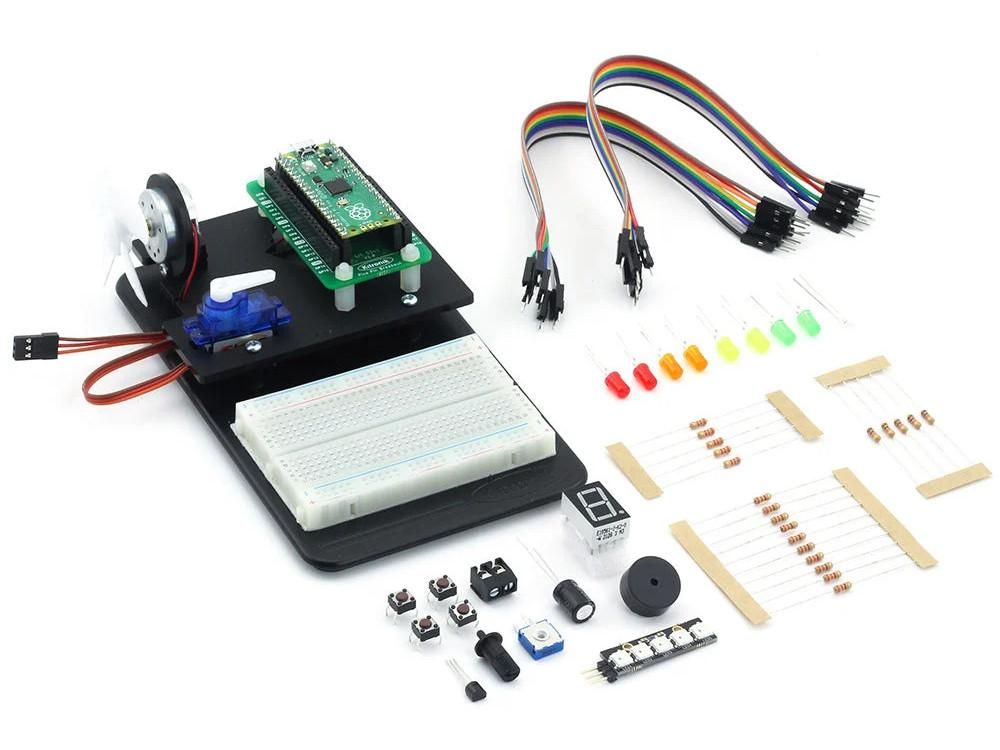
Kitronik produce three Inventor's Kits for the
- Arduino (UNO),
- BBC micro:bit (V1 or V2) (MakeCode or MicroPython) and
- Raspberry Pi Pico.
These affordable kits provide an introduction to physical computing using electronic components and a breadboard. The kits come with a detailed booklet describing ten experiments. The booklet is written in English, some kits are available in Dutch, French, German and Spanish.
These kits can also be used for simple prototyping and other projects like this one where the breakout board and breadboard provide a convenient way to connect other boards and sensors.
Testing Setup


The hardware setup is simpler than it looks. The top board is a Pi Pico W** acting as a Signal Generator (SG) and also performing analogue measurements. It generates an analogue output using PWM on GP10 with two external resistors and a capacitor acting as a low-pass RC filter to smooth the pulses into a steady voltage with a small amount of ripple. This then passes through another 10k resistor which is acting to increase the impedance of the output on its way to the input pin of the Pi Pico 2 W, the Board Under Test (BUT).
The voltage is measured either side of the "impedance" resistor. The voltage difference allows the the current flow to be easily calculated. These two measurements are performed by the RP2040 on the Pi Pico W and the (optional) TI ADS1115. The RP2350 on the Pi Pico 2 W also reads the digital or analogue value of the pin which is connected to one side of the resistor.
Connectivity and Passive Components
The wire connections for the Pi Pico W and Pi Pico 2 W are listed below.
- SG VBUS (red) and GND (black) to BUT VSYS and GND.
- SG 3V3(OUT) (red) and GND (black) to top rails on breadboard.
- Breadboard rails to ADS1115 VCC (red) and GND (black).
- SG GP15 (yellow) and GP14 (white) to ADS1115 SCL and SDA.
- SG GP10 (orange) to breadboard lower row 30. This is the PWM output.
- SG GP26 ADC0 and ADS1115 A0 (purple) to breadboard upper row 25.
- SG GP27 ADC1 and ADS1115 A1 (brown) to BUT GP26 (row 10)
- SG GP16 to BUT GP17 (blue), SG GP17 to BUT GP16 (green). This pair is for the UART serial communication. Note: the crossover between pins here.
- Breadboard link between lower row 26 and upper row 25 (grey).
There are a pair of 220ohm resistors in parallel on the breadboard between lower rows 26 and 30. There is a 10k resistor*** acting as an impedance for the output between upper row 26 and row 10 (BUT GP26 ADC0). There's a 470uF electrolytic capacitor between the breadboard ground rail and lower row 26.
A multimeter was used to check the resistance of the 10k resistor out of circuit, it read 9.91k.
The 470uF capacitor isn't ideal for this but it's the only one available in the kit. If you have a 100uF capacitor this is a better choice and works well with a single 220 ohm resistor.
** The diagram uses a breadboard for the top Pi Pico W as the Fritzing drawing for the Kitronik breakout board wasn't available.
*** Other combinations of 10k resistors may be interesting to test, e.g. two in series for 20k, two in parallel for 5k.
Installing CircuitPython and Software

If you are not familiar with CircuitPython then it's worth reading the Welcome to CircuitPython guide first.
- Install the latest version of CircuitPython (10.1.3 on February 2024) from https://circuitpython.org/ - this process is described for a similar RP2040-based board in Introducing Adafruit Feather RP2040: Installing CircuitPython. Ensure the correct file is used which matches the board exactly, for this article these two were used.
- adafruit-circuitpython-raspberry_pi_pico_w-en_GB-10.1.3.uf2
- adafruit-circuitpython-raspberry_pi_pico2_w-en_GB-10.1.3.uf2
- Verify the new installation by connecting to the serial console over USB. The REPL prompt shows the version number. The version can also be checked by inspecting the boot_out.txt file on the CIRCUITPY drive.
- Install this library from a recent bundle from https://circuitpython.org/libraries into the lib directory on CIRCUITPY:
- adafruit_ads1x15 - this is only required on the Signal Generator
- Download the example program to CIRCUITPY by clicking on the Raw button on the page and then Save link as...
- on pico-input-tester.py for Signal Generator
- on pico-input-read.py for Board Under Test.
- Rename or delete any existing code.py file on CIRCUITPY, then rename pico-input-tester.py or pico-input-read.py to code.py. This file is run when the CircuitPython interpreter starts or reloads.
The versions used for this article were:
- CircuitPython: 10.1.3
- CircuitPython library bundle: adafruit-circuitpython-bundle-10.x-mpy-20260214
The V1.0 Software

Signal Generator Program
The CircuitPython Signal Generator (SG) program is a straightforward one. It creates a triangle wave by ramping the duty cycle up and down on a PWM output and measures the voltages either side of the "impedance" resistor which can be used to calculate any (leakage) current flowing across it. The Board Under Test (BUT) has its GPIO set to either a digital input (without use of internal pull-up/pull-down resistors) or an analogue input. The input values are passed across the serial connection. The software waits for 5 RC time periods to let the capacitor voltage stabilise. For the 470uF capacitor from the Inventor's kit this is around half a second which means the tests are very slow when the duty cycle increments/decrements are small.
For the RP2040 and RP2350 ADCs the measurements are arithmetic means calculated by taking 32 samples and discarding the top 2 and the bottom 2 values based on the assumption they may be outliers caused by internal noise.
The PWM output after smoothing and passing through the "impedance" resistor is show above in cyan, the yellow trace is just a temporary addition to the program to trigger the oscilloscope. The duty cycle was set to 30% for this capture. The ripple on the signal can be seen as around 30mv peak to peak.
If you change the resistor or capacitor in the RC filter then you should update the values at the top of the program.
Board Under Test Program
A simpler CircuitPython program runs on Board Under Test. It waits for commands sent over a serial connection (UART) and responds to those with either a digital or analogue input reading. This allows the SG program to both control the GPIO input type and retrieve the input value.
Example output
The output from the signal generator program starts with a header row and then continues as each set of measurements are made for a particular duty cycle value. The duty cycle values are ramped up and down in a triangle waveform fashion with the step size changing between cycles of the triangle waves.
- start_ns - the start time (from the SG) in nanoseconds.
- test_idx - the number of the test starting at 1.
- dc_value - the CircuitPython pwm output duty cycle value, range is from 0 to 65535.
- int_adc_smout - SG (RP2040) measurement of smoothed pwm output.
- ext_adc_smout - ADS1115 measurement of smoothed pwm output.
- int_adc_res_smout - SG (RP2040) measurement of smoothed pwm output on other side of resistor at BUT GP26.
- ext_adc_res_smout - ADS1115 measurement of smoothed pwm output on other side of resistor at BUT GP26.
- input - the type of test, on the BUT CircuitPython's analogio.AnalogIn is used for A and digitalio.DigitalInOut is used for D. This upper-case character should really be output with double quotes.
- rem_adc_res_smout - BUT (RP2350) input value retrieved over the inter-board serial connection, either 0 or 1 for digital or 0.0 to 65535.0 for analogue. The use of adc in this header name is misleading.
V1.0: Testing an RP2350 A2 Digital Input on Pi Pico 2 W


The plots of the results with the RP2350 GPIO set to a digital input (internal pull-up and pull-down not enabled) are shown above. The plot on the left is the calculated current across the "impedance" resistor using the Pi Pico W's RP2040 ADC - negative values indicate the pin is sourcing (leaking) current rather than sinking it. The plot on the right uses the 16bit TI ADS1115 which has an internal precision voltage reference. Both plots show the rising values in red and the falling ones in blue, both use a simple calculation using the duty cycle to determine the applied voltage. The RP2040/RP2350 ADC values are converted to voltages simply by multiplying by 3.3/65535.0, i.e. there was no attempt at line fitting to minimise Integral Nonlinearity (INL) errors.
The green areas are the voltages within the range where the datasheet specifies a low (up to 0.8V) and high digital value (2.0V and above) for a digital input then the microcontroller is powered at 3.3V.
The 10k "impedance" resistor here doesn't actually stop the input from going back to a low state after it's been driven high. It goes high around 1.1V but only goes back to low at 0.3V which does not match the specification. The datasheet specifies a maximum input leakage current of 1uA which is clearly breached here.
The Pi Pico 2 W was reset at the start of this testing by removing the power briefly.
V1.0: Testing an RP2350 A2 Analogue Input on Pi Pico 2 W


This pair of plots are the same as the previous page but with the RP2350 GPIO set to an analogue input.
The ADS1115 show values very close to 0uA and well within +/- 1uA. There's a curious negative period up to about 0.6V.
The RP2040 view of the same data looks rather different with a lot of expected noise but there is a clear trend going from about -1.5uA to 6uA. This could be investigated further to see if this can be improved or corrected to get closer to the ADS1115 values which are more likely to be the accurate ones. This is likely to be related to the effective input impedance on the RP2040 ADC but this does not explain the negative values from 0.0 to around 0.8V.
V1.0: Looking for the RP2040 Errata 11 ADC Issue


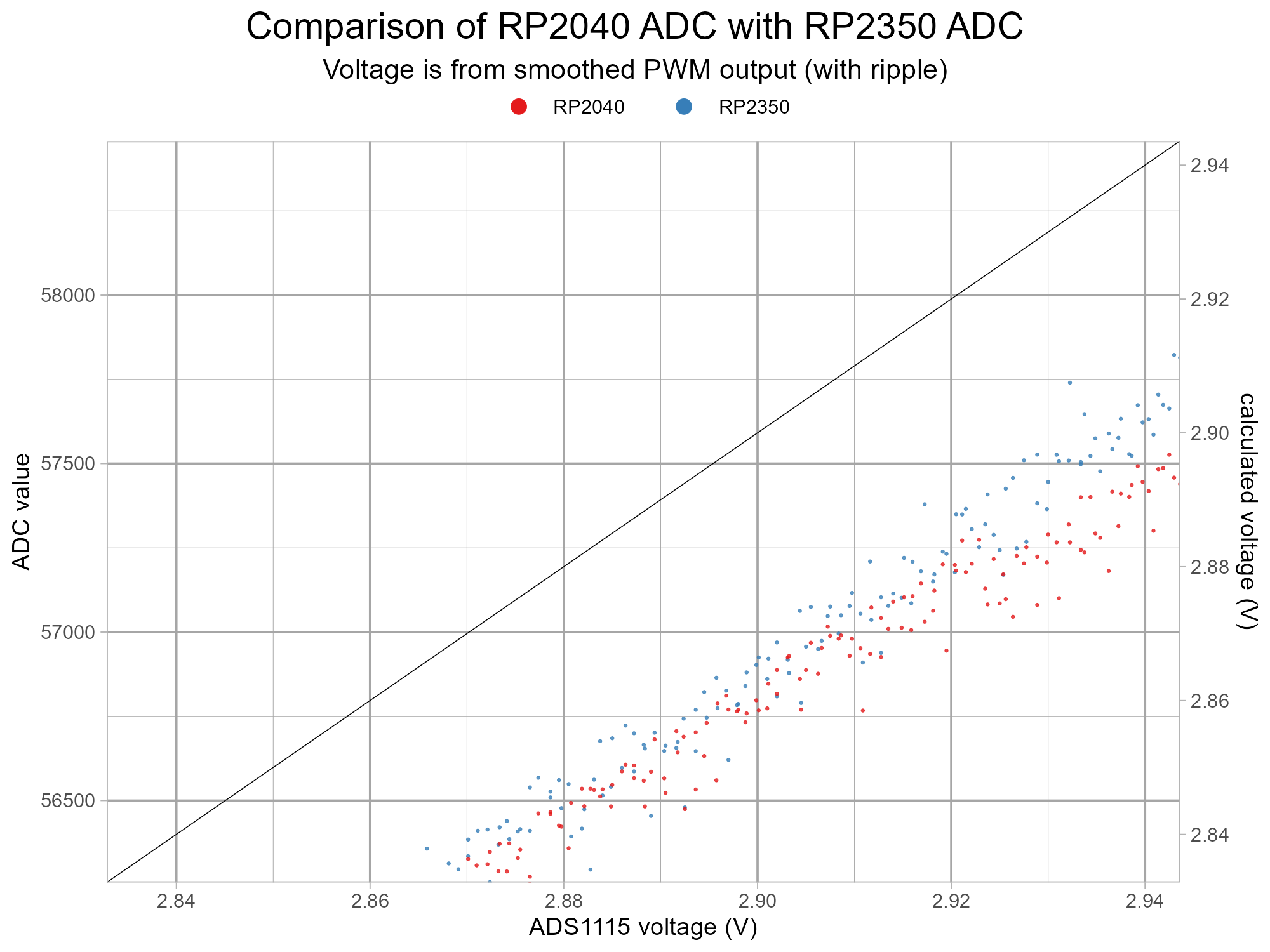


This testing might happen to show the minor flaw in the RP2040 ADC described in errata 11 in the datasheet.
Nominally an ADC moves from one digital value to the next digital value, colloquially expressed as “no missing codes”.
However, if the ADC skips a value bin this would cause a spike in the Differential Non-Linearity (DNL) error. These types of error often only occur at specific codes due to the design of the ADC.
The RP2040 ADC has a DNL which is mostly flat, and below 1 LSB. However at four values — 512, 1,536, 2,560, and 3,584 — the ADC’s DNL error peaks, see Figure 117
The plots are shown above of the RP2040 and RP2350 ADC view of the voltage at the RP2350 GP26 pin against the voltage measured by the TI ADS1115. CircuitPython scales ADC values from the microcontroller's range, 0 to 4095 in this case for a 12bit ADC, to 0 to 65535. The equivalent problematic values are 8194, 24582, 40969 and 57357. The RP2040 points look like they go a bit horizontal around 8500 but this isn't near the problematic value which means the viewer is being fooled by randomness. In this case the minor flaw can't be seen on the zoomed-in plots - this is either going to be due to the ripple (noise) present on the imperfectly smoothed PWM output or the signal generator program's step size.
The zoomed-in plot near 0v shows the RP2350 has an improved offset from 0V.
V1.0: Checking the Voltage Calculations From PWM Duty Cycle

The previous plots show the voltage applied to the "impedance" resistor. This is a value simply calculated from the duty cycle of the PWM output. The TI ADS1115 offers another view of this voltage and is likely to be far more accurate. These are plotted above from testing with a digital input. There's some visible voltage dip away from the desired straight line, the linearity isn't great. This is probably because the current sourcing and sinking through the 110 ohm resistance into the 470uF capacitor is too high for the RP2040 microcontroller.
The V2.0 Software

After a look at the results from the first batch of tests there was a significant amount of noise on the RP2040 measurements. As this could be related to ripple from the analogue voltage produced with smoothed PWM output there appears to be little that can be done to remove this. One approach would be to try to synchronise the ADC reads with the pulsing to get more consistently timed reads during the ripple. The use of a large value capacitor offers another approach here, the PWM can be momentarily turned off leaving the substantial stored charge in the capacitor to provide a good current source (and sink). The high value of the capacitor combined with the low currents and brief measurement period (a few milliseconds) made this worth exploring as a ripple elimination (noise reduction) technique.
The PWM output after smoothing and passing through the "impedance" resistor is show above in cyan, the yellow trace is just a temporary addition to the program to trigger the oscilloscope. The duty cycle was set to 30% for this capture. The smoothed signal settles down after the PWM is paused.
The v2.0 software performs a second set of tests with the PWM briefly paused during measurements. Unrelated to this, a test targeting the RP2040-E11 DNL values was added to see if this issue could be measured in this potentially lower noise environment.
A new output field c_pwm has values of T or F for continuous PWM or paused PWM, respectively.
V2.0: Retesting an RP2350 A2 Digital Input on Pi Pico 2 W


These plots are the same as the previous ones except:
- the Signal Generator's PWM output on Pi Pico W is now turned off while the reads/ADC measurements take place;
- the x axis is using the voltage from the TI ADS1115 ADC rather than a simple calculated one from duty cycle value.
The noise on the RP2040 is significantly reduced. The reduction in noise has uncovered some kinks, these are very likely to be related to the RP2040's DNL spikes.
V2.0: Looking for and Finding the RP2040 Errata 11 ADC Issue


The pausing technique has reduced the noise on the output voltage and now the RP2040 errata 11 issue can be seen on the plot and the zoomed-in versions around the problematic (16 bit scaled) values: 8194, 24582, 40969 and 57357.
The zoomed-in plots reveal the RP2350 is a bit more noisy than the RP2040. These values are processed ones averaging 28 samples from 32 where the top 2 and bottom 2 are discarded. This noise difference could be a genuine difference between the microcontrollers or a quirk of this particular hardware setup.
V2.0: Checking the Voltage Calculations From PWM Duty Cycle With R=220 Ohm , C=10uF

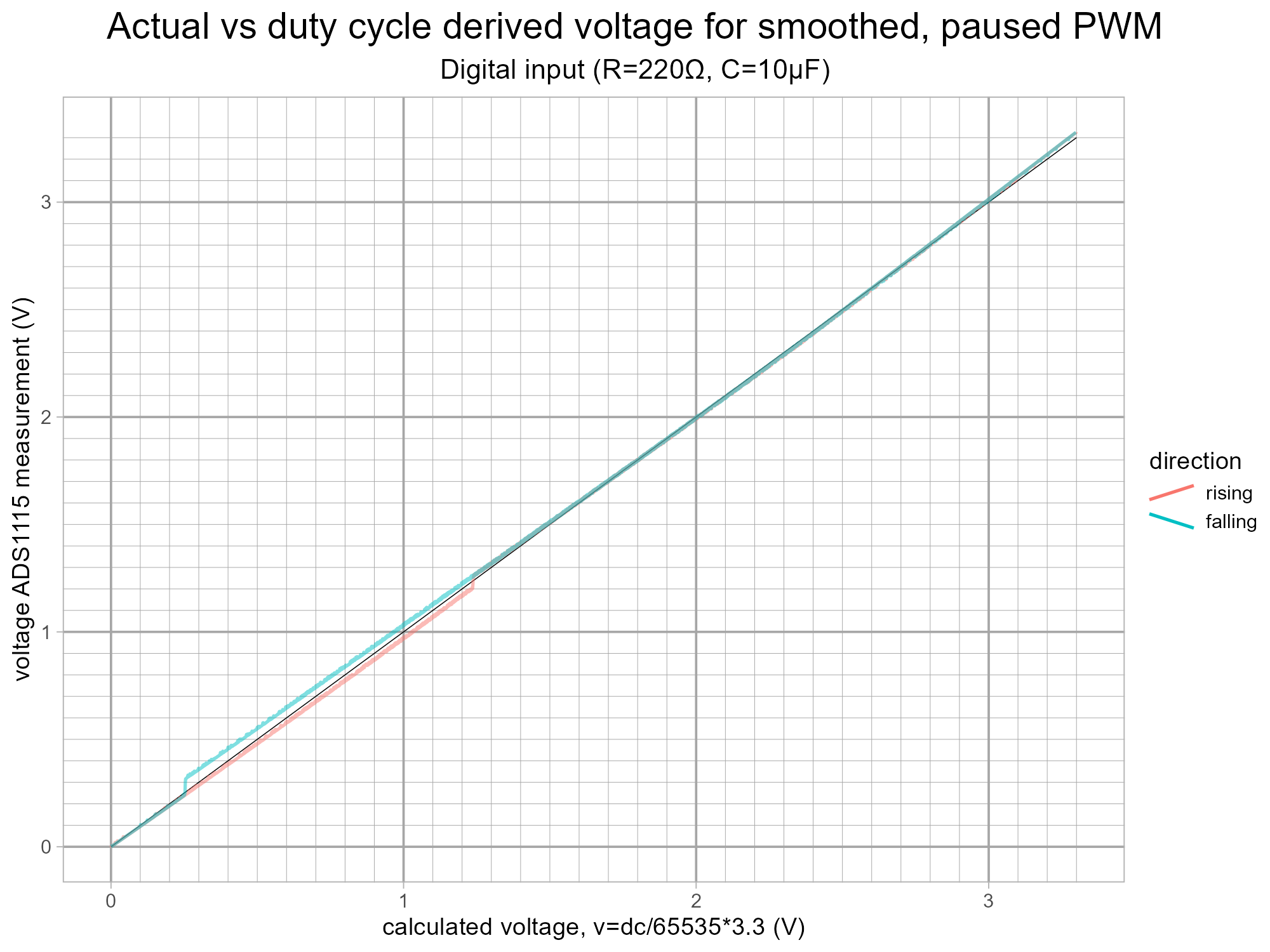
This is another look at comparing the voltage calculated from duty cycle with the TI ADS1115 measurement with a different RC filter. The RC filter has a higher resistance at 220 ohm, the capacitance is much lower at 10uF. The first plot shows the continuous PWM and the second one features the paused PWM during measurements of the GPIO as a digital input.
The linearity is much improved compared to the original 110ohm/470uF setup for the continuous PWM. The paused one appears to be suffering from too much effect from the RP2350 input leakage current flaw - a slightly higher capacitor value than the 10uF one will help here.
V2.0: Testing an RP2350 A4 Digital Input on Pi Pico 2 W
Results will appear here when a board is available to test...
V2.0: Testing an RP2350 A4 Analogue Input on Pi Pico 2 W
Results will appear here when a board is available to test...
Going Further

Ideas for areas to explore:
- Repeat the testing with 5k and 20k "impedance" resistance.
- Test a few Pi Pico 2 boards to check how much this varies across different RP2350 chips.
- Investigate the higher current leakage which increases with voltage calculated from RP2040 ADC measurements. This looks different in terms of trend (gradient) to the ADS1115 measurements.
- Use a reasonable quality, low impedance output external DAC with its own stable power supply for even more accurate testing and to compare the RP2040 and RP2350 ADCs.
- Carefully compare the noise on the RP2040 ADC vs RP2350 A2 ADC and RP2350 A4 ADC paying attentions to good breadboard connectivity, grounding, power supplies on the Pico boards, 3.3V power smoothing including less visible capacitors like on other like the Grove ADS1115 and stability and impedance of the test voltage. Check the noise distribution at different voltages and across time.
- Reimplement the board under test program in a language with more control over the finer points of the GPIO configuration, e.g. C/C++.
- Find an elusive RP2350 stepping A3 or A4 to test.
Similar measurements/projects/discussions:
- Raspberry Pi Forum: RP2350 Errata E9 - Pull-down lock-up
- Element 14 Forum: RP2350 GPIO Pull-down Latching Bug
- Mastodon Social: tubetime: post showing plot of input current leakage
- Dr. Monk's DIY Electronics Blog: Are the Pico 2 (RP2350) GPIO pins broken?
- 0033mer: RP2350 GPIO Latch-up Glitch / Pico2 (YouTube)
- Instructables: An Imperfect Comparison of Arduino Analogue and Digital Inputs: UNO R3, Leonardo, UNO R4 Minima and UNO R4 WiFi - the search for "missing" hysteresis on a different microcontroller's GPIO.
Other examples of using Kitronik Inventor's kits:
- Instructables: Using the Kitronik Inventor's Kit With the Adafruit CLUE
- Instructables: Make a Component Tester With Adafruit CLUE and Kitronik Inventor's Kit - this also features using PWM outputs as substitutes for DACs with a discussion about trade-offs between ripple and slew rates.
- Instructables: Battery Capacity Measurement Using Kitronik Inventor's Kit and Adafruit CLUE
- Instructables: NiMH Rechargeable Battery Comparison Using Kitronik Inventor's Kit and Adafruit CLUE
- Bitheads: Micro:bit Thermostat Controlled Fan – Part One: What Does it Do? and Micro:bit Thermostat Controlled Fan – Part Two: Make the Circuit (YouTube)
Further reading:
- RP2350 Errata 9 "Increased leakage current on Bank 0 GPIO when pad input is enabled"
- GitHub: adafruit / circuitpython: RP2350: hardware issue: stuck inputs #9541
- GitHub: earlephilhower / arduino-pico: RP2350-E9 erratum: input pin can become latched at about ~2V #2380
- GitHub: raspberrypi / pico-feedback: RP2350-E9 Erratum: can get "stuck" at 2V state even without pulldown #401
- Raspberry Pi News: RP2350 A4, RP2354, and a new Hacking Challenge
- Instructables: Adding a Touch Button to GurgleApps Word Clock Using RP2040/RP2350 Programmable IO (PIO) - shows capacitive touch working on an RP2350 A2 using internal pull-up.
- RP2040 Errata 11 "DNL error peaks in ADC"
- Mark Omo's Characterizing the Raspberry Pi Pico ADC
- Raspberry Pi Forums: ADC Differential Non-Linearity
- ADC
- Adafruit Learn: Choosing an ADC
- Texas Instruments: AC & DC specifications: Offset error, gain error, CMRR, PSRR, SNR and THD (YouTube)
- Analog Devices: Staying Well Grounded
- Adafruit Forums: ADC noise RP2350 vs RP2040
- Texas Instruments: Fundamentals of Precision ADC Noise Analysis (pdf) - very detailed!
- Filtered/smoothed PWM as a substitute for a DAC
- Northwestern Robotics: Using output compare to create an analog output (Kevin Lynch) (YouTube)
- Texas Instruments: Using PWM Output as a Digital-to-Analog Converter on a TMS320F280x Digital Signal Controller (Application Report SPRAA88A) (pdf)
- EDN: Cancel PWM DAC ripple with analog subtraction - Stephen Woodward's novel approach to PWM ripple reduction, this is analysed in
- Sam Ben-Yaakov: Ripple cancelation in PWM DAC & Addendum to: Ripple cancellation in PWM DAC (YouTube) - comparison with two pole RC filter, also covers an alternative, the Analog Devices: LTC2645 Quad 12-/10-/8-Bit PWM to VOUT DACs but doesn't discuss output impedance.
- All Electronics Channel: PWM DAC - Ripple Cancelation (YouTube) - demonstration with components, oscilloscope and a dynamic signal analyser.
- The Art of Electronics: The x-Chapters: 4x.25 Ripple Reduction in PWM (book)