Reverse Engineering the Nidec 24H055M020 Encoder Sensors

by NewsonsElectronics in Circuits > Arduino

70 Views, 0 Favorites, 0 Comments

Reverse Engineering the Nidec 24H055M020 Encoder Sensors

Reverse Engineering the Encoder in the Nidec 24H055M020 BLDC Motor
NO Charger!!! (8).png

Encoder sensors are vital for creating a closed-loop system where a motor can provide feedback on how many rotations it has completed. This information is very useful for projects that require wheels or belts to move a precise distance.

Unfortunately, when I bought this Japanese Nidec 24H055M020 BLDC motor, there was no documentation available online explaining how to get these sensors working. However, after some reverse engineering and debugging, I was able to get the encoder to output the FG (frequency generator) signal.


Link to the full video explanation

https://youtu.be/TdrySOXRl-Y


Supplies

vlcsnap-2026-03-09-21h20m05s408.jpg
vlcsnap-2026-03-09-21h20m18s906.jpg
uno.jpg

For this instructable you will need the motor and an Arduino Uno board to control the motor.


Nidec 24H055M020 BLDC motor→ Amazon.ca , Amazon.com , Taobao

Arduino UNO→ Amazon.ca , Amazon.com

Solder & Soldering Iron → Amazon.ca, Amazon.com

Multimeter leads → Amazon.ca, Amazon.com

Motor Pinout and Notes

vlcsnap-2026-03-09-21h20m57s052.jpg
freq.jpg

Here is the pinout of the motor. It should be noted that the original pinout diagram contained some incorrect labels.

The motor operates from 1 kHz to 16 kHz, and its speed is controlled via PFM, not PWM. The Enable pin deactivates standby mode and is normally tied to 12 V. The Brake pin is activated when connected to GND. The Direction pin determines rotation: connected to VCC, the motor spins CCW; connected to GND, it spins CW.


The issue was the 4 Feedback pins from the encoder no one knew what they did so I had to do some testing.


// Motor pinout (viewed from bottom, left to right)
1. PFM
2. Enable (12V)
3. Brake (GND)
4. Direction (CCW = VCC, CW = GND)
5. HU / FG – Hall sensor 1 after MOD
6. HV – Hall sensor 2
7. HW – Hall sensor 3
8. GND – Hall sensors
9. GND
10. GND
11. VCC (12V)
12. VCC (12V)

Encoder Feedback Pins

vlcsnap-2026-03-09-21h21m12s960.jpg
vlcsnap-2026-03-09-21h21m52s996.jpg
vlcsnap-2026-03-09-21h21m20s083.jpg
mosfets.jpg
Encoder Wires Diagram.jpg

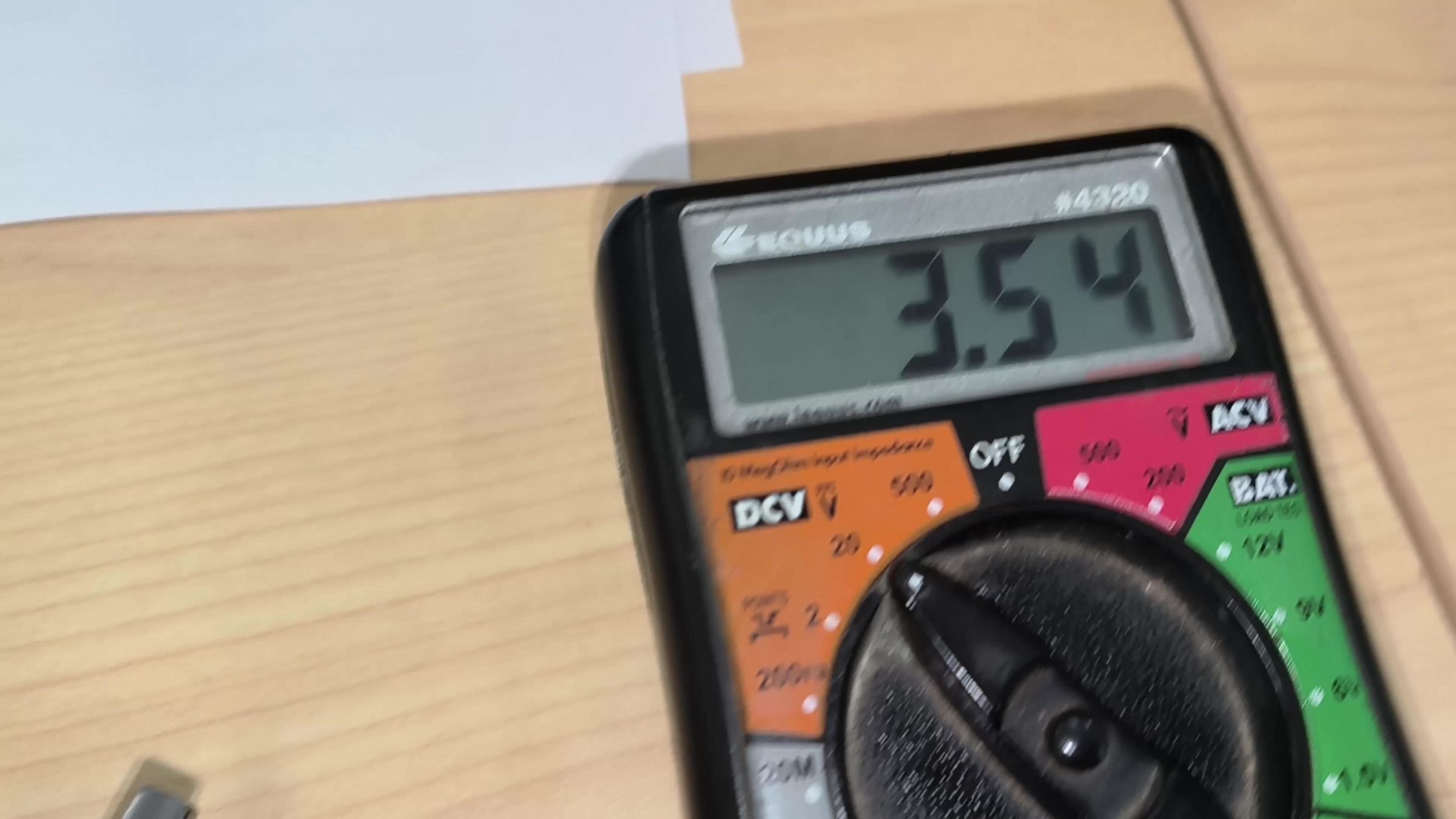
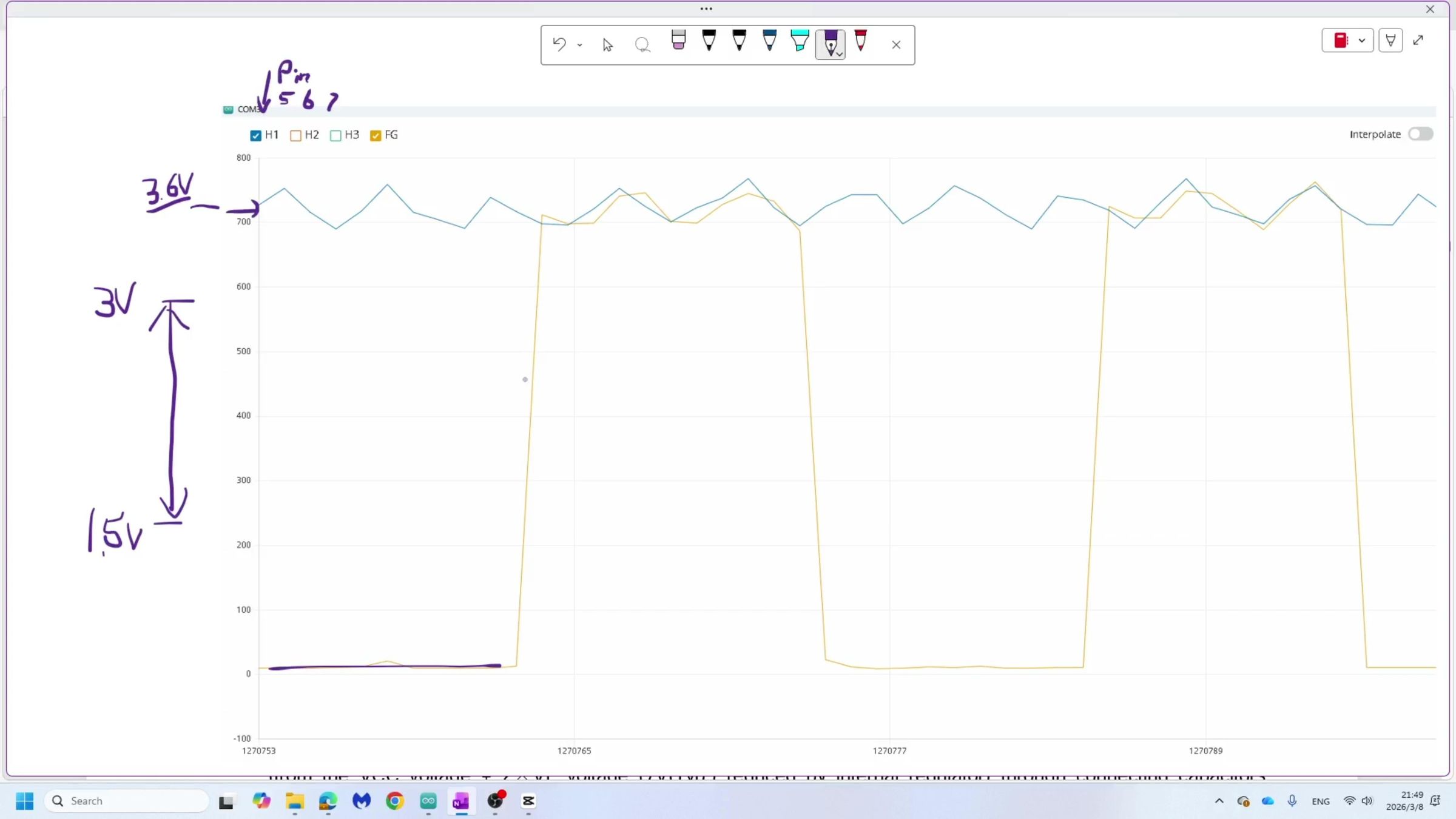
Pins 5, 6, 7, and 8 are connected to the motor’s encoder. Pin 8 is GND, but measuring pins 5, 6, and 7 shows about 3.6 V on each. These signals are quite noisy, and no one online seemed to know how to decode them.

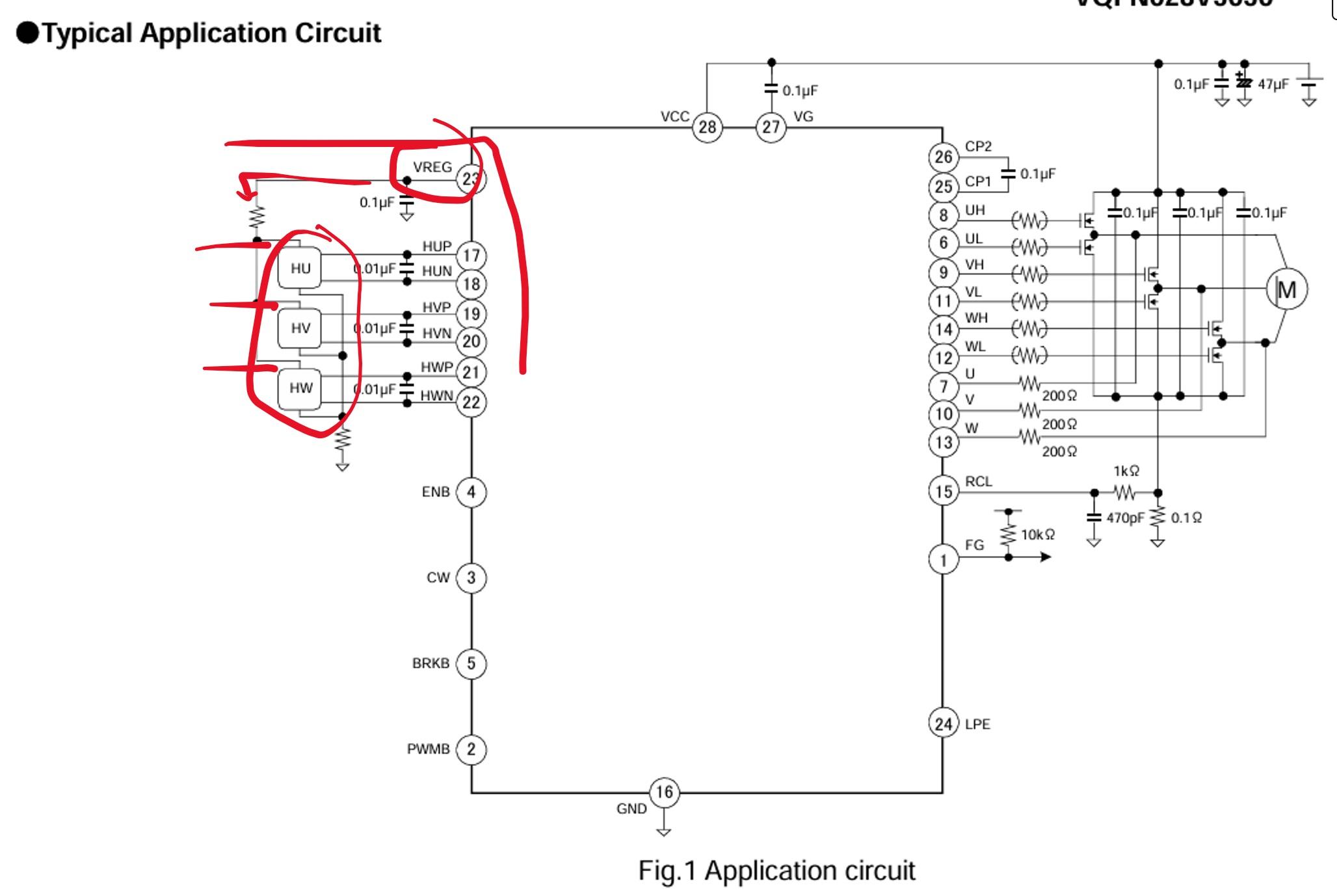
After opening the motor, I noticed the BD63000 chip. This chip retrieves data from the encoder and uses it to control the three MOSFETs, allowing the motor to spin properly. The reason the three encoder sensor wires each read 3.6 V is that they are connected to VREG within this IC. The three unknown feedback wires are HU, HV, and HW—Hall effect sensor wires.

At slow speeds, these encoder wires can be used to determine the motor’s RPM by programming an averaging algorithm and checking when the analog read from an Arduino Uno crosses a set threshold.

Example code:


// ===== H1 Averaging =====
H1Total -= H1ReadingsArray[H1Index];
H1ReadingsArray[H1Index] = analogRead(H1);
H1Total += H1ReadingsArray[H1Index];

H1Index++;
if (H1Index >= H1Readings) H1Index = 0;
H1Average = H1Total / H1Readings;
threshold = H1Average;

// ===== Edge detection using H1 =====
if (H1Value > threshold + 3 && lastState != 1) {
counterAbove++;
lastState = 1;
maxH3 = 0;
}

if (H1Value <= threshold - 3 && lastState != 0) {
lastState = 0;
minH3 = 1024;
}


Downloads

The Issue

vlcsnap-2026-03-09-21h22m10s880.jpg
pinout.jpg
fg out.jpg

The issue is that HU, HV, and HW require external circuitry to amplify the signal and filter out noise. Luckily, the BD63000 chip handles all of this internally and outputs a clean FG (frequency generator) signal. By modifying the motor, we can solder a wire to the FG pin to extract this signal.


Adding FG Wire

Circuit FG locations.jpg
vlcsnap-2026-03-09-21h23m23s914.jpg
vlcsnap-2026-03-09-21h23m31s224.jpg
vlcsnap-2026-03-09-21h23m45s501.jpg

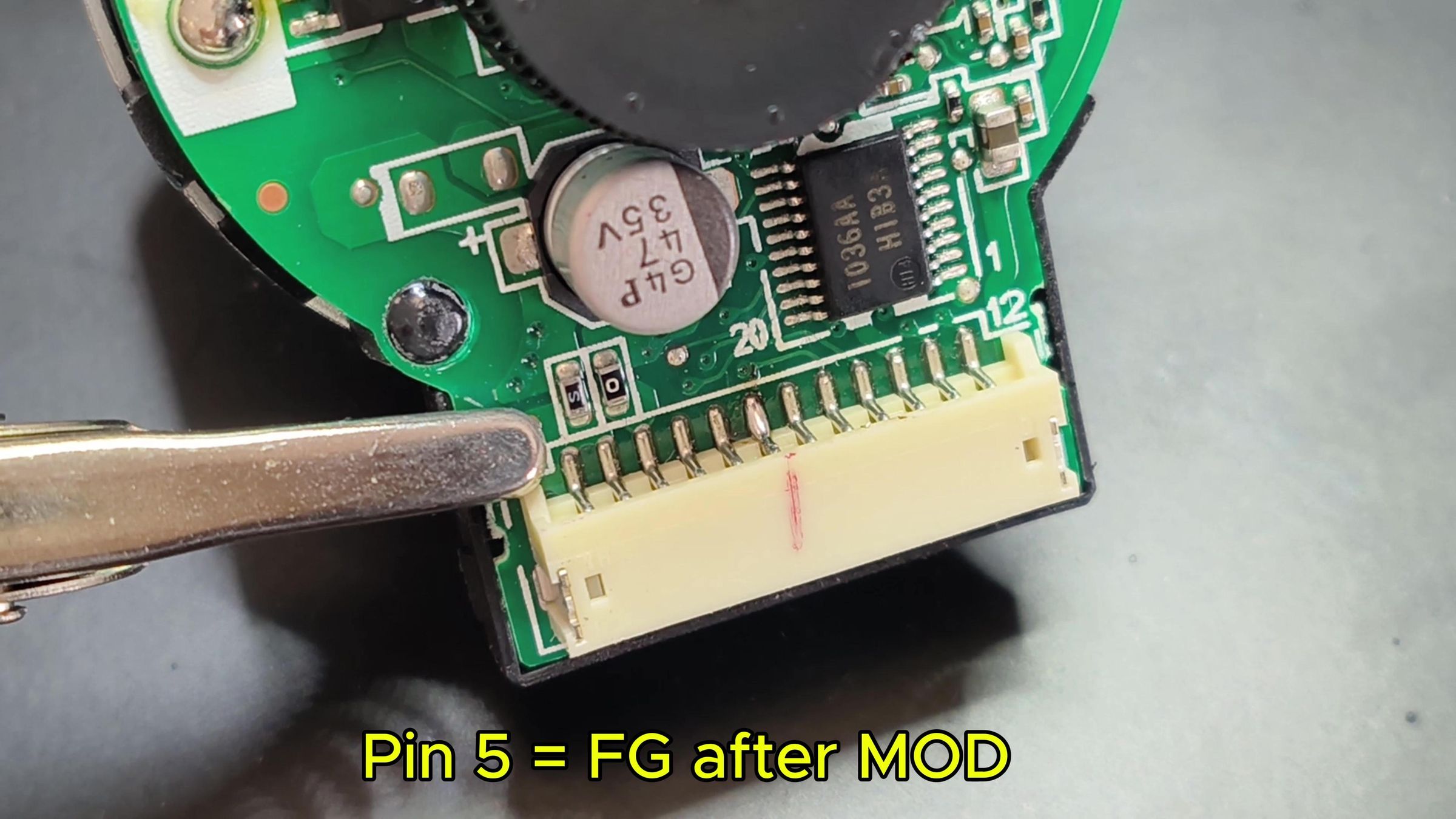
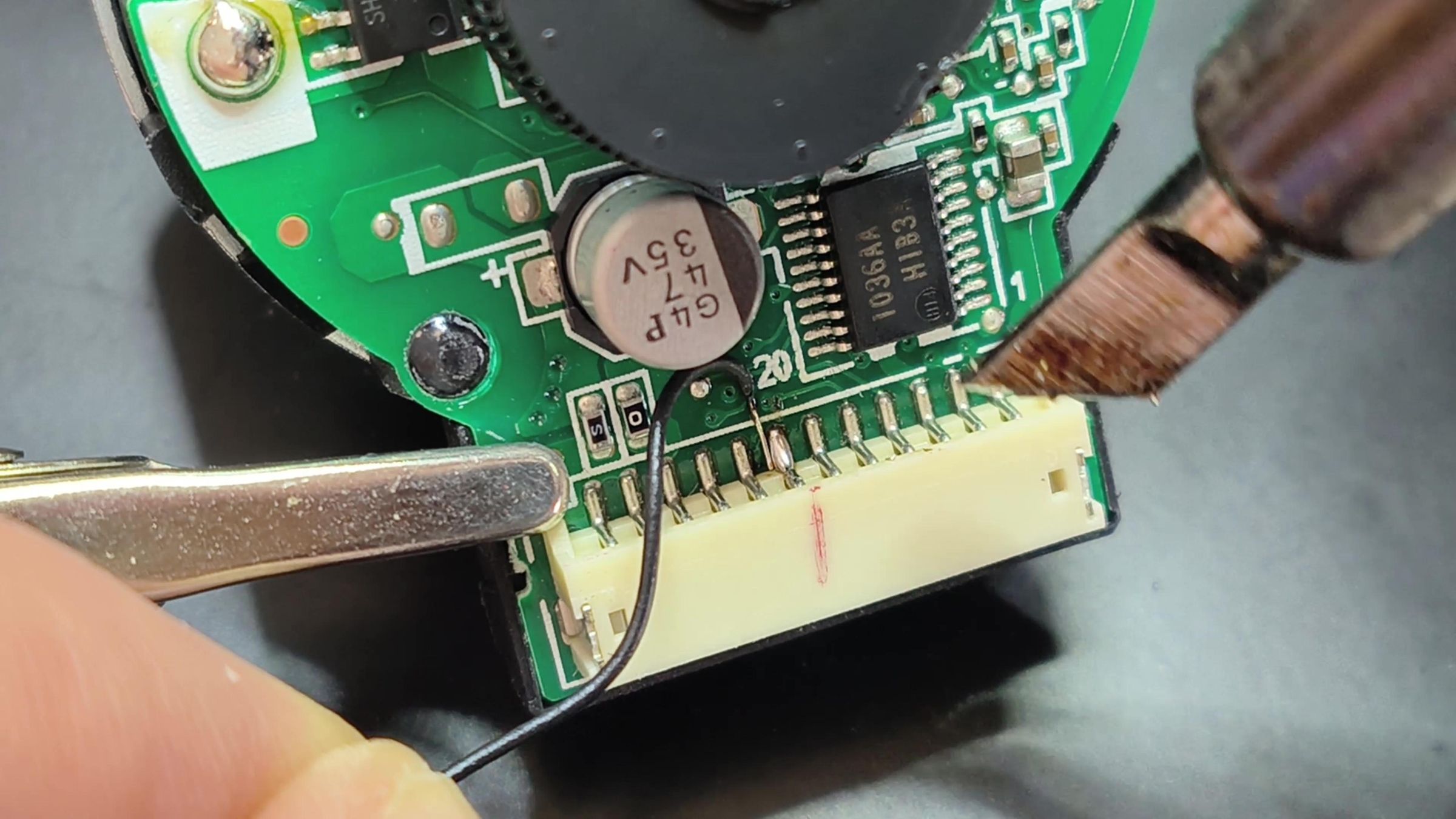
By probing the PCB, I found that the FG pin is connected to two small resistors. We can solder a wire from this point and connect it to the 5th motor pin to extract the signal.

Clean FG Signal
vlcsnap-2026-03-09-21h22m47s126.jpg
arudnio pinout.jpg
vlcsnap-2026-03-09-21h22m36s314.jpg

Now that we have access to the FG pin, it produces a clean square wave. We can connect this to pin 2 on the Arduino and use a falling-edge interrupt to track how many cycles the motor rotor completes:


pinMode(fgPin, INPUT_PULLUP); // Digital pin 2
attachInterrupt(digitalPinToInterrupt(fgPin), countFallingEdge, FALLING);

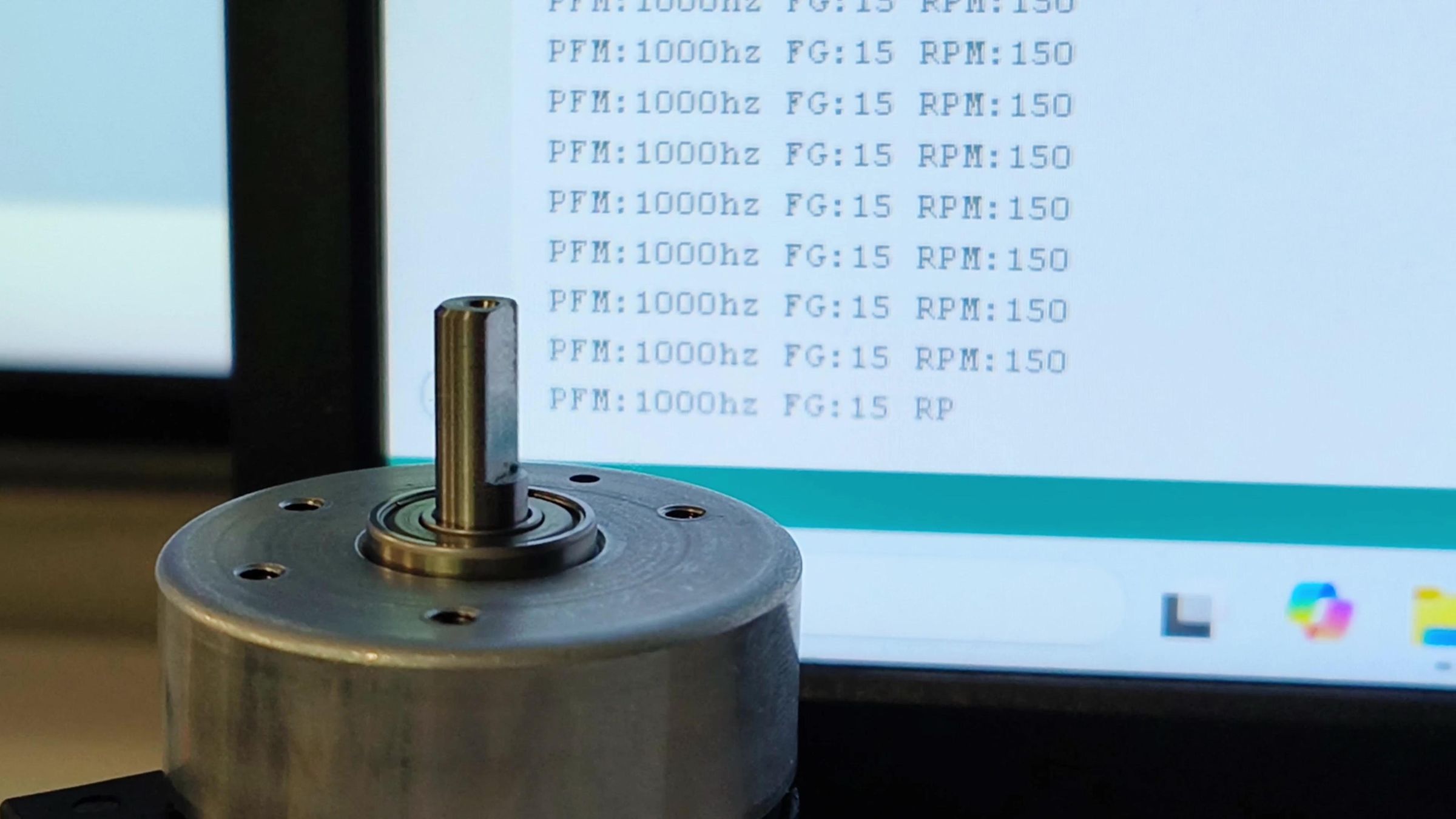
from testing the FG signal, it can be determined that 1000 Hz corresponds to 150 RPM, and each increase of 1 kHz results in an additional 150 RPM. The motor can operate in a range from 250 Hz to 20,000 Hz.


The motor is now working with all of it's function including the Encoder Sensor Feedback using the FG signal!

Arduino Code Used for Testing
vlcsnap-2026-03-09-21h24m00s138.jpg
//Nidec 24H055M020
//Feedback Encoder Sensors working

// Motor pinout (looking from bottom left to right)
// 1. PFM
// 2. Enable (12V)
// 3. Break (GND)
// 4. Direction (CCW=VCC, CW=GND)
// 5. HU/FG pin after MOD Hall sensor 1
// 6. HV - hall sensor 2
// 7. HW - hall sensor 3
// 8. GND - hall sensor
// 9. GND
// 10. GND
// 11. VCC (12V)
// 12. VCC (12V)


// Newson's Electronics
// March 9,2026


// Reverse engineering the encoder sensor for this motor


// ===== Pin Definitions =====
const int pfmPin = 9; //
const int potPin = A0; // Used to control speed
const int H1 = A1; //hall one wire Pin 5 on Motor
const int H2 = A2;
const int H3 = A3;
//const int FG = A4;

const int fgPin = 2; // using interupt to count pulese on FG pin
const int dirPin = 10; // used to control direction
const int enPin = 11; // enable motor keep to 12V

int frequencyH1=0;
float RPM=0; // Rounds per Minute Frequency/6.6667
// ===== Threshold =====
int threshold = 770; // base of Hall 1,2,3 when motor is not spinning or 3.6volts

// ===== User Variables =====
unsigned long pfmFrequency = 4000;// starting speed in hz
float dutyPercent = 80.0;
unsigned long lastTime = 0;
const unsigned long displayTime = 0;

volatile unsigned long edgeCount = 0;
float frequency = 0.0;

unsigned long previousMillis = 0;
const unsigned long frequencyTime = 1000; // time for frequency calculations.

// ===== Pot averaging =====
const int potReadings = 10;
int readings[potReadings];
int potIndex = 0;
long potTotal = 0;
long potAverage = 0;

// ===== H1 Averaging =====
// if you don't use mod average H1 sensor and evertime it goes above you can count frequency
const int H1Readings = 100;
long H1Total = 0;
int H1Index = 0;
int H1ReadingsArray[H1Readings];
long H1Average = 0;

// ===== Variables =====
int counterAbove = 0;
int counterBelow = 0;
int lastState = 0;

int maxH3 = 0;
int minH3 = 1024;

int locMinH3 = 1024;
int locMaxH3 = 0;

int rise = 0;

// ===== FG Interrupt =====
void countFallingEdge() {
edgeCount++;
}

void setup() {

Serial.begin(115200);

for (int i = 0; i < potReadings; i++) {
readings[i] = 0;
}

for (int i = 0; i < H1Readings; i++) {
H1ReadingsArray[i] = 0;
}

pinMode(pfmPin, OUTPUT);
pinMode(dirPin, OUTPUT);
pinMode(enPin, OUTPUT);

digitalWrite(dirPin, HIGH);
digitalWrite(enPin, HIGH);

pinMode(fgPin, INPUT_PULLUP); // Digital pin 2
attachInterrupt(digitalPinToInterrupt(fgPin), countFallingEdge, FALLING);
// ===== Timer1 PWM =====
TCCR1A = 0;
TCCR1B = 0;
TCCR1A |= (1 << COM1A1);
TCCR1A |= (1 << WGM11);
TCCR1B |= (1 << WGM12) | (1 << WGM13);
TCCR1B |= (1 << CS10);
setPWMFrequency(pfmFrequency);

pinMode(potPin, INPUT);
}

void loop() {

unsigned long now = millis();

// ===== Pot Averaging =====
potTotal -= readings[potIndex];
readings[potIndex] = analogRead(potPin);
potTotal += readings[potIndex];

potIndex++;
if (potIndex >= potReadings) potIndex = 0;

potAverage = potTotal / potReadings;

int H1Value = analogRead(H1);
int H2Value = analogRead(H2);
int H3Value = analogRead(H3);
//int FGValue = analogRead(FG);

// ===== H1 Averaging =====
H1Total -= H1ReadingsArray[H1Index];
H1ReadingsArray[H1Index] = analogRead(H1);
H1Total += H1ReadingsArray[H1Index];

H1Index++;
if (H1Index >= H1Readings) H1Index = 0;
H1Average = H1Total / H1Readings;
threshold = H1Average;

// ===== Edge detection using H1 =====
if (H1Value > threshold + 3 && lastState != 1) {
counterAbove++;
lastState = 1;
maxH3 = 0;
}

if (H1Value <= threshold - 3 && lastState != 0) {
lastState = 0;
minH3 = 1024;
}

// ===== Update frequency from pot =====
if (now - lastTime >= displayTime) {

lastTime = now;

pfmFrequency = map(potAverage, 0, 1024, 1000, 15500); // normal range 1k to 16khz
RPM=pfmFrequency/6.6667;

setPWMFrequency(pfmFrequency);

//Serial.print(" FG:");
//Serial.print(H1Value);
//Serial.print(" H2:");
//Serial.print(H2Value);
//Serial.print(" H3:");
//Serial.print(H3Value);
//Serial.print(" avgH1:");
//Serial.print(H1Average);


// Serial.print(" FG:");
// Serial.print(FGValue);


Serial.print(" PFM:");
Serial.print(pfmFrequency);
Serial.print("hz");
Serial.print(" FG:");
Serial.print(frequency,0);
Serial.print(" RPM:");
Serial.print(RPM,0);


Serial.println("");
}

// ===== Frequency Calculation =====
unsigned long currentMillis = millis();

if (currentMillis - previousMillis >= frequencyTime) {

previousMillis = currentMillis;

frequency = edgeCount * (1000.0 / frequencyTime);

frequencyH1 = counterAbove;

edgeCount = 0;
counterAbove = 0;
}
}

// ===== PFM Function =====
void setPWMFrequency(unsigned long frequency) {

if (frequency == 0) frequency = 1;

unsigned long topValue = (16000000UL / frequency) - 1;

ICR1 = topValue;

OCR1A = (dutyPercent / 100.0) * ICR1;
}