Rooster Claw, the Super Aerodynamic Pinewood Derby-like Car That YOU Can Make!
by Battletoad68 in Design > 3D Design
163 Views, 1 Favorites, 0 Comments
Rooster Claw, the Super Aerodynamic Pinewood Derby-like Car That YOU Can Make!
.MP.jpg)
We often take for granted how fast things move, from information to people, we are constantly pushing the boundaries of speed. One of the most important parts of going fast is aerodynamics. To educate you on this topic and to help build useful skills I will show you how to design and 3D print a super aerodynamic pinewood derby-like car that is easy to make and mostly abides by official pinewood derby regulations.
Supplies
You will need:
A computer(preferably Windows for the best software compatibility)
A 3D printer(I use an Ender 3 V3 KE)+ some filament(I will be giving instructions regarding PLA but if you are a more advanced 3D Printer user you can you a different filament)
CAD software(I will be using and giving instructions based on Fusion360 for this project but other CAD software like FreeCAD or solidworks will also work if you're looking for a free alternative and aren't a student). I have also added the files for the parts further down the page on step 5 but i strongly encourage you to try to follow my steps and design it yourself.
Slicer software of your choice( I use Creality print but for the most consistent results with the least amount of tinkering, use whatever slicer you printer comes with/suggests)
Hot glue gun or similar strength adhesive( I use tacky glue but a hot glue gun would probably work better)
your phone or stopwatch(only if testing)
a strong wood or cardboard strip(around 6ft (only if doing tests))
The Power of the Airfoil
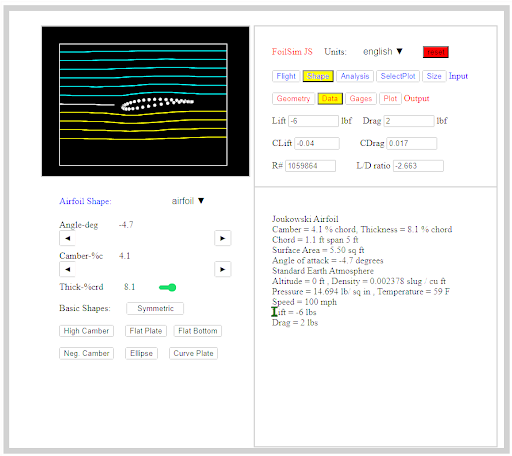
To start off my project I didn't know that much about Aerodynamics , And so after I did a bunch of research, based off my findings from this NASA aerodynamics sim , the airfoil has arguably the best aerodynamic properties for a shape, however, there are different types, but because I don’t want my car achieving liftoff, I needed an airfoil that minimized lift and drag at the same time. The image above was what I came up with(if you want to have an easier time, try looking through the NACA airfoil list and using the Fusion airfoil generator from the Autodesk app store). The important numbers to look at are the lift in pound force, AKA how many pounds of pressure are pushing the object up(negative number means it is pushing down) and the drag in pound force(how much force is pushing against the object). While these numbers are much higher than they would be in the real world due to our car being much smaller than 5.5ft squared. However, the principle is similar compared to most non space/military applications of this sort of technology.
Getting the Basic Shape


To make my airfoil, I used this airfoil plotter and put in the values for camber and thickness I got from the simulator, then I exported as a CSV file and opened it in Fusion by going to the utilities tab, going to add-ins, scripts and add-ins, then to ImportSplineCSV option.
Congratulations! Your airfoil is now in fusion and should show up as a sketch! But if, like me, you decided to do a custom one and your import didn’t quite go as planned, I would recommend clicking on the sketch and dragging around the green dots and, if that doesn’t work, sparingly delete points that make up the wonky line/s. Unfortunately, mine was too far gone, although because the CSV gave me points it was very easy to trace around the shape with the fit point spline tool. After extruding and rounding the edges with the fillet tool, it looks something like the silverish object pictured above. the CSV file i got can be downloaded below
Downloads
Getting Ready for Wheels

.png)
While this would work as a funky paperweight, we want it to go fast! To achieve this, we need wheels. For that, I added a recessed inner fender to both sides of the front section using the hole tool, using the part of the red circle that was jutting out to help me visualize the wheels we will be making. If you are also making a car, position the cuts as close to the front as possible, it will help when you add the back wheels. If you are having trouble lining up the cuts, remember that the hole shape can be seen through your object as shown by the pictures above. As seen in the screenshot of the simulation in the first part, the optimal angle for the airfoil was -4.7 degrees. Go ahead and orient your model to your design’s angle as provided in the simulation(could be an opposite angle than in the simulator depending on how you got your aerofoil to this point ex. I had to do 4.7 instead of -4.7 ). Next, we make the front wheels. Because most 3D printers ship with a 0.4mm nozzle, we need to design around that limitation.
Wheel Time!
.png)

Now, go ahead and make your wheels. I used create -> cylinder for this(if you do this, make sure to select the new body option in the right hand menu that pops up. ). a little bit smaller than the cutout we made for them, while making sure to keep the measurements within a tolerance of at least about 0.1mm(if you have a super nice 3d printer, you may be able to go lower). Make sure your wheels are a good amount less wide and tall than your cutouts to prevent scraping. Next, we make the axle. Position your wheels over Make a hole that goes through the center of your wheels and and your car body if you haven't already, and then make a hole at a wheels center that goes through all of them plus a little extra like in the image above. Make note of your hole’s dimensions for the making of the axle(mine is relatively thick as my car’s length is only about 80mm so if you make a bigger one you can have relatively thinner axles).
Wheels Continued
.png)
 - Autodesk Fusion (Education License).png)
.png)
The back wheels are where we have to give up a little bit of aerodynamics in order to make the design process and printing much easier. Start out by making wheels in the same way you did before(no need for any cutouts, but you can add them if you want to) while making sure that the bottoms of both front and back wheels line up. Your wheel should be pretty big. To help with alignment after creating the first wheel, I recommend using the move/copy tool(make sure to select the body and not just the face as the part you're moving and to check the create copy box!). Now use the same method of drilling a hole for the axle as you did for the front wheels, changing only that you don't go through one of the wheels fully. Try to use the same size hole so you will only have to design one axle.
To make the axle, use your noted measurements to make a cylinder while reducing it’s width(make it quite a bit smaller than your drill hole as things such as the thermal expansion of the plastic). I also found that it was necessary for me to give it quite a bit more height as well. To make assembly easier, join the top or bottom of the axle to the side of one of the wheels by deleting the inside face of the wheels hole and combining with the combine tool. repeat for each type and ensure that for the back wheels, the wheel with no hole is the one that gets conjoined with the axle.
Go ahead and export all of your parts by clicking on the eye next to the bodies in the left hand menu except one and exporting as an STL. you should have a file for: your front wheel, car body, axle front, axle back, and back wheel.
3D Printing

.png)
Whew, all done. But now it's time to make your car in the real world! Go ahead and open up your slicer and import your models. make sure to duplicate the wheels and the axle If you run into an error while slicing like I did, you can ignore it if it is like mine and won’t affect the finished item much if at all, or you may have to tweak your design by moving the cutouts of the affected area up a bit in your CAD program.
It doesn’t matter too much how you arrange your parts on the build plate, except that you want to make sure that your axle is standing up to make sure its smooth when printed and your wheels and body are on their sides for a smoother result. While settings can vary a bit from printer to printer, here are the settings that should match mine along with explanation as to why:
20% sparse infill(sometimes just called infill) done to give it a bit more weight to help with speed a bit while still having fast print times. However, you can go higher if you want more mass
Gyroid infill pattern as it has the best strength to weight ratio
Supports on(auto is fine) makes sure steep overhangs still print
I also quickly designed a super basic version of the car's body to give a reference point and to demonstrate how aerodynamics effects speed, but you don't need to print this part plus the accompanying extra axles and wheels.
Downloads
Putting It All Together


After printing( I did mine in a silver colored silk PLA), go and put the Rooster Claw and the reference model if you decided to print it together to ensure everything fits together. The axles should have little to no friction sliding in(you can play around with the scale of objects in your slicer if something doesn't fit). now, take the axle wheels and slide them through the car's body and glue on a matching wheel on the other side of the axle, similar to what's done above. after repeating for the back wheels(or front if you did the back first), you now have a finished project!! Congrats! you can stop here if you want but the next step I'll let you do as a fun science experiment :) (wouldn't want to spoil the results now would we? besides, the results aren't exactly straightforward) although I will release results should the demand be great enough.
How to Test
You have a bunch of freedom on how you test, I would recommend a roughly 6ft board to put at a 45 degree angle as a ramp. then for accuracy, send them down the ramp one at a time and use your phone as a stopwatch. mark the times for both cars and compare results!
Behind the Scenes(reflection)
I learned a bunch while undertaking this project, and I encountered many problems that led to troubleshooting and design changes. The axles were definitely the hardest part to get right and the results of the experiment surprised me but made sense due to the speed that gravity would induce. I hope that this inspires you to make your own speedy projects(would love to see someone add a motor to something like this to take better advantage of the base shape) and to look more into engineering if you haven't already. as nothing is impossible when there is a need for speed.