Silicon Core Decorative PCB Pendant
by groberts2026 in Circuits > Wearables
106 Views, 1 Favorites, 0 Comments
Silicon Core Decorative PCB Pendant

PCBs (Printed circuit boards) tend to be functional but their geometric patterns can sometimes be very beautiful. This project takes the basic circular PCB and turns it into a wearable pendant inspired by a microprocessor. The design features a central square core with traces radiating outwards. Even without the components or electronics, the gold traces and green solder mask create a modern and tech-inspired look. This project is an easy intro to PCB design for art purposes and results in a unique jewelry piece.
Supplies
Software:
- KiCad (free)
Hardware:
- Custom PCB (order from JLCPCB or other manufacturers)
- Necklace chain or cord
PCB Specs:
- 2 layer PCB
- Circular shape 25mm diameter
- Green solder mask
- ENIG (gold) surface finish
- No components, just decorative
Start a New KiCad Project
I created a new PCB project in KiCad to design the pendant layout. Since the board was purely decorative, I focused around symmetry and visual appeal over electrical function.
Create the Circular PCB Shape

Using the Edge.Cuts layer, I drew a circle 25mm in diameter to define the pendant outline. I added a 3mm hole near top to attach a necklace chain to later, and also added some outer edge designs to spice it up.
Add the Central "Core"

I drew a filled square in the center of the circle to represent a microprocessor core alongside lots of smaller pads outlining each side to act as the soldering pads. This acts as the focal point of the design.
Draw Radial Traces

I added several straight traces radiating out from the central square to the edge of the circle. I arranged them symmetrically for balance. Alongside that also some vias where place here and there but remained symmetric. No components or footprints used, as the traces themselves were the tech-inspired aesthetic.
Preview Design
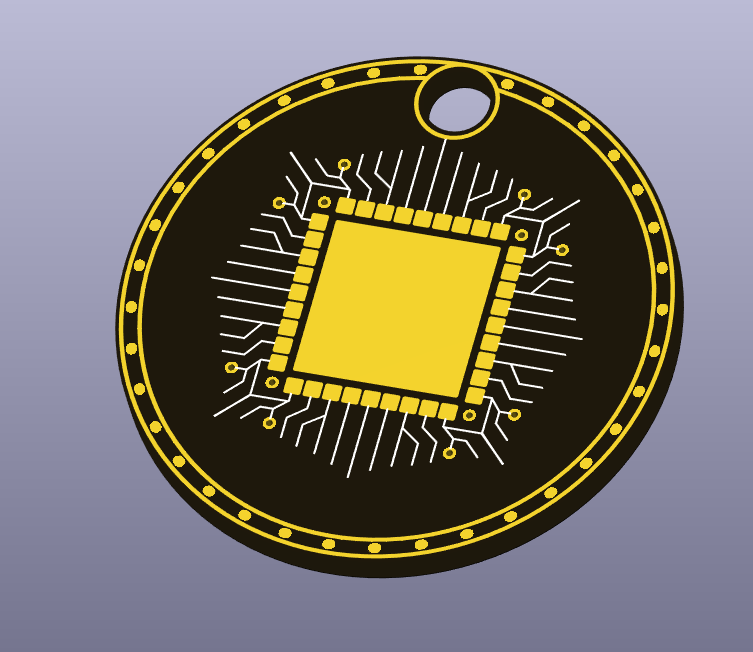
I used KiCad's preview and 3D viewer to make sure the design looked clean and symmetrical. I adjusted the visual colors to show black solder mask and gold traces.
Export and Order PCB
I exported the Gerber files and uploaded them to a PCB manufacturer. I selected black solder mask and ENIG finish to make the traces appear gold against the black board.
Assemble Pendant
Once I received the PCB, I threaded a necklace through the hole. The finished pendant is very lightweight and visually striking even without true electronics.
Once PCB received, thread a necklace through the hole. The finish is lightweight and visually striking.