Single Chip Computer Running MCS BASIC-52
by mit41301 in Circuits > Computers
177 Views, 0 Favorites, 0 Comments
Single Chip Computer Running MCS BASIC-52


Have you ever wondered how a computer performs the arithmetic operations, logical operations or decision making? If we want to learn how a computer works and to start programming, we should start building a simple computer with minimal hardware resources and simple architecture.
After understanding how a computer works, we can start working with Micro:bit, Arduino, Raspberry etc.,
Before start programming, it is recommended to build a small computer with minimal configuration to understand the hardware first. To make a standalone computer, we need a processor, code memory ROM, external working space or RAM, oscillator or crystal for clock.
We can ignore keyboard, VDU monitor and we can substitute with a smartphone, standard desktop or laptop keyboard and screen.
With advance in technology, we can create all in one chip computer which costs less than $2, which includes microcontroller, printed circuit board, few lEDs, few switches and USB connector. Obviously, there are some limitations. But spending few dollar is worth for it!
There are many retro computers and platforms are available to start with. The main criteria for selection is easy availability of the components with reasonable price, good software support for code development and availability of documentation. Intel MCS-51 family was very famous and still available with lots of enhancements at lower price. The advantage with MCS-51 architecture is the controller is produced by almost every vendor and all the documents are available. Similarly for the software development both in assembly and C language, we have many resources and many of them open source and or free with some limitations.
For MCS-51 architecture, there are many opensource Simulator and HDL models available both for simulation and synthesis. So we knew each and every component inside the MCS-51 till the final gate level.
Supplies
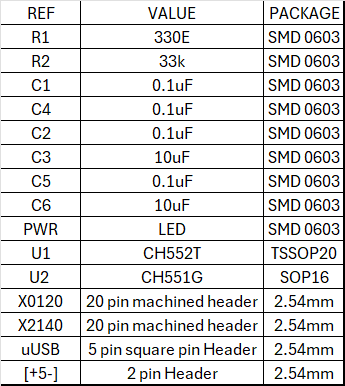
CH552, CH558 or CH559
keil C51
SDCC
Tera Term
WCHISPTOOL
Why Single Chip Computer?

The main idea is to demonstrate how a simple computer works and not depends on any of external development tools or environment. The Single Chip Computer will have all sufficient hardware and onboard software to run. This avoids buying an expensive external programmer.
We can write the code directly into the RAM and run it. No compiler or no assembler required. The whole interpreter just occupies 8kB of ROM. So obviously we can perform limited operations only. But it is good enough for someone to understand basics of computer and start programming.
Hardware to Software Mapping
The whole MCS BASIC-52 interpreter just occupy 8,192(8kB) bytes of ROM. Compared to modern day devices and firmware it is negligible. With just 8kB of code, we can easily perform addition(+), subtraction(-), multiplication(*), division(/) and exponent(**).
We can also perform logicial operations like AND, OR, XOR and NOT using .AND. .OR. .XOR. and NOT commands. there are relational operators like EQUAL, GREATER, GREATER THAN or EQUAL, LESS THAN, LESS THAN or EQUAL and NOT EQUAL TO are implemented as =, >, >=, <, <=, <>
Math Operators = + * / ** > < <> >= <= ABS ATN COS EXP INT LET LOG NOT PI RND SGN SIN SQR TAN
Logical Operators .AND. .OR. .XOR.
Program Control Structures (loops and subroutines) DO UNTIL, DO WHILE, END, FOR TO [STEP] NEXT], GOSUB, GOTO, IF THEN [ELSE], ON GOSUB, ON GOTO, RETURN
Running and Listing Programs CONT LIST NEW RAM REM ROM RROM RUN STOP XFER
Input/Output CBY DBY GET INPUT LIST# NULL PORT1 PH0.# PH1.# PRINT#, P#, ?# XBY
Data Storage ASC CHR CLEAR CLEARS DATA DIM LD@ POP PUSH READ RESTORE ST@
Timers and Interrupts CLEARI CLOCK0 CLOCK1 IDLE IE IP ONERR ONEX1 ONTIME PCON PWM RCAP2 RETI T2CON TCON TIME TIMER0 TIMER1 TIMER2 TMOD
For more details refer to the BASIC-52 manual.
Each function or operator implemented in assembly language. The assembly language source code was published into public domain by Intel and available online. The BASIC-52 user manual also available online.
The original Intel version 1.1 supported onchip EPROM programmer software with external EPROM which requires 12.75V for programming. In version 1.31 this feature was removed and replaced by EEPROM which can operated at 5V power supply. Since we do not have any address or data bus along with ALE signals, we can not implement any external memory with is microcontroller.
We can modify the code and assemble using assembler provided by many developers and vendors for free.
If we are not interested into the details, we can start writing programs in BASIC-52.
Select the Controller


MINIMUM REQUIREMENT:
As per Intel manual, We need a 8051 microcontroller, a latch, few kB of external RAM, crystal for clock and reset circuit. All the communication to the computer is through the serial communication UART using Rx and Tx lines.
The CH55x family has many variants in terms of internal FLASH size, RAM capacity, available I/O pins and different packages.
The least member is CH551 available in SOP16 package. But the internal resources are very limited and we can not run the BASIC-52 programs. But still we can use the CH551G in COMMAND LINE mode.
For starter, CH552 family is good enough. CH552 having 16kB FLASH, 1kB internal RAM and can be operated with 24MHz internal clock.
We can also use CH558 or CH559 with more FLASH and RAM and operating at 48MHz internal clock. But it is a overkill for a beginner.
Why CH552T Selected?
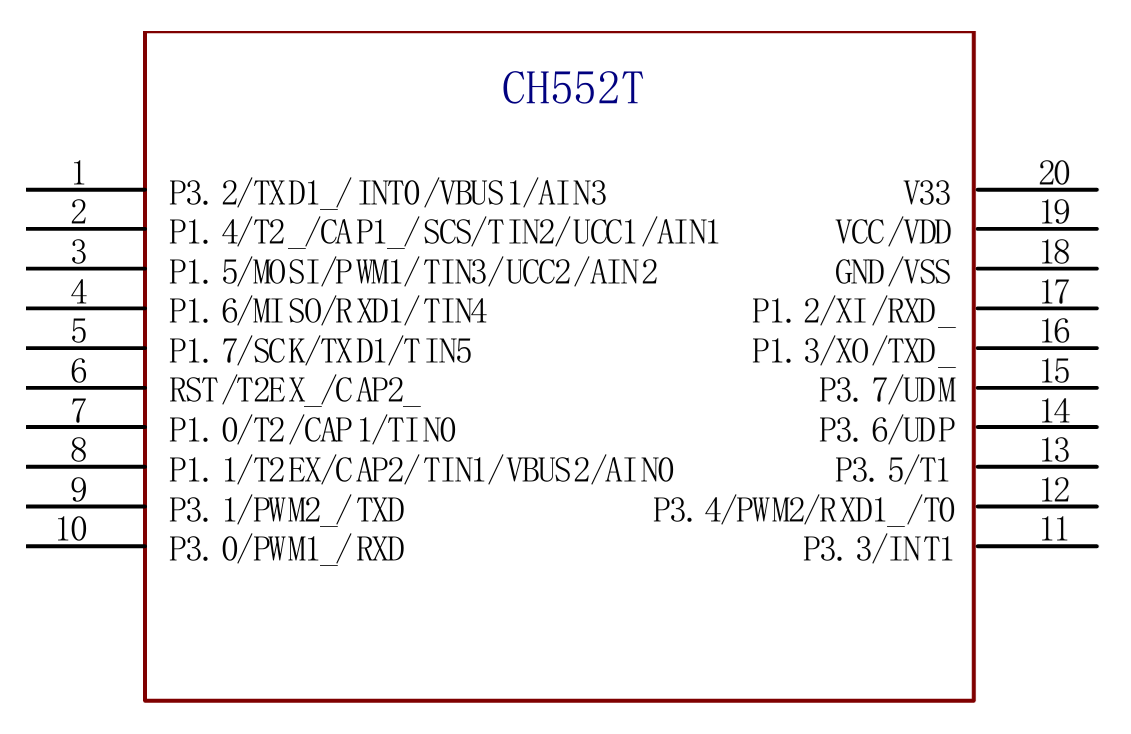

The CH552 family of controllers having 4 variants. CH552G, CH552E, CH552P and CH552T.
The least pin device is CH552E with just 10 pins and the device with highest pin count is CH552T with 20 pins. From internal resources all the devices are the same. The device support flash programming through USB port. So no additional external hardware programmer required.
We can access the PORT1 of the CH552 through the BASIC-52 interpreter using PORT1. We can easily read or write into PORT1. But only in CH552T the complete PORT1 pins are available. Also CH552T is having more pins compared to the other members. So we can map more pins to the original 40 pin 8052 device.
DIP40 Board


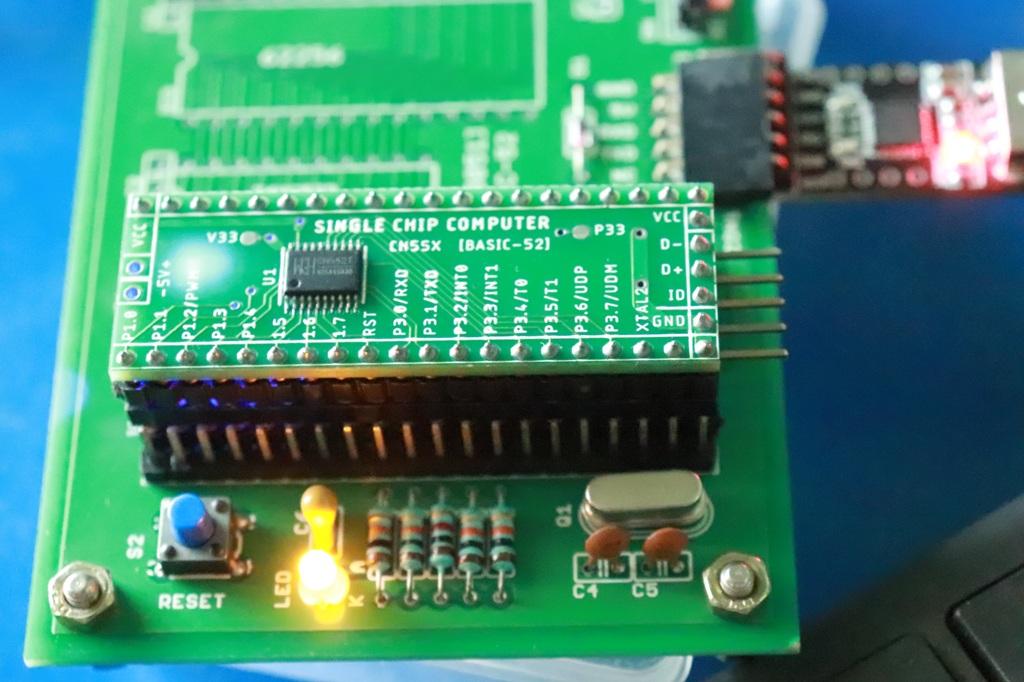


There are many commercial boards available. But none of them are compatible with DIP40 form factor with the same 8051 compatible pinout.
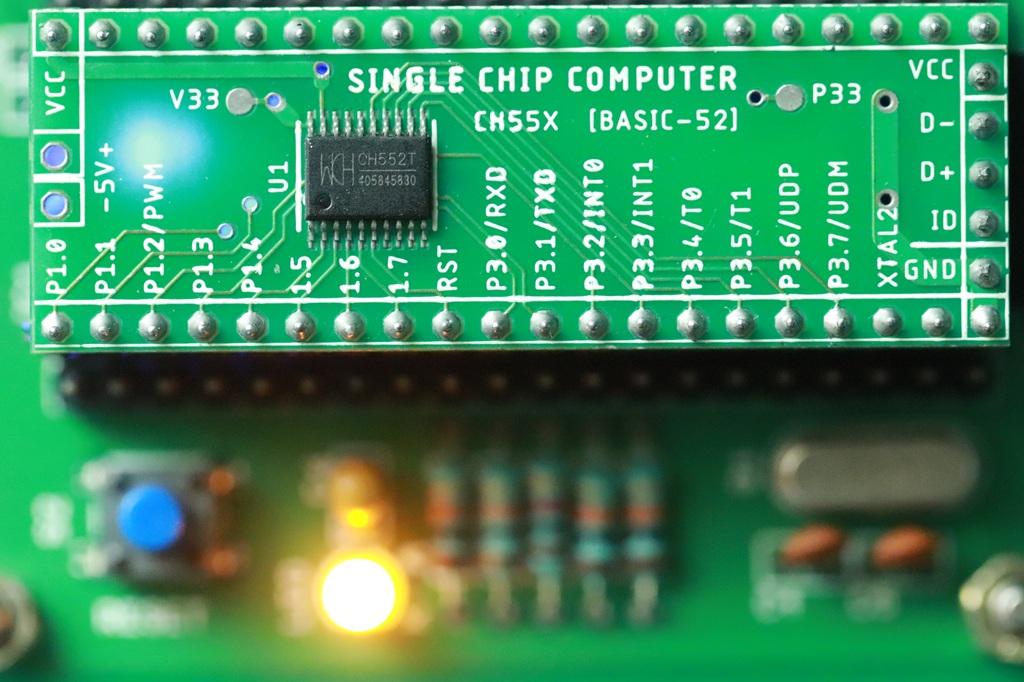
So if we design a DIP40 size board with the same pin mapping to original 40 pin device is to just replace the 40 pin device with the above board. The above board draws power from the existing board.
We can connect with a external USB-TTL which provides both communication and power to the Single Chip Computer.
Since the DIP40 board is having only one TSSOP20 IC, there are lots of free space available on both top and bottom side. In the bottom side USB-TTL circuit is implemented with a single IC with minimal components.
We can also connect directly to the USB port of the PC where VCC, GND, D+ and D- lines of USB connected to the Single Chip Computer. Both power and communication provided through USB port.
We can also use machined IC base as shown above. We can directly solder the board on top of the IC base. This will give a look, feeling and treatment same as standard DIP40 IC.
Flash Programming With BASIC-52
We can program the CH552T with the BASIC-52 using the TOOL provided by the vendor through the USB port. The firmware required for the BASIC-52 is available from HERE. The HEX code is meant for default XTAL value of 11.059200 MHz.
Compared to other industry grade devices, which have tens of thousands of FLASH memory erase and programming life cycle and endurance. But CH55x family uses iFLASH which is having limited erase and write cycles.
"ROM is an iFlash™ process, which can be programmed about 200 times under 5V power supply for the finished products after the formal packaging of blank ROM." from datasheet.
What You Can Learn?

Just connect with any serial terminal with 19200 baud with few ms of inter character and line delay
After connecting we can start programming immediately!
We can learn all the arithmetic operations, logical operations and other mathematical operations. We can also start writing small programs which involves iterations and loops.
We can also activate and toggle PORT1 which consists of 8 bits. We can both write and read from PORT1. There are two external interrupt pins available. There are two timer related pins are also available.
Here is a very simple program to try:
Enter each of the lines, including the line numbers. BASIC-52 automatically stores the program in RAM. To run the program, type RUN. You should see this
Let us calculate the speed of light from permittivity of free space and permeability of free space.
The formula used is C = 1 / √(
 )
)
 : speed of light
- : vacuum permeability
- : vacuum permittivity
ε0 = 8.8541878188(14)×10−12 F⋅m−1
μ0 = 1.25663706127(20)×10−6 N⋅A−2
The following is the simple program which Convert temperature from Centigrade to Fahrenheit, takes the input from the user then computes and prints the output.
Fahrenheit to Centigrade in BASIC-52
Square and Cube calculator
BASIC-52 capable of performing AND OR XOR operations on 16 bit values
Another simple program to calculate the sum of the first N natural numbers
Another simple program to calculate square and cube of any given number
Here is another interesting Quiz program on simple multiplication on BASIC-52. The Single Chip Computer will generate two random single digit number and asks the user to enter for the multiplication result. We need to answer within 5 seconds.
When you run the program
This program can be found in MCS® BASIC-52 USERS MANUAL(270010-003) page 39
ASCIIART program and RUN result
This program just took 24.395 seconds to finish. The same program will take 409 seconds with original 12T Intel controller running at 11.0592 MHz.
Documentation

The BASIC-52 user manual along with Intel original source code available from HERE
There is a very good BASIC-52 book available in free PDF from HERE
The Microcontroller Idea Book
Circuits, Programs, & Applications
featuring the 8052-BASIC Microcontroller
by Jan Axelson
All the programs listed in the book is available for download from the above link. So we can just open with a text editor and modify the programs instead of typing all the programs.
Board Design


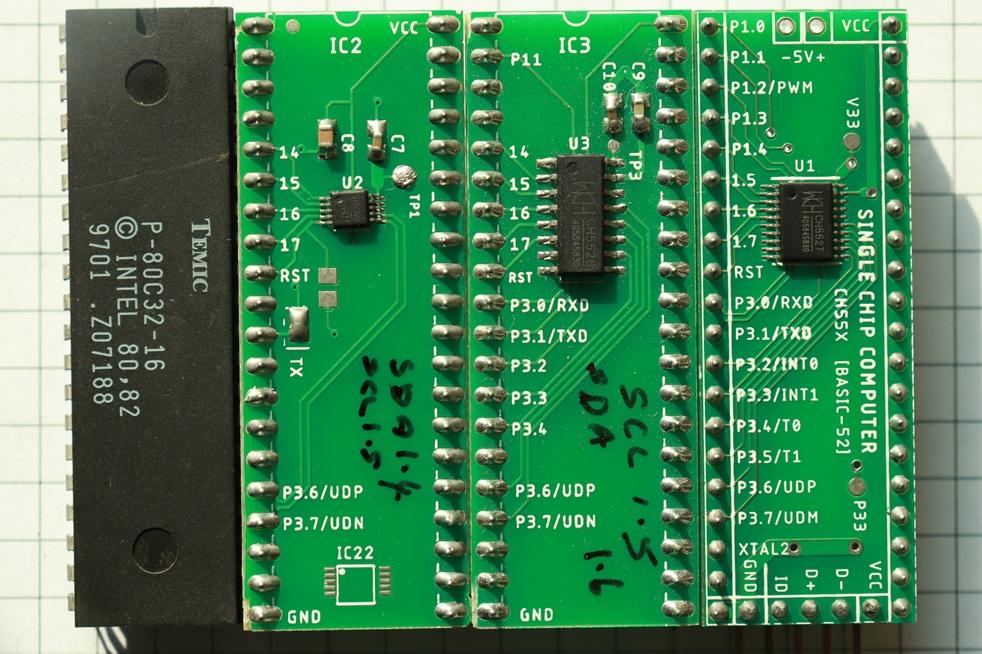


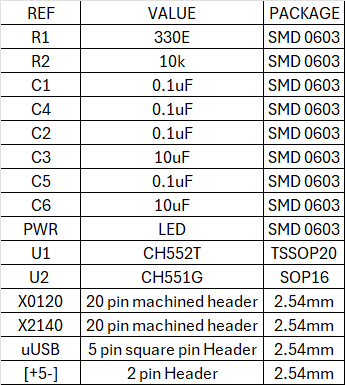
The DIP40 size board designed with double sided 1.6mm thickness. The minimum trace width is 10 mil and minimum drill size is 0.5mm.
Enhancements


- We can add a Bluetooth serial port instead of having a USB-TTL. Having a bluetooth module gives easy access to the single chip computer from both smartphone, desktop or laptop. We can download the programs from a PC and then switch to smartphone for running the programs.
- We can easily add a keyboard and LCD screen so that we do not require a smartphone or a PC to operate it.
- We can also add a solar panel with a Li battery along with charger and keep the whole setup inside a enclosure. This will lead to power independant computer.