Smart Automatic Backup Lamp With Touch-Dimming
by abtAmit in Circuits > Microcontrollers
156 Views, 1 Favorites, 0 Comments
Smart Automatic Backup Lamp With Touch-Dimming

Have you ever fumbled in the dark looking for a switch during a sudden power outage? Current market solutions for power outages fall into two categories, both of which have significant limitations:
- Standard Emergency Lamps: These are entirely manual. If left on by mistake, they drain the battery completely, and when the power goes out, you still have to hunt for the switch.
- Commercial Rechargeable Bulbs (Inverter Bulbs): To charge the internal battery, your wall switch often needs to be kept in the 'ON' position. This leads to situations where the light is ON when not needed just to ensure it charges, resulting in a significant waste of electricity.
Supplies
1x Arduino Nano (any microcontroller)
1x LDR (Light Dependent Resistor / Photocell)
1x Standard Resistor
1x 3.7V Lithium Polymer Battery
1x TP4056 Battery Charging Module
1x TTP223 Touch Sensor
1x IRFZ44N MOSFET
1x High-brightness LED
Features
Before wiring it up, here is what makes this lamp "smart":
- Intelligent Automation: The LDR constantly monitors the room's light levels. It only kicks on when the environment is actually dark.
- Touch Dimming: The TTP223 sensor is more than just an on/off switch. By long-pressing the sensor, you can adjust the brightness via PWM, allowing you to save battery or set a mood.
- Soft-Off (Grace Period): Sensitive touch sensors often cause accidental blackouts. To prevent this, when you tap to turn the lamp off, it blinks and waits 5 seconds before cutting the power. If you touch the sensor again during this countdown, the shutdown is canceled!
Wiring the Power Supply
The TP4056 module handles charging the battery safely and supplies power to the Arduino. Because the ATmega328 on the Nano can run from 1.8V to 5V, the 3.5V–4.2V range of the Li-ion battery can be connected directly to it.
Connections:
- Battery (+) ➔ TP4056 B+
- Battery (-) ➔ TP4056 B-
- TP4056 OUT+ ➔ Arduino Nano 5V Pin (This will also connect to the LED Anode)
- TP4056 OUT- ➔ Arduino Nano GND
Connecting the Sensors
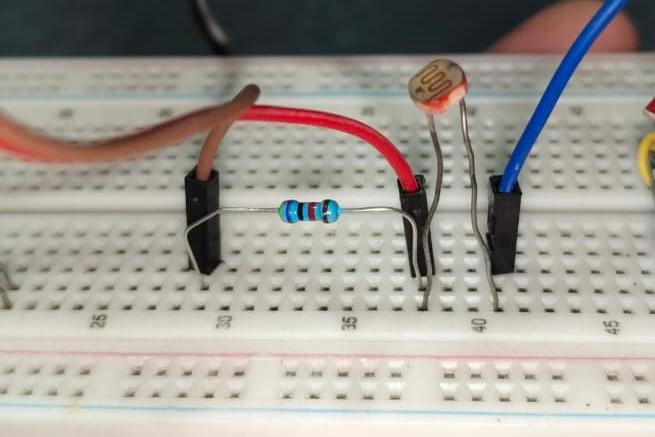


LDR (Light Sensor):
- LDR Leg 1 ➔ Arduino 5V
- LDR Leg 2 ➔ Arduino A1
- Resistor Leg 1 ➔ Arduino A1 (Shares the pin with LDR Leg 2)
- Resistor Leg 2 ➔ Arduino GND
TTP223 Touch Sensor:
- VCC ➔ Arduino 5V
- GND ➔ Arduino GND
- I/O Pin ➔ Arduino D6
Connecting the LED & MOSFET

You can control one or two led directly but the Arduino pins cannot supply enough current to directly power a bright powerful LED, we use the IRFZ44N MOSFET as an electronic switch.
MOSFET & LED Connections:
- Gate (Pin 1) ➔ Arduino D11
- Drain (Pin 2) ➔ LED Negative
- Source (Pin 3) ➔ Arduino GND
- LED Positive ➔ TP4056 OUT+
Downloads
.webp)
Working of Code
Stable Readings: The Arduino reads the LDR sensor 50 times rapidly (with a 1ms delay) and calculates the average to get a stable, reliable value. A higher value (> 800) means Dark, and a lower value means Bright. The lamp turn on or off according to these values.
Anti-Flicker Mechanism: This is the most important part of the code! When the lamp turns on in a dark room, the room suddenly becomes bright. If the Arduino checked the light level normally, it would think, "It's bright now!" and turn the lamp off, causing endless flickering.
The Fix: Immediately after turning the LED on, the code waits 500ms for the system to stabilize. It then takes a new brightness reading which also includes the lamp's own light and saves it as a current_reference variable. This value effectively becomes the new baseline. The Arduino is now saying, "Okay, this brightness level is the new 'Dark'. I will ignore this much light."
code: SmartLamp
Downloads
Testing the Prototype
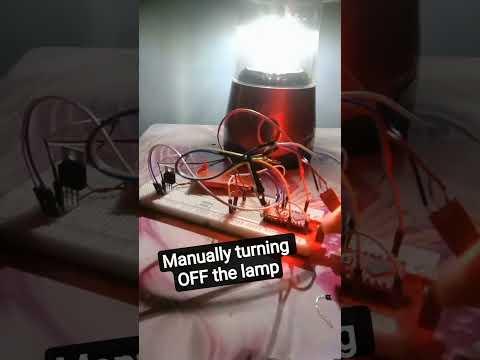
Before adding the circuit inside lamp i need to test it so that if any problem occur i can fix it easily
The Final Assembly
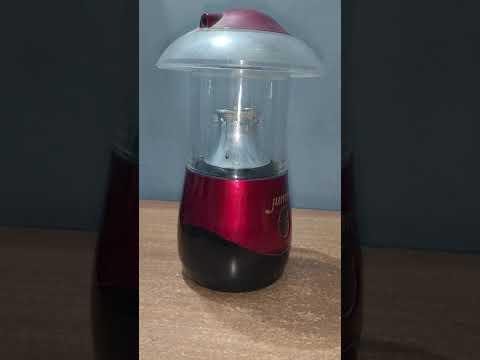

Placing all the circuit inside the lamp to give it a better look.
make sure that you place the LDR slightly above the LED other wise the LDR will be overwhelmed by the led light.
In the second video you can see that you can also turn ON the lamp in Daylight also but it wont automatically turn OFF.