Tabouret (The Craftsman’s Transition – From Sawdust to Pixels)
by TiborF3 in Workshop > 3D Printing
35 Views, 1 Favorites, 0 Comments
Tabouret (The Craftsman’s Transition – From Sawdust to Pixels)

My original calling is that of a Woodworking Technologist—a fact already evident to some readers. I was forged in a rather specific "Prussian-style" vocational system, characterized by rigorous practical training and a theoretical depth akin to college-level engineering. This heritage is precisely why I felt it wouldn't be "sporting" to enter a woodworking project into this competition. Instead, I have turned toward a medium I have long admired from afar: 3D printing. I began this journey with a formidable handicap; I possessed absolutely no prior experience in either CAD software or the intricacies of additive manufacturing.
Supplies

Fusion 360
Google AI (Digital Mentor)
3kg of "Plastic Spaghetti (Filament)
A 300x300mm "Dance Floor A large-format 3D printer.
Sheer Fanaticism
Nerves of Steel
A Bucket of Humility
Mission Objectives & Structural Constraints
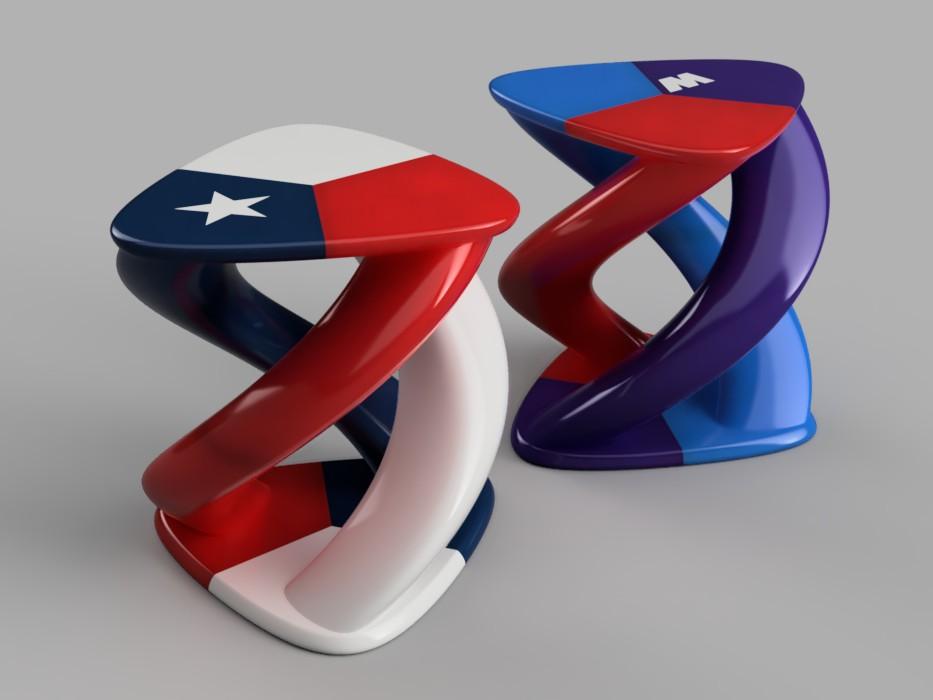
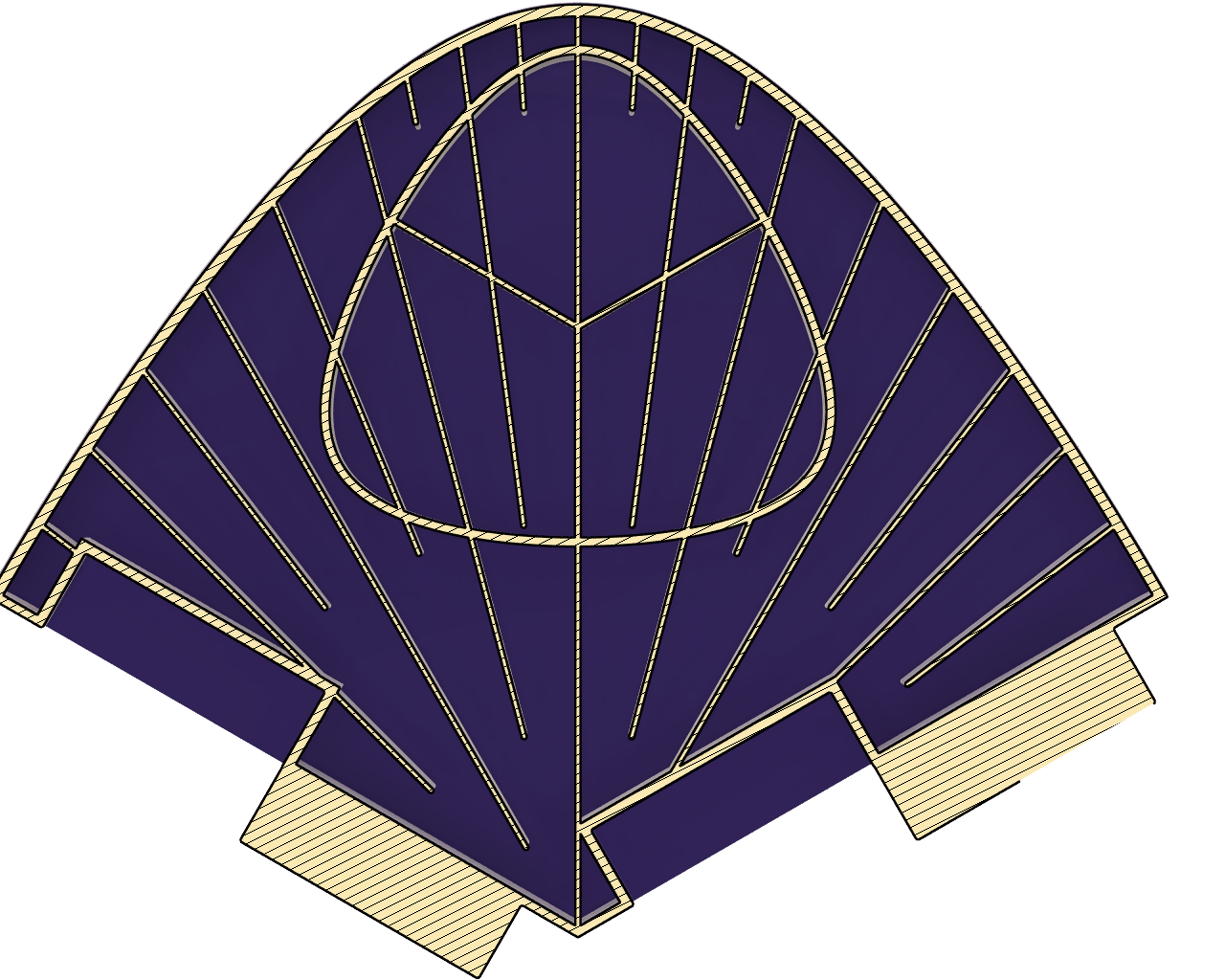
My ambition was to create a Tabouret (stool) that embodies geometries and joinery nearly impossible to achieve through traditional woodworking: the Hollow Barley Twist pillars and non-separable, self-locking joints. I employed these complex features because the overall dimensions of the structure exceed the build volume of a standard 3D printer. To solve this, I divided the seat and the base into three equal segments along radial axes originating from the centre. This not only facilitates printability but also accentuates the triangular symmetry of the form. I bisected the pillars, and the resulting six half-pillars were then integrated with the six segments of the seat. This configuration ensures that the hollow internal structure remains significantly more stable during the printing process. While aiming for a load-bearing capacity of at least 75-100 kilograms, I set a strict weight limit of 3 kilograms (equivalent to three spools of filament). To achieve this, I eschewed standard, slicer-generated infill in favour of integrated radial ribbing, creating optimized load paths. Every curve and print orientation was meticulously calculated to minimize the need for support structures. And so, the journey began.
Cessna-172 Vs. F-22 Raptor


As a novice in the world of Computer-Aided Design, I initially embraced Tinkercad for its charming, almost childlike simplicity. It served its purpose for visual confirmation, yet I soon hit a wall. The segmentation of curves and the demand for absolute precision felt coarse and dilated. Since Tinkercad is mesh-based, every object is a mere collection of tiny triangles (polygons). A circle is never truly a circle—only a sequence of short, straight segments. The larger the object, the more jagged the edge. For a project of this calibre, such compromise was unacceptable. Thus, with half a century on my shoulders, I found myself compelled to step out of a steady Cessna-172 and into the cockpit of an F-22 Raptor.
Fusion 360 (The F-22 Raptor)


Fusion 360, by contrast, operates on a Parametric B-Rep engine, ensuring the mathematical perfection of Bézier curves, G2 Curvature Continuity at every junction, the absolute precision of joints, and full editability via the Timeline. This is my maiden voyage in such an environment. My native tongue is one of the world's most beautiful yet difficult languages, spoken by barely 15 million people. Consequently, the technical jargon within the official documentation often felt like an impenetrable fortress. To scale these walls, I summoned a Digital Mentor: Google’s AI-based assistant. This digital companion stood by me, patiently translating complex concepts into layman's terms, answering my hundredth identical question with the same grace as the first.
Eighteen days ago, based on a detailed description of dimensions and joinery, I sketched my first profile: a Reuleaux-style ("guitar pick") profile built from Bézier curves. It was a wild beast, difficult to tame into the required proportions. My first reality check came when I realized that in this environment, one cannot simply rescale a geometry without consequences. I persevered, and the seat was born. At that stage, I was still relying on Boolean Operations, which backfired spectacularly when it came to placing the internal reinforcement ribs. I pushed forward to the twisted pillars, but the Sweep tool refused to cooperate. In a moment of creative desperation, I pivoted to the Coil method. It worked. I didn't overthink the joinery—I simply trimmed the legs to size and headed for the Creality Slicer.
Then came the technical blow to the jaw: the model was 15% too large for the build plate. In this design, durability isn't born from solid mass, but from intelligent internal bracing. The 1.2 mm radial ribs, the triple-star reinforcement, and the wall thicknesses were all mathematically tuned to a 0.4 mm nozzle. A simple percentage-based downscaling would have shattered the structural integrity and precision. Fourteen days of work vanished into the digital void. I had to start over.
The Second Ascent (The 8-Hour Sprint)


By the third day, I was muttering G-code in my sleep. I even caught myself trying to shell the neighbor's cat using a Shelling operation, just so they could save on pet food... but I digress.
The only silver lining of a total redesign is the clarity of hindsight. I knew exactly what sketches were required, leading to a much cleaner Assembly Tree (Browser). Learning from my previous failures, I used the Shelling technique for the seat's hollow core, bypassing the struggle with rib alignment. What followed was a rapid-fire sequence of Extrusion, Construction Planes, Body Splitting, Sweeping with Twist, and Filleting. Using Fusion 360 Section Analysis, I monitored the fit of every joint in real-time. What originally took fourteen days, I now rebuilt in a focused eight-hour sprint.
Victory, however, was brief. I discovered that the Coil tool could not calculate a wall thickness thinner than 2.3 mm for my specific Reuleaux-style ("guitar pick") profile. I needed a new way to create the joinery. I opted for loose tenon joinery on the internal walls. This required entirely new sketches, as downscaling Bézier curves inevitably leads to profile distortion. I accelerated the process by extruding 10 mm segments from the solid pillar sketches and shelling them to the correct wall thickness to ensure parallel walls. (The larger segment merges into the pillar, while the smaller one maintains a 0.3 mm clearance for a perfect fit). I opened a new sketch to intersect these segments and utilized the Project (P) function to extract the geometry for the tenon joints. I divided these contours into six distinct segments, extruded them using a path generated by the Coil command, and finally trimmed them to length via Split Body. Then began the "Match-making game"—sorting through the chaos of numerous components to bring order to the model. Finally, I merged the groups, and... VOILÁ!
But the celebration was premature. I realized that tubes born of Bézier curves cannot be cut haphazardly; they "spring" like a real pipe being sliced lengthwise. The deviation was minimal, but enough to make the fit uncertain. Nevertheless, I moved to the slicer to check my progress: it finally fits within the 300x300x300 mm build volume. Success! Every wall and rib was once again aligned with the 0.4 mm nozzle path, ensuring a clean Toolpath. However, due to the unplanned reinforcement of the pillars, I overshot my weight target by a mere 100 grams. A third iteration will shave that off—I am certain I'll find a few more functions in Fusion to achieve this. What is truly sobering, though, is the estimated print time: over 72 hours.
Conclusion: the Final Descent

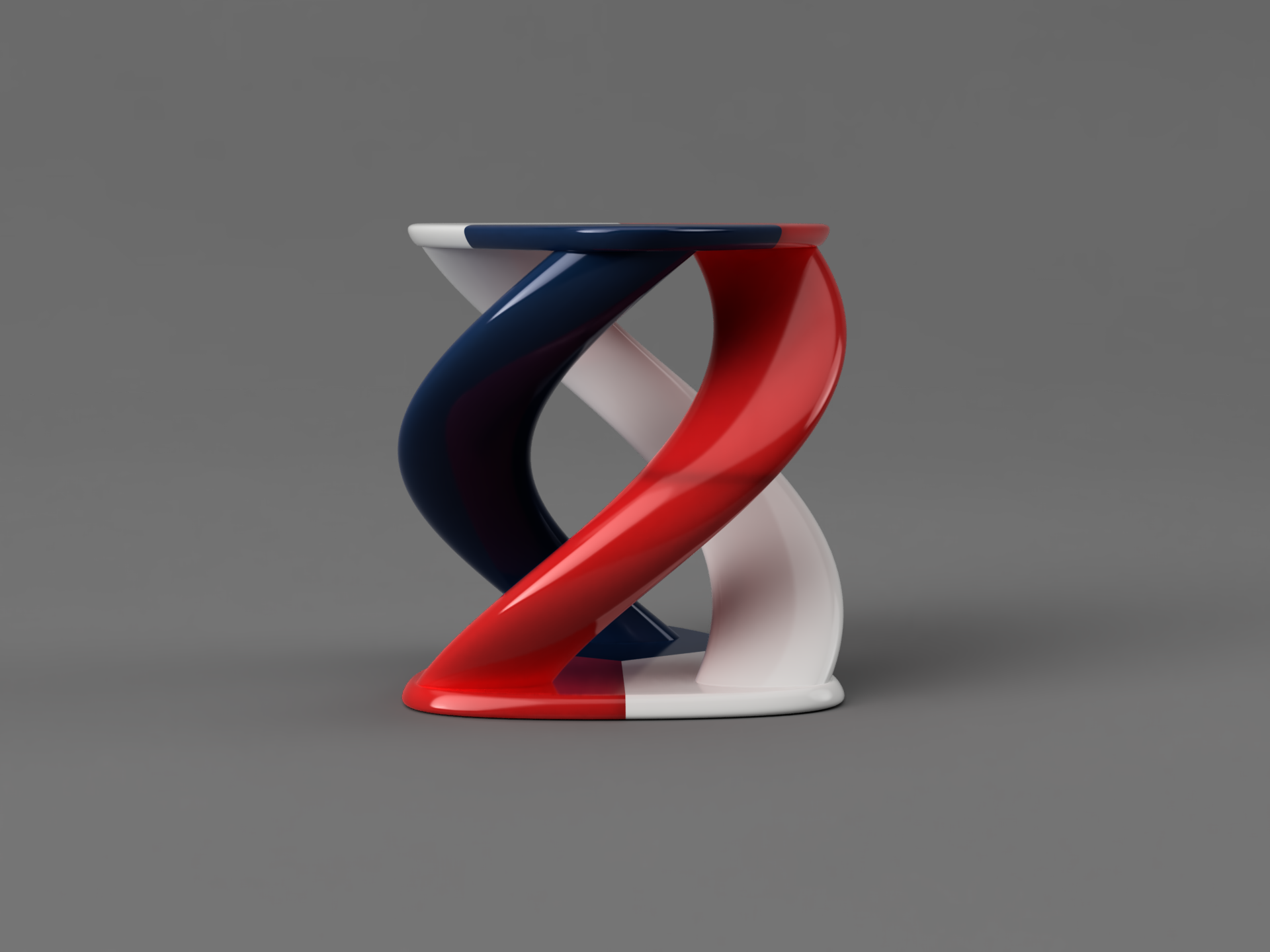
The first physical print still awaits, as I refuse to surrender. I am already embarking on a third iteration to refine the pillar twist and joinery. In the meantime, I have prepared several Renderings to showcase how this piece can be decorated—be it in the iconic BMW M Power livery or a tribute to the Texas Lone Star.
Less than three weeks ago, when I began my very first CAD and 3D printing project, I knew it wouldn't be easy. But I never imagined it would be this difficult. To you, dear reader, I ask only this: when you download a model and press "Start," spare a thought for the time, energy, and sheer willpower poured into that file. My gratitude goes to the team at Autodesk for the opportunity to use Fusion 360, and to the Google team for the AI-based assistant that served as my guide through this daunting learning curve.
Week Three, Third Launch
Another week has passed. The experiences have settled, like confetti swirling in the air. As promised, I’ve taken a third run at it with a completely new approach.. I have optimized the model for a 0.4mm nozzle, 0.2mm layer height, 0.42mm line width, and a 300×300×300mm build volume. Therefore, the scale is fixed!
Here is a step-by-step guide (including a raw draft in PDF format) for the final ascent:
Note: Ensure all sketch centers are aligned with the Origin.
1. Base Sketch (The Large "Guitar Pick")
- Create Sketch → XY Plane.
- Create → Polygon → Circumscribed Polygon. Click the Origin, enter radius: 190.526 mm, sides: 3.
- Constraints → Horizontal/Vertical: Apply to the bottom edge of the triangle.
- Construction Lines: Draw lines (L) from each vertex to the midpoint of the opposite side. Select them and press X (Construction).
- Bézier Curves: Spline → Control Point Spline. Draw a curve at each vertex.
- Constraint: Select the spline handle and the construction line → Perpendicular.
- Dimension (D): Set the control handle length to 70 mm.
- Slicing: Draw two lines from the origin to the edge midpoints to define a 1/3 segment. Finish Sketch.
2. Base Body and Edge Profile
- Base Body: Extrude (E) the entire shape by 21 mm. New Body.
- Extracting the Edge Profile:
- Duplicate the Base Body (Ctrl+C, Ctrl+V).
- Modify → Scale (Relative to Origin) → Factor: 0.062067.
- Split Body: Use the YZ plane to cut the scaled body in half along the Y-axis.
- Project Sketch: Create a sketch on the cut surface, Create → Project/Include → Intersect. Copy (Ctrl+C) the resulting profile lines.
- Base Segment: Extrude (E) only the 1/3 segment sketch by 21 mm.
- Applying the Profile: Create a sketch on the end face of the segment, paste (Ctrl+V) the profile.
- Sweep: Profile = the edge profile; Path = the curved edge of the base segment. Operation: Join.
3. Internal Hollowing and the "Cutting Tool"
- Negative Form: Duplicate the 1/3 base segment. Scale (Relative to Origin) → 0.997. Move (M) → Lift by 0.03 mm in the Z-axis.
- Cylinder: Create → Cylinder (Origin) → Diameter: 404 mm, Height: 23 mm. Move it 1 mm below the base plane.
- Boolean Subtraction: Modify → Combine. Target: Cylinder. Tool: The 0.997 scaled segment. Operation: Cut. This body will be your "trimming tool" for the ribs.
4. The "Canopy" Ribbing (Radial Bracing)
- Rib Sketch: New Sketch on the XY Plane.
- Polygon: 24 mm, 12 sides.
- Draw radial lines from the Origin at ±60° from the Y-axis. Repeat 4 times, doubling the values as per your structural design.
- Offset (O): Apply a Symmetric offset of 0.63 mm (Total thickness: 1.26 mm).
- Closure: Use 2-point circles to cap the ends, then Trim (T) excess lines until you get a closed (blue) profile.
- Forming Ribs: Extrude the rib sketch high enough to pass through the base.
- Trim to Fit: Combine. Target: Rib body. Tool: The "Cylinder Tool" created in Step 3. Operation: Cut.
5. Column (Leg) Integration
- Leg Cross-section: Duplicate the Base Body. Scale → 0.3333 (resulting in a 110 mm side length).
- Hollowing: Shell the leg body with an Inside Thickness of 2.1 mm.
- Project Lines: Create a sketch on the midplane and Project (P) the wall boundaries.
- Tri-Star Reinforcement: Draw lines from the Origin to the midpoints. Offset (Symmetric) → 0.63 mm.
- Positioning: Move (M) the leg 127 mm inward from the base vertex along the Y-axis.
- Integration:
- Extrude (Cut): Use the full leg profile to cut a -2.1 mm deep pocket into the base.
- Extrude (Join): Extrude the leg walls and the Tri-Star brace into the base by 18.9 mm.
7. Creating the Joinery (Mortise and Tenon)
The design of the interlocking joints is highly complex, as it was optimized specifically for 3D printer tolerances to ensure maximum structural stability. For this reason, the exact dimensions are best referenced from the attached technical drawings/images.
- Sketch Placement: Create a new sketch directly on the mating faces of the split segments.
- Geometry: Use the reference images to define the 60-degree angled extrusions (20 mm depth).
- Printer Optimization: Ensure a slight chamfer is applied to the edges of the tenons (plugs) and mortises (sockets) to allow for easier assembly and to account for elephant’s foot or minor over-extrusion.
Congratulations! If you have followed these steps correctly, you have successfully modeled the top and bottom sections of the Tabouret.