The UV Glow Keyring: Stopping Sunburns!!
by inaki.iturriaga in Circuits > Assistive Tech
52 Views, 0 Favorites, 0 Comments
The UV Glow Keyring: Stopping Sunburns!!
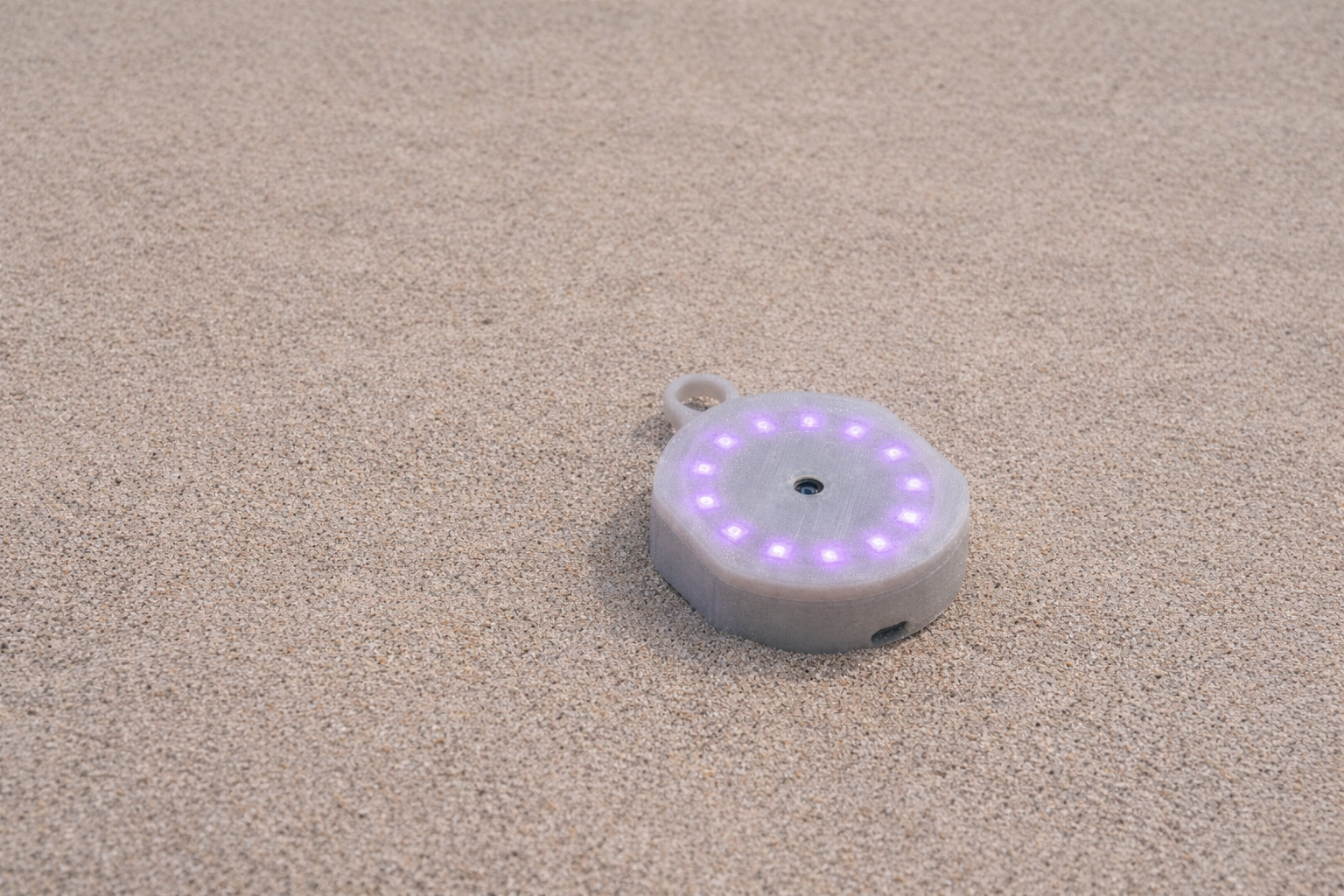
As a natural redhead, I have a complicated relationship with the sun. I don’t really tan, I burn. Fast. The problem is that UV radiation is completely invisible. By the time I feel the heat or see the redness on my skin, the damage is already done. And after not having learnt my lesson by now, getting the worst sunburn in my life, I wanted to build a device that acts as a 'sixth sense', a way to see the invisible radiation hitting my skin in real-time before it becomes a burn.
For the Visualize It contest, I created the UV Glow Keyring. It uses a UV sensor and a microcontroller to measure the invisible Ultraviolet Index (UVI) and translates that data into a subtle glowing ring of light. The higher the UV, the warmer the colors shift, from a safe Green to a scorching Purple.
Supplies
Supplies and Components
To build this, I wanted to keep the footprint as small as possible. I chose the RP2040-Zero because it is tiny, powerful, and runs on 3.3V logic, which matches modern sensors perfectly.
Electronics:
- Microcontroller: RP2040-Zero
- Sensor: ML8511 UV Sensor
- Display: NeoPixel Ring 12
- Power: 3.7V LiPo Battery (I used an 804030 for this)
- Charging: TP4056 USB-C Charging Module
- Switch: Small Slide Switch
Materials:
- Filament: White PLA (Crucial for the light diffusion effect at the top)
- Wire
- Superglue
Tools:
- Soldering Iron & Solder
- 3D Printer
- Wire Strippers
Designing the Case (Autodesk Fusion 360)


I designed the enclosure entirely in Fusion 360. The goal was to make the device look like a solid piece of white plastic when it's off, but allow light to shine through the solid material when it's on.
I designed the case in three specific parts to manage the light and the electronics:
- The Main Case (Bottom): This holds the heavy components—the battery, the charging board, and the RP2040-Zero.
- The Baffle (Middle Separator): It sits on top of the electronics and creates a physical wall between the center sensor and the outer LEDs.
- The Diffusion Lid (Top): I modeled the top face to be 0.6mm thick (3 layers of printing). This is thick enough to look solid white, but thin enough that the LEDs can shine through it, creating a "phantom" light effect.
The Circuit

To verify my connections before soldering, I mapped out the logic in EasyEDA.
The Wiring Map:
- Power: The Battery connects to the TP4056 charger. The output goes through a switch to the 5V/VBUS pin of the RP2040.
- Sensor (ML8511): Connected to 3.3V (Power), GND, and Pin GP26 (Analog Data). The EN (Enable) pin is tied to 3.3V so the sensor is always active.
- LEDs (NeoPixel): Powered by 5V (for maximum brightness) and Data connected to Pin GP0.
Printing the Parts

I printed these parts on an FDM printer using White PLA.
- Layer Height: 0.2mm
- Infill: 100% (Solid).
- Tip: You must use 100% infill for the lid. If you use a grid infill, you will see the grid pattern shadow when the lights turn on. Solid plastic creates a smooth, milky diffusion.
In the photo above, you can see the three stages of the assembly:
- Left: The bottom case for the battery.
- Middle: The "Baffle" or separator plate with the cable pass-through hole.
- Right: The top lid with the diffusion face and the dedicated sensor pupil in the center.
(The files are attached to the project)
The Code
The code runs on the RP2040. It reads the analog voltage from the sensor, smooths out the data (averaging 10 readings to prevent flickering), and maps that voltage to the standard UV Index scale.
The visualizer then converts that number into color:
- Index 0-2 (Low): Green
- Index 3-5 (Moderate): Yellow
- Index 6-7 (High): Orange
- Index 8-10 (Very High): Red
- Index 11+ (Extreme): Purple
Here is the code I wrote for the project:
Assembly
Since the device is compact, the assembly order is important.
- The Bottom Stack: I soldered the battery to the TP4056, and the TP4056 to the RP2040-Zero. These were placed into the bottom of the main case.
- The Wiring Pass-through: I soldered long wires to the UV sensor and the LED ring. I threaded these wires through the center hole of the Middle Baffle piece.
- The Sandwich:
- The Baffle was glued on top of the RP2040, creating a flat platform.
- The NeoPixel ring was glued onto the Baffle.
- The UV Sensor was placed in the dead center of the ring.
- Closing the Lid: Finally, the wires were soldered to the microcontroller below, and the Top Lid was snapped into place. I used a tiny drop of superglue to ensure the UV sensor stayed perfectly aligned with the small hole in the lid.
And that's pretty much it! Hope this helps prevent some nasty sunburns!