The WheelFrame


Every day for 180 days a year, I’ve had to lug around my backpack with me on my shoulders. Since I started Middle School, I’ve had to carry all my books with me since our school doesn’t have lockers for us to keep our materials in. With all of my notebooks and textbooks my backpack came out to around 15-20 lbs total. I also take the bus, so if I am not able to find a seat, I’ll have to carry my backpack with me for another hour straight. This severely hurts my shoulders and back (Image 3), and I know I am not the only student experiencing this problem. Ask almost any students in upper grades and they’ll all be able to relate to this.
You may think roller backpacks are one good solution to combat this problem, however they have 3 main problems. 1. Roller backpacks are often much more expensive than normal backpacks, costing around $60-$100. 2. If your current backpack is in good condition and still works, you wouldn’t want to waste money to buy a completely new one and just put your old backpack to waste. 3. Roller backpacks aren’t flexible. If you are going on a vacation or traveling somewhere where wheels won’t be optimal, you won’t be able to take the backpack that you spent so much on with you.
Supplies

PETG Filament (Opted not to use PLA since PETG is much stronger)
PLA Filament (Optional only for support interfaces)
TPU Filament (Depending on your hardness level, you will need to tweak the settings in the slicer.)
6x M3x16 BHCS Self Tapping Screws
4-8x Large Rubber Bands
Superglue (I used Gorilla GEL Superglue)
Design Plan
To address all 4 (including the back and shoulder stress) problems, I decided to create a hybrid roller backpack. It would still have wheels and a handle that you would pull it from, but it wouldn’t come with the backpack. Instead, you would take your current backpack and put it into the cart that is attached to the wheels. This solves the issue of cost and you can reuse your backpack instead of having to throw it away. The backpack can also be removed and used like a normal one should the need for it arise.
Create Basic Dimensions

I wanted this to be able to fit various sizes of backpacks with room to spare so I made it a little larger. The max backpack size is around 370x250mm (height shouldn’t be a problem). I created a basic rectangle from here and just extruded it around 10cm. I then created a small lip around the outside of this main rectangle to prevent the backpack from falling out. Then from the sides and the back of the base, I added taller support frames with a hexagonal cutout pattern in it to reduce filament usage and improve structural integrity.
Separate the Model Into Pieces

The biggest constraint with this project was size. Obviously, a whole backpack frame won’t be able to fit as one piece on a normal 3D printer. I needed to split them up to fit everything on a 256cm^3 print volume. First, I mapped out where I wanted to splits to be and ensured everything would fit. I could’ve just split them with flat sides and used superglue, however, it would not be optimal at all for structural purposes and would most likely break under the pressure of the bag after long use. To gain more surface area for the glue to stick, I decided to make puzzle piece like shapes. This way, even if you tried pulling the pieces apart, it wouldn’t be able to split apart because of the unique shape of the puzzle piece.
Adding the Axles

It’s a roller backpack so of course we need wheels for it to roll. But the wheels also need axles to spin on so that’s what the next step in modeling this was. For the axle, I just created 2 separate rectangular prism pieces with cutouts to attach the connecting piece. I had to split them up into 3 pieces again because of size constraints. The connecting piece in the middle was more for splitting up the weight, ensuring that the axles did not end up bending one way or the other because of it.
I decided to screw these pieces in using a machine screw and a hex nut. I opted not to go for self tapping screws because the threads would eventually rip and would break. I created a hole from the top of the base to go down into each of the axles.
For the connecting piece, it didn’t really need much support since it would be sitting in between the 2 axles, so I just modeled a hole slightly smaller than the screw and used self tapping screws instead to secure it in place.
Adding the Wheels


Now, we need to add wheels. For the bearings, I had 42mm diameter bearings. I know it's slightly overkill, but I only had those ones on hand and felt it might be a waste to buy brand new ones. Also, larger bearings would be suitable because there is a lot of downward force on the wheel and small bearings would not be able to handle it.
For the wheels, I printed them in TPU for AMS. TPU for AMS is much harder than normal TPU at shore hardness of 68D (I didn’t have normal TPU). To ensure the wheel still had some springness, I removed the top and bottom shell layers and made the infill hexagonal at a lower percentage. If you use normal TPU, you need to tweak these settings in the slicer, otherwise it may become too soft and collapse under the weight of the bag. I made multiple different designs before settling on the optimal one (Image 2)
To increase grip on the wheels, I added arrow-like treads all around the tire. I also made 2 small cutouts in each arrow to put a rubber band around the tire. This would ensure that the tires would still have grip even on smooth surfaces.
Since this is only a 2 wheeled design, I needed to add supports to the rear of the project so it could stand upright (Image 3). I just modeled 2 small pegs the same height as the tire. I wanted this to be screwed in so I added the necessary holes for a hex nut and machine screw.
Adding the Handle

The handle was a pretty straightforward step. After measuring a comfortable height for the handle based on multiple people, I settled for 30 cm off of the ground. For the initial base of the handle, I made it attach to the edge brackets using the hexagonal pattern. I split it up into 2 pieces and added a square cut-out through them to create a holder for the first pair of rods. I had to break the design into multiple pieces again due to size restraints of a 3D printer. After the initial pair of rods, I had to add one more that would sit into a cutout in the first pair. From here, the last step was just to add the handle. I did a simple U-Shape and added cut outs so it would fit on top of the second pair of rods.
Assembly
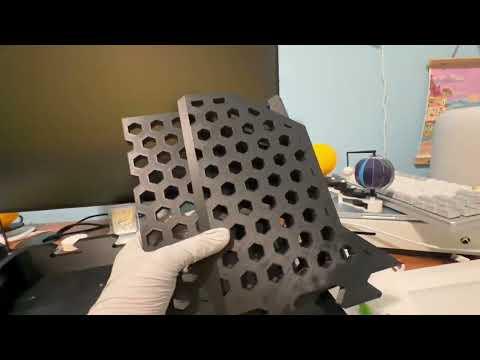
The assembly should be pretty straight forward. I created a simple YouTube video to help show it a lot better visually. Note: for the axle, make sure to insert the middle connector block before you screw it onto the base (I forgot to show this in the video)
Slicer Settings
There isn't anything we really need to change, however, I just wanted to give my recommended settings.
For the bottom 2 pieces of the handle, I would print it with the curved side facing up and use PLA support interfaces with the PETG to ensure a clean and easy support removal. This is because the chemical composition of PLA and PETG don't stick together, so after printing, they should easily separate.
For all the parts in general, I recommend using specific settings to reduce the filament usage; ~5% Infil, gyroid infill, 1-2 wall loops, and 1-2 top and bottom shell layers. I have included preset 3mf files, however, these are only for Bambu Studio. If you will not use Bambu Studio, you will need to configure the settings on your own.
IMPORTANT
Disclaimer: This model is designed to be a simple prototype, not to be fully functional. Putting heavy backpacks may break the product and it is not recommended.
Also, you need to add a layer break for the axles so you can add in the necessary hex nut.