Trash Can Robot and Waiter


A desktop size prototype for a wandering full size trash can and table for use in science fairs and robot workshops.
The trash can robot will follow a black line on the floor and stop if it encounters an obstruction. When the obstruction is removed, it will continue following the line.
If it detects an obstruction near the lid, say someone attempting to put something in the bin, then the robot stops and opens the lid. After a delay, the lid is closed and the robot continues, unless there is an obstruction or more to go in the bin.
The final version will be full size but the logic is expected to be much the same.
Supplies
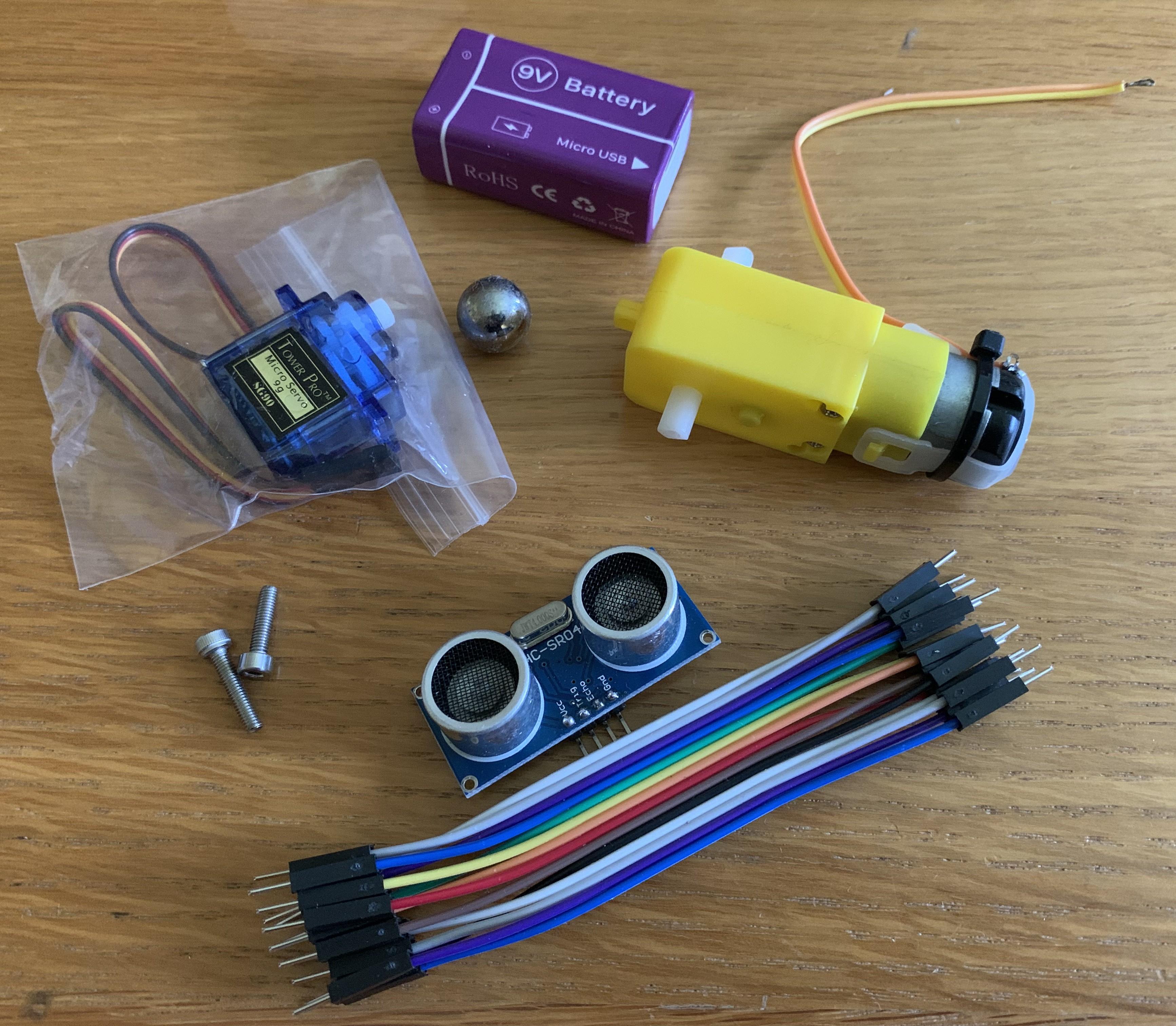
Main Robot :
SG90 or MG90 servo
2 x HC-SR04 ultrasonic sensors
2 x TT motors with wheels
9V lithium battery
3D printed parts
13mm ball bearings for skids
dupont hookup wire
Line Follower board
toy size trash can
Controller:
MP2307 buck regulator
dupont pcb sockets
dupont pcb pins
dupont hookup wire. These are both F-F and M-F. 20cm is adequate for most connections but 30cm F-M may be needed for the upper SR04 sensor.
screw terminals
DRV8833 module
Resistors: 330R, 2 x 2K, 3 x 1k,
LED, any colour for power indication
S8050 Transistor
PCB sounder
Controller Board
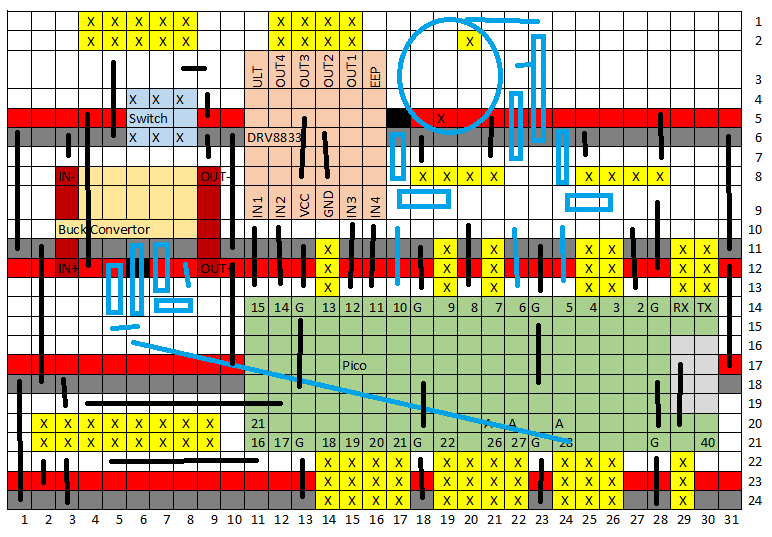
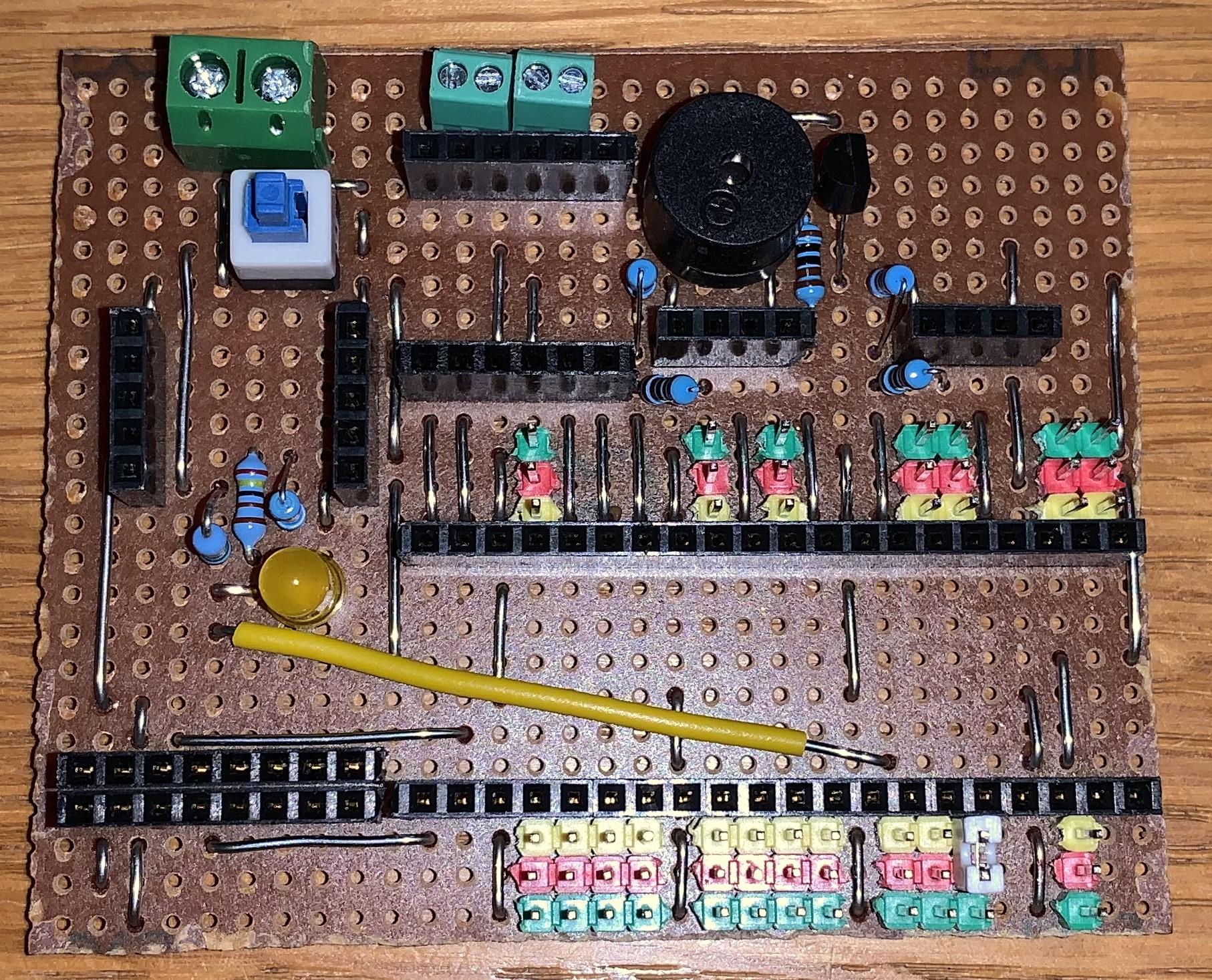
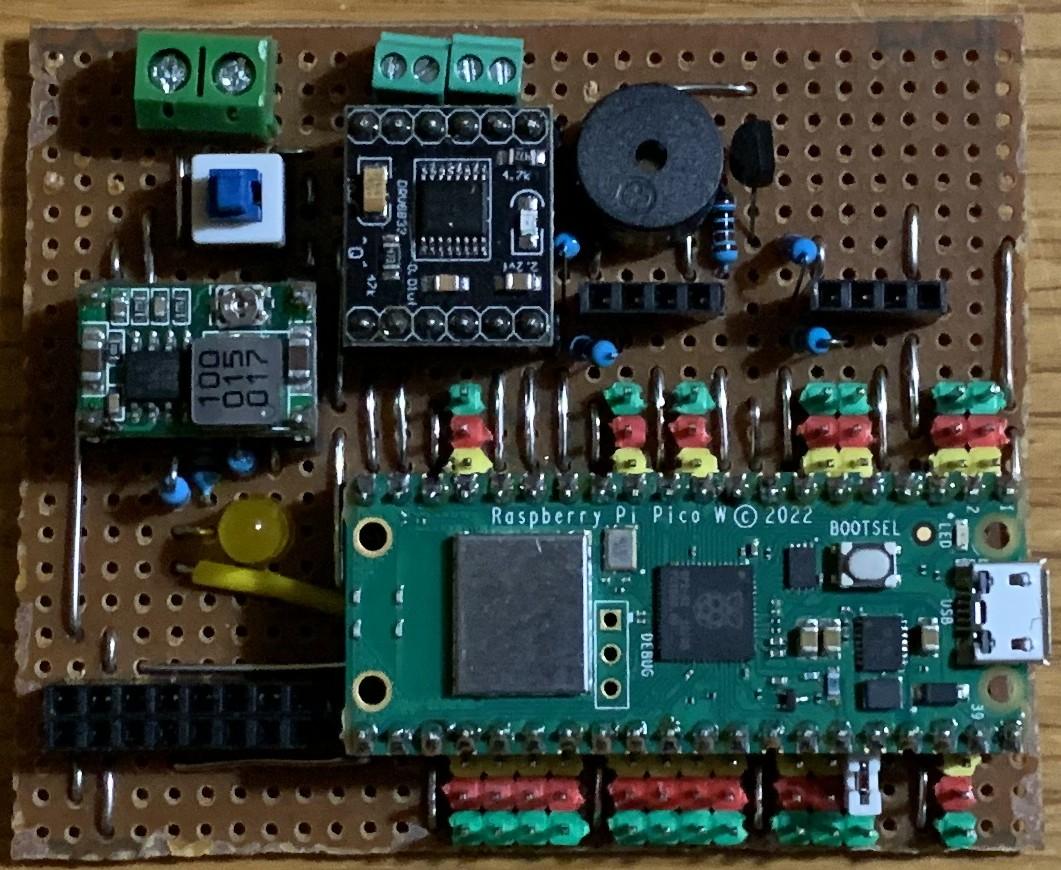

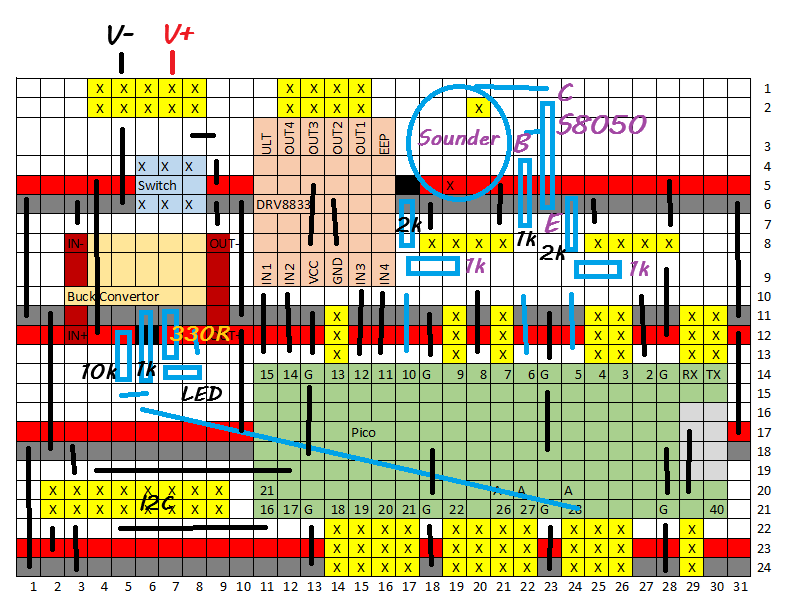

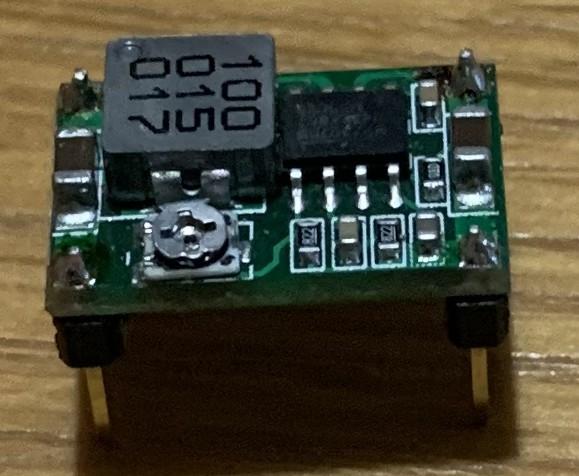

The robot has been designed around a DIY controller board based on a Raspberry Pi Pico and constructed on stripboard. Any robot controller board will do providing it can support two HC-SR04 ultrasonic detectors, two DC motors, a servo and the line follower board. There is an optional use of a sounder to act as a horn if the robot is delayed in moving for an extended length of time. An i2c interface is also included to support a MPU6050 in the future to detect if the robot is falling over or has been pushed.
One of the 3D print components is to hold the controller board so this will likely need to be changed if a different board is used.
Print Robot Chassis and Holders
The robot is mostly constructed from 3D printed components and this will take some time to complete. It has been designed on TinkerCAD and the design is available for anyone to copy and edit.
The component parts have been loaded here as .stl files. The TinkerCAD design does contain a basic design for a bin to aid the design but it needs refinement before it can be used. The constructed version uses a bought desktop toy version.
Downloads
Software
The code for the robot is held on github here. Download onto the Pico controller board once complete, some of the software will be used to setup and test the assembly and wiring as you go along.
It is primarily a line follower with frequent references to the two ultrasonic sensors. It is written in micropython for a Raspberry Pi Pico and will need to be changed to accommodate a different controller board or microcontroller. It will be updated as the project develops, see potential changes in the last step.
Assembly


- Solder dupont connector wires to the TT motors with the correct ends free for connecting to your chosen controller board, in the example shown, these were bare ends.
- Fit the motors to the chassis, securing them with two 40mm M3 bolts through the holes provided.
- Attach the wheels to the motors and secure with screws, and feed their wires through the central hole
- Attached the skids to the chassis with M3 bolts and push a ball bearing into the base of each. The robot should now stand level.
- Fit the battery holder to the chassis with two M3 bolts
- Fit the HR-SR04 ultrasonic sensors to their respective holders using M2 bolts and nuts, with the pins pointing down in each case.
- Attached the line sensor holders to the chassis
- Attach four dupont cables to the lower SR04 sensor, pass them through the central hole and then attach the holder to the front of the chassis. These are female to male dupont connectors
- Attach 9 dupont cables to the line sensor and pass then through the central hole, and then attach the line sensor to it's holders with M3 nuts and bolts. These are female to female dupont connectors.
- Temporarily connect the servo to the controller board, GPIO 9, and the pico to a computer. Run the alignservo.py program from github. This sets the servo to zero degrees so that the arm will point down when at rest.
- Attach the arms to the servo and the servo to it's holder
- Measure the rear of the bin and drill three holes to attach the servo and drill a hole at the base of the rear to accommodate the servo control wires and plug. Drill two holes in the base to attach the bin to the chassis. This will need to be measured depending on which model of bin is used.
- Attach the bin to the chassis using M3 bolts and nuts if required
- Pass the servo control cable through the hole in the base and then attach the servo holder to the inside of the bin using M3 bolts through the holes drilled earlier.
- Attach 4 dupont cables to the upper SR04 sensor and then attach this to tower. These are female to male dupont connectors.
- Attach the tower to the chassis using 2 M3 bolts and adjust the position of the upper SR04 sensor holder to ensure that it can 'see' over the top of the bin.
- Attach the PCB holder to the rear of the chassis using two M3 bolts
The assembly should now be complete.
Connecting Up


There are a lot of wires involved but can be broken down into these sections for ease of connection.
Power and motors
- Thread the wires from the battery connector through the hole in the chassis at the rear of the battery box and connect them to the positive and negative screw connectors on the controller board, taking care to get the correct orientation.
- Connect the motor connections to the controller board in pairs
- Connect the Pico to a computer and run the motortest.py program from the github repository. This should run each motor forwards. If this is not the case when testing, reverse the wiring on the errant motor and test again.
SR04 Sensors
These use female to male dupont connectors
- Connect the wires from the upper sensor to the middle connector on the controller board. From the middle these are GND, ECHO, TRIGGER and VCC
- Connect the wires from the lower sensor to the outer connector on the controller board. From the middle these are GND, ECHO, TRIGGER and VCC
- Connect the Pico to a computer and run the SR04test.py program from the github repository. Point the sensors into open space and then move an object in front of each to test operation. A message should be sent to the console indicating operation.
Servo connector
- Connect to GPIO 9, observing the correct polarity.
- Connect the Pico to a computer and run the lidtest.py program from the github repository. The lid should open and close once.
Line sensor
There nine connections and all of them are wired though not all used in the first version, they will be available for the future if desired. These use female to female dupont connectors
The connection pairs are
VCC red 28
GND orange 28
Analog yellow 27
Calibrate green 26
D0 blue 22
D1 purple 21
D2 grey 20
D3 white 19
D4 black 18
The VCC and GND are connected to the power and ground pins adjacent to GPIO 28. GPIO 28 is used to measure the battery supply voltage.
Connect the Pico to a computer and run the linetest.py program from the github repository. Pass a white piece of paper with a thick line on it under the sensors. The program should report the position and the sensor light up. Verify that they correspond.
Future Directions
This is a prototype and it has been obvious showing it at workshops that there are a few additions that could be useful.
- While an opening bin lid is nice, it may not be necessary and an open bin might be just as effective. Alternatively a swinging bin lid might be just as effective.
- The bin opening mechanism is inside the bin and could be relocated outside making it easier to add rubbish.
- A bin full detector - possibly by weight
- A bin close safety switch/detector
- Set stop stations on the line round the room
- A function to call the robot to a particular station
- An 'empty the bin' station
- An additional function to also carry both full drinks around the room, with milk and sugar for tea/coffee drinkers, sandwiches, biscuits, and also to take away used cups, mugs, plates and glasses.
- Some form of stability control to prevent inadvertent falling over, especially if pushed from the side
- A full size version might also have some provision for shorter/wheelchair users
- Move the SR04 ultrasonic processing into the PIO, activating the website and adding additional sensors.