What Is a Power Supply?

A power supply is just just what its name suggests, it is a device used to provide power is Watts to a PC's components whether that's a Motherboard, RAM, Monitor, or the case fans. Without this component the PC would obviously not be able to power itself on. When looking for a Power Supply make sure that the power supply that you are choosing can provide enough Watts to power your system ad then some just as a safety precaution. Also, make sure that you don't cheap out when choosing a power supply, you don't want your gaming rig to set up in flames from purchasing a $15 power supply.
What are the different kinds of Power Supplies throughout history?
The 661-2816 power supply was one of the earliest power supplies that you could buy for a PC which almost all were prebuilt the need for this power supply, launched in 2003 was for the Macintosh if the power supply failed, though people mostly turned to just buying a whole new computer because if the power supply were to fail, that could potentially mean the end of your system.
A more recent power supply that was big in the market around 2015 was WattagePriceSeaSonic M12II 850 Evo which is now priced at around $100 and can power up to 850 W. This was one of the many power supplies that blew up when PC building started get big. Honestly, this is all you need to use for a normal gaming rig since its 80 + bronze and has a 24 pin connector. This power supply will be compatible with both newer and older motherboards since it has 24/20 pin connector.
One of the newest power supplies in the market right now is the Corsair RM550x which despite only being able to supply 550 W, it is certainly much more reliable and doesn't even exceed temperatures over 48 degrees Celsius. Sure, there are more overkill choices for a modern day gaming rig, but this power supply is perfect for silent gaming. Though, if you want a more flashy look I would consider getting an RGB power supply which companies had just started to make.
Some form factors when choosing a PSU is the amount of wattage it has or the rating it has whether it is a 80+ 550W bronze PSU, a 80+ gold 650W, or a 80+ platinum 850W PSU. The meatl rating is basically jsut rating the efficiency.
How to Install a PSU
.jpeg)
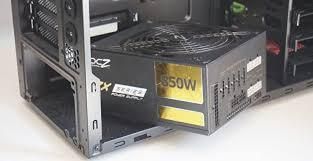
Some may think that installing a PSU may be one of the easiest parts of building a PC which is true if you know what you're doing.
1. Make sure that you have all of your screws out.
2. Install your power supply onto either the bottom left or top left of your case ( varies between cases but bottom left is usually more common).
3. Make sure that all of your other components are in your gaming rig.
3. Connect all of your power cables including your 24 pin connector, SATA cable, case fan cables, and 6/8 pin power cable to your GPU into your motherboard.
4. Make sure that all of your PCIe cables are in the correct order, this is by far the most challenging part of the power supply setup if you don't know what order they go in.
5. Check that all of the cables are connected all of the way the 24 pin connector may need an extra push which might seem like your going to break the motherboard, but in reality you'll be fine. ( Just don't be like the hulk and try to smash your 24 pin connector in).
6. Plug your power supply to the wall and power on your PC, and your ready to game!
Make sure that you use the right size screwdriver in order to install the PSU!
Note: getting a really cheap PSU can lead to it potentially being set up in flames and damage all other components. Also make sure that your PSU can handle the amount of watts that is required to run your PC.