Worlds Smallest Joystick Remote Control

by Markus Opitz in Circuits > Microcontrollers

338 Views, 5 Favorites, 0 Comments

Worlds Smallest Joystick Remote Control

smallestRemote_Titel2.jpg

As in the previous project, the aim is to make a remote control even smaller. And it works! According to my research, this is actually the smallest DIY joystick remote control in the world!

It is useful for RC vehicles, robots, pan-tilt cameras, garage gates and much more.


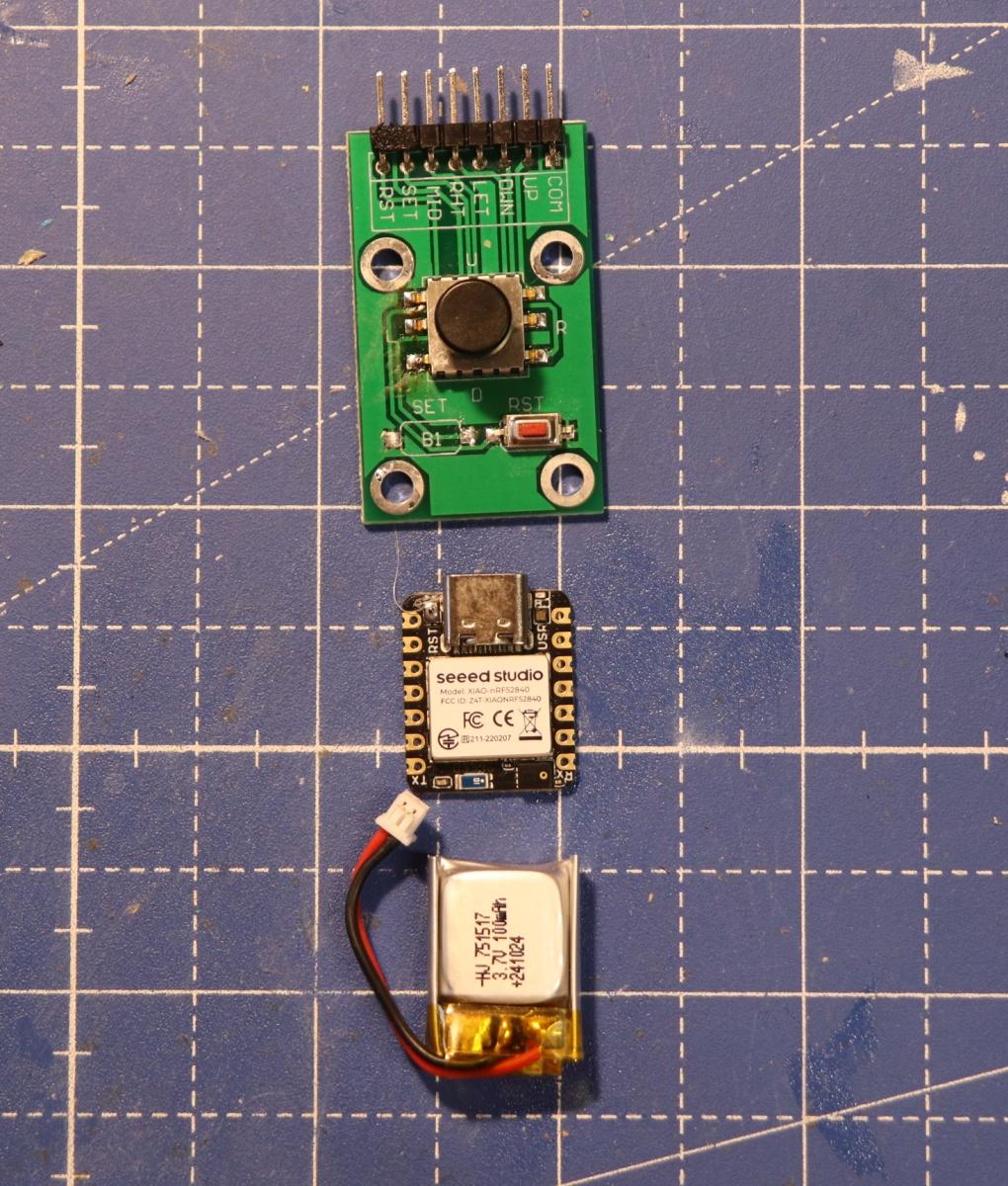
No problem with a XIAO ESP32 (-C3, -C6, or the new -C5) from Seeedstudio. The great thing about these devices is that they already have a LiPo battery charging unit on board. No battery replacement is necessary. The limiting factor is the joystick itself. A KY-023 has potentiometers on board that provide analog values. I found a "Five Direction Navigation Button Module" joystick. However, it is soldered onto a comparatively huge PCB.


Basic knowledge of Arduino is required.

Supplies
01-Supply.JPG

XIAO ESP32-C6 (or -C3, -C5) + antenna

mini joystick

switch

Lipo battery 100mAH

housing (3D, cardboard, wood9, peppermint tin, ...)

The Circuit & Soldering

circuit.jpg
MicroJoystick_pinout.jpg
02-xiao.jpg
Löten698.jpg
Löten669.jpg

So get the joystick off the PCB board! A hot air gun makes it quick and easy. The joystick knob is attached directly to the ESP32 with double-sided tape. Follow the wiring sketch, it is simple and adapted to the pins. The software does the rest.

Joystick XIAO ESP32

  1. UP D5
  2. RIGHT D4
  3. DOWN D2


  1. GND GND
  2. LEFT D9
  3. MID D10

ESP-NOW

03-ESP-now.jpg

…is an easy-to-use 2.4GHz communication protocol based on 2.4 GHz with an amazing range. With antennas on the transmitter and receiver, I was able to achieve a distance of 300 m! Enough for an RC vehicle or a garage door.

The Software

First, you need to use the sketch "MAC-Addr.ino" to determine the MAC address of the receiver. The transmitter only communicates with this device.

Sending and receiving are slightly different with this joystick than with the large joystick. Only digital on/off signals are detected here. However, these can be processed as absolute commands (up/down/on/off/button) or recognized as additive. Five button signals can be detected, but not sending (center) could also be sent as a status.

Upload the sketch.

/*
world's smallest remote control joystick
Transmitter: XIAO ESP32 + ESP-NOW
Markus Opitz 2026
instructables.com
*/


#include <WiFi.h>
#include <esp_now.h>

// ================== adjust it ==================
uint8_t receiverMac[] = { 0x.., 0x.., 0x1.. 0x.., 0x.., 0x.. }; // e.g. ESP8266 node MCU Amica
// ==============================================


// ===== Button Pins =====
#define BTN_UP D5
#define BTN_DOWN D2
#define BTN_LEFT D4
#define BTN_RIGHT D9
#define BTN_CENTER D10


// ===== direction Codes =====
enum Direction {
DIR_NONE = 0,
DIR_UP,
DIR_DOWN,
DIR_LEFT,
DIR_RIGHT,
DIR_CENTER
};


// ===== data structure =====
typedef struct {
uint8_t direction;
} ControlData;

ControlData data;


// ===== debounce =====
uint8_t lastStableDirection = DIR_NONE;
uint8_t lastReadDirection = DIR_NONE;
unsigned long lastChangeTime = 0;
const int debounceTime = 30; // ms


void setup() {

Serial.begin(115200);

pinMode(BTN_UP, INPUT_PULLUP);
pinMode(BTN_DOWN, INPUT_PULLUP);
pinMode(BTN_LEFT, INPUT_PULLUP);
pinMode(BTN_RIGHT, INPUT_PULLUP);
pinMode(BTN_CENTER, INPUT_PULLUP);

WiFi.mode(WIFI_STA);

if (esp_now_init() != ESP_OK) {
Serial.println("ESP-NOW init fail");
return;
}

esp_now_peer_info_t peerInfo = {};
memcpy(peerInfo.peer_addr, receiverMac, 6);
peerInfo.channel = 0;
peerInfo.encrypt = false;

esp_now_add_peer(&peerInfo);

Serial.println("transmitter ready");
}


uint8_t readDirection() {

// set priority (important!)
if (digitalRead(BTN_CENTER) == LOW) return DIR_CENTER;
if (digitalRead(BTN_UP) == LOW) return DIR_UP;
if (digitalRead(BTN_DOWN) == LOW) return DIR_DOWN;
if (digitalRead(BTN_LEFT) == LOW) return DIR_LEFT;
if (digitalRead(BTN_RIGHT) == LOW) return DIR_RIGHT;
return DIR_NONE;
}


void loop() {

uint8_t currentRead = readDirection();

// change detected
if (currentRead != lastReadDirection) {
lastChangeTime = millis();
lastReadDirection = currentRead;
}

// check debounce
if ((millis() - lastChangeTime) > debounceTime) {

if (lastStableDirection != lastReadDirection) {

lastStableDirection = lastReadDirection;
data.direction = lastStableDirection;

if (data.direction == 1) Serial.println(" ^");
if (data.direction == 2) Serial.println(" v");
if (data.direction == 3) Serial.println(" -->");
if (data.direction == 4) Serial.println("<-- ");
if (data.direction == 5) Serial.println(" button");

//Serial.print("Direction: ");
//Serial.println(data.direction);

esp_now_send(receiverMac, (uint8_t*)&data, sizeof(data));
}
}
delay(5);
}

Battery

fertig061.jpg
Test856.jpg
Akkus707.jpg

The remote control already works, but with USB power.


Solder the battery contacts to the bottom of the XIAO ESP32. Don't forget the switch.

Plug in the battery. The switch must be ON to charge via USB.

Housing

10-case.jpg
Geh&auml;use16s490.jpg
Benutzungs468.jpg
I built the world's smallest joystick remote control #shorts #ESP32 #arduino #remote

All you need to do now is get a case (3D print, cardboard, wood, used case e.g. peppermint drop tin), install it, and your joystick will fit in your fist. Charge it, turn it on, and have fun!


Don't like the joystick button that comes with it? There's a solution for that too with 3D printing.